
WHT on Purchase Invoices
In several countries — India, Brazil, and many others — the law asks the buyer to act as a small tax collector: keep back a slice of what you owe the vendor and hand that slice to the tax authority instead. India calls it TDS (Tax Deducted at Source); the general term is withholding tax, or WHT. Get it wrong and the penalty lands on you, the buyer — so REDA Financials calculates it automatically on every Purchase Invoice where your entity has withholding enabled.
Access you'll need. Creating, editing, and posting these requires the Accounts Payable v2 permission set (AP clerks & managers) or Accounting Admin v2 (system administrators). The Accounting Controller v2, Accounts Receivable v2, and Read Only v2 sets can view but not create or post. Setting up WHT rules and rates is an administrator task.
The idea in one bill
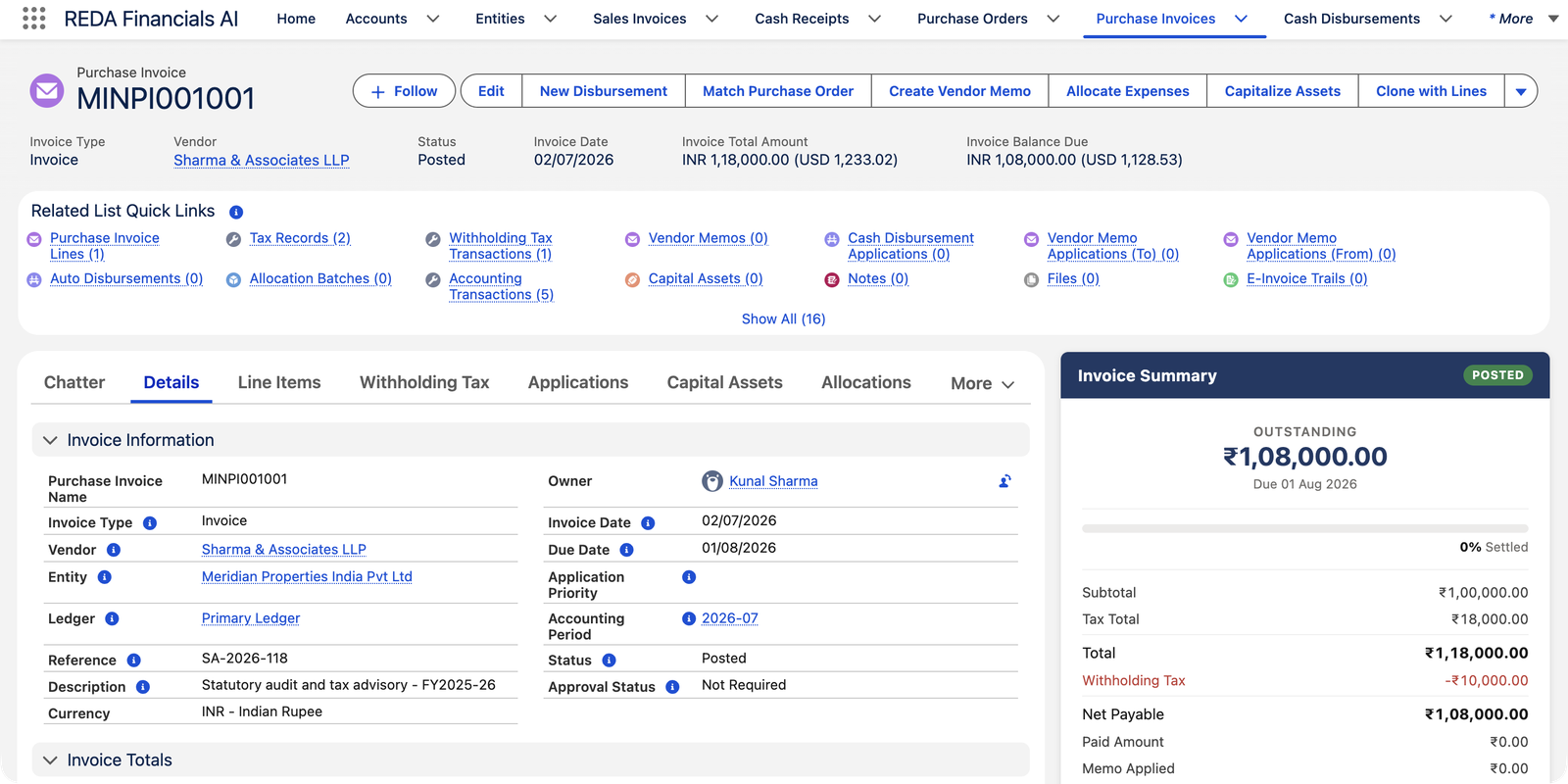
Meridian Properties India Pvt Ltd receives a ₹1,00,000 audit-and-advisory bill from Sharma & Associates LLP. Indian GST adds ₹18,000, so the invoice totals ₹1,18,000. But professional fees paid to a firm attract 10% TDS — Meridian must keep back ₹10,000 and remit it to the Income Tax Department on Sharma & Associates' behalf. So:
| Amount | |
|---|---|
| Professional fees (the cost) | ₹1,00,000.00 |
| + GST @ 18% | ₹18,000.00 |
| Invoice total | ₹1,18,000.00 |
| − Withholding tax @ 10% (kept back, owed to the authority) | −₹10,000.00 |
| Net payable to the vendor | ₹1,08,000.00 |
Two things are worth pausing on. The withholding does not change what the service costs Meridian — the expense is still ₹1,00,000. And it is computed on the fee before GST (10% of ₹1,00,000, not of ₹1,18,000), which is how the seeded rules are configured.
When does withholding apply?
REDA Financials withholds only when all of these line up — each one is master data, set up once:
| Condition | Where it's set |
|---|---|
| Your entity has withholding enabled for purchases | The Entity record |
| The vendor carries a WHT rule (e.g., India's professional-fees rule at 10%) | The vendor's account — with a per-line override available for mixed bills |
| The rule is in force on the invoice date | Each rule has effective dates |
| The vendor is not exempt | Vendors can be marked exempt, with an optional expiry date on the exemption |
| The vendor's classification matches the rule (company, individual…) | The vendor's account (Payee Classification) |
| The line is at or above the rule's threshold | The rule — e.g., India's professional-fees TDS applies only from ₹30,000 per line up |
If any condition fails, that line simply isn't withheld — a ₹25,000 consulting bill from the same vendor stays below the ₹30,000 threshold and is paid in full.
Where you see it on the invoice
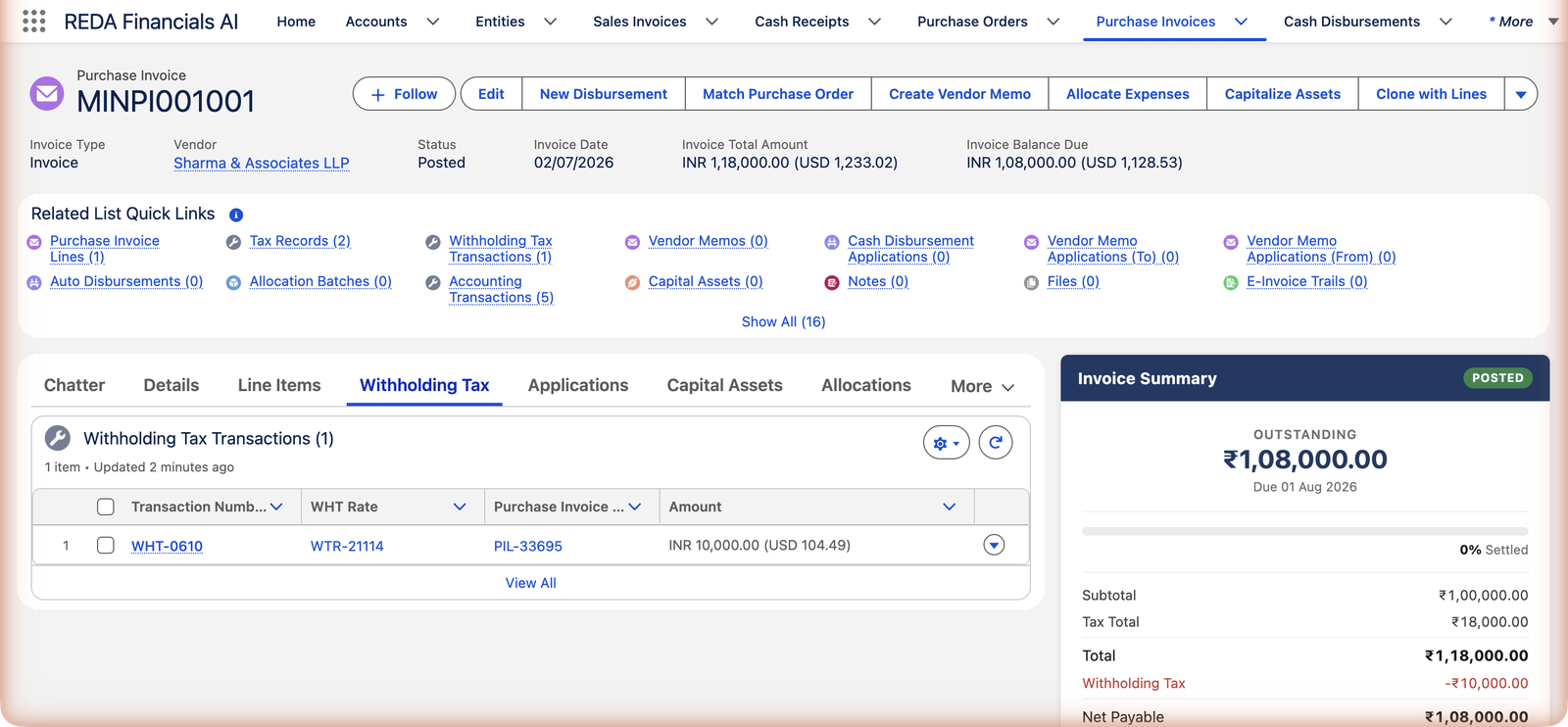
Withholding shows up in three places on a posted Purchase Invoice:
- The Invoice Summary — the red Withholding Tax line between Total and Net Payable (screenshot above).
- The Withholding Tax tab — one transaction per withheld amount, linked to the rate that produced it and the invoice line it came from.
- The Balance Due — already net of withholding, so payments and payment runs settle the right amount automatically.
What posting records
Posting the Meridian bill creates one balanced set of entries — cost, recoverable GST, the vendor's net payable, and the amount now owed to the tax authority:
| Account | Debit | Credit |
|---|---|---|
| Professional & Statutory Fees | ₹1,00,000.00 | |
| CGST Input Tax Credit Receivable | ₹9,000.00 | |
| SGST / UTGST Input Tax Credit Receivable | ₹9,000.00 | |
| Withholding Tax Payable | ₹10,000.00 | |
| Accounts Payable — Trade | ₹1,08,000.00 |
Notice the payable to the vendor is the net ₹1,08,000 from the moment of posting, and the withheld ₹10,000 sits in Withholding Tax Payable — a liability that accumulates until you remit it to the authority under your local filing schedule. The withholding amounts are fixed at posting; reopening the invoice removes them (together with the tax records and accounting entries), and the next post recalculates everything.
What needs to be in place
Enable withholding on the entity
Purchase-side withholding is switched on per entity. Entities in countries without buyer-side withholding simply leave it off — Meridian's UK entity, for example, never withholds on vendor bills.
Give the entity a default Withholding Tax Payable account
The withheld money must have a home in your books. If it's missing, posting stops with a clear message asking for the entity's default WHT payable account — your administrator sets it once.
Assign a WHT rule to each affected vendor
Pick the rule matching what you buy from them — professional fees, rent, contract work each have their own rule and rate. For a vendor who bills you different kinds of work, the invoice line's rule override handles the exceptions.
Complete the vendor's tax identity
Record the vendor's taxpayer ID (PAN in India) and classification. Rules can carry a special — usually much higher — rate for vendors with no tax ID on file, so an incomplete vendor record can legally mean a bigger deduction.
Where to go next
- Understanding Withholding Tax — the concept across the whole system.
- WHT Rules & Rates — thresholds, classifications, and rates in depth.
- PI Tax & Tax Profiles — the other tax on this same bill.
- Creating a Cash Disbursement — paying the net amount.
Frequently asked questions
Walk the checklist above in order: is withholding enabled on the entity? Does the vendor carry a WHT rule, and is it the one in force on the invoice date? Is the vendor exempt? And is the line at or above the rule's threshold — India's professional-fees rule, for instance, ignores lines under ₹30,000.
No. The full fee remains your cost (₹1,00,000 in the example). Withholding only splits who receives the money: most goes to the vendor, a slice goes to the tax authority. Think of it as paying the vendor's tax on their behalf.
On the pre-tax amount, per the seeded rules — 10% of ₹1,00,000, not of ₹1,18,000. (Rules can be configured to include tax in the base where a jurisdiction requires it.)
It accumulates in your Withholding Tax Payable account as a liability to the tax authority. You remit it on your local filing schedule — in India, typically monthly, with a certificate to the vendor so they can claim credit for it.
Ask for their exemption certificate, then have your administrator mark the vendor exempt with the certificate's expiry date. REDA Financials stops withholding immediately and resumes automatically when the exemption lapses.
Yes — withholding is evaluated line by line. A line below the threshold, or one whose rule override says "no withholding", is paid in full while other lines on the same bill are withheld.
Was this article helpful?