
Understanding Budgets
A budget is a promise you make to yourself in January and try to keep by December. REDA Financials turns that promise into a live control: each spending account gets an annual allowance, every purchase order commits a slice of it, every vendor bill turns commitment into actual spend — and the system can warn, or outright refuse, when a purchase would break the promise.
Access you'll need. Any REDA Financials permission set can view budgets and their figures. Creating, editing, and posting them requires the Accounting Admin v2 or Accounting Controller v2 permission set; the Accounts Payable v2, Accounts Receivable v2, and Read Only v2 sets are view-only.
The five numbers that matter
Every budget line — a spending account, optionally split by Cost Center (and any other dimensions your administrator has set up for budgeting) — tracks the same arithmetic:
| Number | Meaning | Who sets it |
|---|---|---|
| Budgeted Amount | The original allocation | You, when building the budget |
| Effective Budget | Budgeted ± approved amendments | Calculated (see Budget Entries) |
| Committed | Promised to vendors on open purchase orders | The system, when POs post |
| Actual | Really spent — invoiced | The system, when purchase invoices post |
| Available | Effective − Committed − Actual. Negative = over budget. | Calculated, always current |
Around those five, each line carries the full supporting cast — all system-maintained except the first:
| Field | How it's calculated |
|---|---|
| Budgeted Amount | Typed by you when building the budget; frozen once posted; never negative |
| Approved Increases / Approved Decreases | Accumulated from approved Budget Entries (supplements and transfers-in / reductions and transfers-out), always positive |
| Effective Budget Amount | Budgeted + Approved Increases − Approved Decreases — the authoritative spending limit |
| Committed Amount | Value of posted purchase-order lines not yet invoiced |
| Actual Amount | Value of posted purchase-invoice lines |
| Available Amount | Effective − Committed − Actual; negative = over budget |
| Utilization % | (Committed + Actual) ÷ Effective |
| Variance Amount / Variance % | The same headroom as Available, named for variance-reporting conventions |
| Is Over Budget | A checkbox that flips when Committed + Actual exceed Effective — made for list-view filters |
| Notes | Your commentary — assumptions, carry-forward reasoning, one-offs |
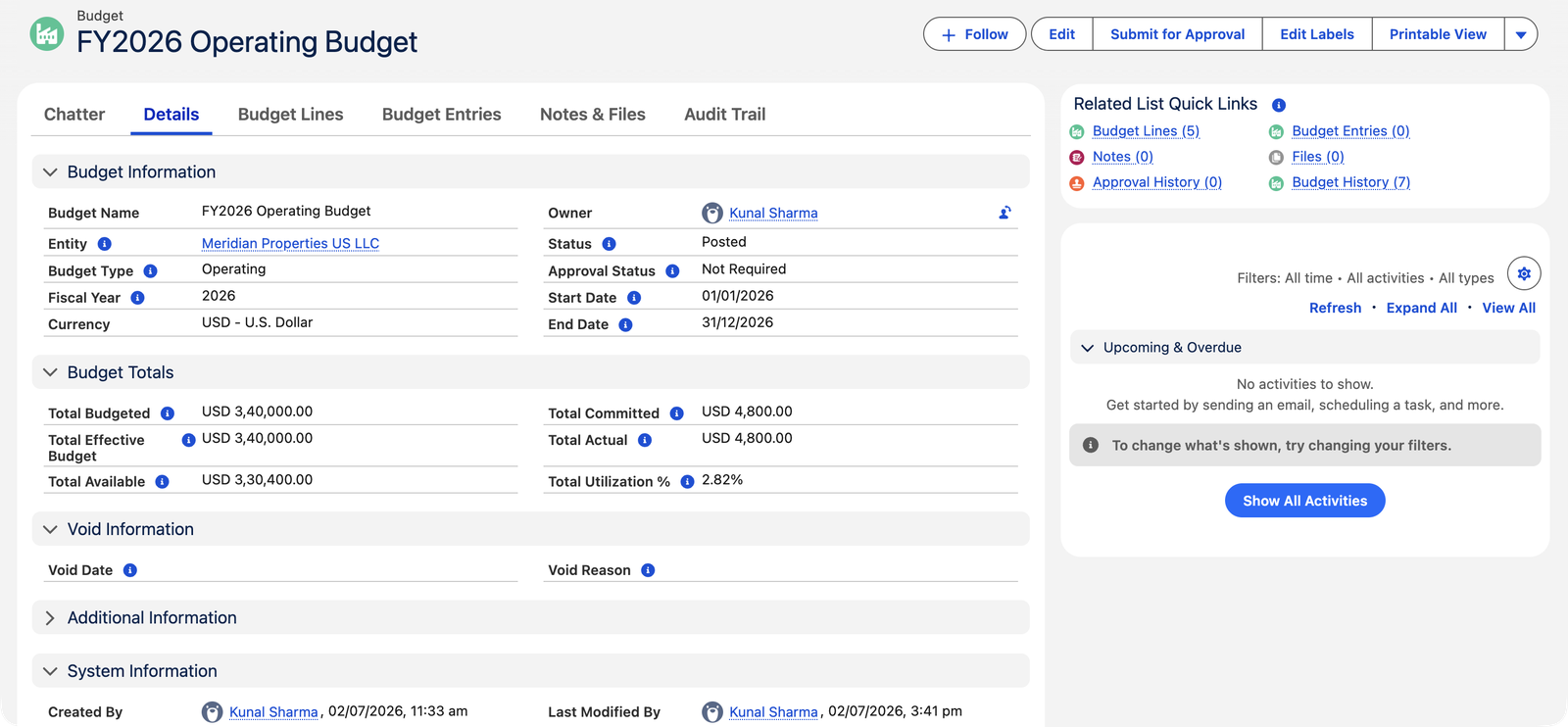
The header rolls the lines up: Total Budgeted, Total Effective Budget, Total Committed, Total Actual, Total Available and Total Utilization % — the Budget Totals panel in the screenshot above.
How money flows through a budget
A purchase order posts → Committed rises
Meridian's $9,600 janitorial PO reserved $9,600 of the Other Operating Expenses line the moment it posted. Nothing is spent yet — but the money can't be promised twice.
The matched invoice posts → Committed converts to Actual
When Sterling's first $4,800 bill arrived and posted against the PO, that slice moved from Committed to Actual. Available didn't change — the money was already spoken for; it just changed state from promise to fact. Partial invoicing moves exactly the invoiced amount.
Direct bills post → Actual rises straight away
Purchase invoices that never had a PO (utilities, one-off costs) add to Actual directly against the matching account's line. Corrections travel the same road in reverse: voiding or reopening a PO or bill puts its amounts back.
One line, followed through the year
Meridian's Other Operating Expenses line budgets $60,000. Watch the numbers as the Sterling Janitorial engagement moves through it:
| Event | Effective | Committed | Actual | Available |
|---|---|---|---|---|
| Budget posts (January) | $60,000 | $0 | $0 | $60,000 |
| Sterling's $9,600 annual PO posts | $60,000 | $9,600 | $0 | $50,400 |
| Sterling's first $4,800 invoice posts against the PO | $60,000 | $4,800 | $4,800 | $50,400 |
Two things worth staring at. First, Available dropped when the PO posted, not when the bill arrived — the control bites at the promise. Second, the invoice didn't change Available at all: $4,800 moved from the Committed column to the Actual column, promise becoming fact, while the remaining $4,800 of the PO stays committed until Sterling's next bill. That's also why the whole budget's Totals read Committed $4,800 / Actual $4,800 / Available $330,400 in the screenshot above.
Budget types and shape
- Type: Operating, Capital, or Project — an entity can hold several budgets of different types for the same year (Meridian runs an Operating budget; a lobby-renovation Project budget could sit alongside it).
- Scope: one entity, a date range (typically the fiscal year), and one line per spending account — optionally split by Cost Center and any other dimensions your administrator has enabled for budgeting — each with an annual amount. Budget the same account once overall, or several times split by dimension (Repairs for the North office and Repairs for the South office as two lines); each combination is budgeted exactly once.
- Date range: the Start Date and End Date define the period the budget governs — and they are what transactions match against. A purchase finds its budget when its date falls inside this range (same entity, posted budget).
- Fiscal Year: a plain-year label (2026, like Meridian's) used for reporting and search. It's handy to keep tidy, but it does not drive which budget a transaction matches — the date range does that.
- Currency: always the entity's home currency; foreign-currency purchases are converted before they count.
Lifecycle
Draft (build and edit freely) → Posted (the budget goes live: POs can reference it, enforcement applies, and the numbers lock — changes now happen through auditable Budget Entries, never by editing) → optionally Void (retired; no new documents can reference it). A posted budget with commitments or actuals can't quietly slip back to Draft — the trail of a live budget is permanent.
The rules that keep budgets honest
Real messages, quoted exactly, with the way out alongside:
| The message | What it means / what to do |
|---|---|
| "Cannot modify a posted budget. Use Budget Entries for amendments." | Posted numbers are the signed-off promise — every change goes through a dated, reasoned Budget Entry. |
| "Cannot modify lines on a posted budget. Use Budget Entries for amendments." | The line-level twin: no adding, editing or deleting lines on a live budget. |
| "Cannot modify a voided budget. Reopen it as Draft first." | Void is a locked position, not a graveyard — reopen if the budget should live again. |
| "Cannot delete a posted budget." | Posted and voided budgets stay on file; only drafts delete. |
| "Budgeted Amount cannot be negative. Use a Budget Entry with type Reduction to decrease an approved budget." | Budgets allocate money, they don't owe it — decreases are amendments. |
| "End Date must be after Start Date." | The period must be a real span. |
| "The selected Entity is inactive. Budgets can only be created for active Entities." | Retired companies don't get new plans. |
| "Budget currency must match the entity's functional currency (…). Budgets are always in the entity's home currency." | Foreign-currency purchases convert into the budget's currency; the ceiling itself never moves abroad. |
| "This budget has related Purchase Orders or Purchase Invoices. Use Budget Entries for amendments instead." | The reopen door closes the moment real money commits — see the lifecycle above. |
Common mistakes to avoid
| Mistake | Why it hurts | Do this instead |
|---|---|---|
| Trying to edit a posted budget's numbers | Blocked — and if it weren't, the audit trail would show a promise quietly rewritten | Create a Budget Entry: supplement, reduction, or transfer, with its reason |
| Start/End dates that don't cover the period you spend in | Purchases dated outside the range can't find the budget — enforcement silently never engages for them | Set Start Date and End Date to span the full period; the dates, not the Fiscal Year label, are what purchases match on |
| Two posted budgets covering the same account, entity and year | A purchase can only honor one ceiling per account — which one governs becomes ambiguous | One posted budget per account per year; use budget types (Operating vs Capital vs Project) for genuinely separate pots |
| Budgeting revenue or liability accounts | Nothing ever arrives — only purchase documents feed budget numbers | Budget the spending accounts you steer; plan revenue in your reporting |
| Reading Available as "cash we still have" | Available is budget headroom, not bank balance | Cash lives in your bank accounts and reconciliation; Available answers "may we promise more?" |
Who works with budgets
Budgets belong to the people who own the books: Accounting Controller and Accounting Admin create, post, amend, and void them. AP, AR and Read Only users see budget status — including the warnings on their own purchase orders — but can't move the goalposts.
Where to go next
- Creating Budgets & Budget Lines — building one from scratch.
- Budget Enforcement on POs — warning mode vs blocking mode.
- Budget Entries (Amendments) — changing a live budget, auditably.
- Budget Analysis Modal — the pre-purchase check.
Frequently asked questions
Because the money was already reserved when the PO posted. The invoice converts Committed into Actual — a state change, not new spending. Available only drops when new promises or unplanned bills arrive.
No — a budget belongs to one entity, in that entity's currency. Group-level budgeting is simply each entity's budget, reviewed together.
By cost center, yes. A budget line is a spending account plus optionally a Cost Center — and any extra dimensions your administrator has set up for budgeting — so you can budget the same account separately for the North office and the South office as two distinct lines. Month-by-month is still the reporting side's job: the budget's own periods are annual, but your reporting tools slice actuals by month as finely as you like.
The budget simply ends with its date range — unspent Available doesn't roll anywhere. Build next year's budget fresh (see Cloning Budgets for Next Year) and retire the old one once its last invoices have landed.
Exclusively from approved Budget Entries — supplements and incoming transfers accumulate as increases; reductions and outgoing transfers as decreases. Both are always positive numbers; the Effective Budget formula does the signed arithmetic. You never type either field.
Utilization is (Committed + Actual) ÷ Effective — Meridian's ($4,800 + $4,800) ÷ $340,000. Judge it against the share of the year gone and the line's spending rhythm: a low figure mid-year means discipline or a plan that hasn't started. The per-line view in Budget Utilisation Reports is where that conversation starts.
Only a Draft — "Cannot delete a posted budget." A posted budget that shouldn't exist is voided (with a reason and date, kept on file); one that was never real is deleted while still a draft, lines and all.
Was this article helpful?