
Year-End Close
Every fiscal year ends with the same ritual: the P&L accounts hand their result to equity and reset to zero, so the new year starts its own story. Done by hand it's error-prone drudgery; in REDA Financials it's the Year-End Close tab of the Financial Center — preview, execute, done, reversible through a formal reopen.
Access you'll need. Any REDA Financials permission set can open the tab and preview the closing entries; executing the close posts journals, so it requires the Accounting Admin v2 or Accounting Controller v2 permission set (the tiers that can create and post journal entries).
What closing does
For the chosen entity and fiscal year, the close creates one system-generated closing journal per ledger, dated the fiscal year's last day: every revenue and expense account's net balance for the year is reversed to zero, with the offset landing in the entity's Default Retained Earnings account — net income credits it, a loss debits it. The journals post immediately (typed Closing, clearly system-generated, named YEC-…), and the entity's Year-End Closed Through advances. From then on, the balance sheet's retained earnings carries the year permanently — no more report-time roll-forward for that year.
The closing journal, up close
What the preview shows — and execution posts — is worth reading once in detail:
| Element | What you'll see |
|---|---|
| One journal per ledger | Every ledger with revenue or expense activity in the fiscal year gets its own closing journal; ledgers with none are skipped. |
| The lines | Each P&L account's net balance for the year, reversed: an account carrying a credit balance (revenue) gets a debit line; a debit balance (expense) gets a credit line. Accounts that netted to zero are skipped. |
| The offset | One line to the entity's Default Retained Earnings account — shown in the preview as Retained Earnings, Type Equity. Net income credits it; a net loss debits it. |
| Name and date | Named YEC- + the entity's code + the fiscal year's starting year, dated the fiscal year's last day, Type Closing, marked system-generated, with a description naming the entity, ledger and fiscal year. |
| The bookmark | On success the entity's Year-End Closed Through advances to the fiscal year end, and a toast confirms: "Year-end close completed successfully. 2 closing Journal Entry(ies) created and posted." |
The screen, control by control
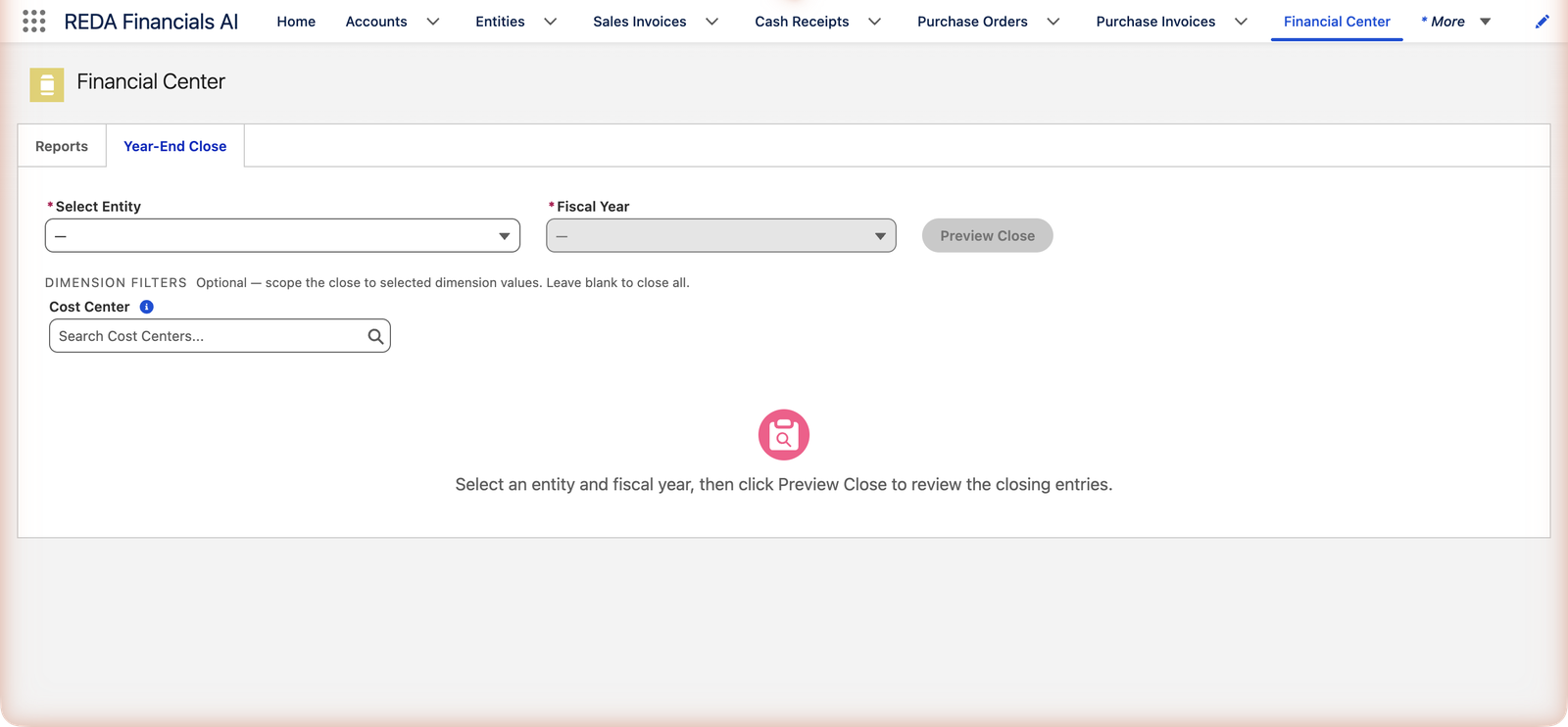
Select Entity lists your entities as "code — name". Fiscal Year then offers the current and the last five fiscal years, each spelled out from the entity's fiscal calendar — "FY 2025 (Apr 2025 – Mar 2026)" for an April-year entity — so there's no ambiguity about which twelve months are closing. The optional Dimension Filters section says exactly what it's for: "Optional — scope the close to selected dimension values. Leave blank to close all." (If your organization marks a dimension as required for postings, the close insists on it: "Select a value for required dimension(s): …".) Then Preview Close builds the per-ledger Closing Entry Preview tables — columns GL Account, Type, Debit, Credit, a subtitle stating the fiscal year's exact dates, a Net Income or Net Loss badge, and a Total row. While executing you'll see "Processing year-end close...".
Running it
Prerequisites — the gate list
Four things must be true, each with its own clear refusal: the entity has a Default Retained Earnings account and a Fiscal Year Start Month; the GL is closed through the fiscal year end ("Close all periods through the fiscal year end first." — see Closing the Books); and an accounting period exists for the year-end date.
Preview Close — read before you sign
The preview lays out each ledger's closing entry: every P&L account, its year balance, the debit or credit that zeroes it, the retained-earnings offset, a Net Income/Net Loss badge and totals. This is the moment for the controller's eyebrow — an account that shouldn't be there, a number that doesn't smell like the year you lived.
Execute — with the seatbelt on
The confirmation says it straight: "This will create and post closing Journal Entries for all ledgers and lock the fiscal year. This action is irreversible without a formal reopen. Proceed?" Execution is all-or-nothing — a failure in any ledger rolls the whole close back.
The refusals, verbatim
The close would rather refuse than post something half-ready. Each guard message names its own fix:
| The message | What it means / what to do |
|---|---|
| "Entity does not have a Default Retained Earnings GL Account configured. Set this in Entity setup before running year-end close." | The offset account is missing — a one-time entity setup item for your administrator. |
| "Entity does not have a Fiscal Year Start Month configured." | Without it, "the fiscal year" has no meaning. Also fixed once, in Entity setup. |
| "The GL must be closed through the fiscal year end date before executing year-end close. Close all periods through the fiscal year end first." | Periods are still open — finish the monthly discipline (Closing the Books) through year-end first. |
| "This fiscal year has already been closed for this entity." | Someone got here first. Check the entity's Year-End Closed Through and the YEC journals before assuming anything's wrong. |
| "No revenue or expense transactions found for this fiscal year. Nothing to close." | A dormant year, or the wrong entity/fiscal year selected. |
| "No accounting period found for the fiscal year end date. Create the required period before running year-end close." | The closing journal needs a period to land in — your administrator creates it. |
| "Only the most recently closed fiscal year can be reopened. Close the later years first." | Reopening runs strictly last-in, first-out. |
| "This fiscal year is not closed for this entity." | Nothing to reopen — check which year you selected. |
Reopening — formal, bounded, honest
A late audit adjustment happens to everyone. Reopen Year voids the closing journals and rolls the closed-through marker back — with two disciplines: only the most recently closed year can reopen ("Close the later years first."), and the confirmation reminds you sub-ledger close dates may need attention. Post the adjustment, close again; both closes live in the journal history, dated and attributed.
Mechanically, reopening voids the system-generated closing journals dated that year's end (their void reason reads "Year-End Close Reopen") and rolls Year-End Closed Through back to the previous closed year's end — or clears it entirely if this was the first close. The confirming toast counts the work: "Fiscal year reopened successfully. 2 closing Journal Entry(ies) voided." Reopened means the balance sheet's report-time earnings roll-forward covers that year again, so equity stays right while you post the adjustment.
Who runs it
Anyone can see the tab; executing needs journal-posting rights — Accounting Controller or Accounting Admin — since the close creates and posts journals. In practice this is the controller's ceremony, right after the final period's books close.
Common mistakes to avoid
| Mistake | Why it hurts | Do this instead |
|---|---|---|
| Closing before the year is truly final | Every late adjustment then costs a formal reopen-adjust-reclose cycle | Close after the audit adjustments land; the balance sheet's roll-forward keeps equity right in the meantime |
| Skipping the preview | Execution posts exactly what the preview showed — unread | Read the preview like a controller: every P&L account, the retained-earnings offset, the Net Income/Net Loss badge |
| Leaving a dimension filter set by accident | You close one cost center's P&L and leave the rest of the year open — a confusing half-state | Dimension-scoped closes are for organizations that mean it; most should leave the filters blank ("Leave blank to close all.") |
| Letting several years pile up unclosed | Reopening is most-recent-only — fixing an old year means unwinding every year after it | Close each year once it's final, in order |
| Treating the closing journal as editable | It's a posted, system-generated journal — hand-editing the year's handover to equity undermines the whole ceremony | Wrong close? Reopen formally, fix the source, close again — every step stays on the record |
Where to go next
- Closing the Books — the monthly discipline that leads here.
- Balance Sheet — retained earnings before and after.
- Understanding Journal Entries — what the closing entries are.
Frequently asked questions
No — new-year postings proceed regardless; the balance sheet's report-time roll-forward keeps equity right meanwhile. Close when the old year is truly final (post-audit for many). Just don't leave multiple years unclosed — reopening is most-recent-only, so order matters.
The closing entry snapshots the year's P&L — if postings could still land in the year afterwards, the snapshot would lie. Locking the periods first makes the close mean something.
Per entity, deliberately: each has its own fiscal calendar, retained earnings and readiness. Meridian closes the US entity in January and the April-year entities (UK, India) after each March.
An ordinary (if long) posted journal — Type Closing, system-generated, one line per P&L account plus the retained-earnings line, dated the year's last day. Fully drillable from any statement, like everything in the ledger.
It can't half-happen: the close is all-or-nothing, so a failure in any ledger rolls the entire run back and nothing is posted. Fix what the error names and execute again — the preview and execution read the same data, so a clean preview is a good omen.
Executing (and reopening) creates and posts journal entries, which needs journal rights — Accounting Controller or Accounting Admin territory. Every role can open the tab and view; the posting step is where permissions bite.
No, it's information: no revenue or expense activity was found for that entity and fiscal year. Check you picked the year you meant (the picker spells out each year's exact dates); a genuinely dormant year simply has nothing to hand to equity.
Was this article helpful?