
Customer Account Ledger
"How do we stand with Brightline?" is a question with four numbers hiding in it — what they owe, what they've paid that isn't matched yet, what credits they hold, and the honest net of all three. REDA Financials answers it twice over: at a glance on the customer's account page, and transaction-by-transaction in the Account Ledger — a running statement you can filter, export, and send to the customer.
Access you'll need. Any REDA Financials permission set can open a customer account and read its ledger — what you see is limited to the records your role can view. Creating the invoices, receipts, and credit memos behind those numbers is Accounts Receivable work.
The Ledger Summary — the glance
Every customer account page carries a Ledger Summary strip:
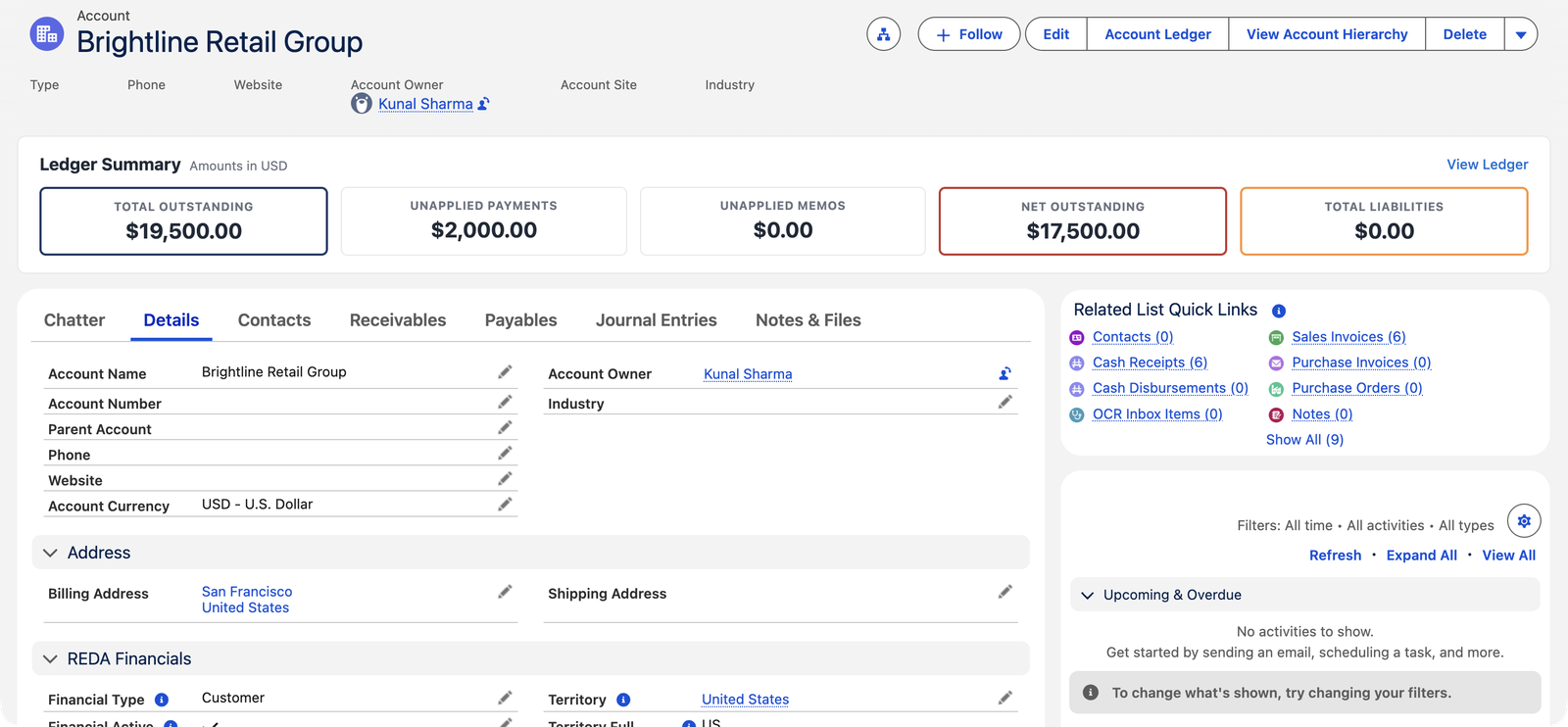
| Tile | Meaning |
|---|---|
| Total Outstanding | Sum of open balances across the customer's posted invoices. |
| Unapplied Payments | Money received but not yet matched to invoices — receipts with Unapplied Cash. |
| Unapplied Memos | Credit memo value not yet applied or refunded. |
| Net Outstanding | The honest position: outstanding minus the unapplied money and credits. |
| Total Liabilities | What you owe them — populated when the account is also a vendor. |
The Account Ledger — the story
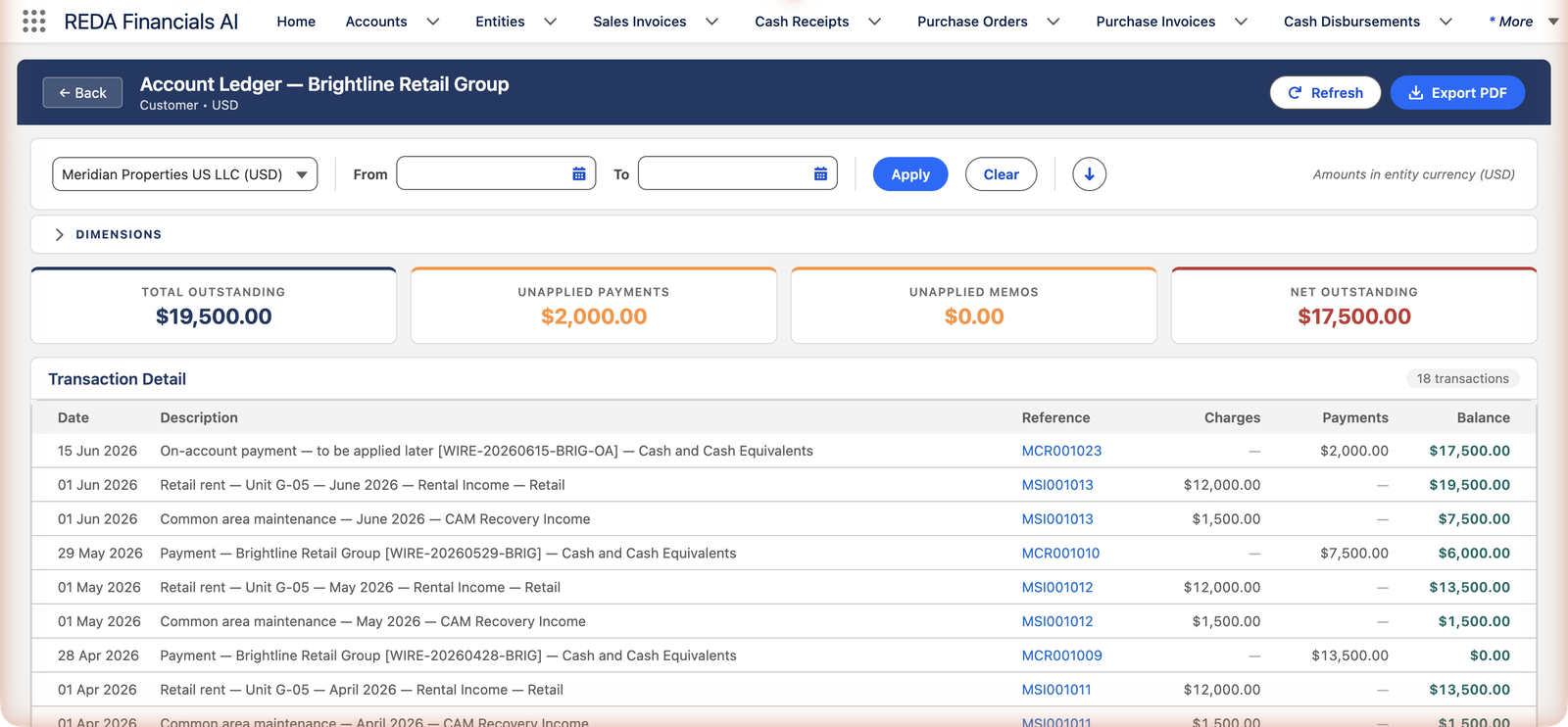
Click Account Ledger (or View Ledger) and the full statement opens: every invoice, credit and payment in date order with a running balance, filterable by entity and date range, with the same summary tiles on top:
How the statement is built
Nothing here is typed by anyone. The ledger assembles itself from the customer's posted documents: Sales Invoices land in the Charges column, Cash Receipts in Payments, and Credit Memos reduce the charge side — with every line dated by its document and linking back to it. The running balance is simple arithmetic carried down the page: opening balance + charges − payments, line by line, ending at the customer's current position. The same component reads the account's Financial Type to decide which story to tell: a customer's receivable story, a vendor's payable story, or — for a customer-and-vendor account — each side in its place.
| Column | What it shows |
|---|---|
| Date | The document's own date — the statement reads in true chronological order. |
| Description / Reference | What the line is ("Retail rent — June 2026") and its external identifier — the same Reference discipline that drives bank reconciliation pays off here. |
| Charges | Amounts that increase what the customer owes — invoices. |
| Payments | Amounts that decrease it — receipts, including on-account money. |
| Balance | The running position after this line — the column a customer reads first. |
Reading Brightline's statement — a worked glance
Two Brightline lines show why the ledger beats any single number:
- The part-payment. May's $13,500 invoice appears as a charge; the $7,500 payment against it appears below. The running balance drops by exactly what was paid — and the $6,000 difference stays visible in the balance column, which is precisely what the customer's own records should show.
- The on-account wire. The 15 June payment of $2,000 (receipt MCR001023, not matched to any invoice) still reduces the running balance to $17,500 — because the ledger tracks the relationship, and Brightline's money is Brightline's money whether or not it's been allocated yet.
That second line explains the tile arithmetic above it: Total Outstanding $19,500 counts only open invoice balances; the running balance ends at $17,500 because the statement also counts the unapplied $2,000. Both are true — they answer different questions ("what do the invoices say?" vs "where do we actually stand?"), and the Net Outstanding tile reconciles them for you.
- Entity selector — a customer can trade with several of your entities; the ledger shows one entity's currency-consistent story at a time.
- Date range + running balance — answer "what happened in Q2?" precisely; the balance column carries forward from the opening position.
- Dimensions — slice the story by cost center where your books are dimensioned.
- Export PDF — the classic statement of account for the customer, straight from the same data.
- Works for vendors too — the same Account Ledger on a vendor account shows the payable story; a customer-and-vendor account shows each side in its place.
Common mistakes to avoid
| Mistake | Why it hurts | Do this instead |
|---|---|---|
| Chasing the Total Outstanding number | Brightline "owes $19,500" — but $2,000 of their money is sitting unapplied; the chasing email overstates the debt | Chase Net Outstanding; first apply (or explain) the unapplied money |
| Sending a screenshot instead of the statement | Screenshots crop, age instantly, and carry no period context | Export PDF — a dated Statement of Account for an exact date range |
| Reconciling a customer dispute from the invoice list | Invoices alone miss payments, credits, and on-account money — exactly the lines disputes hinge on | Walk the ledger's running balance against the customer's records, line by line |
| Expecting drafts to appear | The ledger is built from posted accounting — a draft invoice isn't in anyone's books yet | Post promptly; the ledger (and the customer's statement) then tells the whole truth |
| Comparing balances across entities in one head | Each entity's ledger is its own books, possibly its own currency — mental addition mixes apples and euros | Read per entity via the selector; use the account-page tiles for the aggregate glance |
Where to go next
- AR Aging Reports & Snapshots — the overdue view across all customers.
- Applying Receipts to Invoices — clean up unapplied payments the ledger reveals.
- Vendor Account Ledger — the same tool, payable side.
Frequently asked questions
Export PDF from their Account Ledger for the period in question — a dated statement of account with every charge, payment and running balance. Disputes usually dissolve on line 3.
Check the other tiles first: an on-account payment (Unapplied Payments) or an unused credit (Unapplied Memos) reduces the net without touching any invoice's balance. Net Outstanding is the number to reconcile against.
No — the ledger is built from posted accounting. Drafts haven't happened yet; voided documents' entries were removed.
Yes. The entity selector includes an All Entities choice that combines every entity's activity, converted into your corporate currency — and when the customer has activity in more than one entity, that combined view is what opens first. Pick a single entity from the selector to see that company's detail in its own books and currency.
As reductions on the charge side, dated by the memo — the running balance drops when the memo posts, whether or not the credit has been applied to a specific invoice yet. The Unapplied Memos tile separately tracks credit still waiting for allocation.
Total Outstanding counts open invoice balances only; the running balance also nets in unapplied payments and credits. Brightline: invoices say $19,500, the statement ends at $17,500 — the $2,000 difference is their on-account wire. When everything is applied, the two agree.
Two places, same result: the Account Ledger button (or View Ledger link) on the customer's account page, or the Account Ledger app page where you pick the account first. Both offer the entity selector, date range, dimension filters, Refresh, and Export PDF.
Was this article helpful?