
Income Statement (P&L)
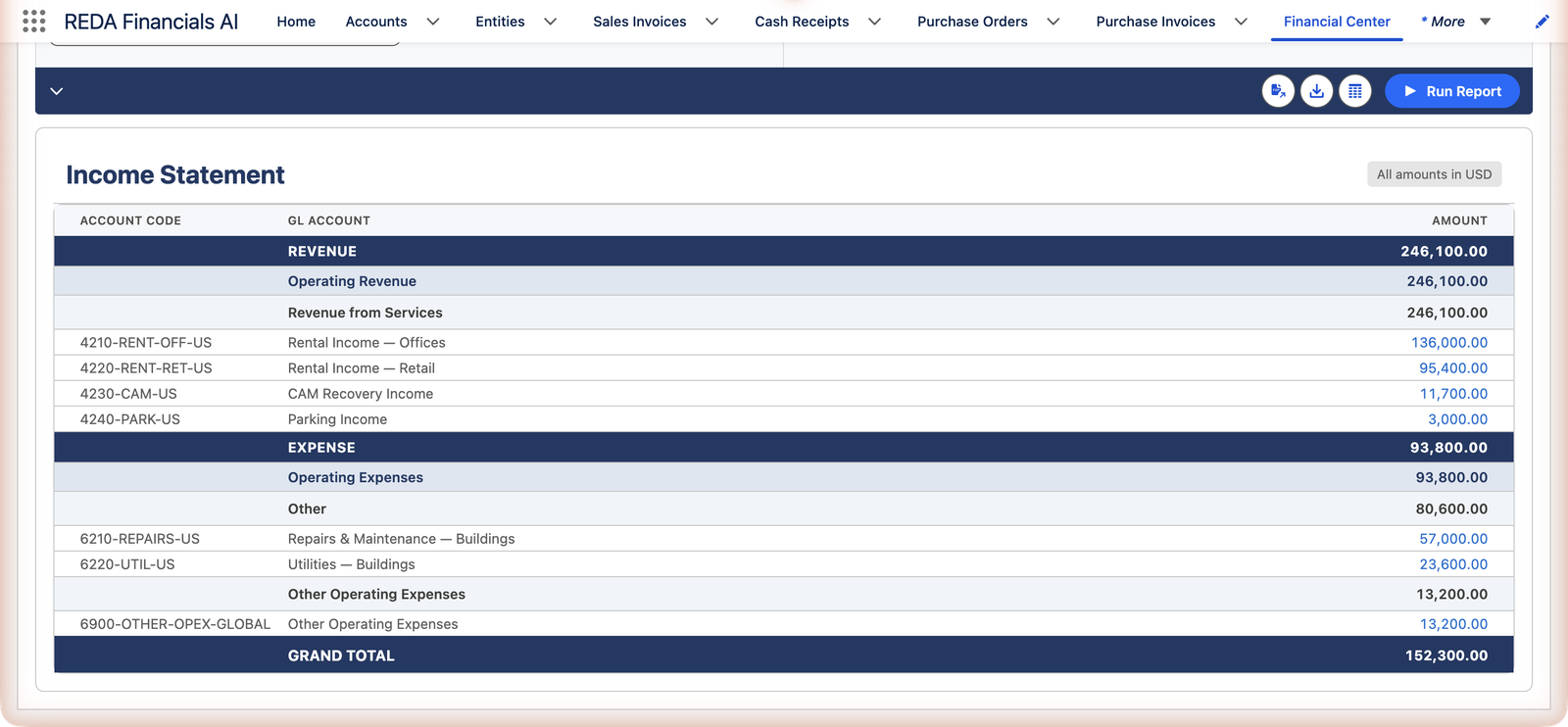
Did we make money? The income statement answers for any period you choose: revenue earned, expenses incurred, and the line every owner reads first — the bottom one. Meridian's first half, straight from the Financial Center:
Access you'll need. Any REDA Financials permission set can open the Financial Center tab and run the income statement; what you see is limited to the records your role can read.
Setting up the run
The income statement shares the Financial Center's filter panel with the other statements (full reference):
| Control | For the income statement |
|---|---|
| Report Type | Set to Income Statement. Switching type clears the previous result. |
| Date From / Date To | The period being measured — strictly. Add more ranges for comparisons, and use each range's Label ("Q1", "Q2") to name its columns. |
| Entity + Ledger | Each entity row adds that company's columns; the Ledger box preselects the entity's default ledger. |
| Reporting Framework | Optional — your management or statutory P&L layout. Left at "-- No Framework (Taxonomy) --", rows group by account type and subtype. |
| Hide Zero Balances | Prunes rows that are zero in every column and any groups left empty — handy on a full chart of accounts. |
| Run Report | Enabled once at least one entity and one date range are set. |
How to read it
- Structure: Revenue sections first, then Expenses, grouped by account subtype — or by your own reporting framework for a statutory or management layout with your headings and order.
- Signs are already natural: revenue and expenses both display positive; the Grand Total is revenue minus expenses — net income (negative and red when it's a loss).
- Strictly the period: only activity between your From and To dates counts. Run January–June, get January–June; no year-to-date bleed unless you ask for it.
Meridian's first half, line by line
The screenshot's numbers repay a slower read — they show every convention of the report at work:
| Line | Amount | What to notice |
|---|---|---|
| Rental Income — Offices | 136,000.00 | Revenue displays positive even though it lives as credits in the ledger — the report translates the bookkeeping into reading order |
| Rental Income — Retail | 95,400.00 | Sister revenue lines grouped under REVENUE; each amount drills to its invoices |
| CAM Recovery Income | 11,700.00 | |
| Parking Income | 3,000.00 | |
| REVENUE | 246,100.00 | The group subtotal — arithmetic over its members |
| Repairs & Maintenance | 57,000.00 | Expenses also display positive; the report knows which side is "normal" for each account type |
| Utilities | 23,600.00 | |
| EXPENSE | 93,800.00 | Total operating costs for the half |
| Grand Total | 152,300.00 | Net income = revenue minus expenses. A loss would show negative, in red |
That 152,300 travels: it's the figure the cash flow statement starts from ("Net Profit / (Loss) for the Period") and the amount the balance sheet rolls into equity as current-year earnings. Three statements, one number — because there's one ledger underneath.
Comparisons that answer real questions
| Question | Setup |
|---|---|
| "How does Q2 compare to Q1?" | Two date ranges, labeled Q1 and Q2 — a Variance column appears automatically with exactly two periods |
| "Each entity's P&L side by side?" | Add entity rows — one column set per entity, with a Total where currencies allow (mixed currencies switch the report to corporate currency automatically) |
| "Just the Property Operations cost center?" | Set the dimension filter — the whole statement recomputes for that slice |
Messages you may meet
| The message | What it means / what to do |
|---|---|
| "Configure your report parameters and click Run Report" | Nothing has run yet — set an entity and a date range. |
| "Generating report..." | The run is computing. |
| "No data found for the selected parameters" | Nothing matched: check the dates, the entity, and any dimension filter left on from a previous run. |
| "At least one entity is required to generate a report." / "At least one date range is required to generate a report." | The two prerequisites — Run Report also stays disabled until both are set. |
| "Date To is required for date range row 2." | A comparison row was added but its To date left empty — incomplete rows are not submitted, so the column you expected never appears. |
| "Report generation failed: …" | The detail after the colon says what stopped the run; persistent failures go to your administrator. |
Common mistakes to avoid
| Mistake | Why it hurts | Do this instead |
|---|---|---|
| Hunting for a bank loan or customer deposit on the P&L | Money in isn't revenue — those postings live on the balance sheet, and the search wastes an afternoon | Remember the scope: Revenue- and Expense-type accounts only; positions belong to the Balance Sheet |
| Comparing periods of different lengths | A 31-day month "beats" a 28-day one every time; the variance column faithfully reports the noise | Compare like with like — month to month, quarter to quarter — and label the ranges so columns say what they hold |
| Declaring an expense "missing" while its invoice sits in Draft | The statement reads posted accounting only; drafts haven't happened yet | Post the document, or check its status before escalating — the drill-down settles what's actually in a figure |
| Reading a revenue account's red negative as a display bug | Negative revenue is usually real — credit notes exceeding sales for the period | Drill the line: a period dominated by credit memos is a business event worth understanding, not a formatting issue |
| Running January–June when the question was "June" | The report answers exactly the range you set — a half-year figure quoted as a month overstates by 6× | Match the range to the question; for month + year-to-date side by side, use two labeled ranges in one run |
Where to go next
- Balance Sheet — where this period's profit lands.
- Report Filters & Dimensions — frameworks, currencies, comparisons.
- Budget Utilisation Reports — the plan these actuals answer to.
Frequently asked questions
Build them into a reporting framework — groups in your chosen order give you the sections and subtotals your management pack expects. The taxonomy view (no framework) shows type/subtype groupings with a single net-income total.
Because they're not income — money in isn't the same as revenue earned. Those live on the balance sheet; the income statement shows only Revenue- and Expense-type accounts. Double-entry keeps the two views honest.
On accrual-basis entities, yes — revenue counts when invoiced, which is the standard treatment. Cash-basis entities recognize on collection instead (Cash Basis Revenue Recognition); the statement simply reflects whichever your entity uses.
Yes — set the value in the Dimensions section of the filter panel and the whole statement recomputes for that slice. The same filter carries into drill-downs and exports, so everything you see stays in one consistent scope.
By design — switching type clears the previous result so a balance sheet is never read against income statement filters. Export before switching if you need the run, or simply run again; the statements compute live either way.
The Total column appears when more than one entity is selected and the amounts are addable — corporate-currency mode, or all entities sharing one currency. A single-entity run has nothing to total across.
Was this article helpful?