
Understanding Credit Memos
Billing mistakes happen. Meridian Properties once invoiced its tenant NovaTech Systems $1,200 too much — a metering error on the March rent. You can't quietly edit a posted invoice (posted documents are locked, and the customer already has their copy), and you shouldn't delete anything. The professional fix is a Credit Memo: a formal, negative-value document that says "we owe you $1,200 back" — which the customer can then use against what they owe you, or, if nothing is owed, take as a refund.
Access you'll need. Any REDA Financials permission set can view credit memos. Creating, editing, and posting them requires the Accounts Receivable v2 permission set (AR clerks & managers) or Accounting Admin v2 (system administrators); the Accounting Controller v2, Accounts Payable v2, and Read Only v2 sets can view but not change them.
What a Credit Memo is
Technically it's a Sales Invoice whose Invoice Type is Credit Memo — same form, same lines, same posting flow — with two defining differences:
- Its total is negative. Each line is marked as a credit line, and REDA Financials refuses to post a memo that doesn't come out negative overall.
- It carries credit, not a balance due. Instead of aging as a receivable, it holds Unapplied Credit — value waiting to be used.
The life of a credit
Created, usually from the invoice being corrected
The Create Credit Memo action on a posted invoice copies its details with the lines flipped to credits and links the memo back to that Original Invoice. See Creating a Credit Memo.
Posted
The reversal hits the books immediately (see below) and the memo's full amount becomes Unapplied Credit.
Used
Applied against the customer's invoices (Applying Credit Memos), refunded in cash (Credit Memo Refund), or a mix of both — until Remaining Credit reaches zero.
What posting records
Posting the memo reverses the over-billed revenue and reduces what NovaTech owes — immediately, before any application:
| Account | Debit | Credit |
|---|---|---|
| Rental Income — Offices | $1,200.00 | |
| Accounts Receivable — Trade | $1,200.00 |
Note what this means: applying the memo later moves no money in the ledger — the accounting already happened at posting. An application only decides which invoice the credit offsets, so balances and statements read correctly. (If the memo credited a taxed invoice, the tax lines reverse here too, keeping your tax return accurate.)
Two more things worth knowing about the posting itself. First, a memo always reverses against each line's own revenue account — even for entities that run cash-basis accounting and normally defer revenue, the credit hits revenue directly. Second, mixed memos are allowed: a memo can carry credit lines and ordinary charge lines (say, a credit for over-billed rent minus a small restocking charge) — each line posts to its own side, as long as the document nets negative overall.
A worked correction, end to end
Here is the NovaTech story in numbers. The March invoice, MSI001021, went out at $9,800 when it should have been $8,600:
| Step | Document | Effect on NovaTech's account |
|---|---|---|
| 1 — The invoice posted | MSI001021 — $9,800.00 | NovaTech owes $9,800 — $1,200 more than it should. |
| 2 — The memo posted | MCM001001 — −$1,200.00 | The receivable drops by $1,200 immediately, and the memo holds $1,200 of Unapplied Credit. |
| 3 — The credit applied | $1,200.00 applied to MSI001021 | The invoice's balance due falls to $8,600 and the memo reads FULLY UTILIZED — no new ledger entries, just the right invoice offset. |
Notice the division of labor: posting fixed the books; applying fixed the invoice. If NovaTech had already paid the $9,800 in full, step 3 would have had nothing to offset — the credit would instead wait for their next invoice, or go back as cash via a refund.
Around the record
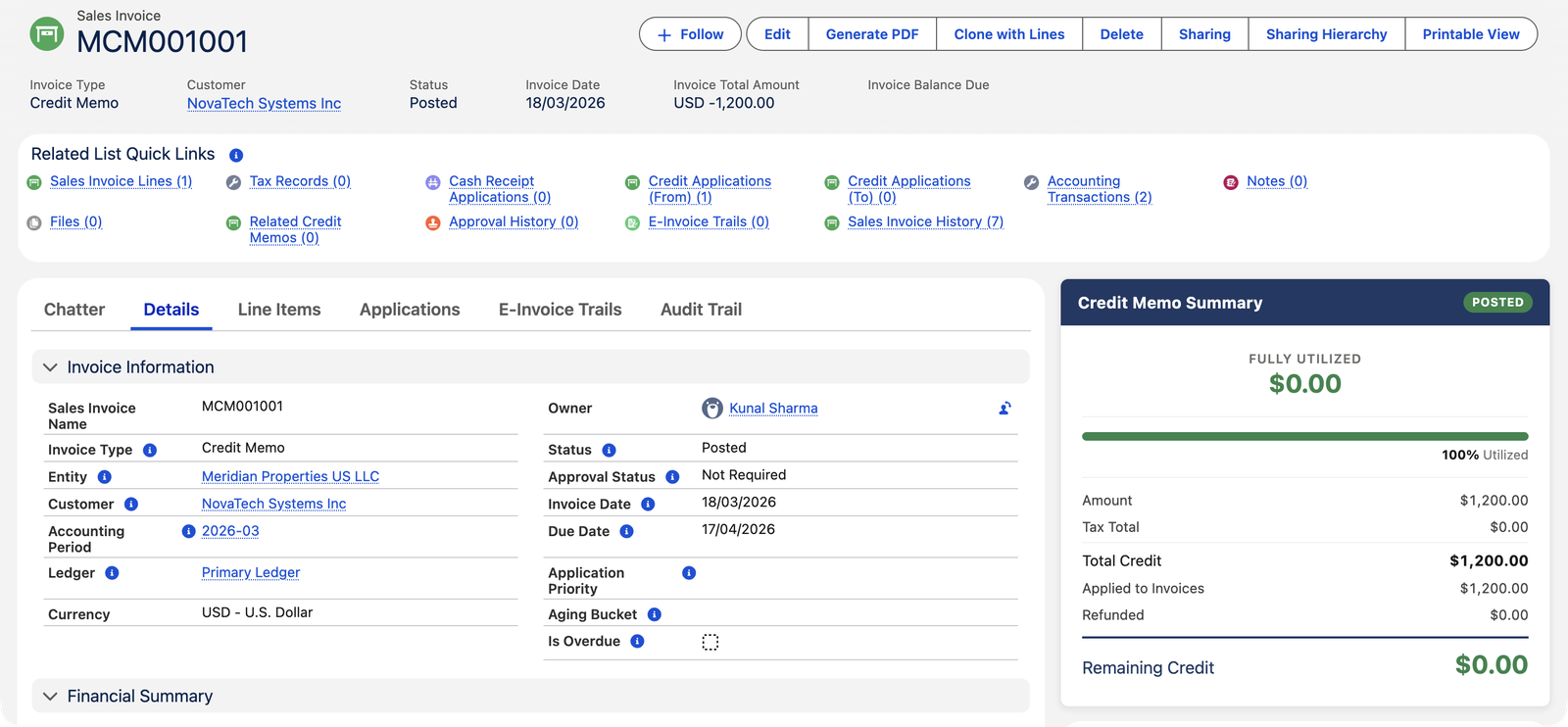
A Credit Memo record page reads like an invoice's, tuned for credit:
| Where | What you'll find |
|---|---|
| Buttons | Edit, Generate PDF (the printed document is titled CREDIT MEMO), Clone with Lines, and Delete — with the Apply and Refund actions in the ▼ dropdown. |
| Tabs | Chatter · Details · Line Items · Applications · E-Invoice Trails · Audit Trail. |
| Credit Memo Summary (sidebar) | Amount, Tax Total, Total Credit, Applied to Invoices, Refunded, Remaining Credit — plus a % Utilized bar and a state badge such as FULLY UTILIZED. |
| Related list quick links | Credit Applications (From) — every application this memo has made; Credit Applications (To); Related Credit Memos; Tax Records; and Cash Receipt Applications — where a cash refund of the memo shows up. |
Memos can apply themselves
You don't have to match every memo by hand. A posted memo carries an Auto Apply Memo checkbox — tick it and the credit spreads across the customer's open invoices in this entity, the Original Invoice first, then oldest-first (invoices with an Application Priority number jump the queue). Two refinements are available per memo: Match Lines on Apply restricts the credit to invoices carrying the same products as the memo's lines, and Dimension Match keeps the credit inside the memo's own cost-center slice. Administrators can also schedule the Credit Memo Auto-Apply Batch from REDA Settings, which sweeps every posted memo with unapplied credit on a cadence. The full story is in Applying Credit Memos.
The rules that keep credit memos clean
Each guard below is the exact message you may meet, with what it means beside it — the same rules protect imports and integrations:
| The message | What it means / what to do |
|---|---|
| "Credit Memo must have a negative total. Use Credit lines to produce a negative total amount. Current total: {0}" | A memo must net negative — mark the lines as credit lines, or check that a charge line isn't outweighing the credits. |
| "Credit Memo total is zero — nothing to post." | The lines cancel out exactly; review quantities and prices. |
| "This document requires approval before posting. Approval Status must be Approved or Not Required." | New memos are stamped Pending — get the approval before posting. |
| "Credit Memo must be in Posted status to apply credit." | A draft memo holds no credit yet — post it first. |
| "This Credit Memo is linked to a specific invoice (Original Invoice). Credit can only be applied to that invoice. Clear the Original Invoice field on the Credit Memo to apply to other invoices." | The lock is deliberate — a correcting memo stays with the invoice it corrects until you decide otherwise. |
| "Credit Memo and Invoice must have the same Customer." | Credit belongs to the customer it was issued to — always. |
| "Credit Memo and Invoice must belong to the same Entity. Cross-entity credit memo application is not supported." | Memos never cross company lines; group settlements flow through cash receipts instead. |
| "Posted Sales Invoices cannot be deleted. Void the invoice instead." | A memo is a Sales Invoice under the hood — posted memos never disappear silently. |
Common mistakes to avoid
| Mistake | Why it hurts | Do this instead |
|---|---|---|
| Trying to edit the posted invoice instead of crediting it | Posted documents are locked, and the customer already holds their copy — silent edits break the paper trail | Issue a memo for the difference; both documents stand and the story is auditable |
| Issuing a memo for a duplicate invoice nobody paid | Two extra documents where zero were needed; statements read strangely | Void the invoice — memos are for corrections, voids are for documents that shouldn't exist |
| Expecting the application to move money in the ledger | You'll hunt for entries that don't exist — the accounting happened when the memo posted | Read applications as bookkeeping between documents: they only decide which invoice the credit offsets |
| Leaving Original Invoice set on a credit meant to be general | Every application except to that one invoice is refused | Clear the Original Invoice field when the credit should be free to apply anywhere |
| Letting unapplied memos accumulate unreviewed | Customer statements show credits the customers may not know they have; cash forecasts overstate collections | Review Remaining Credit alongside the monthly aging — apply, refund, or investigate each one |
Reading a Credit Memo record
| Field / panel | Meaning |
|---|---|
| Total Credit | The memo's full value (shown positive in the summary; the document total is negative). |
| Applied to Invoices | How much has offset invoices so far. |
| Refunded | How much was paid back in cash. |
| Remaining Credit | What's still available = Total − Applied − Refunded. |
| Original Invoice | The invoice this memo corrects. While set, the credit can only be applied to that invoice — clear it to free the credit for others. |
| Aging Bucket / Balance Due | Blank — memos don't age; they aren't receivables. |
Who can work with credit memos
Accounts Receivable and Accounting Admin create, post, apply and refund credit memos. Accounting Controller and Read Only can view them but change nothing.
Where to go next
- Creating a Credit Memo — from the invoice, in two minutes.
- Applying Credit Memos — using the credit against invoices.
- Credit Memo Refund — paying the credit out in cash.
- Understanding Vendor Memos — the same idea, on the buying side.
Frequently asked questions
Void when the whole invoice should never have existed (duplicate, wrong customer) and nothing has been paid. Credit memo when the invoice was partly right, has payments against it, or the customer already booked it — a memo corrects the record without rewriting history.
No — credit belongs to the customer it was issued to. The application rules enforce the same customer (and the same entity: cross-entity memo application is not supported; group settlements flow through cash instead).
No. It stays as Remaining Credit — and as a customer-level Unapplied Memos figure on the account's Ledger Summary — until applied or refunded. Good practice is to review unapplied memos with your aging every month.
Balance due is an invoice concept (what the customer owes you). A memo is the reverse — value you owe the customer — tracked as Remaining Credit instead. That's also why memos never show in aging buckets.
No — and that surprises people used to cash receipts. The receivable was already reduced the moment the memo posted; an application is pure bookkeeping between documents, netting the memo's credit against a specific invoice's balance. Check the memo's Accounting Transactions after applying: nothing new appears, by design.
Yes. Mixed memos are supported: credit lines reduce, charge lines add, and each posts to its own account. The only requirement is that the document nets negative — otherwise posting stops with "Credit Memo must have a negative total."
In two places: the Refunded figure on the Credit Memo Summary, and the Cash Receipt Applications quick link, which lists the refund receipt that paid the credit out. Remaining Credit drops by the refunded amount. See Credit Memo Refund.
Was this article helpful?