
Financial Setup Tab
Two kinds of org-wide configuration live here: Global Accounting Defaults — the GL accounts, ledger, and reporting framework that apply to entities without territory-specific defaults — and REDA Application Settings, the org-wide behaviour switches (at present a single one: Multi-Currency).
Access you'll need. Editing these org-wide settings requires the Accounting Admin v2 permission set; the Accounting Controller v2 can reach the console too. The Accounts Payable v2 and Accounts Receivable v2 sets cannot see it — this is administrator-only.
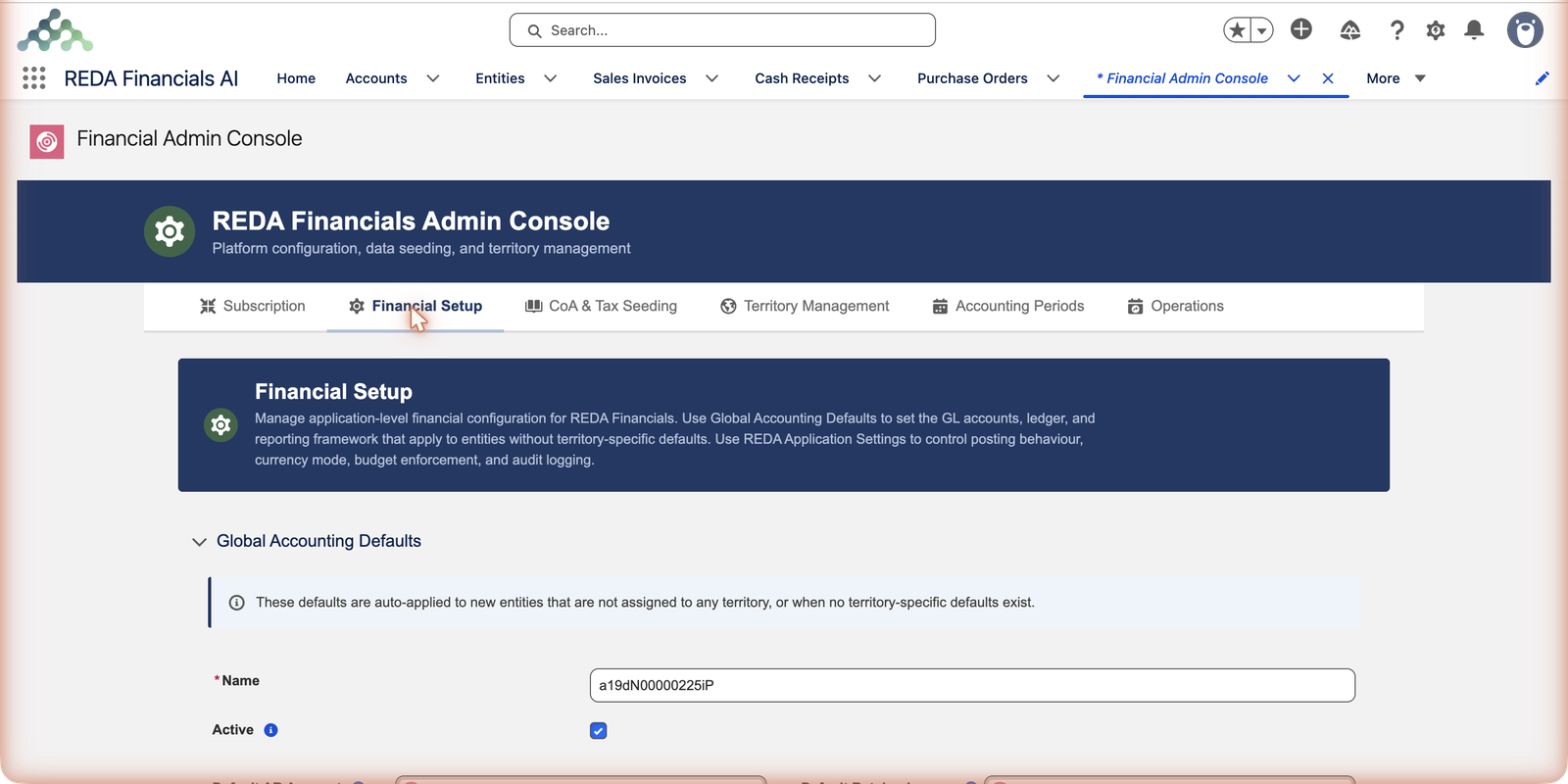
Global Accounting Defaults
This is the template every new entity copies its account wiring from: default AR and AP control accounts, cash, unapplied cash and unapplied payments, revenue and expense catch-alls, retained earnings, FX gain/loss, the intercompany pair, the default ledger and reporting framework. Meridian’s US entity was born correctly configured because these defaults existed — REDA copied them in automatically at creation (see Understanding Accounting Defaults).
- Resolution order: a territory’s own defaults (managed from Territory Management via each territory’s Defaults button) beat these global ones; global is the safety net for everything else — exactly as the on-screen note says.
- Seeding fills them: running the Global CoA pack in CoA & Tax Seeding creates this record already pointed at the seeded accounts. Review rather than build.
- Changing them later affects future entities — existing entities keep their copied values (adjust those on the entity records).
The defaults, field by field
The Global Accounting Defaults editor is a single record. Every field on it answers one question: when a document posts and nothing more specific has been configured, which account takes the entry?
| Field | What it wires up |
|---|---|
| Default AR Account | The receivables control account — where customer invoices build the "customers owe us" balance. |
| Default AP Account | The payables control account — the mirror for vendor bills. |
| Default Cash Account | The GL account representing money in the bank when no bank-specific account applies. |
| Default Unapplied Cash Account | The holding account where a posted cash receipt parks until it's applied to invoices — without it, an entity can't post a cash receipt. |
| Default Unapplied Payments Account | The same idea on the payments side: disbursed money awaiting its match to vendor bills. |
| Default Revenue Account | The catch-all income account when a line has no product or account of its own. |
| Default Expense Account | The catch-all cost account — the expense mirror. |
| Default Retained Earnings Account | Where each year's profit rolls into equity at year-end. |
| Default FX Gain/Loss Account | Where exchange-rate differences land when foreign-currency documents settle at a different rate than they posted. |
| Intercompany Receivable / Intercompany Payable | The account pair used when one entity's books owe another's — for example, the intercompany journals the expense allocation batch posts. |
| Default Ledger | The ledger new entities post to unless told otherwise. |
| Reporting Framework | The framework the entity's statements are classified under. |
A worked example — how Meridian's defaults resolve
Meridian Properties Group operates entities in the United States, United Kingdom, India and Brazil. The resolution order — territory defaults first, global defaults as the safety net — plays out like this:
| Entity | Territory defaults exist? | What a new entity copies |
|---|---|---|
| Meridian Properties UK Ltd | Yes — the UK territory carries its own defaults (set via the territory's Defaults button) | The UK territory's accounts — the global record never enters the picture |
| Meridian Properties US LLC | No territory-specific defaults | The Global Accounting Defaults on this tab, copied in at creation |
| A future entity in a brand-new country | No territory yet at all | Global again — which is why this record should always be complete, even when every current territory has its own |
The on-screen note above the editor says exactly this: "These defaults are auto-applied to new entities that are not assigned to any territory, or when no territory-specific defaults exist."
REDA application settings
Beneath the defaults sits the org-wide behaviour switchboard — each setting a row with a plain description and a type-appropriate editor (a toggle, a number, a text value). The list is deliberately short; at present it holds a single setting:
- Multi-Currency — whether REDA’s multi-currency features are active (paired with the platform’s own multi-currency setting; see Enabling Multi-Currency).
Edits save individually per row and take a few seconds to apply (configuration deploys behind the scenes) — the toast confirms each one. Settings are deliberately few and deliberately documented on-screen; when in doubt, the row’s description is the authority.
Common mistakes to avoid
| Mistake | Why it hurts | Do this instead |
|---|---|---|
| Editing global defaults to fix one entity's wrong account | Existing entities keep their copied values — the global edit does nothing for them and quietly changes what future entities inherit | Fix the account on the entity record itself; reserve this tab for the template |
| Leaving a defaults field blank because "we'll never use it" | The gap surfaces as a posting failure months later — for example, the first cash receipt in a new entity refusing to post for want of an Unapplied Cash account | Fill every field; the seeded chart gives each one a sensible home |
| Building the defaults record by hand before seeding | You duplicate work — the Global CoA pack creates this record already pointed at the seeded accounts | Seed first (CoA & Tax Seeding), then review here |
| Flipping several settings at once while chasing a problem | When behaviour changes you won't know which lever did it — and every entity feels all of them | One change, one confirmation toast, one verification — then the next |
| Assuming a saved setting applies to the screen you're looking at | Saves take a few seconds to deploy and apply from the next action — a stale screen can mislead you into "fixing" it again | Wait for the toast, refresh, then retest |
Where to go next
- Understanding Accounting Defaults — the global → territory → entity chain.
- CoA & Tax Seeding Tab — what fills the defaults initially.
- REDA Setup Settings — the settings reference.
Frequently asked questions
By design: defaults are copied at entity creation, then owned by the entity. That protects a running company’s configuration from an org-wide edit. Update the entities themselves for retroactive changes.
Setting saves deploy configuration and take a few seconds; the toast confirms when done. If a screen still shows old behaviour, refresh it — the setting applies from the next action.
Territory. A territory's own defaults (set from Territory Management via its Defaults button) beat the global record; global applies only to entities with no territory, or whose territory has no defaults of its own. The note on the tab spells this out.
They only come into play when entities transact with each other — for instance when the expense allocation batch posts intercompany journal entries. With one entity there's nothing to wire, but filling them costs nothing and future-proofs the record for entity number two.
From seeding. Running the Global CoA pack in CoA & Tax Seeding creates the Global Accounting Defaults record already pointed at the seeded accounts. Your job here is review and adjustment, not construction.
Administrators — the tab lives in the Admin Console, which belongs with the Accounting Admin permission set. Day-to-day accounting roles never see it.
Was this article helpful?