
Creating a Cash Receipt
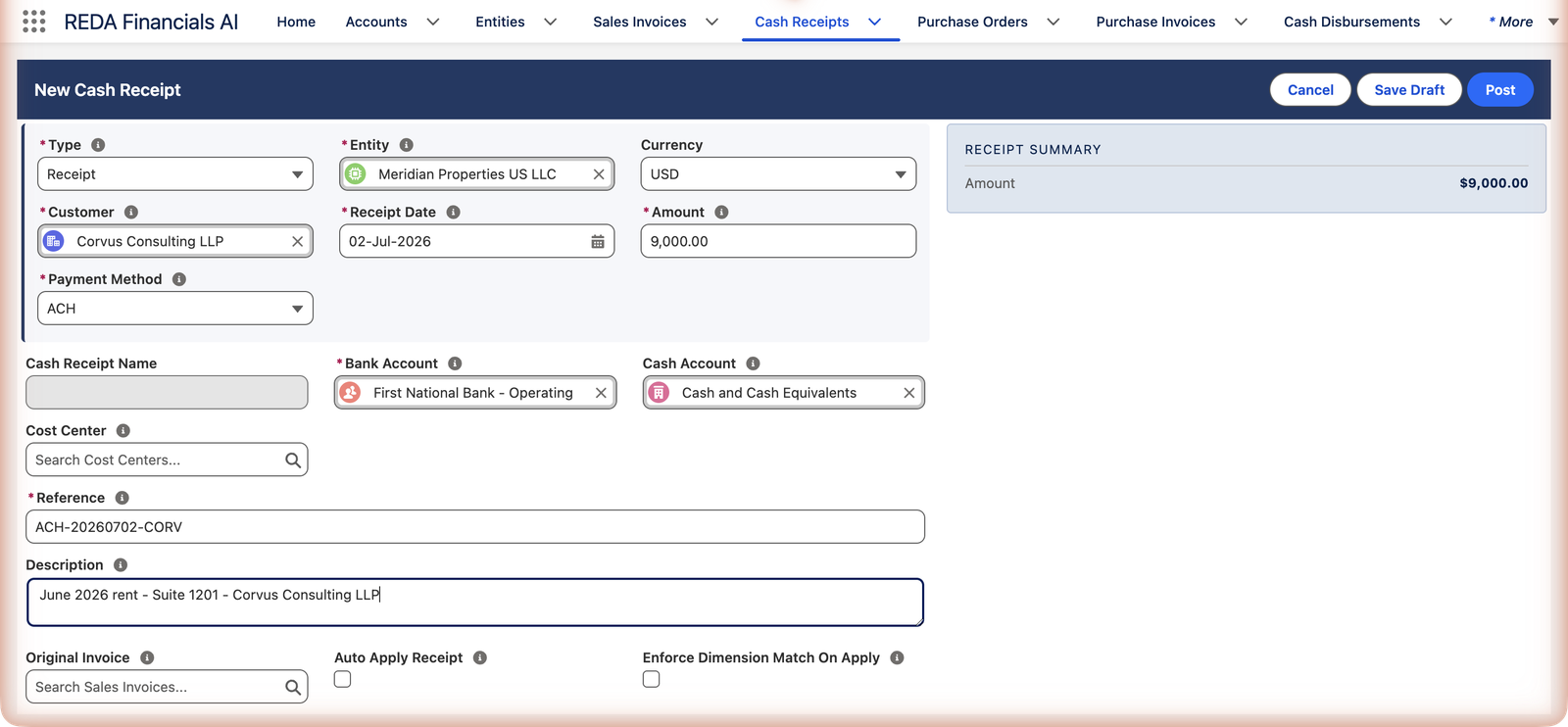
Meridian Properties' tenant Corvus Consulting LLP just paid their June rent — $9,000 by ACH transfer, spotted on the bank feed this morning. Let's record it. This walkthrough enters a Cash Receipt from scratch; if you'd rather start from the invoice itself, the Receive Payment action on a Sales Invoice pre-fills most of this form for you.
Access you'll need. Creating, editing, and posting Cash Receipts requires the Accounts Receivable v2 permission set (AR clerks & managers) or Accounting Admin v2 (system administrators). The Accounting Controller v2, Accounts Payable v2, and Read Only v2 sets can view receipts but not create or post them.
Open the form
Go to the Cash Receipts tab and click New. The receipt form opens with three buttons at the top right — Cancel, Save Draft (keep an unfinished receipt without touching the books), and Post (record it in one go). A Receipt Summary panel on the right tracks the amount as you type.
Fill it in
Leave Type on "Receipt"
That's the ordinary money-into-the-bank case. The other types have their own articles: WHT Received and Refund.
Pick the Entity — and watch the form help you
Choose Meridian Properties US LLC and three fields fill themselves: the currency (USD), the Bank Account (the entity's default — First National Bank - Operating), and the Cash Account (that bank's ledger account). Adjust the bank only if the money actually landed somewhere else.
Pick the Customer
Corvus Consulting LLP. The customer matters beyond record-keeping: this receipt can only ever be applied to this customer's invoices.
Receipt Date and Amount
The date the money arrived (02-Jul-2026) and the amount that actually hit the bank (9,000.00). The accounting period is assigned automatically from the date — you'll see it on the saved record.
Payment Method and Reference
How it arrived — ACH here; the choices are Check, Wire, ACH, Credit Card, Cash, Withholding Tax Received, and Other. Then the Reference: the real-world identifier (check number, wire confirmation, or transaction ID). It's required, and it's what bank reconciliation will match on — Meridian uses ACH-20260702-CORV straight from the bank feed.
Optional extras
A Description for humans ("June 2026 rent - Suite 1201"), a Cost Center if your reporting slices cash by dimension, an Original Invoice link if this payment belongs to one specific invoice, and the Auto Apply Receipt checkbox if you want the system to match it to open invoices the moment it posts (oldest first — see Auto-Apply Cash Receipts).
Every field on the form — the reference
| Field | Required? | What it does |
|---|---|---|
| Type | Yes (defaults Receipt) | Receipt = money into a bank · WHT Received = a withholding certificate (its own article) · Refund = money back to a customer, started from a credit memo |
| Entity | Yes | Whose books; picking it auto-fills Currency, Bank Account (entity default) and Cash Account (that bank's GL) |
| Currency | Auto | Follows the entity; selectable among active currencies in multi-currency orgs — applications later require receipt and invoice currencies to match |
| Customer | Yes | Who paid — must be a customer-class account; applications are restricted to this customer's invoices |
| Receipt Date | Yes | When the money arrived; drives the Accounting Period (re-derived if you change the date on a draft) |
| Amount | Yes | Exactly what hit the bank — gross, before any fees the bank netted |
| Payment Method | Yes | Check · Wire · ACH · Credit Card · Cash · Withholding Tax Received · Other |
| Cash Receipt Name | Auto | Numbered from the entity's Cash Receipt sequence at save; locked when a sequence exists |
| Bank Account / Cash Account | Yes for Receipt type | Where the money landed and its ledger twin; the bank must belong to the receipt's entity. WHT Received receipts must leave the bank BLANK |
| Cost Center | No | Dimension stamp for organizations that slice cash by cost center |
| Reference | Yes | The external identifier — "check number, wire confirmation, or transaction ID. Used for bank reconciliation." This is auto-match's best key |
| Description | No | The human note — what this money is |
| Original Invoice | No | The specific invoice the customer said they're paying — auto-apply settles it first |
| Auto Apply Receipt | No | Apply to open invoices the moment it posts, oldest first (details) |
| Enforce Dimension Match On Apply | No | Restrict applications to invoice balances in this receipt's dimension |
Post it
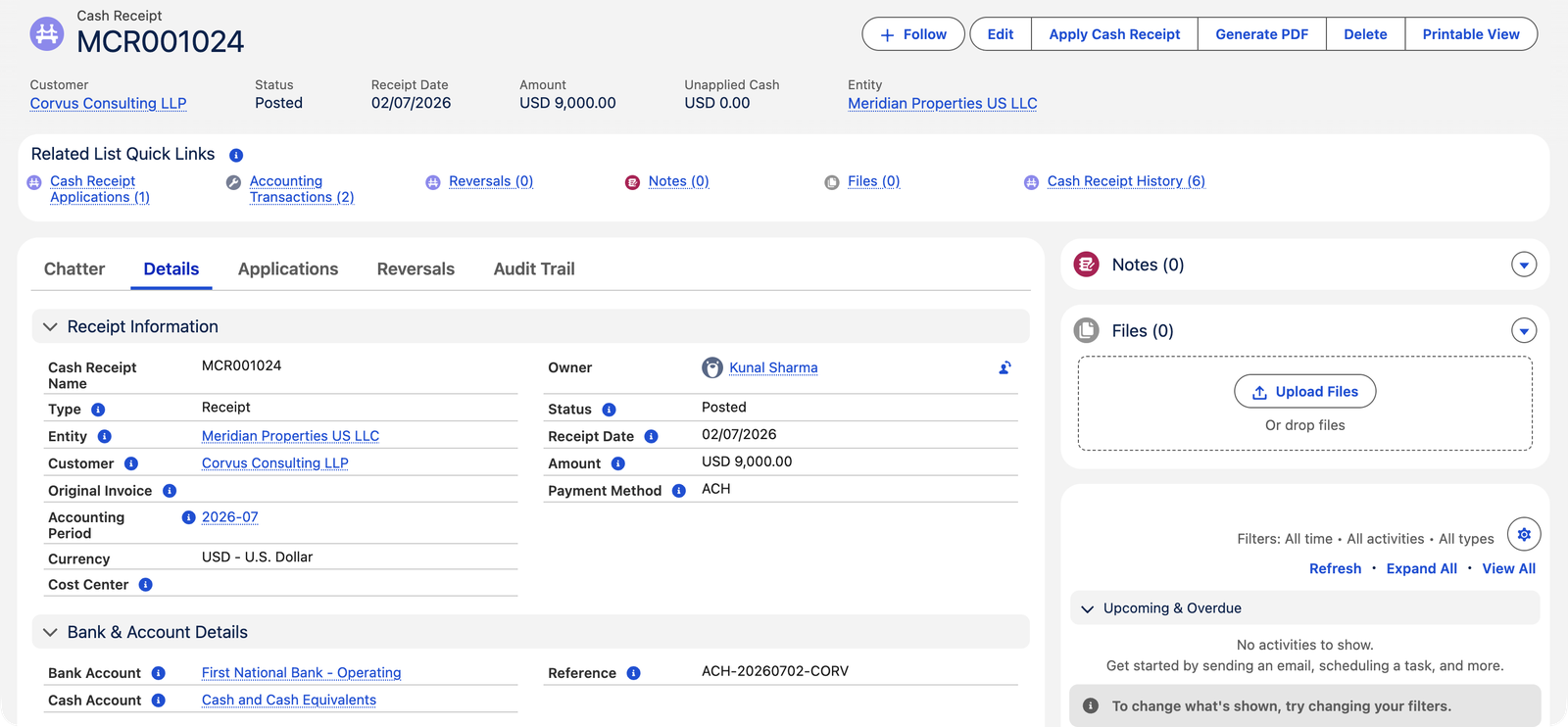
Click Post. REDA Financials saves the receipt, numbers it from the entity's Cash Receipt sequence, assigns the accounting period from the date, and records the money:
| Account | Debit | Credit |
|---|---|---|
| Cash and Cash Equivalents | $9,000.00 | |
| Customer Deposits and Prepayments Received | $9,000.00 |
The credit sits in the deposits holding account — not yet against any invoice — which is why the freshly posted receipt shows Unapplied Cash $9,000.00. Matching it to Corvus's June invoice is the next article: Applying Receipts to Invoices. (Meridian applied this one in full — here's the record afterwards.)
The rules that keep receipts clean
Each guard below is the exact message you may meet, with the remedy beside it:
| The message | What to do |
|---|---|
| "Bank Account is required for Receipt type Cash Receipts." | A Receipt is a bank deposit — pick the bank that received it. |
| "Bank Account must be blank for WHT Received type. WHT receipts represent tax certificates, not bank deposits." | Certificates never touch a bank — clear the field. |
| "Receipt Date must fall within the selected Accounting Period date range." | Date and period disagree (usually after editing the date) — let the period re-derive or pick the right one. |
| "Accounting Period must belong to the same territory as the Cash Receipt's entity." | You picked another territory's period — clear it and let the system derive. |
| "Bank Account must belong to the same entity as the Cash Receipt." | Each entity banks separately; pick one of this entity's accounts. |
| "The selected Cash Account belongs to a different entity. Choose a global GL Account (no entity) or one that matches this receipt's entity." | Same discipline, ledger side. |
| "Customer must be a Customer or Customer & Vendor account. Cash Receipts require customer-class accounts." | The account is vendor-only — fix its Financial Type or pick the right party. |
| "Entity requires a Default Unapplied Cash GL Account to post a Cash Receipt. Configure it in Entity setup." | One-time setup gap; your administrator adds the holding account on the entity. |
| "A document with this number already exists for this entity…" | Manual numbering collided — with a sequence configured this never happens. |
| "Sales-side WHT is not enabled for this entity. Enable WHT Enabled (Sales) on the Entity before posting a WHT Received receipt." | WHT Received receipts need the entity switch — see WHT on Cash Receipts. |
Common mistakes to avoid
| Mistake | Why it hurts | Do this instead |
|---|---|---|
| Netting processor fees off the amount | The statement shows gross + a separate fee; reconciliation can't match either | Record gross; the fee becomes an adjustment or a rule-created entry |
| Typing a placeholder Reference | Kills exact-pass auto-matching forever after | Copy the bank's real identifier from the feed |
| Backdating into a closed period | The application or posting will be refused at the closure gate | Date receipts when the money arrived; if that period is closed, talk to your controller |
| Posting before confirming who paid | Mis-attributed money means un-applying, re-attributing, and an awkward statement | Save Draft for unidentified transfers; post once confirmed |
| One receipt for a day's worth of checks | The bank shows one deposit; your books show five receipts — or worse, vice versa | One receipt per check, grouped in a Bank Deposit that matches the slip |
Where to go next
- Applying Receipts to Invoices — the second half of this workflow.
- Auto-Apply Cash Receipts — skip the manual matching.
- Understanding Cash Receipts — the concepts behind the form.
- Voiding & Refunding Receipts — when something was recorded wrong.
Frequently asked questions
Post when you're sure — most receipts. Save Draft when something needs confirming first; drafts have no accounting effect and can be edited or deleted freely. Only drafts can be deleted — posted receipts must be voided instead.
Numbers come from the entity's document sequence so they're gapless and unique — if a sequence is configured, the number field is locked ("Document number is auto-assigned by the configured sequence and cannot be changed.").
The receipt's currency follows the entity (multi-currency organizations can select among active currencies). To apply a receipt to an invoice, both must be in the same currency — the system enforces this at application time.
Yes — the Receive Payment action on a posted Sales Invoice opens this same form pre-filled with the customer, amount and the invoice linked as Original Invoice. For point-of-sale situations, a Receipt-type invoice goes further: posting it creates and applies its own cash receipt automatically.
The running amount of the receipt — a simple sanity check that what you keyed matches the bank feed before you commit. Unlike invoices there are no lines or taxes to total; a receipt is one amount.
Tick it when the money should simply pay the customer's oldest open invoices — the common case for regular tenants. Leave it off when you need control: partial allocations, disputed invoices, or on-account money the customer wants held. Details in Auto-Apply Cash Receipts.
Was this article helpful?