
Customer & Vendor Accounts
Everyone you trade with — the customers you invoice and the vendors you pay — is recorded in REDA as a standard Salesforce Account. REDA doesn't add a separate "customer" or "vendor" object; instead it layers a set of financial fields onto the Account you already know. Fill those fields in well and every invoice, bill, payment and tax calculation involving that account just works. This article explains what those fields are and, crucially, how each one is used downstream.
Access you'll need. Accounts are the standard Salesforce Account record — vendors are typically maintained by Accounts Payable v2 users, customers by Accounts Receivable v2 users, and either by an Accounting Admin v2. Permission to create or edit an account itself comes from your Salesforce profile's access to the Account object, not from the REDA financial permission sets.
The one field that sets the role: Financial Type
Because an Account can be a customer, a vendor, or both, REDA needs to know which. That's the Financial Type field, and it's the most important one on the record:
| Financial Type | Means | Where it can be used |
|---|---|---|
| Customer | You sell to them (AR only) | Sales Invoices, Cash Receipts, Credit Memos |
| Vendor | You buy from them (AP only) | Purchase Invoices, Cash Disbursements, Vendor Memos, Purchase Orders |
| Customer & Vendor | Both — you sell to and buy from them | All of the above |
What financial fields an account carries
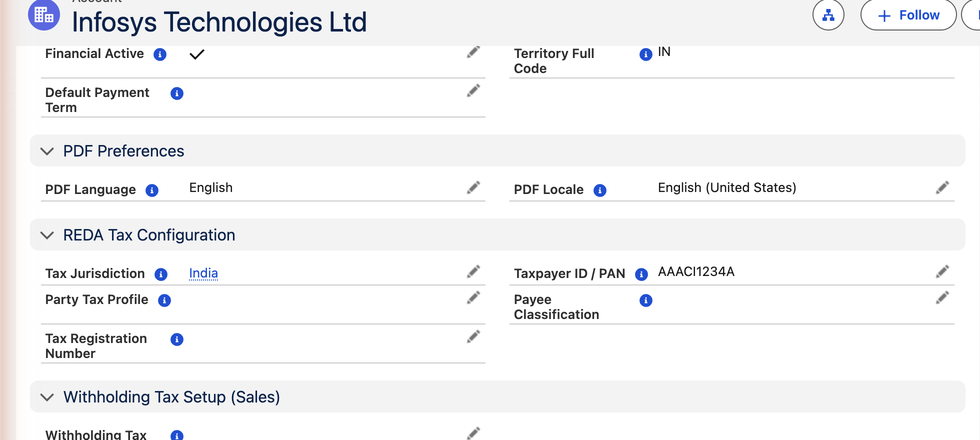
Beyond the role, an account holds the tax, withholding, payment and document settings REDA needs. Here's the complete map, grouped by purpose, with what drives what. You won't fill all of these for every account — a simple domestic customer needs only a few — but it's worth knowing the whole picture.
Tax identity
| Field | What it is | How it's used |
|---|---|---|
| Party Tax Profile | The account's tax behaviour — a registered business vs an end consumer | The tax engine matches it to decide which tax rules apply. |
| Tax Jurisdiction | Where the account is located for tax | The engine uses it as the destination when matching tax rules (state level for US/Canada, country level for Brazil/India). |
| Tax Registration Number | GSTIN (India), VAT number (EU/UK), ABN (Australia)… | Printed on invoice PDFs as the buyer's tax registration. |
| Taxpayer ID / PAN | The tax ID used for withholding (India PAN, Brazil CNPJ/CPF, US EIN/SSN) | Gates the WHT rate: when this field is blank, only the special No Tax ID withholding rates fire — typically the punitive ones tax authorities apply to undocumented payees. Fill it in and the normal rates apply. |
Withholding tax
Only relevant where you (or your customer) must hold back tax on a payment. New to it? See Understanding Withholding Tax.
| Field | What it is | How it's used |
|---|---|---|
| Withholding Tax Rule (Purchase) | The rule for tax you withhold when paying this vendor (India TDS 194C/194J, Brazil IRRF…) | Auto-fills new Purchase Invoices and drives the WHT calculation. |
| Withholding Tax Rule (Sales) | A legacy field — leave it blank | Sales-side withholding (tax a customer keeps back when paying you) is not calculated from this field. It is recorded when the certificate arrives, as a Cash Receipt of type WHT Received — see Sales-Side WHT. |
| Payee Classification | Company / Individual / Non-Resident | Selects the right WHT rate — e.g. India 194C is 2% for a company, 1% for an individual. |
| WHT Exempt (Purchase) + Certificate + Valid To | A documented exemption with its certificate and expiry | The engine produces zero withholding while valid, and ignores the flag once the Valid To date passes. |
Payment terms & role
| Field | What it is | How it's used |
|---|---|---|
| Default Payment Term | When payment is due (e.g. "2/10 Net 30") | Auto-fills invoices; the Due Date = Invoice Date + Net Days, and the early-pay discount is offered. If neither the invoice nor the account carries a term, REDA falls back to 30 days. See Payment Terms. |
| Financial Type | Customer / Vendor / Both | The role — drives every lookup filter (above). |
| Financial Active | On/off switch for financial use | Turn off to retire a relationship — the account vanishes from new-document lookups but all history stays intact. |
Territory & document language
| Field | What it is | How it's used |
|---|---|---|
| Territory | The region the account belongs to | Groups accounts by territory for reporting and visibility. Blank for global accounts like AWS or Microsoft. |
| Territory Full Code | A read-only code stamped from the Territory (e.g. IN-HR) | System-maintained so your administrator can build criteria-based sharing rules on it — REDA ships none by default. Don't edit it. |
| PDF Language | The language for documents sent to this account | With Locale, selects the right PDF template at render time. Blank = the entity default. |
| PDF Locale | Number/date format and layout direction | en_US → $1,234.56; en_IN → ₹1,23,456.78; ar_AE renders right-to-left. |
The payoff — one account pick fills the document
All that setup earns its keep the instant you pick the account on a document. Raise a Sales Invoice and choose your customer, and REDA fills in:
| Document field | Comes from the account |
|---|---|
| Payment Term & Due Date | Default Payment Term → Invoice Date + Net Days |
| Tax applied | Party Tax Profile + Tax Jurisdiction → the right rules fire |
| Tax-exempt handling | Party Tax Profile's exempt flag — an exempt customer produces zero tax automatically |
| Buyer's tax number on the PDF | Tax Registration Number |
| The document's language & formatting | PDF Language + Locale |
Nobody typed a tax rate, a due date or a withholding rule — the account carried them. That's the entire point of setting accounts up properly.
Where to go next
- Setting Up a Customer — the fields a customer needs, step by step.
- Setting Up a Vendor — including withholding tax, the richest part.
- Payment Terms — how "2/10 Net 30" works and what it posts.
Frequently asked questions
It's the same record. REDA reuses the standard Salesforce Account your sales team already uses and adds financial fields to it — so there's one shared view of each company, not a separate finance copy.
Yes — set Financial Type to Customer & Vendor. The account then appears in both sales and purchase lookups, and you can invoice them and be billed by them.
An Entity is one of your own companies (whose books you keep). An Account is someone you do business with. You sell from an entity to a customer account.
No — turn off Financial Active. They disappear from new-document lookups but their invoices and payment history stay for audit and reporting.
Was this article helpful?