
Products & Assets
Most products end their journey on an invoice line. But some — a vehicle, a machine, a server — are capital items: you don't expense them, you capitalise them and depreciate them over years. In REDA, the product is the front door to that whole lifecycle. Set one field on the product, buy it on a Purchase Order, and the system builds the Fixed Asset for you — already wired with the right depreciation method, useful life and GL accounts.
Access you'll need. Editing a product code's Type and Asset Type requires the Accounting Admin v2 or Accounting Controller v2 permission set. The Accounts Payable v2, Accounts Receivable v2, and Read Only v2 sets can view product codes but not change them.
The two fields that make the bridge
| Product field | What it does |
|---|---|
| Type = Asset | Marks the product as a capital item — signals that buying it should create a Fixed Asset, not just book an expense. |
| Asset Type | Points to an Asset Type, which carries the depreciation defaults: method (straight-line, declining balance…), convention, useful life, residual value, and the asset/depreciation/expense GL accounts. The created asset inherits all of it. |
So the Asset Type is doing the heavy lifting — the product just points at it. Define the Asset Type once; every product of that kind reuses it. Here's what one carries:
| Asset Type setting | What the created asset inherits |
|---|---|
| Asset Category | Tangible (default) or Intangible — decides the capitalisation route (see below) |
| Default Method / Convention | How depreciation is computed — Straight Line and Pro-rata (Daily) by default |
| Default Useful Life (Months) / Residual % | How long, and what's left at the end |
| Record Mode | Individual (one asset per unit — vans, laptops) or Bulk (one asset per receipt — a batch of chairs) |
| Is Depreciable | Unchecked for assets that never depreciate, like land |
| GL accounts | Asset, accumulated depreciation, depreciation expense and related accounts — where its postings go |
What happens when you buy one
Take the Company van — Type = Asset, Asset Type = "Motor Vehicles". Here's the lifecycle from purchase:
Put it on a Purchase Order
Add the van to a PO line with its Create Asset flag checked — the line carries the Asset Type that the product points to, so the depreciation defaults travel with the order.
Receive the goods
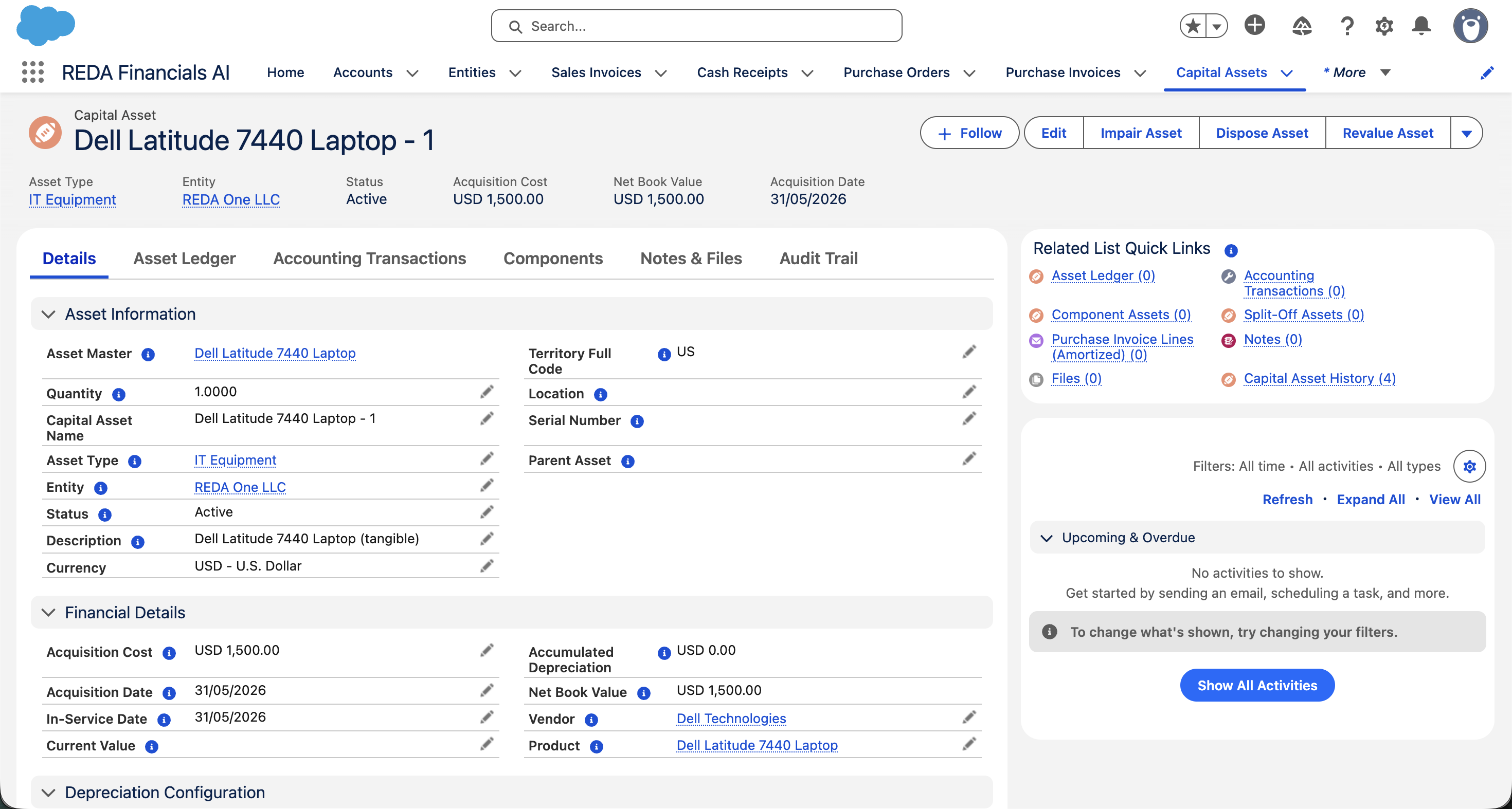
Run Receive Goods on the PO. On receipt, REDA finds or creates an Asset Master (keyed by Entity + Product + Asset Type) and creates the asset beneath it — one asset per unit received, so five vans become five assets under one master.
The asset inherits its rules
Method, useful life, convention, residual value and GL accounts all come from the Asset Type — no re-keying. The new asset starts life as Under Construction: on the books, not yet depreciating.
Activate it to start depreciation
When the asset is placed in service, set its Status to Active. That's the activation: REDA stamps the In-Service Date, fills any blank depreciation settings from the Asset Type, and generates the depreciation schedule automatically. From there it depreciates on its own cycle — the product's job is done.
Tangible vs intangible — an important fork
The PO route creates a Fixed Asset only for tangible capital items — things you can touch (vehicles, equipment, furniture). The Asset Type's category decides this:
| Asset Type category | How it's capitalised | Example |
|---|---|---|
| Tangible | PO receipt creates the Fixed Asset (the flow above) | Company van, laptop fleet, machinery |
| Intangible | Not via PO — capitalised through the Purchase Invoice Amortize action instead | Software licence, patent |
The product feeds the asset — and steps back
The relationship is deliberately one-directional. The product (via the PO) feeds data into the asset at creation — and from then on the asset lives its own life. It depreciates, can be revalued, impaired, or disposed of, all within the Assets module, and never reaches back to change the product, PO or PI. This is why Assets is its own category in this Help Center: the product is just the entry point.
If an asset wasn't created
- Type isn't Asset. Only
Type = Assetproducts create assets. A van mistakenly set to "Goods" just books an expense. - No Asset Type on the product. Without it there are no depreciation defaults to inherit — set the Asset Type.
- Asset Type is intangible. Then the PO won't create it by design — use the PI Amortize action.
- Bought on a PI, not a PO. Asset creation flows through PO receipt. A bill alone doesn't capitalise a tangible asset.
Where to go next
- Creating Products — create the products first.
- Product Catalogue Overview — how products fit together.
- Product Fiscal Profiles — set tax and accounting per product.
Frequently asked questions
From the Asset Type the product points to — not the product itself. The product references the Asset Type; the asset inherits the Asset Type's rules. Define it once, reuse it across products.
Yes — buy a quantity of 5 vans and you get 5 assets under one Asset Master (Entity + Product + Asset Type). The Asset Master groups identical items. (That's the default Individual record mode on the Asset Type; a Bulk-mode Asset Type creates one asset for the whole received quantity instead — used for things like a batch of chairs.)
Give it an intangible Asset Type and capitalise it via the Amortize action on the Purchase Invoice, not the PO. The PO route is for tangibles only.
No. The product feeds the asset only at creation. Once a Fixed Asset exists it's independent — manage it in the Assets module.
Was this article helpful?