
Creating an Entity
In this guide we'll create a real company — Meridian Properties UK Ltd, the UK company of our example group — from start to finish, explaining each field as we go and why it's there. If you've never set up a company in an accounting system before, don't worry: REDA does most of the heavy lifting. The pleasant surprise is that you won't hand-enter the long list of general-ledger accounts a company needs day to day. If a little groundwork is done first, the entity inherits them automatically the moment you save.
Access you'll need. Creating and editing entities requires the Accounting Admin v2 or Accounting Controller v2 permission set. The Accounts Payable v2, Accounts Receivable v2, and Read Only v2 sets can view entities but not create or change them.
What to set up first (and why)
An entity doesn't stand alone — it points to a few things that should already exist. Think of it like furnishing a house: the rooms (accounts, calendar, region) need to be there before the company can move in.
| Set up first | What it is | Why the entity needs it |
|---|---|---|
| Territory | The region/country grouping (e.g. United Kingdom) | The entity belongs to one; it anchors the financial calendar and supplies inherited accounts. |
| Chart of Accounts | The list of accounts the business posts to | The entity's default accounts are chosen from it. |
| Ledger | The book of record postings land in | Every transaction for the entity posts to its default ledger. |
| Accounting Defaults | The standard accounts set once at the territory | This is what the entity inherits, so you don't type a dozen account codes. |
The trick: accounts flow in on save
When you save a new entity, REDA quietly looks up the Accounting Defaults for the entity's territory and copies any account you left blank onto the new entity. If the territory itself has no defaults, REDA looks one level up (to a parent territory), and finally to a global default — using the most specific match it finds. Crucially, it only fills the blanks: anything you typed in yourself is never overwritten.
| Inherited automatically (if you leave them blank) |
|---|
| Receivables, Payables, Cash, Revenue, Expense, Retained Earnings, Unapplied Cash, Unapplied Payments, Deferred Revenue, FX Gain/Loss, Intercompany Receivable & Payable — plus the default Ledger and Reporting Framework. |
Step by step — building Meridian Properties UK Ltd
MPG-GB — a short code (no spaces) that identifies this company across the system, appears in document numbering, and is the key for intercompany matching. Company Name (the legal name printed on PDFs) = "Meridian Properties UK Ltd". Tax Identifier = the VAT number, GB416988735. Optionally a Logo URL for branded documents.GBP — the company's home currency, the one its books are kept in. (In a single-currency system this must match the org currency; with multi-currency on, it's this company's functional currency — see Multi-Currency.) Choose carefully: this locks once you start posting.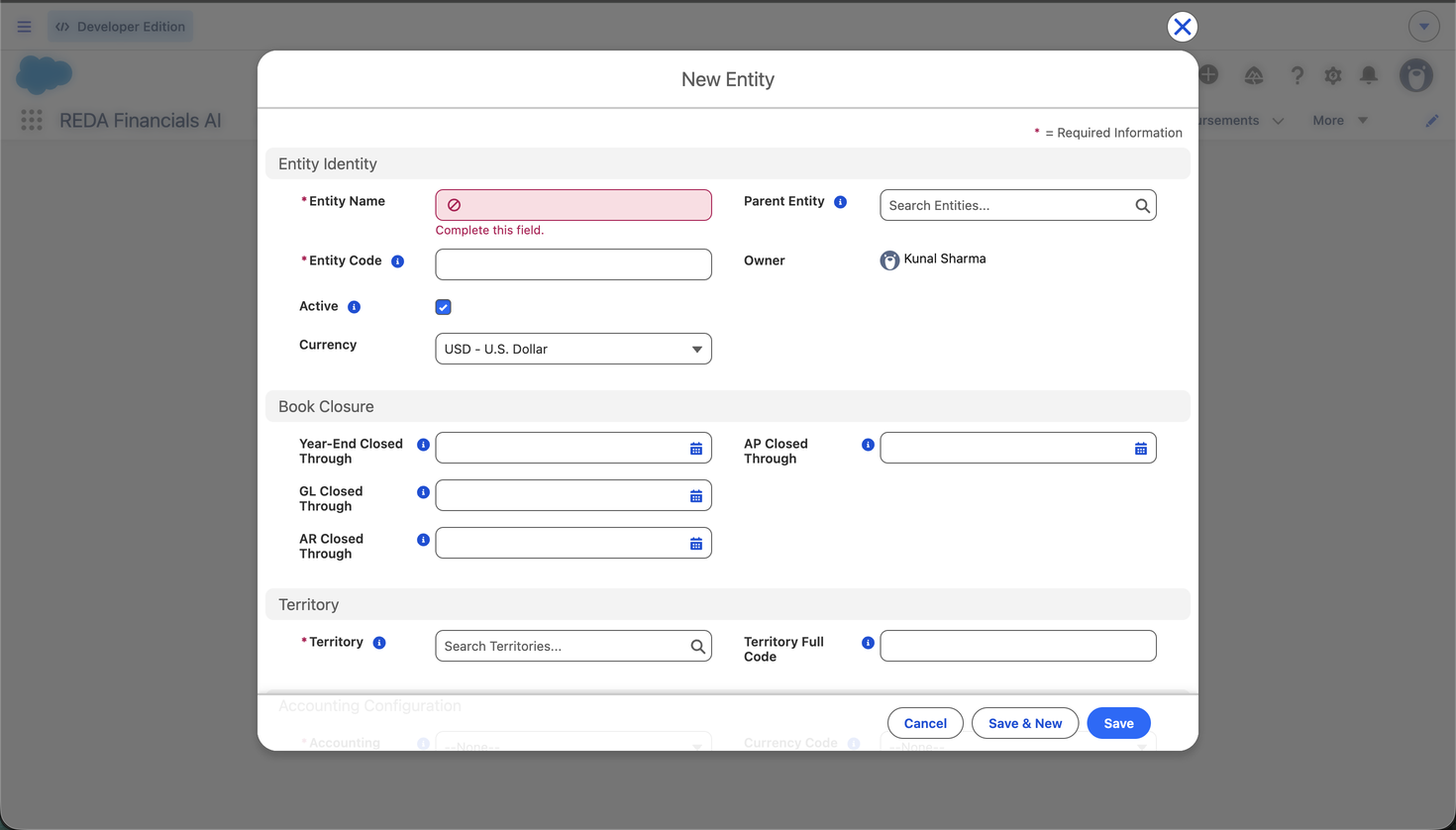
What REDA checks when you save — and why
A dozen guardrails keep your companies' books consistent. Each one stops a specific mistake. The ones you'll meet creating an entity:
| If you… | The exact message | Why REDA stops you |
|---|---|---|
Put a space in the Entity Code (MPG GB) | “Entity Code cannot contain spaces. Use hyphens or underscores as separators (e.g. US-01, AU_CORP).” | The code appears in document numbering and matching keys, where spaces cause problems. |
| Choose Cash basis with no Deferred Revenue account | “Cash basis entities require a Default Deferred Revenue Account. Configure it in the Default GL Accounts section before saving.” | Cash-basis invoices have to park their income somewhere until you're paid — without that account there's nowhere to put it. |
| Set only one intercompany account | “Intercompany accounts must be configured together. Set both Default IC Receivable and Default IC Payable, or leave both blank. Partially configured intercompany accounts will block journal entry posting.” | Intercompany entries need both a receivable and a payable side. |
| Point to an inactive Territory, Ledger, Framework, Jurisdiction or Tax Profile | e.g. “Default Ledger is inactive. Select an active ledger.” — each lookup has its own version | A retired record shouldn't sit at the heart of a live company. Pick an active one. |
| Make the entity its own parent, or pick an inactive parent | “Parent Entity must be active and cannot reference this entity itself (consolidation hierarchies have no self-loops).” | A company can't be its own parent in a group — that would be a loop with no top. |
| Enable multi-currency without a Default FX Gain/Loss account | “Default FX Gain/Loss GL Account is required when Multi-Currency is enabled. Realized and unrealized foreign exchange differences cannot be posted without this account.” | Exchange-rate differences arise on every foreign-currency payment — they need a home. See Enabling Multi-Currency. |
| Set a currency other than the org's in a single-currency system | “In single-currency mode, Currency Code must match the org default currency.” | Without multi-currency enabled there is only one currency to keep books in. |
The payoff — everything just works
Save, and Meridian Properties UK Ltd is a fully working set of books: it has its everyday posting accounts (inherited), a ledger, a home currency, a financial calendar and a tax registration. Watch what happens the first time you raise a sale from it:
| You do | REDA fills in automatically |
|---|---|
| Create a Sales Invoice, pick the UK company | Currency = GBP; the next invoice number from the UK company's document sequence; the UK receivables account |
| Add a line for a product | The product's revenue account, price and the correct VAT |
| Post it | A balanced journal: DR Receivables / CR Revenue / CR VAT — none of which you chose by hand |
Now create the sibling, Meridian Properties US LLC (MPG-US), the
same way (Territory = United States, Currency = USD, Accrual basis, fiscal year starting
January). You now have a two-company group, each keeping its own books, ready to trade, settle
and consolidate — and the India and Brazil companies follow the identical recipe.
Where to go next
- Entity Fields Reference — every field on the entity, explained.
- Entity Default GL Accounts — set the accounts REDA posts to.
- Document Sequences — give the entity its numbering.
- Entity-Level Policy Settings — tune how the entity behaves.
- Understanding Entities — the concepts behind the record.
Frequently asked questions
There were no Accounting Defaults configured for the entity's territory (or any parent, or globally). Set them up under Accounting Defaults — then new entities inherit them — or set the entity's accounts by hand.
Almost all of them, any time — name, accounts, policies, tax settings. The exceptions: Currency and Accounting Basis lock once the entity has posted transactions, Fiscal Year Start Month locks once accounting periods exist for the entity's territory, and the Entity Code can't change once transactions are posted. Get those right up front.
Entity Name is the label you see inside REDA; Company Name is the legal name printed on PDF documents (invoices, statements). They're often the same, but Company Name lets you print the exact registered name.
Only if you have a group and want consolidated reporting. A standalone company leaves Parent Entity blank.
Was this article helpful?