
Aging Snapshot Batch
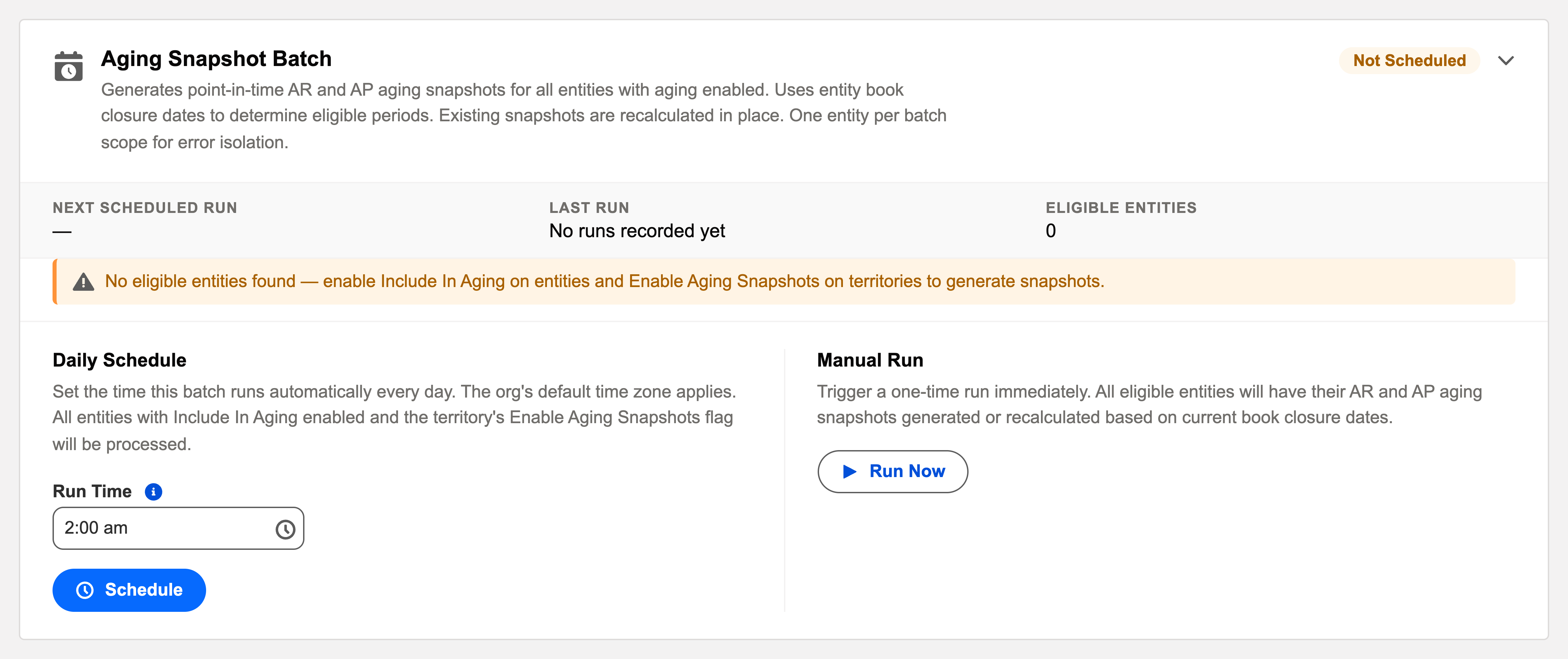
Month-end aging without the month-end ritual. The card: "Generates point-in-time AR and AP aging snapshots for all entities with aging enabled. Uses entity book closure dates to determine eligible periods. Existing snapshots are recalculated in place. One entity per batch scope for error isolation."
Access you'll need. Scheduling and running batch jobs requires the Accounting Admin v2 permission set. The Accounting Controller v2 and Read Only v2 sets can open the console to view outcomes; the Accounts Payable v2 and Accounts Receivable v2 sets cannot see it, though they see the snapshots the batch produces.
The essentials
- Who’s in scope: entities marked Include In Aging. Everything else is skipped by design.
- Which period: whatever each entity’s books are closed through — the batch follows your close, never outruns it (that’s the same books-closed rule manual snapshots obey).
- Refresh in place: one snapshot per entity + type + period; a rerun recalculates that snapshot’s lines rather than multiplying records.
- Isolation: one entity per scope — a data problem in one company’s payables can’t block another’s snapshot.
What the batch builds — the snapshot, field by field
An Aging Snapshot is a frozen photograph of one entity’s receivables or payables as they stood at a date — the thing live aging can never give you, because live numbers move. Each snapshot the batch creates or refreshes carries:
| Field | What it holds |
|---|---|
| Entity / Type / Accounting Period | The photograph’s subject: whose books, AR or AP, for which period. Together they’re unique — one snapshot each, which is why reruns recalculate in place instead of multiplying records. |
| Snapshot Date | The as-of date every invoice is aged against. |
| Status | Draft (created, not calculated) → In Process (the background run is working) → Completed — or Completed with Errors when the run finished but flagged problems worth reading the audit log for. |
| Aging Buckets / Total Outstanding / Record Count | The rollups: one amount per bucket (Current · 1-30 · 31-60 · 61-90 · Over 90 days past due), the grand total, and how many invoices were captured. |
| DSO / DPO | The speed metric — how fast customers pay you (AR) or you pay vendors (AP). Tracked snapshot-over-snapshot it becomes the trend line finance leadership actually uses. |
| Is Valid | The trust flag: it self-invalidates if the closed books behind the snapshot are reopened, so a stale photograph can never masquerade as evidence. |
Behind the header, every Snapshot Line is one outstanding invoice, captured with its party, dates, original and outstanding amounts, days outstanding and bucket. Once captured, lines don’t drift: pay the invoice tomorrow and the June snapshot still shows June’s truth.
A finished snapshot, read like the CFO would — Meridian’s June AP
Meridian Properties Group’s US entity closes June, and the overnight run delivers the AP snapshot: $17,150 outstanding across 3 invoices — $950 sitting in Current (an elevator-maintenance bill not yet due) and $16,200 in 31-60: a construction balance and a janitorial bill that slipped through April’s payment runs. A DPO of 78.55 completes the diagnosis — payment speed dominated by that one part-paid construction bill, and every number drillable to a named invoice via the Snapshot Lines. That’s the batch’s product: period-end aging that exists the morning after the close, with zero clicks spent making it.
Monitoring and troubleshooting
Green means: the card shows Scheduled, the last-run timestamp is from the expected window, and the outcome is informational. Anything else, click View Audit Log — the run’s record lists processed / succeeded / failed with a reason per failure.
| Symptom | Likely cause → action |
|---|---|
| An entity never produces snapshots | Usually not a failure — it’s excluded (Include In Aging unticked) or its books haven’t been closed. Both are visible on the entity record. |
| No snapshot for a closed month | The close date doesn’t cover the period end, or the entity isn’t aging-enabled. Fix on the entity, then Run Now. |
| Numbers look stale after corrections | Recalculate — the batch (or the snapshot’s own Calculate action) rebuilds the lines in place. |
| A snapshot shows Completed with Errors | The run finished but some lines carry problems the audit log names — read it, fix the cause, recalculate. |
Common mistakes to avoid
| Mistake | Why it hurts | Do this instead |
|---|---|---|
| Expecting snapshots for an entity that isn’t aging-enabled | The batch skips it by design, forever — and writes no failure, because nothing failed | Tick Include In Aging on the entity, then Run Now |
| Treating snapshot-vs-live differences as errors | Hours lost reconciling two numbers that are both right — for different moments | Expect them to differ by exactly the activity since the capture |
| Filing a Completed with Errors snapshot as done | Some of its lines carry problems the audit log names — the totals may mislead | Read the log, fix the cause, recalculate |
| Ignoring an invalidated snapshot | Someone reopened the closed books behind it — Is Valid says its numbers no longer describe anything real | Re-close the period, then recalculate for a fresh, valid capture |
| Running the close but never checking the card | A silently unscheduled batch means no snapshots — noticed months later, when the trend chart has holes | Make the card’s chip and last-run timestamp part of the close checklist |
Operating it
Schedule daily and forget it — snapshots simply appear as periods close, feeding trend reporting (DSO/DPO over time) with zero clicks. Run Now after closing a period gets the snapshot immediately. Reading the snapshots themselves: AP Aging Reports & Snapshots and the AR mirror.
Where to go next
- AP Aging Reports & Snapshots — reading what the batch builds.
- Closing the Books — the prerequisite the batch waits for.
- Operations Scheduler Overview — the console.
Frequently asked questions
No — one snapshot exists per entity, type and period ("An Aging Snapshot already exists for this Entity, Type, and Accounting Period." guards manual attempts). A rerun recalculates the existing snapshot’s lines in place.
Yes — the Aging Snapshots tab’s New plus Calculate does exactly what the batch does, one snapshot at a time, under the same books-closed rule. The batch is that workflow on a schedule, for every aging-enabled entity at once.
One entity per batch scope — error isolation by design. A data problem in one company’s payables can’t block another’s snapshot; the failed entity’s reason is in the run’s audit entry, and a Run Now after the fix catches it up.
Deliberately not — that permanence is the point. The snapshot holds the period-end capture; live aging (the self-updating fields and list views on invoices) shows now. Report from the photograph, act on the live picture.
Someone reopened the closed books behind it, so Is Valid switched off — the flag exists so nobody quietly quotes a photograph whose foundation moved. Once the period is closed again, recalculate: the fresh capture is valid.
Was this article helpful?