
Depreciation Batch
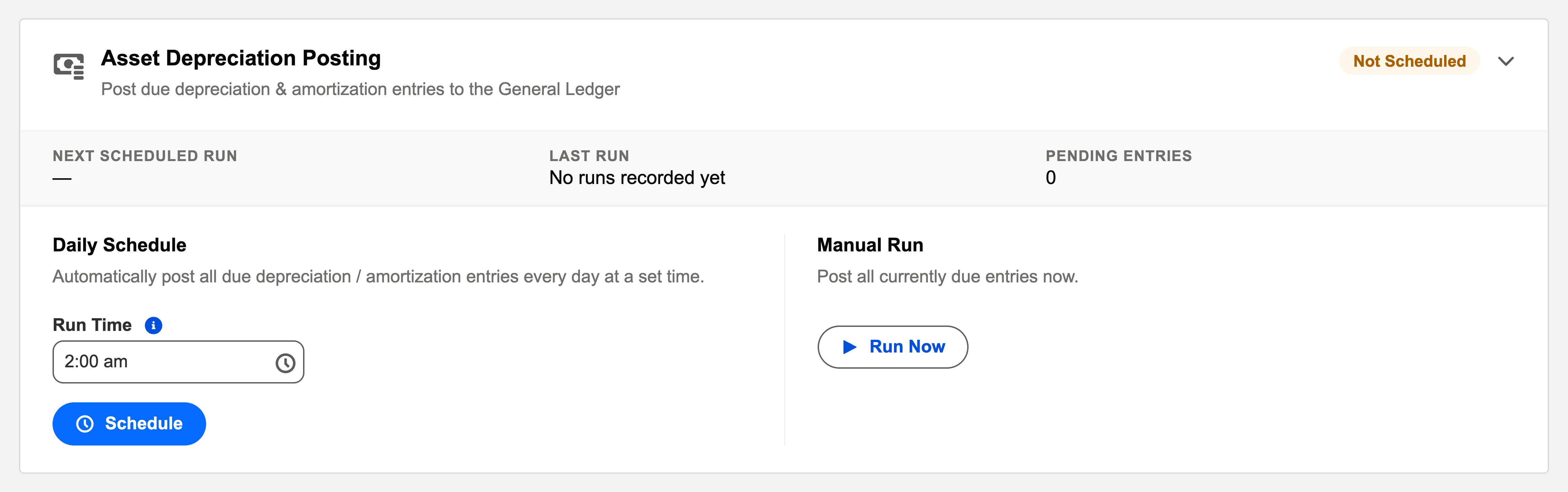
Assets lose value on schedule; someone has to book it. The Asset Depreciation Posting card does, monthly and unfailingly: "Post due depreciation & amortization entries to the General Ledger."
Access you'll need. Scheduling and running batch jobs requires the Accounting Admin v2 permission set. The Accounting Controller v2 and Read Only v2 sets can open the console to view outcomes; the Accounts Payable v2 and Accounts Receivable v2 sets cannot see it, though they see the depreciation the batch posts.
The essentials
- The schedule already exists: when an asset is capitalized, REDA Financials generates its full depreciation schedule as asset ledger entries — dated, amounted, waiting.
- The batch posts what’s due: each run finds scheduled entries whose date has arrived and posts them to the general ledger — debit depreciation expense, credit accumulated depreciation, per the asset type’s accounts.
- Assets stay truthful: net book values fall as entries post; fully-depreciated assets flip status by themselves.
Which entries a run posts — the four tests
Each run sweeps all assets and entities for ledger lines that pass all four tests — and only those:
| Test | What it excludes |
|---|---|
| Status Scheduled | Draft manual entries and already-posted lines are left exactly where they are. |
| Book Financial | Alternative-book (Tax/IFRS) lines are parallel records — they never reach your general ledger via the batch. See Multi-Ledger Depreciation. |
| Ledger Date on or before the run date | Future months wait their turn; month-end lines become due the night they mature. |
| Amount greater than zero | Zero-amount lines aren’t postings. |
For each passing line, posting writes the GL pair — for Meridian Properties Group’s equipment: DR Depreciation and Amortisation $83.33 / CR Accumulated Depreciation — PP&E $83.33 — in the period the line’s date resolves to. Accumulated depreciation and net book value update through the posting, never by hand.
The card, element by element
| Element | What it tells you / does |
|---|---|
| Pending Entries | "{n} entries are due to post." — the live count of Scheduled lines whose date has arrived. Your health check: this should read zero shortly after month-end’s run. |
| Last run / next fire | When the batch last ran and when the daily schedule fires next. |
| Daily schedule | "Automatically post all due depreciation / amortization entries every day at a set time." — default 02:00. Saving confirms: "Asset depreciation posting scheduled daily at {time}." |
| Run Now | Asks "Run depreciation posting now?", explains "This posts every due Asset Ledger depreciation / amortization entry to the General Ledger.", then confirms the batch started. With nothing to do: "There are no entries due to post right now." |
The rules a line must satisfy, verbatim
| The message | What it means / what to do |
|---|---|
| "Cannot post this Asset Ledger entry - Amount must be greater than zero." | A zero or negative charge isn’t a posting — enter the real amount. |
| "Cannot post this Asset Ledger entry - both a Debit GL Account and a Credit GL Account are required." | Each line is a self-contained two-account movement — usually defaulted from the Asset Type; fill any blanks. |
| "The Debit GL Account and Credit GL Account must be different." | Debiting and crediting the same account moves nothing. |
| "Cannot post this Asset Ledger entry because its Capital Asset has no Entity." | Postings belong to a company’s books — set the asset’s Entity first. |
| "Failed to post this Asset Ledger entry: {reason}" | The general-ledger layer refused (a closed period, for instance) — the stated reason is the fix. |
Common mistakes to avoid
| Mistake | Why it hurts | Do this instead |
|---|---|---|
| Never scheduling the daily job | Lines mature and pile up unposted; depreciation reaches the GL only when someone remembers | Set the daily schedule once — 02:00 works for almost everyone |
| Not generating accounting periods ahead | Month-end lines land in nonexistent periods and wait as "skipped (no period yet)" — expense goes missing from the close | Generate periods ahead of the schedule; the retry catches up, but your close shouldn’t depend on it |
| Treating "skipped (no period yet)" as an error | Panic and duplicate manual work — for a case the batch resolves by itself | Open the period, then let the next run (or Run Now) post it |
| Checking the P&L but never the card | A silently stopped schedule looks like "low depreciation this month" until someone reconciles | Make Pending Entries = 0 part of the month-end checklist, next to the P&L tie-out |
Operating it
Schedule it daily (entries post only when due, so daily is safe and self-catching-up) or run it as a month-end step before closing — Run Now after the last capitalization of the month is the classic move. Failures (typically a closed period or a misconfigured account on an asset type) land in the audit log with reasons; fix and rerun. For surgical work — one entity’s month, say — filter the Asset Ledger list view to the lines you mean and use Bulk Status Update: the same posting machinery, at your scope, each line still passing its own checks.
Where to go next
- Running the Depreciation Batch — the fixed-assets view of the same engine.
- Depreciation Schedule Generation — where the entries come from.
- Operations Scheduler Overview — the console.
Frequently asked questions
Almost always "no period yet": the line’s date falls in a period that doesn’t exist or is closed. Generate or open the period and the next run (or Run Now) picks them up — that’s the designed retry, not a failure.
Everything catches up in one run: a run posts all due lines, however far back their dates reach — and each charge still lands in the period its own date resolves to, so history stays correct. Nothing is lumped into "this month".
It posts the Asset Ledger lines themselves — each posted line writes its own accounting transactions, like an invoice does. No separate journal entry documents are involved.
The scheduled batch is org-wide by design (due is due). For surgical scope, filter the Asset Ledger list view and use Bulk Status Update — same postings, your selection.
On the asset: is it Active (capitalized), with a schedule generated? Under-construction assets don’t depreciate yet — see Asset Capitalization. If the schedule exists but lines fail, the audit log’s reasons point at configuration — typically a missing GL account on the asset type.
The Audit Log — each failed line is recorded as "Asset Depreciation Post Failed" with Severity Critical, and the run’s summary reads "Posted X, failed Y, skipped (no period yet) Z." Failed lines stay Scheduled, so fixing the cause is enough: the next run retries them automatically.
Was this article helpful?