
Balance Sheet
The income statement is a movie; the balance sheet is a photograph — everything the company owns, owes, and is worth, frozen at one instant. In the Financial Center it takes one parameter that matters: the As of Date. Everything from the first transaction ever through that day is in the picture.
Access you'll need. Any REDA Financials permission set can open the Financial Center tab and run the balance sheet; what you see is limited to the records your role can read.
Setting up the run
The balance sheet uses the Financial Center's shared filter panel (full reference), with one visible difference from the other statements:
| Control | For the balance sheet |
|---|---|
| Report Type | Set to Balance Sheet. Switching type clears the previous result. |
| As of Date | Because the report is cumulative from the first transaction, the usual From box disappears and the To box is relabeled As of Date. One date, one photograph. Add a second As of Date row for a comparison. |
| Entity + Ledger | Each entity row adds that company's column; the Ledger box preselects the entity's default ledger. |
| Reporting Framework | Optional statutory or management layout; left at "-- No Framework (Taxonomy) --" the rows group by account type and subtype. |
| Hide Zero Balances | Prunes rows that are zero in every column, plus any groups left empty. |
| Run Report | Enabled once at least one entity and one As of Date are set. |
The photograph's three panels
| Section | What it holds | Meridian examples |
|---|---|---|
| Assets | What the company owns and is owed | Cash, tenant receivables, supplier prepayments, buildings and equipment net of depreciation |
| Liabilities | What the company owes | Vendor payables, accrued expenses, tenant deposits, taxes payable |
| Equity | The owners' stake: capital contributed + profits kept | Share capital, retained earnings — and the current year's earnings, rolled in for you (see below) |
The defining property is in the name: Assets = Liabilities + Equity, always. The report's badge says it out loud — "Balanced — Assets = Liabilities + Equity" — or shows Imbalanced with a non-zero Grand Total, which is a call to investigate, never to shrug.
How each panel reads its accounts follows the grain of double-entry: asset balances are presented as debits net of credits, while liability and equity balances are presented as credits net of debits — so all three panels display in their natural positive form. A negative where you expect a positive (an overdrawn bank account, a receivable that's really a prepayment received) is the report telling you something worth a look.
The current year's profit, rolled forward automatically
A mid-year balance sheet has a subtlety: this year's profit isn't in retained earnings yet (that happens at year-end close), but the balance sheet must still balance. The report handles it: it computes current year earnings — the fiscal year's net income through your as-of date — and presents it inside equity (added to your retained earnings account's line, or as its own "Current Year Earnings" figure). No journal is posted; it's a reporting roll-forward, recalculated every run.
Two details of the roll-forward are worth knowing:
- It's computed per entity, from each entity's own fiscal year start through your as-of date — so a group run with a calendar-year US entity and April-year UK and India entities gets each one's earnings measured over its own year.
- Where it lands depends on entity setup. If the entity has a Default Retained Earnings account configured, the current year's earnings are added into that account's displayed line. If not, the report shows a separate Current Year Earnings amount inside the Equity section. Same total either way; the configured account just makes the presentation match your statutory layout.
Prior years work differently: once year-end close posts its closing journals, those years' results sit in retained earnings permanently, and the report-time roll-forward only ever covers the current, unclosed year.
Reading Meridian's panels
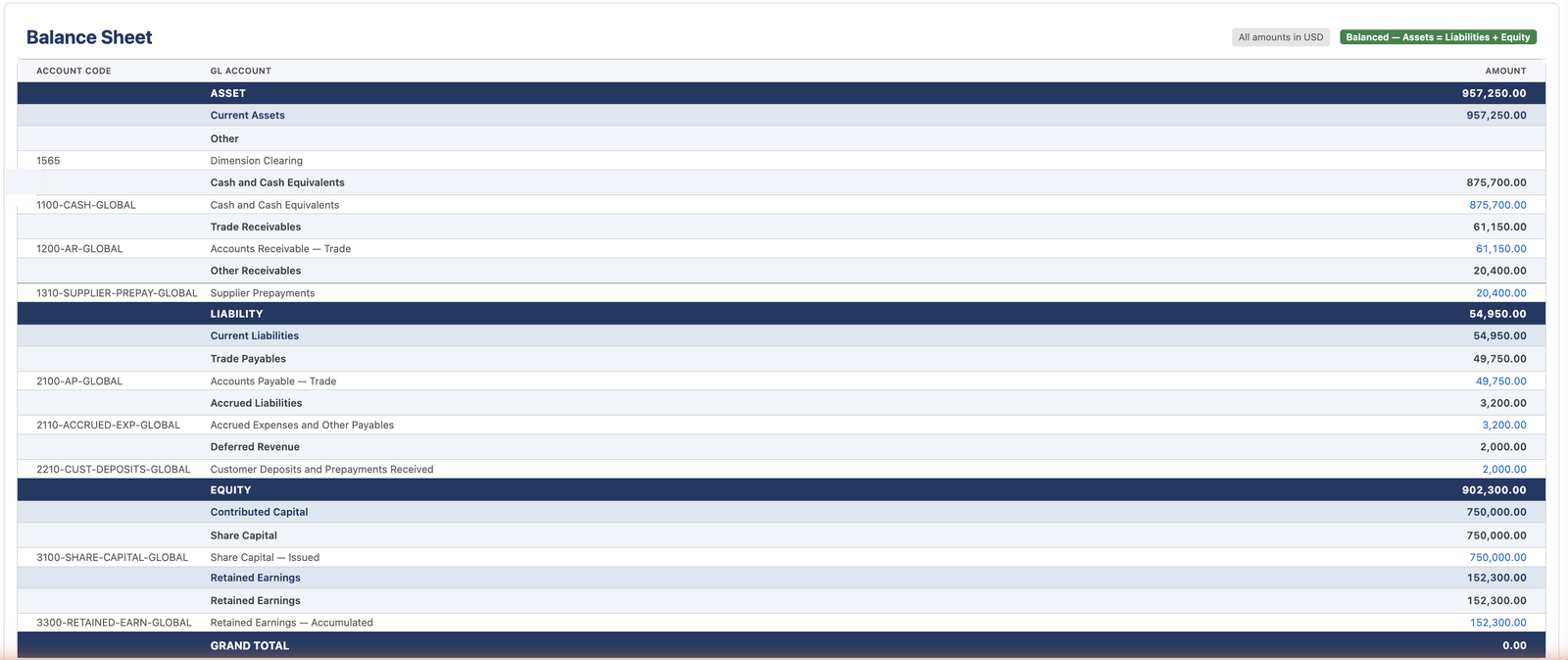
On Meridian Properties US LLC's mid-year balance sheet, the asset panel carries the numbers the other reports have already introduced: Cash and Cash Equivalents at 875,700 (the same closing balance its trial balance shows for 30 June), Accounts Receivable — Trade at 61,150, Supplier Prepayments at 20,400. In equity, the roll-forward presents the first half's 152,300 net income — the identical Grand Total the income statement reports for January–June — without a single journal being posted. That three-way agreement (trial balance ↔ balance sheet ↔ income statement) is not a coincidence to admire but a check to perform: all three read the same ledger, so scoped to the same entity, ledger and dates they must tell one story.
Reading it like an owner
- Liquidity: current assets vs current liabilities — can we pay what's due soon?
- The working-capital story: receivables and payables here are the same numbers your aging reports detail — the balance sheet is their sum, the agings their explanation.
- Two dates, one variance: run two as-of dates (year-start vs today) and the Variance column shows what half a year did to the company's position.
- Every number is provable: drill any line to its transactions — a balance sheet where every figure answers questions is an auditor's favorite kind.
Messages you may meet
| The message | What it means / what to do |
|---|---|
| "Configure your report parameters and click Run Report" | Nothing has run yet — set an entity and an As of Date. |
| "Generating report..." | The run is computing; a since-inception statement over years of history can take a moment. |
| "No data found for the selected parameters" | Nothing matched — usually an As of Date before the entity's first posting, or a dimension filter that excludes everything. |
| "At least one entity is required to generate a report." | Add an entity row. |
| "At least one date range is required to generate a report." | Set the As of Date — the report needs to know which day to photograph. |
| "Report generation failed: …" | The run stopped; the detail after the colon says why. Persistent failures go to your administrator. |
Common mistakes to avoid
| Mistake | Why it hurts | Do this instead |
|---|---|---|
| Reading the balance sheet as "this quarter's numbers" | It's cumulative — the cash figure is all history through the as-of date, not the quarter's movement | Use the Income Statement for period performance; use two As of Dates and the Variance column to see what a period changed |
| Publishing without glancing at the badge | The badge is the report's own integrity check — skipping it means shipping a statement you haven't sanity-checked | Badge first, every run; if it reads Imbalanced, investigate before the statement leaves the building (see the FAQ below) |
| Expecting this year's profit inside the retained earnings account record | The roll-forward is presentation-only — no journal exists until year-end close, so the account itself won't show it | Read equity on this report for the true position; run Year-End Close when the year is final |
| Reconciling receivables here against an aging snapshot from a different day | The snapshot froze one date; your balance sheet photographs another — the difference is real activity, not an error | Match the As of Date to the snapshot date before comparing (see AR Aging) |
| Comparing two entities by eyeballing two separate runs | Different dates or scopes creep in unnoticed | Add both entities to one run — side-by-side columns, one As of Date, one currency (corporate mode handles mixed currencies automatically) |
Where to go next
- Income Statement — the flow that feeds equity.
- Cash Flow Statement — the third statement of the set.
- Year-End Close — when current-year earnings become retained earnings.
Frequently asked questions
A balance sheet is cumulative by definition — Meridian's cash today is every receipt and payment since the company began, not this month's. The As of Date is the only time dimension a snapshot needs.
Stop and investigate before publishing anything: check the Grand Total (the size of the gap), run the trial balance for the same date (does it balance?), and compare which accounts appear on each. Involve your administrator — an imbalanced statement means something structural needs attention, and the gap's exact amount is the best clue.
Remember the roll-forward: the displayed figure may include current-year earnings added at report time. After year-end close posts the closing journal, the same money appears there permanently and the roll-forward starts fresh for the new year.
Yes — account-level amounts open the Transaction Detail window, listing the postings behind the figure with links to their source documents. On a cumulative report that history can be long; the window pages through it 50 entries at a time.
Total assets against total liabilities plus equity — the accounting equation, evaluated on the statement as presented. The Grand Total row shows the same comparison as a number: zero when the badge reads Balanced, and the size of the gap when it doesn't, which is the first clue for any investigation.
Yes. The report switches to corporate currency automatically when your selected entities' currencies differ (with a toast telling you so), making the columns comparable and totalable. The currency badge above the report always names what you're reading.
Was this article helpful?