
Closing the Books
Closing the books is how you, as the controller, declare a period final: once a period is closed, no one can post, edit, or void a transaction dated within it, so the numbers you reported can’t shift after the fact. It’s the control that makes your financial statements trustworthy and your audit trail defensible.
In REDA, closing is deliberately precise: it’s done per entity and per module (AR, AP, GL), and it’s driven by a date, not a switch. This article explains the model, the order to close in, and how to do it entity by entity.
Access you'll need. Closing and reopening books requires the Accounting Controller v2 or Accounting Admin v2 permission set. The Accounts Payable v2, Accounts Receivable v2, and Read Only v2 sets can view the entity but not change its closed-through dates.
Closing is a date, not a switch
Each entity carries a set of “Closed Through” dates. Each one is a line in the sand: everything on or before this date is locked; everything after it is open. That’s a soft close — far more flexible than an open/closed flag, because it lets you close month after month by simply moving the date forward, and reopen by moving it back.
| Field on the entity | What it locks |
|---|---|
| AR Closed Through | Receivables — sales invoices, credit memos, and cash receipts dated on or before this date can no longer be posted, edited, or voided. |
| AP Closed Through | Payables — purchase invoices, vendor memos, and disbursements on or before this date are locked. |
| GL Closed Through | The general ledger — journal entries on or before this date are locked. Closed last (see the sequence below). |
| Year-End Closed Through | The last fiscal year-end that’s been finalised. Set automatically by Year-End Close; while set, none of the three dates above can move before it. |
The order to close: subledgers first, then GL
There’s one rule REDA enforces, and it’s a genuine accounting control: you must close AR and AP before you close the GL for the same date. You finalise the subledgers — receivables and payables — and only then lock the general ledger on top of them. Reopening runs in reverse.
1. Set AR Closed Through = 31 Jan — receivables for January and earlier are now locked.
2. Set AP Closed Through = 31 Jan — payables locked.
3. Set GL Closed Through = 31 Jan — the ledger is now closed for January. (REDA only allows this once AR and AP are already at 31 Jan or later.)
Reopening January (if you must):
1. Move GL Closed Through back first (e.g. to 31 Dec).
2. Then move AR and AP back. (You can’t reopen a subledger while the GL is still closed beyond it.)
How to close an entity’s books
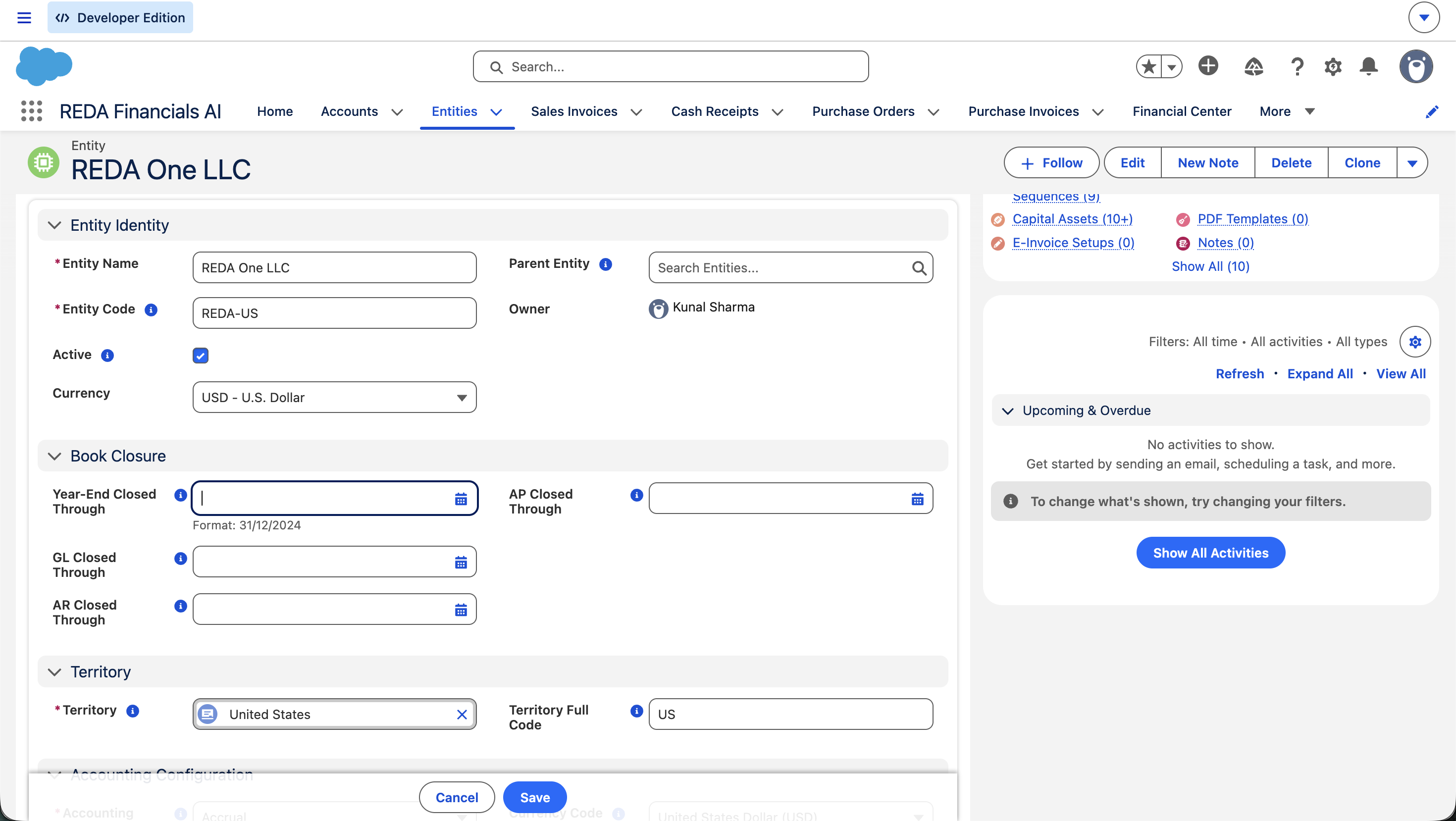
Closing is done right on the entity record:
Open the entity
From the App Launcher (the nine-dot grid, top-left) or the Entities tab, open the entity whose books you’re closing.
Edit the Book Closure section
Click Edit and find the Book Closure section, which holds the four closed-through dates.
Set the dates in order
Set AR Closed Through and AP Closed Through to the period-end date, then GL Closed Through to the same date.
Save
Click Save. From this moment, postings dated in the closed range are blocked for that entity.
What closing does — and how to reopen
Once a date is set, any attempt to post, edit, or void a transaction dated on or before it — for that module, in that entity — is rejected with a clear message. Reporting on the closed period stays exactly as it was; closing freezes the figures, it doesn’t change them.
Reopening is simply moving a closed-through date backward — but two guards apply: you can’t reopen a subledger while the GL is still closed beyond it (reopen GL first), and you can’t move any date before a finalised year-end until that year-end is reopened. Reopening should be rare and deliberate — it’s re-opening history.
Which date locks which documents
Every document type answers to exactly one of the three dates. When a posting is blocked, this table tells you which date is doing the blocking — and therefore which date a controller would have to move to let it through:
| Documents | Governed by |
|---|---|
| Sales Invoices, Cash Receipts, Credit Memos — and the applications that match receipts to invoices | AR Closed Through |
| Purchase Invoices, Cash Disbursements, Vendor Memos — and the applications that match disbursements to invoices | AP Closed Through |
| Journal Entries — and every other posting source (fixed assets, system-generated entries) | GL Closed Through |
The messages you’ll see — and what to do
These are the actual guard messages the system raises around closure. Users hitting them don’t need a ticket — they need this table:
| The message | What it means / what to do |
|---|---|
| “Transaction Date … is on or before the GL book closure date …. Reopen the books to post.” (AR and AP wordings name their own closure date) | The document is dated inside a closed range. Re-date it into the open period if that’s where it belongs; otherwise a controller must reopen, post, and re-close. |
| “Period is closed through … for entity …. Posted entries dated on or before the closure date cannot be unposted.” | Unposting is blocked by the same lock as posting — a closed period can’t be changed in either direction. |
| “Close sequence violation: GL Closed Through cannot be later than AR Closed Through or AP Closed Through. Close AR and AP first, then GL. To reopen, move GL Closed Through backward before moving AR or AP.” | You tried to close the GL past a subledger, or reopen a subledger under a still-closed GL. Follow the order: close AR/AP → GL; reopen GL → AR/AP. |
| “Cannot roll back book closure dates prior to the Year-End Closed Through date. The fiscal year through this date has been closed. To reopen, use the Year-End Close reopen workflow in the Financial Center first.” | The year is formally closed. Reopen the fiscal year in the Financial Center before touching monthly dates inside it. |
Best practices for a clean close
- every transaction for the period is posted (nothing sitting in draft);
- bank accounts are reconciled through the period end;
- AR and AP control accounts tie out to their subledgers;
- intercompany balances mirror across entities.
- Close subledgers before the ledger. AR and AP first, GL last — it’s required, and it’s the right order.
- Close entity by entity. Finish and lock each entity’s period as it’s ready; you don’t have to wait for the whole group.
- Move forward one period at a time. Advance the dates to each successive period end as you finish — the soft-close model makes a rolling monthly close natural.
- Reserve reopening for genuine corrections. Document why, reopen in the right order (GL back first), and re-close promptly.
- Use Year-End Close for the fiscal year. The year-end process rolls profit to retained earnings and stamps the Year-End Closed Through date — see Year-End Close.
Where to go next
- Accounting Periods — the periods you are closing.
- Generating Periods — create the next periods to post into.
- Ledger Management — how ledgers behave across a close.
- Year-End Close — the annual close and balance roll-forward.
- Trial Balance — confirm balances before you lock.
Frequently asked questions
No. Monthly closing has no dedicated screen — the closed-through dates are edited directly on the entity record, and that’s the entire mechanism. The only guided close workflow in REDA is Year-End Close in the Financial Center, which finalises a whole fiscal year.
No — closing is controlled by dates, not checkboxes. Each module (AR, AP, GL) has a “Closed Through” date on the entity. Everything on or before that date is locked; everything after stays open. This soft-close approach lets you close each month by moving the date forward, and reopen by moving it back.
Because AR and AP aren’t closed through that date yet. The GL can only be closed after the subledgers. Set AR Closed Through and AP Closed Through to the period end first, then set GL Closed Through.
Yes — that’s the point of per-entity closure. Entity A can be closed through January while Entity B is still posting. Each entity’s closed-through dates are independent, even when the entities share the same territory calendar.
First ask whether it truly belongs in the closed period or in the current open one — most late items should be posted in the open period. If it genuinely must go into the closed period, a controller can reopen it (move GL back first, then the subledger), post the correction, and re-close. Reopening a closed period is a deliberate, documented action.
No. Closing freezes the period so the figures can’t change — it doesn’t alter them. Your statements for a closed period read exactly as they did at close.
No. A monthly close is purely a lock — it creates no accounting entries of any kind. The one close that does post entries is Year-End Close, which sweeps the year’s revenue and expense balances into retained earnings via a system-generated closing journal entry per entity and ledger.
Was this article helpful?