
Subscription & Plans
REDA Financials AI is not a standalone product — it is part of a connected platform that brings together accounting, AI, and payments into a single subscription. When you subscribe to REDA Financials AI, you get access to three integrated products that work together to power your entire financial operation.
Access you'll need. Activating the subscription and viewing usage requires the Accounting Admin v2 permission set — the Financial Admin Console is visible to Accounting Admins (Accounting Controller v2 and Read Only v2 can reach it; Accounts Payable v2 and Accounts Receivable v2 cannot).
What’s included in your subscription
Every REDA Financials AI subscription includes three products. They are not separate add-ons — they ship together and are designed to work as one unified platform.
REDA Financials — The Accounting ERP
This is the core accounting platform you are reading about. It covers the full financial lifecycle:
- General Ledger — Chart of Accounts, GL groups, accounting periods, ledgers, reporting frameworks, and territories
- Accounts Receivable — sales invoices, credit memos, cash receipts, payment application, and AR aging
- Accounts Payable — purchase orders, purchase invoices, vendor memos, cash disbursements, PO matching, and AP aging
- Tax Management — VAT, GST, sales tax, withholding tax (TDS), with pre-built seed data for 70+ countries
- Fixed Assets — full lifecycle from acquisition through depreciation (7 methods) to disposal, with multi-ledger support (Book / Tax / IFRS)
- Budget Management — budgets by entity and GL account with real-time enforcement on purchase orders
- Financial Reporting — Trial Balance, Income Statement, Balance Sheet, Cash Flow Statement (IAS 7), plus 91 standard Salesforce reports and 3 persona dashboards
- Journal Entries — manual adjustments, intercompany, reversing, and recurring entries
REDA AI — The Intelligence Layer
REDA AI is an agentic AI platform built natively on Salesforce, and it is included in every REDA Financials AI subscription. It installs as its own managed package alongside the accounting app. Note that the AI features built into the accounting workflows below — OCR, bank matching, GL mapping and email intake — run inside REDA Financials itself, so they work whether or not you deploy agents; REDA AI adds the agent layer on top (conversational agents, prompts, tools, and the deployment channels). The AI capabilities you get with the subscription:
- OCR Invoice Processing — scans a PDF or image of a vendor invoice, extracts the header fields (vendor name, invoice number, date, amounts) and line items (product, quantity, unit price), matches them to your master data, and creates a purchase invoice automatically
- Intelligent Bank Matching — analyses bank statement lines against your cash receipts, disbursements, and journal entries using a three-pass algorithm (reference match, date-range match, amount match) to auto-reconcile your bank statements
- Self-Learning GL Mapping — learns from your team’s manual GL account selections and suggests the correct GL account for new transactions, improving accuracy over time
- Email-to-Invoice Automation — monitors an inbound email address, processes attached invoices via OCR, and creates purchase invoices without any manual intervention
- Multi-Channel Deployment — REDA AI operates across internal (Lightning), external widget, Experience Cloud portals, email, and API channels — so your AI accounting assistant works wherever your team works
REDA Pay — The Payments Layer
REDA Pay is the payments and banking layer for REDA Financials. It connects your bank accounts to your accounting ledger in real time. Examples of what REDA Pay handles:
- Inbound Payments (Collections) — processes customer payments, matches them to outstanding invoices, and creates cash receipts automatically
- Outbound Payments (Disbursements) — initiates vendor payments, processes batch payment runs, and creates cash disbursements with bank references
- Payment Settlements — manages the settlement lifecycle from payment initiation to bank confirmation, with real-time status tracking
- Bank Statement Reconciliation — imports bank statements, matches transactions against your books, and identifies unreconciled items for review
- Multi-Bank Support — connects to multiple bank accounts across different banks and currencies, with per-account reconciliation and reporting
How the three products work together
Here is a real-world example of how the three products collaborate on a single business process:
- REDA AI receives a scanned invoice via email, extracts the vendor, line items, and amounts using OCR, and creates a purchase invoice in REDA Financials.
- REDA Financials validates the invoice against the matching purchase order, calculates tax (including withholding tax if applicable), and posts the accounting transactions to the general ledger.
- REDA Pay initiates the vendor payment on the due date, sends the payment instruction to the bank, and reconciles the bank statement when the payment clears.
No middleware, no data exports, no manual handoffs. The entire process — from a scanned piece of paper to a reconciled bank payment — happens inside one platform.
Getting started
To discuss plans, pricing, and implementation for your organisation, contact our sales team:
- Sales: sales@reda.one
- Support: support@reda.one
- Website: reda.one
How subscriptions work
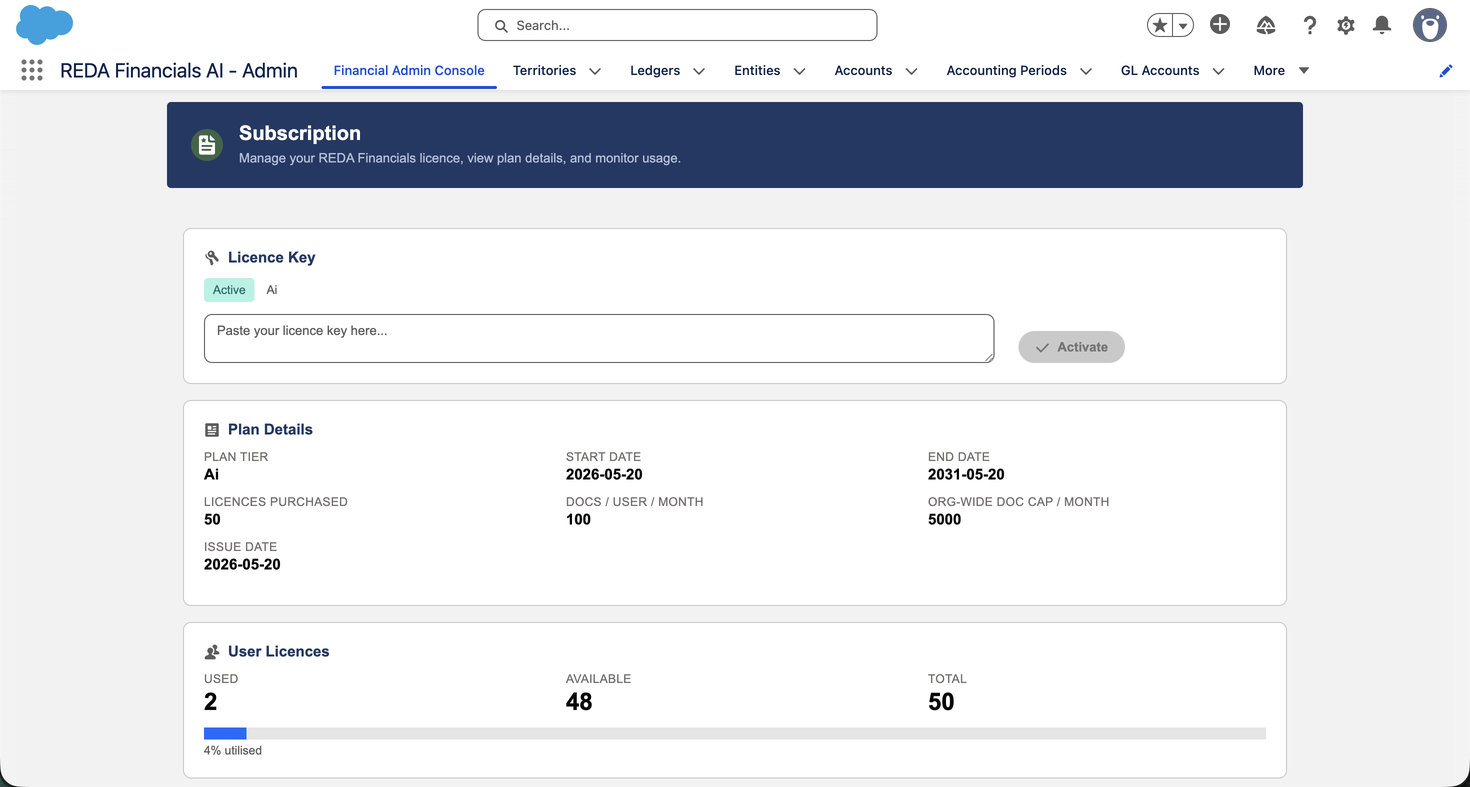
When you subscribe, the REDA team activates your organisation with a secure licence key. This key is unique to your Salesforce org and controls three things:
- Your plan — which features are available (for example, whether AI features are included)
- The number of user licences — how many users can be licensed to post accounting transactions
- Your AI document allowance — how many documents can be processed by AI features each month (on plans that include AI)
The licence key is activated and managed by the REDA team through the Subscription tab of the Admin Console. You can view your current subscription details there at any time.
The plans
REDA Financials AI is offered in two main subscription plans, plus a free trial:
| Plan | What it includes |
|---|---|
| REDA Financials | The complete accounting platform — General Ledger, Accounts Receivable, Accounts Payable, Banking, Tax, Fixed Assets, Budgets, Financial Reports, and PDF generation. Licensed users can post accounting transactions across all modules. |
| REDA Financials AI | Everything in the base plan, plus the AI-powered features: OCR invoice processing (automatically reading scanned invoices and creating purchase invoices) and AI bank statement matching. These plans include a monthly allowance of AI documents. |
| Free Trial | A time-limited trial with full functionality, including AI features, so you can evaluate the platform before subscribing. No payment details are required to start. |
The free trial
The free trial lets you explore REDA Financials AI with full functionality before committing to a paid subscription. During the trial:
- All users are licensed — every user in your org can post accounting transactions without needing an individual licence assigned. This makes it easy to get your whole team evaluating the platform quickly.
- AI features are included — you can try OCR invoice processing and AI bank matching, subject to a monthly document allowance for the trial.
- The trial is time-limited — it runs for a fixed evaluation period. When the trial period ends, you will need an active paid subscription to continue posting transactions.
User licences
On paid plans, your subscription includes a set number of user licences. A licensed user is one who can create, edit, and post accounting transactions. The number of licences your organisation has is agreed when you subscribe and can be adjusted by contacting your REDA account team.
Licences are assigned to individual users by your administrator. For step-by-step instructions, see License Assignment.
The Subscription tab shows your licence usage at a glance: how many licences are used, how many are available, and your total. A progress bar helps you see when you are approaching your limit.

AI document allowances
On plans that include AI features, each AI document processed — such as an invoice read by OCR or a bank statement matched automatically — counts against your monthly document allowance. This allowance is part of your subscription agreement.
REDA Financials tracks document usage per calendar month. The Subscription tab shows:
- Used this month — how many AI documents have been processed in the current month
- Remaining — how many you have left
- Monthly allowance — your total for the month
A new tracking period begins automatically at the start of each calendar month. Your document allowance is specific to your subscription agreement and can be adjusted to suit your organisation’s volume — contact support@reda.one to discuss.

What happens without a licence
REDA Financials protects the integrity of your accounting data by ensuring that only licensed users can write to the General Ledger. If a user is not licensed, here is what they can and cannot do:
| Action | Unlicensed user |
|---|---|
| View records (invoices, reports, ledgers) | Allowed (subject to permission sets) |
| Create or edit draft documents | Allowed (subject to permission sets) |
| Post a transaction (create Accounting Transactions) | Blocked |
| Use AI features (OCR, bank matching) | Blocked |
When an unlicensed user attempts to post a transaction, the system displays a clear message explaining that a licence is required, and the post is prevented. The underlying accounting records are never created without a valid licence — this is a core data-integrity control, not just a screen warning.
Next steps
Assign user licences
Learn how to license individual users in License Assignment.
Assign permission sets
Control what each user can see and do in Permission Set Assignment.
Complete your setup
Configure your organisation in Post-Installation Setup.
Where to go next
- License Assignment — assign the licences your plan includes.
- Installation & Upgrades — install the package into your org.
- About REDA Financials AI — what the platform delivers.
- Managing Your Subscription — administer plans and usage.
- Your Setup Roadmap — the next configuration steps, in order.
Frequently asked questions
Pricing is tailored to your organisation’s size and needs. This help centre does not publish pricing. Contact sales@reda.one for current pricing and a plan recommendation.
The base REDA Financials plan includes the complete accounting platform — all modules, posting, and reporting. The REDA Financials AI plan adds the AI-powered features (OCR invoice processing and AI bank matching) along with a monthly document allowance. Both plans support multi-entity, multi-currency, and the full double-entry accounting engine.
An AI document is any document processed by an AI feature — for example, an invoice scanned and read by OCR, or a bank statement matched automatically by the AI reconciliation engine. Documents you create manually (typing in an invoice, journal entry, or receipt) never count against your allowance.
Once you reach your monthly AI document allowance, AI processing pauses until the next calendar month, when a fresh allowance begins. You can still work normally — manual entry is always available. If you regularly need more, contact support@reda.one to adjust your allowance.
Yes. A licence is required to post accounting transactions, not to view data. Unlicensed users can still view records and create draft documents, subject to their permission sets. This is useful for read-only roles such as auditors or executives who review reports but do not post entries.
Your data is never deleted when a subscription lapses. All your entities, accounts, invoices, and transactions remain in your Salesforce org and stay viewable. The only effect is that posting new transactions is blocked until you renew. Contact support@reda.one to renew.
Was this article helpful?