
Understanding Entities
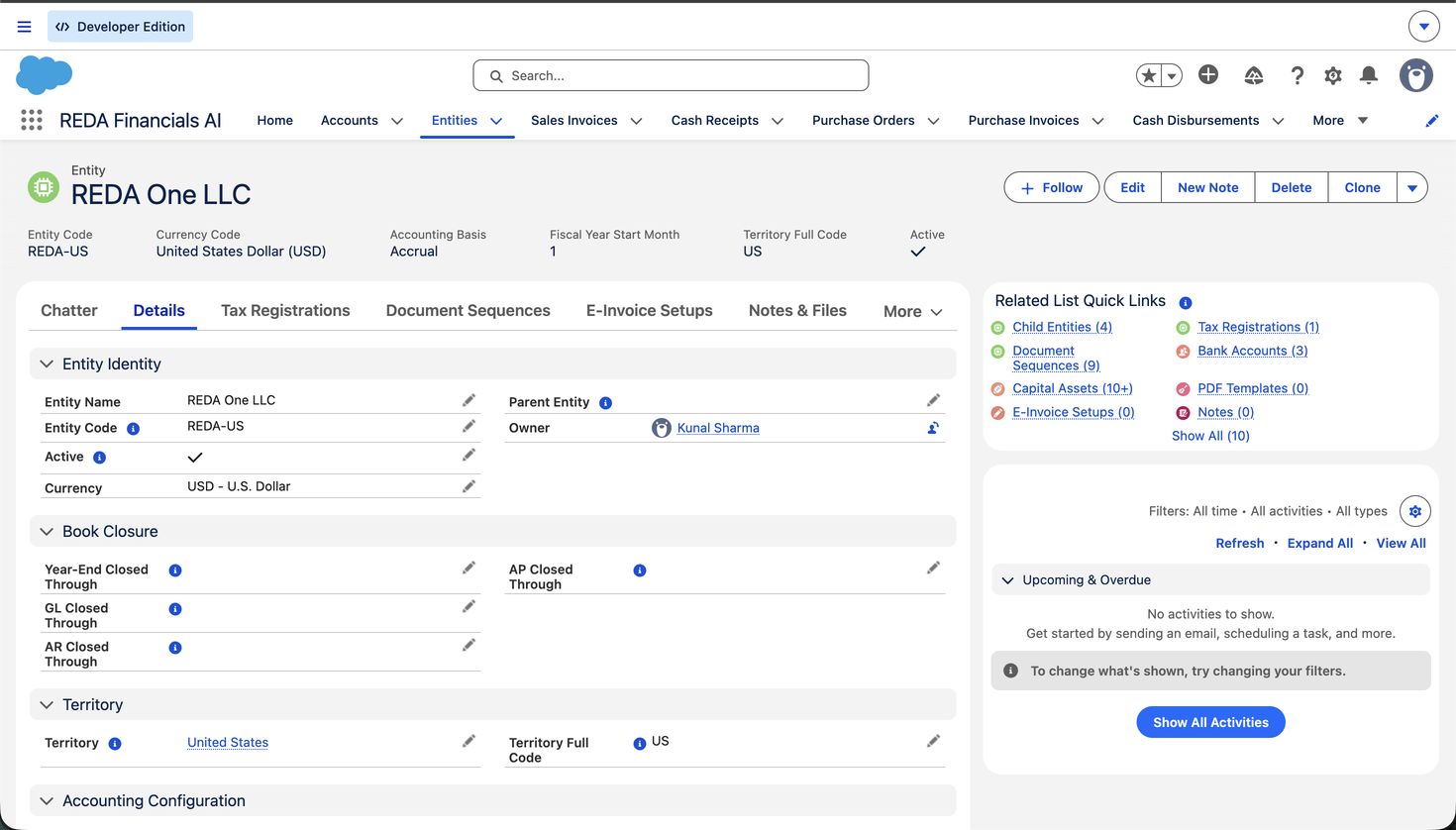
If you're new to REDA Financials, this is the right place to begin. Before you raise a single invoice or record a payment, REDA needs to know who the books belong to — and that "who" is an Entity. Almost everything else in the system depends on it. This article explains what an entity is, why it matters, and how it fits together — in plain language, assuming no prior accounting background. By the end you'll understand the single most important record you'll set up.
Access you'll need. Any REDA Financials permission set can view entities; creating and editing them requires the Accounting Admin v2 or Accounting Controller v2 permission set. The Accounts Payable v2, Accounts Receivable v2, and Read Only v2 sets can see them but not change them.
What is an entity, really?
An entity is a company that keeps its own complete set of accounting records. Accountants call that a "set of books." If your organisation is a single company, you have one entity. If it's a group — a parent with subsidiaries, or separate companies in different countries — each legal company is its own entity, with its own books.
A real-world company isn't just an idea — it has a legal name, a registered address, a tax registration number, a home currency, and a financial year. An entity in REDA holds exactly those things, plus the accounting settings REDA needs to post transactions correctly. Set it up once, carefully, and every document you create afterwards inherits the right behaviour automatically.
Why the entity is the centre of everything
In REDA, nearly every record points back to an entity: Sales Invoices, Purchase Invoices, the payments you receive and make, Journal Entries, Bank Accounts, Budgets, Capital Assets, even the individual accounting entries the system posts behind the scenes. That single link is what lets REDA answer the question every business asks: "How is this company doing?" Filter anything by entity and you have that company's complete financial picture — nothing from any other company mixed in.
Do you need one entity or several?
You create a separate entity whenever a part of your organisation needs to keep its own books. The usual triggers:
| Situation | Entities | Why |
|---|---|---|
| One company, one country | 1 entity | One legal company, one set of books. |
| A parent company with subsidiaries | 1 per company | Each subsidiary is a separate legal company that reports its own results, then rolls up to the group. |
| The same brand operating in several countries | 1 per country company | Each country usually has its own legal company, currency, tax registration and financial year. |
| One company, two divisions (same legal entity) | 1 entity | Divisions that share a legal company share books — track them with dimensions/reporting, not separate entities. |
The three-level picture: Territory, Entity, Parent
An entity sits inside a small structure. Understanding these three levels makes the rest of REDA click into place:
| Level | Answers | What it does in REDA |
|---|---|---|
| Territory | Where does it operate? | A region or country grouping. It anchors the financial calendar (accounting periods are organised by territory) and supplies a starter set of default accounts that new entities inherit. |
| Entity | Who keeps the books? | The legal company itself. Holds its currency, accounts, tax registration and document numbering. |
| Parent Entity | Part of which group? | An optional link pointing up to a group parent, used for consolidation and intercompany. Leave it blank for a standalone company. |
Two concepts the hierarchy unlocks
You don't need to master these on day one, but it helps to know what the structure is for:
- Consolidation — combining several entities' results into one set of group accounts (e.g. seeing the whole Meridian group's revenue, not just one country's). The Parent Entity link is what tells REDA which companies belong to the group.
- Intercompany — what happens when two of your own entities transact with each other (one lends to or invoices the other). REDA can record both sides and keep the group's books in balance. The dedicated intercompany accounts on the entity (covered later) make this automatic.
A worked example — Meridian Properties Group
Throughout this Help Center we follow one example group, so the ideas stay concrete: Meridian Properties Group, a real-estate business operating in four countries — which means four legal companies, four currencies, and four sets of books:
| Entity | Entity Code | Territory | Currency | Why it's its own entity |
|---|---|---|---|---|
| Meridian Properties US LLC | MPG-US | United States | USD | The US company, headquartered in New York. Accrual basis, fiscal year starting January. |
| Meridian Properties UK Ltd | MPG-GB | United Kingdom | GBP | A separate UK legal company with its own VAT registration (GB416988735) and a fiscal year starting April, as is usual in the UK. |
| Meridian Properties India Pvt Ltd | MPG-IN | India | INR | The Mumbai company — GST-registered in Maharashtra (GSTIN 27AAHCM8756Q1Z5), fiscal year starting April, and withholding tax switched on for purchases. |
| Meridian Properties Brasil Ltda | MPG-BR | Brazil | BRL | The Brazilian company, with Brazil's own tax and withholding regime. |
Four companies, four countries, four currencies. That's enough to illustrate single-company setup, multiple currencies, differing fiscal years, consolidation and intercompany without being abstract — and the same group appears in worked examples across the rest of this Help Center, so the whole picture joins up.
What an entity holds — the nine areas
An entity record bundles nine kinds of configuration. You won't set all of it by hand — much is inherited — but here's the whole map, with why each one exists and where it's covered in depth:
| Area | What it controls | Why it matters | Learn more |
|---|---|---|---|
| Identity & branding | Entity code, legal name, address, tax ID, logo | Printed on documents; the code prefixes invoice numbers | Fields Reference |
| Hierarchy | Territory and parent entity | Calendar, inherited defaults, consolidation | this article |
| Currency | The company's home (functional) currency | Every transaction is recorded in it | Multi-Currency |
| Accounting basis | Accrual or Cash — when sales are counted as income | Changes when revenue hits your profit | Accounting Basis |
| Financial calendar | Fiscal year start + book-closure dates | Defines reporting periods and locks closed months | Fiscal Year Start |
| Default GL accounts | ~18 standard accounts the system posts to | So you don't pick accounts on every document | Default GL Accounts |
| Ledger & framework | The book of record and the statement layout | Where postings land and how reports are shaped | Fields Reference |
| Tax & withholding | Tax registration, seller tax profile, WHT switches | Drives how tax is calculated on documents | Tax Registration |
| Policies & PDFs | Budget enforcement, settlement rules, auto-PDFs | Per-company business rules | Policy Settings |
An entity is born pre-configured
Here's the part that saves the most time. The first time you save a new entity, REDA looks up the accounting defaults for its territory (falling back to the parent territory's defaults, and then to the global defaults, if the territory has none of its own) and copies any account you left blank onto the entity automatically. It only fills the blanks — anything you set yourself is left untouched. So a new UK company instantly has the UK receivables account, the UK bank account, the UK revenue account, and so on, without you typing a single GL code.
This is why the setup order is Territories & Defaults → General Ledger → Tax → Product → Entities: by the time you create an entity, everything it needs to inherit already exists.
The safety rails — and the accounting reasons behind them
Because an entity is a live set of books, REDA protects a few things once the entity is in use. These aren't arbitrary — each one prevents a real accounting problem:
| The rule | Why it exists |
|---|---|
| Currency locks after the first posting | Every entry already recorded is denominated in the original currency. Changing it later would silently misstate every historical figure. REDA blocks it: "Currency cannot be changed after accounting transactions have been posted for this entity." |
| Accounting basis locks after posting | Switching Accrual↔Cash mid-stream would recognise some months' revenue one way and others a different way. The message: "Accounting Basis cannot be changed because this entity has posted accounting transactions. Changing the basis after posting would create inconsistent financial statements." |
| Fiscal Year Start Month locks once periods exist | The financial calendar is built from it. Once accounting periods exist for the entity's territory, changing the start month would orphan them — REDA blocks the change and tells you to delete the periods first (or create a new entity). |
| Entity Code can't change once transactions are posted | The code prefixes document numbers and identifies the company across the system — history must keep reading consistently. |
| Territory can't change on an active entity | The territory anchors the calendar and defaults. Deactivate first if you truly must move it — and note that moving doesn't migrate existing periods or transactions. |
| Books close in sequence (sub-ledgers before GL) | You finalise receivables and payables before locking the general ledger, so the ledger total can't be "closed" over detail that's still moving. |
| Retire, don't delete | Switch an entity to inactive when a company is dissolved or sold. Its history stays intact for audit; it just can't take new transactions. |
Common situations
| You have… | Set up… |
|---|---|
| One company in one country | One entity. Leave Parent Entity blank. You may not even need multi-currency. |
| Three companies across two countries | Three entities + one parent for the group. Turn on multi-currency if currencies differ. |
| Acquired a company part-way through the year | A new entity, with opening balances brought in as at the acquisition date (see Data Migration). |
| Companies that buy and sell to each other | Separate entities with intercompany accounts set, so both sides are recorded and the group stays balanced. |
Where to go next
- Creating an Entity — build your first company step by step.
- Entity Fields Reference — every field on the record.
- Entity Default GL Accounts — the accounts each entity posts to.
- Accounting Basis (Accrual vs Cash) — a core entity accounting choice.
- Fiscal Year Start Month — the entity's financial calendar.
Frequently asked questions
No. A Salesforce Account is a customer or a vendor — someone you do business with. An Entity is one of your own companies, whose books you keep. You'll set up customers and vendors separately under Customers & Vendors.
Yes — that's the normal setup. You design one chart of accounts and entities draw their default accounts from it (usually via the shared territory). Each entity still keeps its own separate balances; they just use the same account structure.
No. A single standalone company leaves Parent Entity blank and never thinks about consolidation. You only set a parent when you have a group and want combined group reporting.
Most fields can be corrected any time — defaults, name, policies, tax settings. The ones that lock are currency and accounting basis (once anything is posted), fiscal year start month (once the territory's periods exist), and entity code (once transactions are posted) — so get those right first. If you must change a locked setting, you'd retire the entity and start a fresh one.
Your path through this section
- Creating an Entity — build Meridian Properties UK Ltd, step by step.
- Entity Fields Reference — every field, grouped and explained.
- Entity Default GL Accounts — the accounts the system posts to, and what hits each.
- Accounting Basis & Fiscal Year Start — revenue recognition and your calendar.
- Document Sequences — how invoice and journal numbers are built.
- Then Multi-Currency (for groups with more than one currency) and Application Settings.
Was this article helpful?