
Depreciation Schedule Generation
The moment Meridian activated its office equipment, sixty dated lines appeared on the asset's ledger — one per month, $83.33 each, ending exactly at $5,000. That's the depreciation schedule: the asset's whole expense future, pre-computed and visible, waiting to post month by month. Nothing about depreciation is a surprise in REDA Financials; it's all written down on day one.
Access you'll need. Any REDA Financials permission set can view an asset's schedule; activating an asset to generate one, or editing Scheduled lines, requires the Accounting Admin v2 or Accounting Controller v2 permission set.
When and how it generates
- Trigger: activation (Under Construction → Active), when the asset's Auto-Generate Schedule is on (the default). Uncheck it before activating to build a schedule by hand — for Manual-method treatments.
- Shape: one line per month over the useful life, dated month-end, starting with the in-service month. Amounts follow the method; the first line follows the convention; the final line plugs rounding so the cumulative total lands exactly on the depreciable base.
- Status: every generated line is Scheduled — future bookkeeping, no GL effect yet. The batch posts each when its date arrives.
- Periods resolve later, deliberately: lines don't pre-claim accounting periods — each line finds its period when it posts, so schedules can extend years beyond the periods you've generated so far.
- Intangibles generate the same way with lines typed Amortization; non-depreciable types generate nothing.
Anatomy of a schedule line
Every generated line carries the same small set of fields — worth knowing, because between them they answer every "why" about the schedule:
| Field | What it holds |
|---|---|
| Ledger Date | Month-end of the charge's month — the date that decides when the line becomes due for the batch. |
| Line Type | Depreciation (tangible) or Amortization (intangible). |
| Book | Financial — the book the engine generates and the batch posts. See Multi-Ledger Depreciation. |
| Status | Scheduled at birth; Posted once in the GL; Skipped if a disposal cancels it. |
| Amount / Depreciation Amount | The charge — both fields carry it; Depreciation Amount is what feeds the asset's Accumulated Depreciation rollup once posted. |
| Cumulative Amount | The running total — the last line's value always equals the depreciable base. |
| Accounting Period | Deliberately blank on future lines — resolved from the Ledger Date at posting time (see below). |
| Debit / Credit GL Account | Defaulted from the Asset Type: Depreciation Expense GL / Accumulated Depreciation GL. |
| Ledger | Defaulted from the entity's Default Ledger. |
Meridian's schedule, line by line
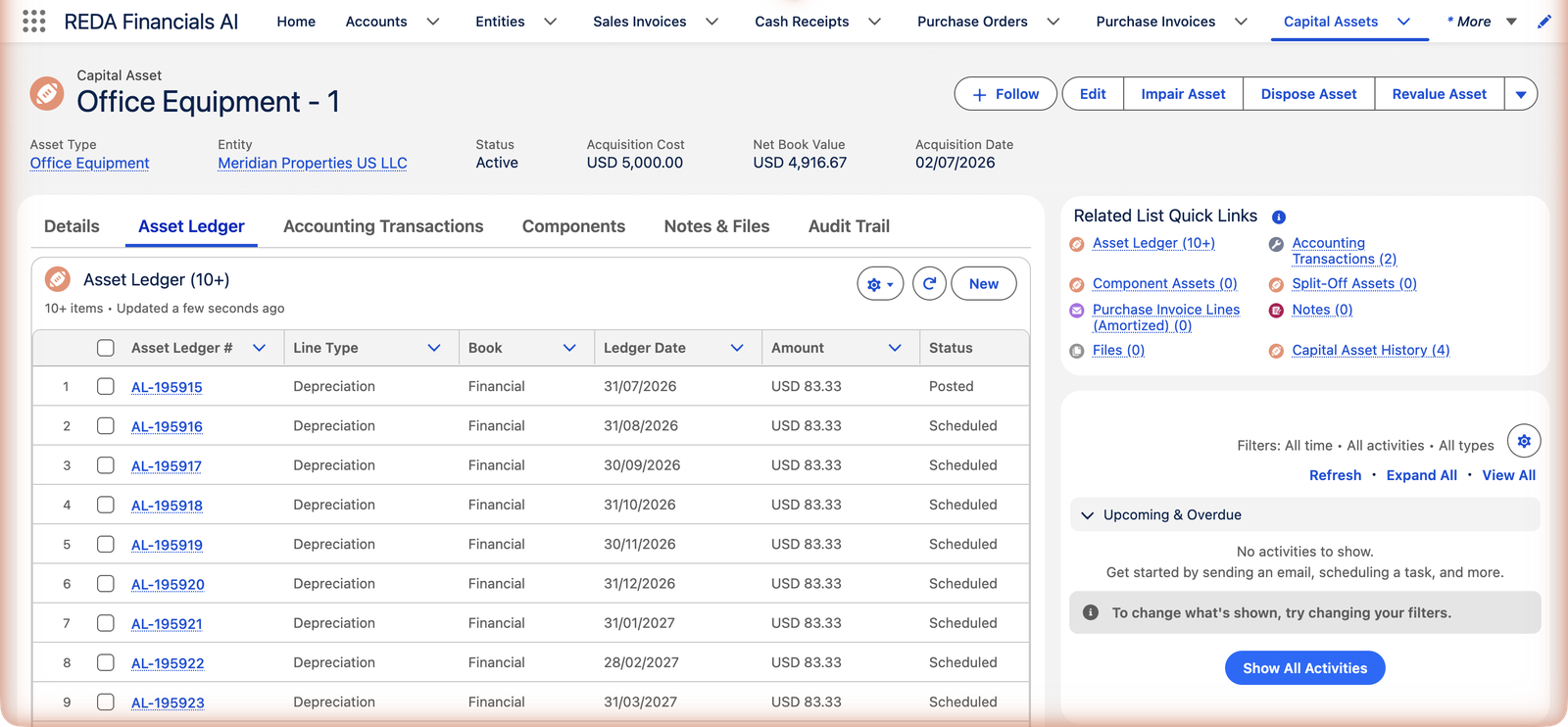
Office Equipment - 1 — $5,000, straight-line, 60 months, in service 1 July 2026 — generated exactly this:
| # | Ledger Date | Amount | Cumulative | Status today |
|---|---|---|---|---|
| 1 | 31/07/2026 | $83.33 | $83.33 | Posted |
| 2 | 31/08/2026 | $83.33 | $166.66 | Scheduled |
| 3 | 30/09/2026 | $83.33 | $249.99 | Scheduled |
| … one month-end line per month … | ||||
| 59 | 31/05/2031 | $83.33 | $4,916.47 | Scheduled |
| 60 | 30/06/2031 | $83.53 (rounding plug) | $5,000.00 | Scheduled |
One line posted so far — which is exactly why the asset's Net Book Value reads $4,916.67 ($5,000 − $83.33). The plugged final line is how sixty rounded charges still close on the base to the penny.
When schedules rebuild
Posted lines are history and never change. The unposted remainder rebuilds automatically when the asset's reality changes — an impairment or revaluation re-spreads the new book value over the remaining life; a disposal flips the leftover lines to Skipped. A deliberate change of method or life works the same way: adjust the asset, regenerate the remainder, posted history intact.
| Event | What happens to the unposted schedule |
|---|---|
| Impairment | Deleted and rebuilt to depreciate the written-down value over the remaining life (original life minus months already posted), resuming the month after the last posted charge. The rebuilt lines use the Full Month convention. |
| Revaluation | Rebuilt the same way over the new carrying amount — up or down. |
| Disposal | Not rebuilt — every remaining Scheduled line flips to Skipped. The clock stops. |
Common mistakes to avoid
| Mistake | Why it hurts | Do this instead |
|---|---|---|
| Hand-editing Scheduled lines to "fix" amounts | The next rebuild (impairment, revaluation, deliberate change) wipes your edits, and the diary stops matching the asset's settings | Fix the cause — method, life, convention, residual on the asset — and let the schedule regenerate |
| Expecting the Accounting Period column to fill at generation | It's blank on purpose — future lines don't pre-claim periods that may not exist yet | Nothing to do: each line resolves its period from its date when it posts |
| Deleting a Posted line as cleanup | Its GL entries vanish and NBV jumps back up — a real accounting reversal, not cosmetics | Only unwind posted lines as a deliberate correction, and re-post the right figure |
| Waiting for a schedule on a Manual / Units of Production / No Depreciation asset | Those methods generate nothing by design | Author the ledger lines yourself (Manual, UoP), or accept the silence (land) |
| Unchecking Auto-Generate Schedule "temporarily" | The asset activates scheduleless and nothing ever posts — NBV frozen at cost | Leave it checked unless a hand-built schedule is genuinely the plan — then build it |
Where to go next
- Running the Depreciation Batch — Scheduled → Posted, nightly.
- Depreciation Rules & Methods — the arithmetic inside each line.
- Multi-Ledger Depreciation — the Book column's bigger story.
Frequently asked questions
Scheduled lines are editable until posted — but prefer fixing the cause (method, life, convention on the asset) and letting the schedule rebuild; hand-edited lines make the diary harder to explain. Posted lines are immutable: move one back to Draft (its GL entries are removed) only as a deliberate correction.
A prorating convention split the first month and parked the remainder in an extra final period — total unchanged. See Depreciation Conventions.
Three benign causes: the asset's Auto-Generate Schedule was unchecked, the Asset Type is non-depreciable (land), or the method is No Depreciation/Manual/Units of Production (schedules for those are yours to author). Check the asset's settings and regenerate by toggling status if needed.
By design. A 60-month schedule reaches years whose periods you haven't generated yet — so lines carry only their date, and each finds (or waits for) its period at posting time. A line whose period doesn't exist simply stays Scheduled and is retried on the next batch run.
Its accounting transactions are removed from the GL, and the asset's Accumulated Depreciation drops by that line's amount through the rollup — NBV rises accordingly. It's a full reversal of that month's charge. Legitimate as a deliberate correction; never casual housekeeping.
No — generation writes the Financial book only, and the batch posts only Financial-book lines. The Tax and IFRS book values exist on the ledger for figures you record yourself; see Multi-Ledger Depreciation.
Was this article helpful?