
Territory Management Tab
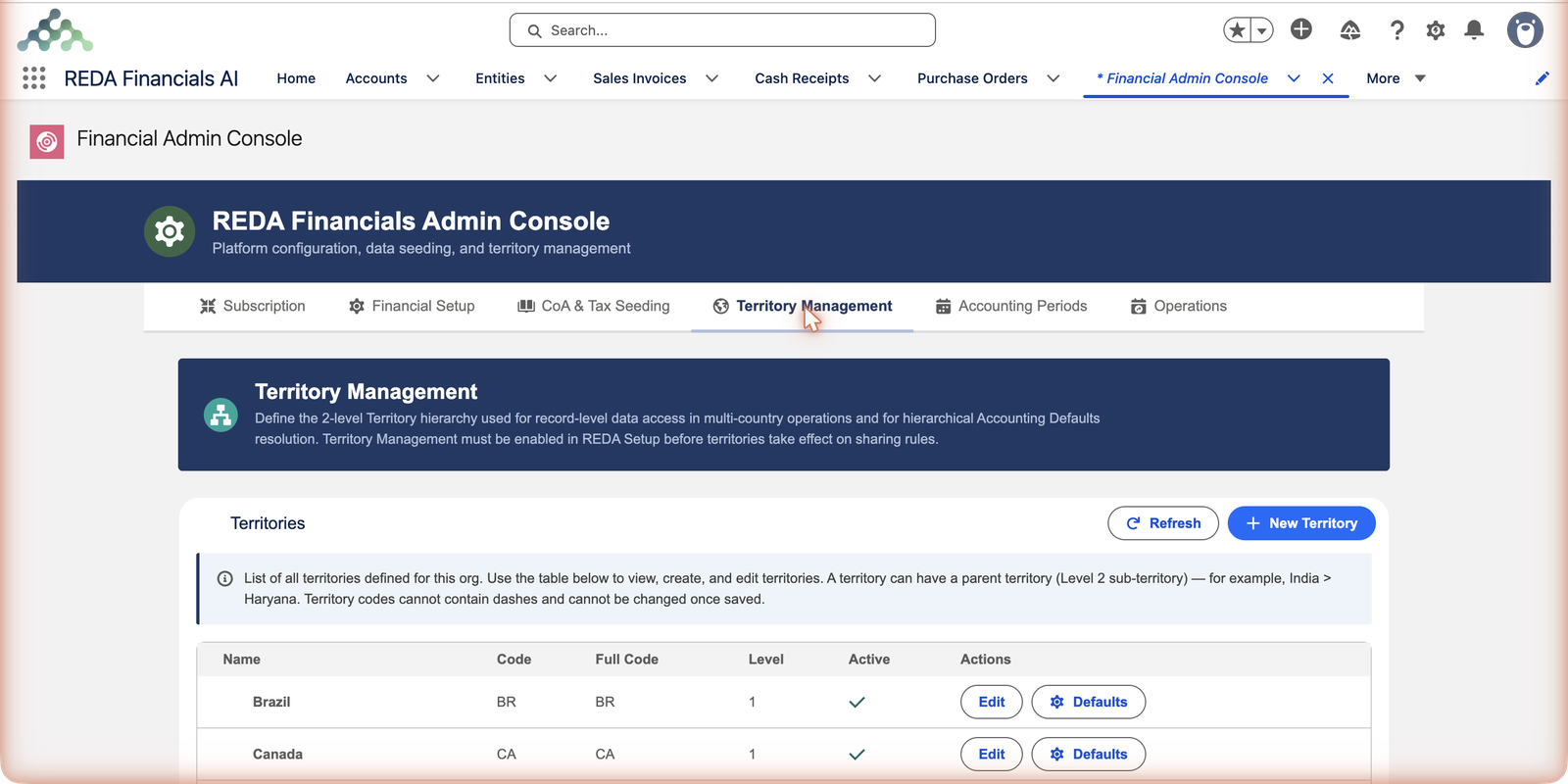
Territories are the geography of your org — the countries and regions your entities live in — and they quietly power two big things: who can see which records in multi-country operations, and which defaults new entities inherit. The tab’s banner says it exactly: "Define the 2-level Territory hierarchy used for record-level data access in multi-country operations and for hierarchical Accounting Defaults resolution."
Access you'll need. Managing territories requires the Accounting Admin v2 permission set; the Accounting Controller v2 can reach the console too. The Accounts Payable v2 and Accounts Receivable v2 sets cannot see it — this is administrator-only.
The model in one minute
- Two levels, no more: a top-level territory (a country — India) may have sub-territories (India > Haryana). That’s the whole tree.
- Codes are forever: short, dash-free, and immutable once saved — they knit into record identifiers across the system. Name changes are fine; code changes are not possible.
- Top-level territories own the calendar: accounting periods are generated per Level-1 territory, and sub-territory entities inherit them (see Accounting Periods Tab).
- Territories can carry their own defaults: each row’s Defaults button opens that territory’s accounting defaults — the middle layer of the global → territory → entity chain (see Understanding Accounting Defaults).
Reading the territory table
The tab is a single table plus two buttons — New Territory to add a row, Refresh to reload the list. Each row shows:
| Column / control | What it means |
|---|---|
| Name | The human label — Brazil, United Kingdom. Freely renameable later. |
| Code | The short system identifier — BR, GB. No dashes, and permanent once saved. |
| Full Code | The territory's complete identifying code as the system uses it across records. |
| Level | 1 for a top-level territory (a country), 2 for a sub-territory under a parent. |
| Active | Whether the territory is in use. Deactivating retires it without deleting history. |
| Edit | Change the name, parent or active flag — everything except the code. |
| Defaults | Opens this territory's own accounting defaults — the middle layer of the global → territory → entity chain. |
The note above the table carries the two rules people trip on, verbatim: "A territory can have a parent territory (Level 2 sub-territory) — for example, India > Haryana. Territory codes cannot contain dashes and cannot be changed once saved."
What territories drive
| Territories power… | How | Where it's managed |
|---|---|---|
| Data access | With territory-based sharing switched on, users see the financial records of their own territories; group roles see across all of them. | The sharing switch lives in REDA Setup; the tree lives here. |
| Accounting defaults | A territory's defaults beat the global template — new entities in that territory copy them at creation. | Each row's Defaults button; the global fallback on the Financial Setup tab. |
| Fiscal calendars | Accounting periods are generated per Level-1 territory; sub-territory entities inherit the parent's calendar. | The Accounting Periods tab. |
Creating a territory
New Territory
Name it for humans (United Kingdom), code it for the system (GB — short, no dashes, permanent), pick a parent only if it’s a genuine sub-region of an existing Level-1 territory, and keep it active.
Wire its defaults (optional but wise)
Click Defaults on the new row and set territory-specific accounts where the country differs from your global template — new entities in this territory will copy these instead.
Generate its periods
A new top-level territory needs a fiscal calendar before its entities can post — one visit to Accounting Periods.
A worked example — Meridian's tree
Meridian Properties Group operates in four countries, and within India its access rules differ by state. Its territory table:
| Territory | Level | Own defaults? | What that means downstream |
|---|---|---|---|
| United States | 1 | No | New US entities copy the global template; US periods are generated for this territory. |
| United Kingdom (GB) | 1 | Yes — set via Defaults | New UK entities copy the UK accounts, not the global ones; the UK's April-start calendar is generated here. |
| India | 1 | Yes | India's accountants see India's books under territory sharing; India's calendar hangs off this row. |
| India > Haryana | 2 | — | A sub-territory for state-level access; its entities inherit India's periods — no calendar of its own. |
| Brazil (BR) | 1 | No | Falls back to the global defaults — which is why that record must always be complete. |
Notice what is not in the tree: cities, offices, departments. Two levels force the discipline of keeping territories about geography-driven access and defaults, nothing else.
Common mistakes to avoid
| Mistake | Why it hurts | Do this instead |
|---|---|---|
| Saving a territory with a placeholder code | Codes cannot be changed once saved — the placeholder is now permanent | Decide the real code before clicking Save; only the name is a display lever |
| Modelling departments or offices as sub-territories | Territories drive geographic access and defaults; org-chart concerns don't fit a two-level country tree | Keep the tree to countries and genuine sub-regions |
| Creating a territory and stopping there | Its entities can't post — no fiscal calendar exists yet | Finish the trio: territory → Defaults (if the country differs) → generate periods |
| Setting territory defaults after entities were created | Entities copy defaults at creation; late defaults only help future entities | Wire the territory's Defaults before creating its first entity |
| Deleting a mistyped territory that's already in use | Entities, periods and records hang from it | Deactivate instead — or, if truly unused, retire it and create a fresh one with the right code |
Where to go next
- Understanding Territories — the concept in depth.
- Understanding Accounting Defaults — the defaults chain.
- Accounting Periods Tab — the calendar step.
Frequently asked questions
Codes can’t change once saved. If nothing depends on the territory yet (no entities, periods, records), deactivate it and create a fresh one with the right code. If it’s in use — the name is your display lever; the code stays.
Only when access or defaults genuinely differ within a country — state-level teams, state-level rules. Most groups run happily on one level: countries.
No — the hierarchy is exactly two levels: a top-level territory and its sub-territories. India > Haryana works; a third level under Haryana does not exist in the model.
Periods belong to Level-1 territories only; entities in sub-territories inherit the parent's calendar. Generate for the parent on the Accounting Periods tab and the sub-territory is covered.
Only if territory-based sharing is switched on in REDA Setup. With it off, territories still drive defaults and calendars; with it on, users see the records of their own territories while group roles see across.
It opens that territory's own accounting defaults — the same kinds of accounts as the global template, but scoped to the territory. New entities there copy these instead of the global ones. See Understanding Accounting Defaults.
Was this article helpful?