
Accounting Periods Tab
Nothing posts without a period to post into. This tab generates each territory’s fiscal calendar — and its banner explains why it matters: "Periods drive period-end reporting, posting controls, and book closure."
Access you'll need. Generating periods requires the Accounting Admin v2 permission set; the Accounting Controller v2 can reach the console too. The Accounts Payable v2 and Accounts Receivable v2 sets cannot see it — this is administrator-only.
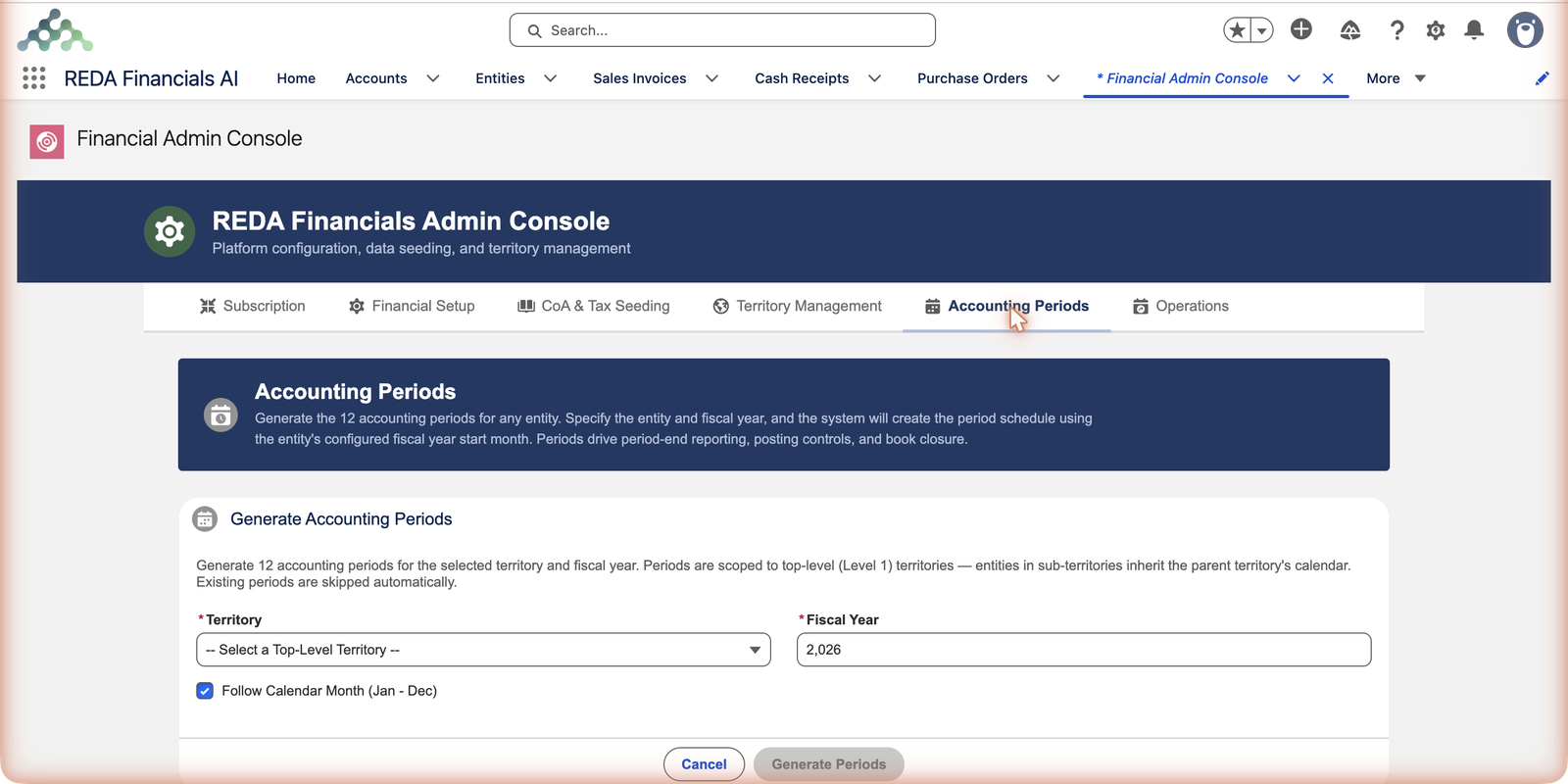
Generating a year, step by step
The generator asks three questions and does the rest. Its own on-screen note is the contract: "Generate 12 accounting periods for the selected territory and fiscal year. Periods are scoped to top-level (Level 1) territories — entities in sub-territories inherit the parent territory's calendar. Existing periods are skipped automatically."
Pick the territory
The Territory picker lists only top-level territories (it opens on -- Select a Top-Level Territory --). Sub-territories don't appear because they inherit the parent's calendar — there is nothing to generate for them.
Enter the fiscal year
Fiscal Year is the four-digit year the twelve periods belong to — 2026 generates that territory's 2026 calendar.
Choose the calendar shape
Leave Follow Calendar Month (Jan - Dec) ticked for a January-to-December year. Untick it and the custom fiscal-year inputs appear: First Month of Fiscal Year (1–12) and First Day of Month (1–28, capped at 28 to avoid month-end issues). That’s how you build the April-start pattern common to UK and India books (see Fiscal Year Start Month).
Generate
Click Generate Periods. Twelve periods appear, each with hard start and end dates. If some already existed, they're skipped — never duplicated, never overwritten.
The generator's inputs at a glance
| Input | Required? | What it controls |
|---|---|---|
| Territory | Yes | Which top-level territory's calendar you're building — every entity under it (including sub-territories) posts into these periods. |
| Fiscal Year | Yes | The year the twelve periods represent. |
| Follow Calendar Month (Jan - Dec) | Checkbox | Ticked: months run January to December. Unticked: two further inputs appear — First Month of Fiscal Year (1–12) and First Day of Month (1–28) — and the twelve periods follow that custom shape. |
How periods are organized
- Twelve per territory per year — named by year and month (2026-01 … 2026-12), each with hard start and end dates.
- Territory-scoped — one calendar per top-level territory, shared by all its entities (Meridian’s US entity posts into the United States territory’s periods, alongside any other US entities). Sub-territories inherit the parent’s calendar.
- Calendar or custom fiscal — tick Follow Calendar Month for Jan–Dec; untick it and enter the First Month of Fiscal Year to start the year in another month (April-start years for UK/India-style calendars).
- Idempotent — existing periods are skipped, so generating a year twice is harmless, and topping up a missing year is one click.
What periods do all day
- Documents attach to them automatically — every invoice, payment and entry resolves its period from its date; users never pick one by hand (and dates must fall inside the chosen period — the validation you’ll meet if they don’t).
- Closure is date-based, per entity — an entity’s books close through a date per module (AP, AR, GL), controlled on the entity, not by flipping period records. The period grid is the calendar; closure is the lock. See Closing the Books.
- Reporting reads them — trial balances, statements and snapshots all slice by these periods.
A worked example — Meridian opens 2026
Meridian Properties Group has four top-level territories — United States, United Kingdom, India and Brazil — so opening the year means four runs of the generator, each a few seconds:
| Run | Territory | Fiscal Year | Follow Calendar Month? | Result |
|---|---|---|---|---|
| 1 | United States | 2026 | Ticked | Twelve periods, 2026-01 through 2026-12 |
| 2 | Brazil | 2026 | Ticked | The same January–December shape for the Brazilian books |
| 3 | United Kingdom | 2026 | Unticked | Twelve periods starting from the First Month of Fiscal Year entered (April) — the April-start year UK books follow |
| 4 | India | 2026 | Unticked | Likewise April-start, matching the Indian fiscal year |
From that moment, every Meridian entity has a home for its postings: the US entity's June invoice resolves to the United States territory's 2026-06 automatically, and the Indian entity's documents land in its own April-start calendar. Nobody ever picks a period by hand. If the administrator accidentally runs the United States generation a second time, nothing happens — all twelve periods already exist and are skipped.
Common mistakes to avoid
| Mistake | Why it hurts | Do this instead |
|---|---|---|
| Waiting until January to generate January's periods | Every dated document — recurring invoices first — fails with the period validation until the year exists | Generate the coming year in advance, one click per territory |
| Looking for a sub-territory in the Territory picker | It will never be there — periods are scoped to top-level (Level 1) territories only | Generate for the parent; entities in sub-territories inherit its calendar |
| Guessing the calendar shape for a new country | A UK or India territory generated as January–December misaligns every statement with the local fiscal year | Confirm the fiscal-year convention before the first generation — the shape is a decision, not a default |
| Trying to "close" a period by deleting or editing period records | Closure doesn't work that way — it's date-based, per entity, per module | Use book closure dates on the entity; see Closing the Books |
| Fearing a re-run will duplicate periods | Hesitation leaves gaps unfixed | Re-run freely — existing periods are skipped automatically; that's the tool's own promise |
Where to go next
- Accounting Periods — the concept for everyone.
- Closing the Books — the closure model.
- Fiscal Year Start Month — entities and non-calendar years.
Frequently asked questions
Either the document’s date is wrong or the target year’s periods don’t exist yet for that territory. Check the grid here; if the year is missing, generate it — the stuck document posts immediately after.
Yes — each territory generates its own calendar. A US calendar year and an India April-start year coexist happily; consolidation reporting handles the alignment.
By design: periods are scoped to top-level (Level 1) territories, and entities in sub-territories inherit the parent's calendar. One calendar per country keeps every entity in that country reporting on the same slices.
Completely — existing periods are skipped automatically, as the generator's note says. Re-running is also how you top up a partially created year: only the missing periods get created.
Almost never. Every invoice, payment and journal entry resolves its period from its document date automatically. The only rule users meet is the validation that the date must fall inside the resolved period's range.
It creates the calendar — that's all. Whether an entity can still post into a month is governed by the entity's book-closure dates per module (AR, AP, GL), managed on the entity record, not here.
Was this article helpful?