
FX Sync (Exchange Rates)
The admin runbook for daily exchange rates. Multi-currency books are only as honest as their rates; this card keeps them current without anyone typing a number.
Access you'll need. Scheduling and running this batch requires the Accounting Admin v2 permission set; the Accounting Controller v2 can reach the console too. The Accounts Payable v2 and Accounts Receivable v2 sets cannot see it — everyone else meets only the rates it syncs.
How a sync works
| Aspect | How it behaves |
|---|---|
| Source | The Open Exchange Rates service — the day's rates, fetched for you. |
| Destination | Your org's dated currency tables — the same dated rates every foreign-currency document, revaluation and report reads. |
| Dated, not overwritten | Each sync adds the day's rate with its effective date. Historical documents keep converting at their historical rates — the backbone of consistent multi-currency books. |
| Prerequisite | Multi-currency must be enabled in the org. Without it, the card shows an informational banner instead of controls — it never pretends to work. |
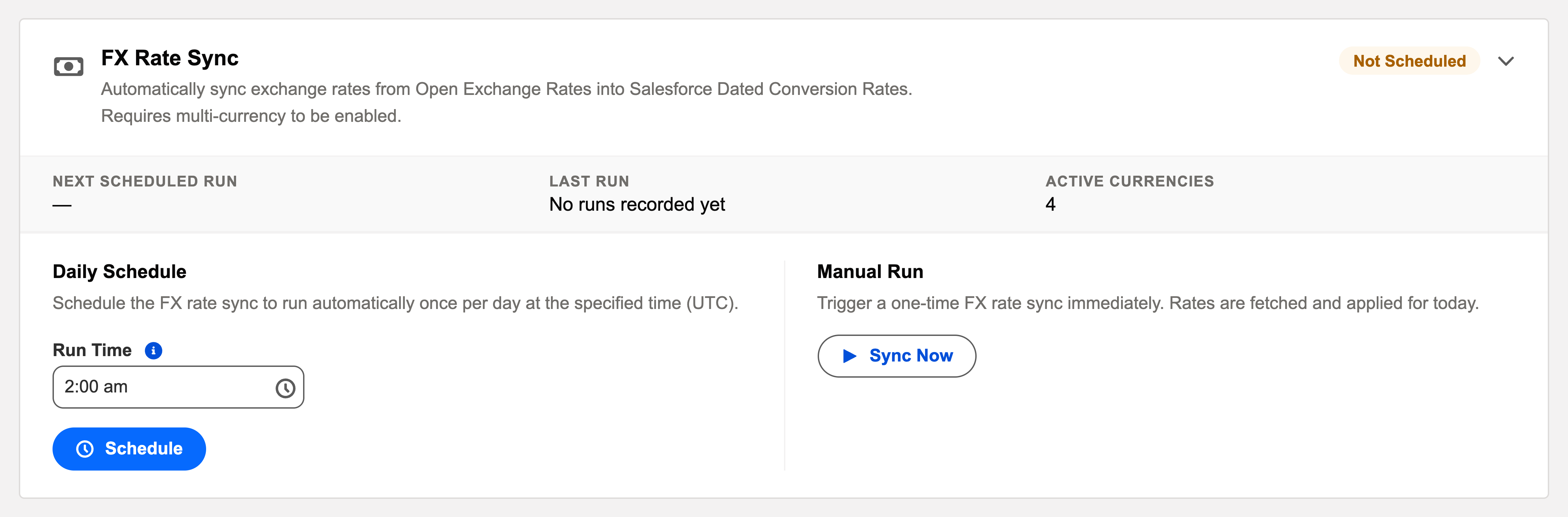
| Manual trigger | Sync Now fetches immediately — for a missed night or a refresh before a big posting. |
Scheduling it
Daily, first in the overnight sequence — everything else that posts foreign-currency amounts deserves today’s rate. Sync Now for a missed night or a pre-posting refresh.
A worked night — why Meridian runs it first
Meridian Properties Group keeps books in four currencies — US dollars, pounds, rupees and reais — so rates touch almost everything its overnight automation does. The sync runs in the earliest slot and adds the day's dated rates to the currency tables. Only then do the other batches follow: the recurring batch generates the day's foreign-currency invoices at today's rate; the auto-apply batches match payments whose converted values now agree with the documents they settle. When Meridian's India entity later reports on a March invoice, that invoice still converts at March's rate — the sync never rewrote history, it only appended. One skipped night once left a one-day gap in the table; the next morning's Sync Now added the missing day, and the gap closed without touching any other date.
Common mistakes to avoid
| Mistake | Why it hurts | Do this instead |
|---|---|---|
| Scheduling FX sync after the document-generating batches | The night's foreign-currency documents post on yesterday's rate | Earliest slot in the sequence — rates before anything that uses them |
| Scheduling it in a single-currency org | There's nothing to sync — the card tells you so with its banner | Leave it alone until multi-currency is enabled |
| Treating a missed night as data corruption | Panic edits to rate tables cause the very inconsistency you feared | It's just a gap: Sync Now resumes, dated entries keep history intact |
| Expecting a sync to change old documents | Historical documents deliberately keep their historical rates | That's the design — rate-difference questions belong to revaluation and FX gain/loss, not to the sync |
| Diagnosing "old rates" without checking the log | You can't fix what you haven't dated | Find the last successful sync in the audit log first; then Sync Now and re-check the document |
Monitoring it
Green means: the card shows Scheduled, the last-run timestamp is from the expected window, and the outcome icon is informational. Anything else, click View Audit Log — the run’s record lists processed / succeeded / failed with a reason per failure. Rates land as dated entries — history is preserved, so a missed night is a gap, not corruption; the next sync resumes. Single-currency orgs see an informational banner instead of controls: nothing to do here until multi-currency is enabled.
Troubleshooting
| Symptom | Likely cause → action |
|---|---|
| Documents converting at old rates | Check the last successful sync in the log; Sync Now, then re-check the document — rates apply by date. |
| Card shows the multi-currency banner | The org isn’t multi-currency; see Enabling Multi-Currency before expecting rates. |
Where to go next
- FX Sync Batch — what the batch does, in depth.
- Operations Tab — the console.
- Audit Logging — reading run history.
Frequently asked questions
From the Open Exchange Rates service into your org's dated currency tables — the same tables every foreign-currency document, revaluation and report reads. One source, one destination, once a day.
No. Rates are dated, and each sync only adds the day's entry. Historical documents keep converting at the rates of their day — that consistency is the whole point of dated rates.
No — a missed night is a gap, not corruption. The next sync (or Sync Now) resumes adding dated entries; existing dates are untouched.
Your org doesn't have multi-currency enabled — the batch requires it, as its description says. See Enabling Multi-Currency; the controls appear once the prerequisite is met.
Two cases: a missed night you want closed immediately, and a refresh right before posting a large batch of foreign-currency documents that deserves today's rate.
Was this article helpful?