
Aging Snapshot Batch
The admin runbook for automatic period-end aging: as entities’ books close, their AR and AP snapshots build themselves.
Access you'll need. Scheduling and running this batch requires the Accounting Admin v2 permission set; the Accounting Controller v2 can reach the console too. The Accounts Payable v2 and Accounts Receivable v2 sets cannot see it — everyone else meets only the snapshots it produces.
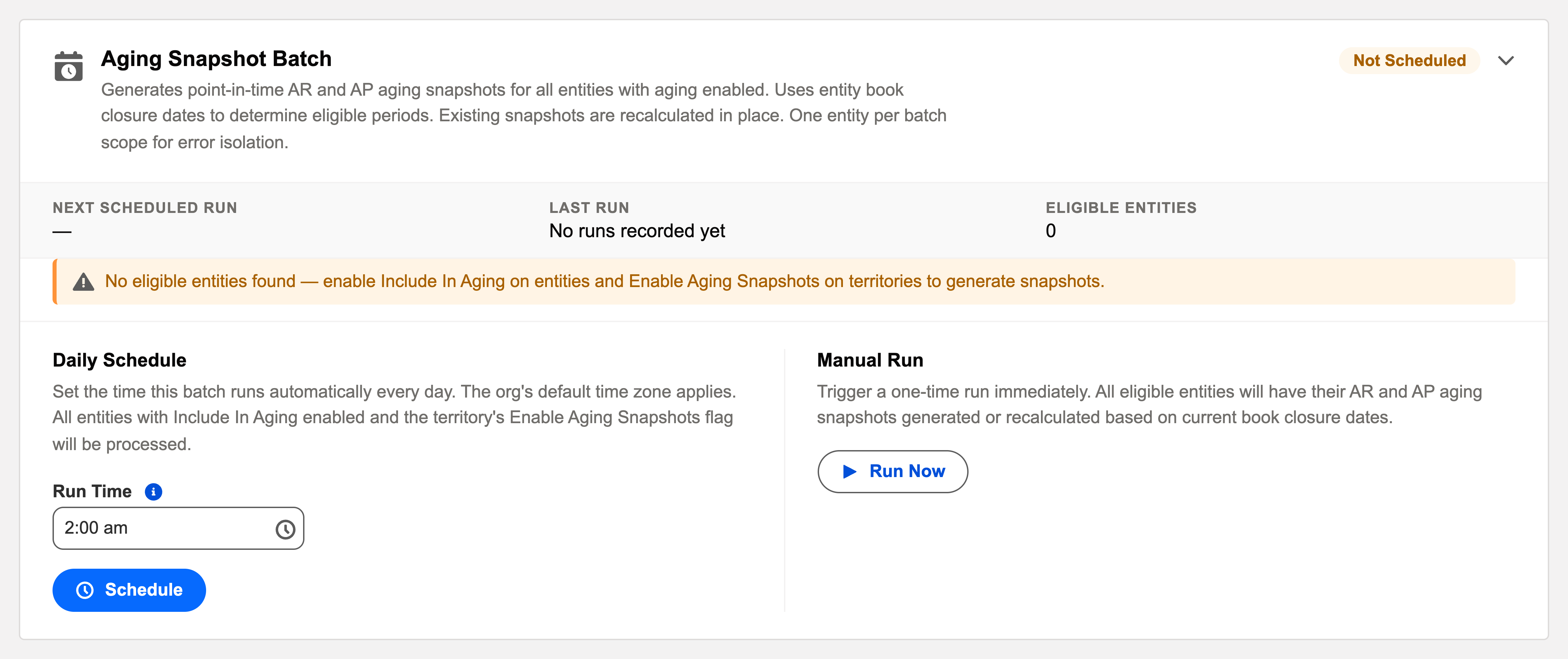
The four rules in the card, decoded
| Rule | What it means in practice |
|---|---|
| "All entities with aging enabled" | Only entities marked Include In Aging are in scope. Everything else is skipped by design — not failing, just excluded. |
| "Uses entity book closure dates" | The batch builds snapshots for whatever each entity's books are closed through. It follows your close and never outruns it — the same books-closed rule manual snapshots obey. |
| "Recalculated in place" | One snapshot per entity + type (AR/AP) + period. A rerun rebuilds that snapshot's lines rather than multiplying records — corrections flow into the existing snapshot. |
| "One entity per batch scope" | Error isolation: a data problem in one company's payables can't block another company's snapshot. |
Scheduling it
Daily is simplest — the batch only acts where a close has created work, so most nights it’s a no-op. Run Now right after closing a period delivers the snapshot to the CFO the same hour.
A worked close — Meridian's June snapshots
Meridian Properties Group closes its US entity's June books in the first week of July. That night the batch, on its ordinary daily schedule, notices the closure date now covers June: it generates the US entity's AR and AP aging snapshots for the period — point-in-time pictures of who owed what, bucketed by age. The UK entity's close lands two days later; its snapshots appear the following night, automatically, with nobody remembering to run anything. When a late correction reopens and re-closes a US month, the next run recalculates the existing snapshot in place — same record, refreshed lines. Over the months, the snapshots stack into the trend data (DSO and DPO over time) the finance team reads without ever having asked for a report to be built.
Common mistakes to avoid
| Mistake | Why it hurts | Do this instead |
|---|---|---|
| Diagnosing a missing snapshot as a batch failure | Usually nothing failed — the entity isn't aging-enabled, or its books simply haven't closed through the period | Check Include In Aging and the closure dates on the entity record first |
| Expecting snapshots ahead of the close | The batch deliberately never outruns book closure — an open month has no point-in-time truth yet | Close first; the snapshot follows the same night (or Run Now) |
| Fearing reruns will pile up duplicate snapshots | Hesitation leaves corrected data unreflected | Rerun freely — one snapshot per entity + type + period, recalculated in place |
| Leaving a new entity out of aging by accident | Months later there's no trend history to backfill conversations with | Decide Include In Aging as part of entity setup, not as an afterthought |
| Scheduling it early in the overnight order | It snapshots data the later batches are still changing | Last slot, with depreciation — reporting after posting |
Monitoring it
Green means: the card shows Scheduled, the last-run timestamp is from the expected window, and the outcome icon is informational. Anything else, click View Audit Log — the run’s record lists processed / succeeded / failed with a reason per failure. An entity never producing snapshots usually isn’t failing — it’s excluded (Include In Aging unticked) or its books haven’t been closed. Both are visible on the entity record.
Troubleshooting
| Symptom | Likely cause → action |
|---|---|
| No snapshot for a closed month | Entity not aging-enabled, or the close date doesn’t cover the period end. Fix on the entity, Run Now. |
| Numbers look stale after corrections | Recalculate — the batch (or the snapshot’s own Calculate action) rebuilds lines in place. |
Where to go next
- Aging Snapshot Batch — what the batch does, in depth.
- Operations Tab — the console.
- Audit Logging — reading run history.
Frequently asked questions
Only those marked Include In Aging. An entity that never produces snapshots usually isn't failing — it's excluded, or its books haven't been closed through the period. Both are visible on the entity record.
No — there's one snapshot per entity, type and period, and a rerun recalculates its lines in place. That's also how corrections after a reopen flow into the numbers.
Yes — the snapshot's own Calculate action rebuilds its lines, same result as the batch touching that entity. Use whichever is closer to hand.
Because an open month is still moving — a snapshot taken before the close would disagree with the books days later. Closure dates are the signal that a period's truth is settled and worth photographing.
In the aging reports and snapshot records — see AP Aging Reports & Snapshots and its AR mirror. The batch is just the automation that keeps them appearing as periods close.
Was this article helpful?