
JE Reversal Batch
The admin runbook for automatic accrual reversals. Accountants set a Reversing Date on their entries; this batch honors it every morning.
Access you'll need. Scheduling and running this batch requires the Accounting Admin v2 permission set; the Accounting Controller v2 can reach the console too. The Accounts Payable v2 and Accounts Receivable v2 sets cannot see it — everyone else meets only the reversals it posts.
How the contract works
The accountant sets a Reversing Date
One field on the journal entry at creation — say, an accrual booked on 30 June carrying Reversing Date: 1 July. That single field is the entire setup on the user side.
The batch honors it on the day
On or after that date, the batch generates the mirror-image entry — debits and credits swapped — posts it into the reversal date's period, marks it system-generated, and links it to the original.
Never twice
Idempotency is checked against the original entry: once a reversal exists, the original is done. Rerun the batch all you like — manually reversed entries are skipped too, so manual and automatic never collide.
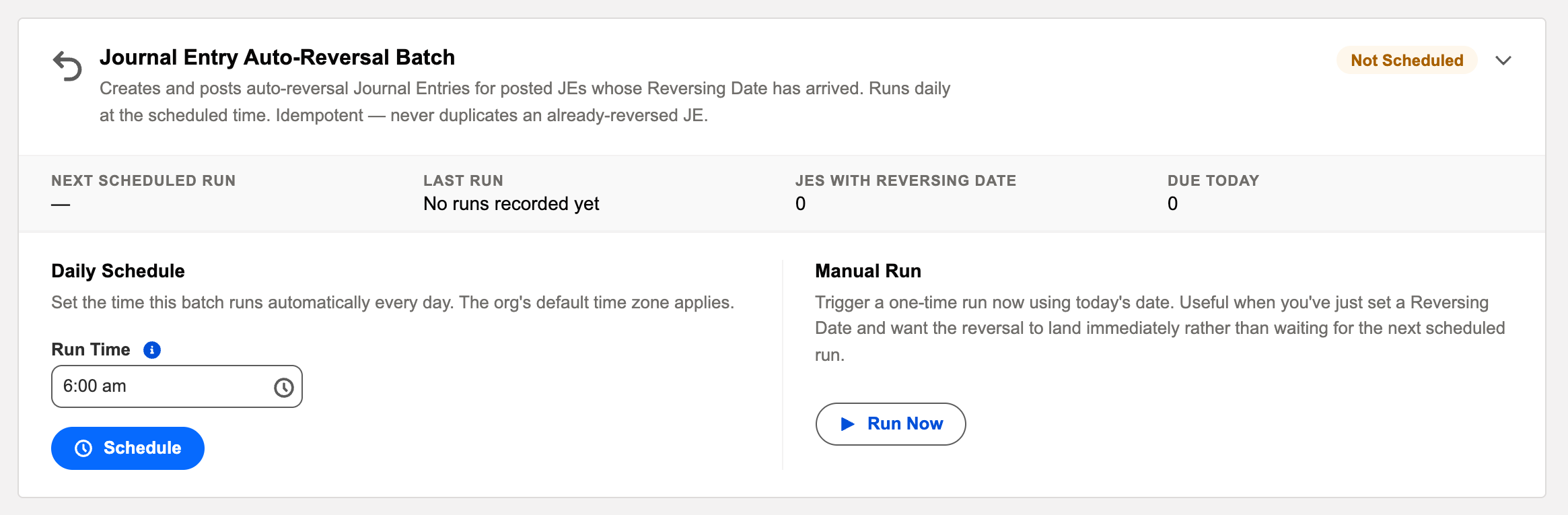
The card's controls
| Control / display | What it does or tells you |
|---|---|
| Status chip | Scheduled or Not Scheduled. |
| Next Scheduled Run / Last Run | The next pass, and the last one with its Info / Warning / Critical outcome. |
| View Audit Log | The run's processed / succeeded / failed detail, a reason per failure. |
| Schedule / Reschedule · Unschedule | Set or move the daily run time; pause the automation. |
| Run Now | An immediate pass — harmless at any time, because the batch is idempotent. |
Scheduling it
Daily, at dawn — reversals overwhelmingly target the 1st of the month, and accountants expect them booked before they sit down. Being idempotent, an extra Run Now never hurts.
A worked month-end — Meridian's utilities accrual
Meridian's controller books an estimated utilities cost on 30 June, dated the last day of the month, with a Reversing Date of 1 July. At dawn on 1 July the batch finds the posted entry, generates and posts its mirror image into July's period — every debit now a credit, system-generated, linked back to the original — and July starts clean, ready for the real bill. Nobody touched anything. If the controller had reversed it manually on 30 June instead, the batch would have seen the existing reversal and left the entry alone. And if July's close team had somehow closed the period first, the batch would have failed loudly with exactly that reason in its audit entry — never posting somewhere wrong.
Monitoring it
Green means: the card shows Scheduled, the last-run timestamp is from the expected window, and the outcome icon is informational. Anything else, click View Audit Log — the run’s record lists processed / succeeded / failed with a reason per failure. The one failure that matters: a reversal aimed into a period that has since closed — it fails loudly with that reason rather than posting somewhere wrong.
Troubleshooting
| Symptom | Likely cause → action |
|---|---|
| Closed-period failures on the 1st | The close ran ahead of the batch. Reopen briefly or align the close checklist to run the batch first. |
| “My accrual didn’t reverse” | Check the entry: is it Posted, with a Reversing Date in the past, and no reversal already linked? All three true and still nothing → check the batch is scheduled. |
Common mistakes to avoid
| Mistake | Why it hurts | Do this instead |
|---|---|---|
| Closing the new period before the batch's first pass | Every reversal aimed at the 1st fails with a closed-period reason | Put "JE Reversal batch has run" on the close checklist before the period lock |
| Scheduling the batch late in the day | Accountants work a whole morning on a month that still carries yesterday's accruals | Dawn — before anyone sits down |
| Reversing manually and expecting the batch to skip it — without checking | Doubt breeds double-checking rituals | Trust the design once verified: an existing reversal marks the original done; the batch never duplicates |
| Hunting the reversal as a separate mystery record | Wasted search time | Open the original entry — its reversal is linked right there in the related records |
| Treating a Critical outcome as "try again tomorrow" | The same closed period will fail the same way tomorrow, now two days behind | Fix the cause (reopen or correct the date), then Run Now today |
Where to go next
- JE Reversal Batch — what the batch does, in depth.
- Operations Tab — the console.
- Audit Logging — reading run history.
Frequently asked questions
Yes — the Reverse action on the journal entry creates the reversal on demand. The batch then sees it exists and leaves the entry alone; manual and automatic never collide.
A posted journal entry of type Reversing, system-generated, dated the reversing date, every line the mirror of the original — and linked back to it, so the pair reads as one story.
Completely. The card's own description promises it: idempotent — never duplicates an already-reversed JE. Extra passes find nothing left to do.
Check the entry first: is it Posted, with a Reversing Date in the past, and no reversal already linked? All three true and still nothing — check the card is Scheduled, then read the last run's audit entry for a failure reason.
The reversal date's period — that's the point of the contract. If that period is closed when the batch arrives, the run fails with that reason rather than posting anywhere else.
Was this article helpful?