
Auto-Allocation Batch
Shared costs deserve automatic sharing. When a posted vendor bill is flagged for automatic allocation, the nightly Expense Auto-Allocation Batch distributes it across entities using the bill's assigned Expense Allocation List — percentages applied, allocation batch created, intercompany journals posted — with no one touching a calculator.
Access you'll need. The Admin Console is an administrator's screen: the Accounting Admin v2 permission set reaches it in full, and Accounting Controller v2 can open it too. The Accounts Payable v2 and Accounts Receivable v2 sets can't see it — scheduling this batch is a Core/Admin task.
The pieces, assembled
An allocation list defines the split
"Group insurance: US 60%, UK 25%, India 15%" — maintained once as a list (Allocation Lists & Rules).
The invoice opts in
A posted Purchase Invoice flagged Auto Allocate Expenses, with its allocation list assigned, joins the queue. (Manual allocation via the invoice's Allocate Expenses action remains available for one-offs — see Expense Allocation Batches.)
The 07:00 batch does the bookkeeping
Per the card's own words: it "uses the assigned Expense Allocation List to create allocation batches and post intercompany journal entries. One PI per batch scope for error isolation." Each entity receives its share of the cost; the intercompany balances record who owes whom — the same IC discipline as intercompany journals, generated for you.
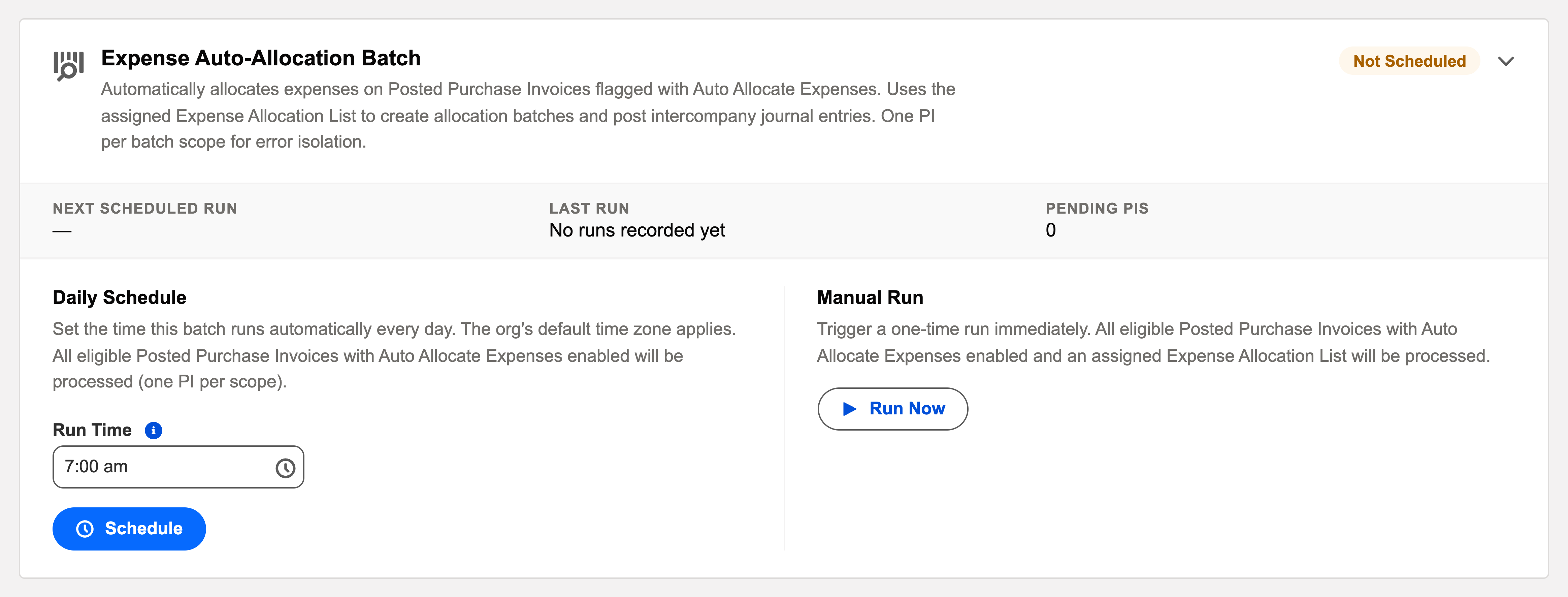
The Operations card
"Expense Auto-Allocation Batch" on the Operations tab: schedule (default 07:00), last outcome, a pending counter ("2 Purchase Invoices are pending auto-allocation and will be processed on the next run."), and Run Now. One invoice per transaction means one bad allocation never blocks the rest — failures log individually with reasons.
The card, field by field
Like every automation, this one is driven from a card on the Admin Console's Operations tab. What you'll find on it:
| Element | What it tells you / does |
|---|---|
| Title & description | "Expense Auto-Allocation Batch" — "Automatically allocates expenses on Posted Purchase Invoices flagged with Auto Allocate Expenses. Uses the assigned Expense Allocation List to create allocation batches and post intercompany journal entries. One PI per batch scope for error isolation." |
| Status badge | Scheduled / Not Scheduled — whether the daily run is armed |
| Next Scheduled Run / Last Run | When it fires next and when it last fired; a fresh org shows "No runs recorded yet" |
| Last Run Outcome | Success, Partial Failure (some invoices allocated, some logged as failed), or Failed |
| Pending counter | "{n} Purchase Invoices are pending auto-allocation and will be processed on the next run." — your queue depth at a glance |
| Daily Schedule | A Run Time in 24-hour format (default 07:00; the org's default time zone applies) with Schedule / Reschedule / Unschedule buttons. The scheduled job appears as "REDA Expense Auto-Allocation Daily" |
| Manual Run | Run Now triggers a one-time pass immediately — useful after flagging a bill you don't want to wait overnight for |
| View Audit Log | Every run writes a summary; failures are itemised with reasons |
A worked split at Meridian
Meridian Properties Group insures the whole group on one policy, billed to the US entity. The allocation list says US 60%, UK 25%, India 15%. June's premium arrives as a $12,000 vendor bill, is posted, and carries the Auto Allocate Expenses flag with the list assigned. At 07:00 the batch picks it up:
| Entity | Share | Expense it carries after the run |
|---|---|---|
| Meridian US (paid the bill) | 60% | $7,200.00 — its own share; the other $4,800 moves out via intercompany journals |
| Meridian UK | 25% | $3,000.00 — booked to its books, owing the US entity |
| Meridian India | 15% | $1,800.00 — likewise, with the intercompany balance recording who owes whom |
By 07:01 the allocation batch record exists, the intercompany journals are posted, and the invoice's allocation is done — the same result the controller used to build by hand each month, now traceable from bill to list to journals.
Common mistakes to avoid
| Mistake | Why it hurts | Do this instead |
|---|---|---|
| Flagging the invoice but forgetting to assign the allocation list | The batch has percentages to apply but no policy to read — the invoice fails its run and waits in the audit log | Flag and assign the list together; the pending counter confirms it queued |
| Expecting draft invoices to allocate | The batch only reads Posted invoices — a draft sits outside the queue entirely | Post first; allocation is an after-posting distribution, not a data-entry step |
| Letting stale percentages run | The group changed shape in March; the list still splits like January — every nightly run compounds the error | Review allocation lists when entities join, leave, or resize; the batch is faithful arithmetic, nothing more |
| Ignoring "Partial Failure" outcomes | One invoice failing is isolated by design — but it stays unallocated until someone reads why | Treat any non-Success outcome as a to-do: open View Audit Log, fix the cause, Run Now |
Where to go next
- Understanding Expense Allocation — the concept end-to-end.
- Allocation Lists & Rules — designing the split.
- Operations Scheduler — the card's home.
Frequently asked questions
Auto for the standing shared costs (insurance, software, headquarters charges) — flag once per recurring bill pattern and forget. Manual for the one-off where a human should pick the list and eyeball the split before it posts.
Yes — the allocation batch and its journals are ordinary records; reversing follows the normal journal/allocation paths. Fix the list before re-running, or the same split returns tomorrow.
Error isolation: each invoice is allocated in its own transaction, so one bad setup (a missing list, a closed period) fails alone and is logged alone — the other nine invoices in the queue still allocate that night.
No — it's a one-time pass over whatever is pending right now; the daily schedule stays armed. If a run is already in progress, the card refuses to start a second one rather than doubling up.
View Audit Log on the card. Every run writes a summary — invoices processed, failures with reasons — and the generated allocation batches and journals link back to their source invoices for record-level tracing.
Was this article helpful?