
Understanding Fixed Assets
When Meridian buys janitorial services, the cost is June's expense and the story ends. When Meridian buys office equipment — or renovates a lobby — the money isn't gone; it turned into a thing that will serve the business for years. Accounting's answer is the fixed asset: put the cost on the balance sheet, then release it to expense gradually (depreciation) over the asset's useful life. REDA Financials runs that entire lifecycle — acquisition, activation, monthly depreciation, and eventual disposal — with the ledger keeping perfect score.
Access you'll need. Any REDA Financials permission set can view assets and their ledgers; creating, activating, and changing assets requires the Accounting Admin v2 or Accounting Controller v2 permission set.
Three records, three jobs
| Record | What it is |
|---|---|
| Capital Asset | The star of the show — one acquisition (a unit, or a bulk lot), with its cost, dates, depreciation settings, status, and running Net Book Value. |
| Asset Master | The register grouping: one per entity + product + asset type, rolling up its capital assets' cost, accumulated depreciation, and NBV. Created automatically — you rarely touch it. (Asset Masters) |
| Asset Ledger | The asset's own journal: every capitalization, depreciation charge, impairment, revaluation, and disposal is a dated ledger line that posts to the GL when its time comes. (More below.) |
The life of Meridian's office equipment
Born: Under Construction
Receiving Meridian's lobby-renovation purchase order created four Capital Assets — one per unit — with status Under Construction: cost captured, clock not ticking. (Creating Assets from POs.)
Activated: the clock starts
When the equipment went into use, the accountant set the asset's status to Active. Activation stamps the in-service date, fills any blank depreciation settings from the Asset Type, and generates the depreciation schedule automatically. (Asset Capitalization.)
Depreciating: value flows to expense, monthly
The nightly batch posts each month's charge as it falls due; Net Book Value steps down accordingly. Along the way an asset can be impaired or revalued if reality diverges from the plan.
Gone: Disposed
Sold, scrapped, traded in — disposal writes the asset off the books, computes the gain or loss, and cancels the remaining schedule. Disposed is final.
Statuses at a glance
| Status | Meaning |
|---|---|
| Under Construction | Acquired, not yet in use — no depreciation. The only status where an asset can still be deleted. |
| Active | In service; the schedule runs. |
| Fully Depreciated | Book value exhausted; still owned and on the register. |
| Impaired | Written down below plan; the remaining schedule was rebuilt over the reduced value. Can return to Active. |
| Disposed | Off the books, permanently — disposed records lock. |
Statuses aren't just labels — they're the levers. Setting the status to Active is what activates an asset; setting it to Disposed (through the Dispose Asset action) is what disposes it. Because a status change fires real accounting, the system only allows moves that make bookkeeping sense:
| From | Can move to | Why |
|---|---|---|
| Under Construction | Active · Disposed | Activate it — or dispose of something that never made it into service. |
| Active | Fully Depreciated · Impaired · Disposed — and back to Under Construction only while the asset has no Asset Ledger lines at all | The back-door to Under Construction exists precisely for "activated too soon" corrections, and closes the moment any ledger line exists. |
| Impaired | Active · Disposed | Recovery (see revaluation) or goodbye. |
| Fully Depreciated | Disposed · Active | Still owned, still on the register; it can return to Active if, say, its life is extended. |
| Disposed | — (terminal) | No status leads out of Disposed. |
Try anything else and the refusal is explicit: "Fixed Asset "{name}": transition from {old status} to {new status} is not allowed." Deleting is stricter still — "Cannot delete a fixed asset with status "{status}". Only "Under Construction" assets can be deleted." Once an asset has been activated, its history is a permanent part of the books; the exit is disposal, never deletion.
How Net Book Value is computed
Net Book Value (NBV) — what the asset is still worth on the books — is never a typed-in number. It is always this arithmetic, recomputed live from the asset's fields and its posted ledger lines:
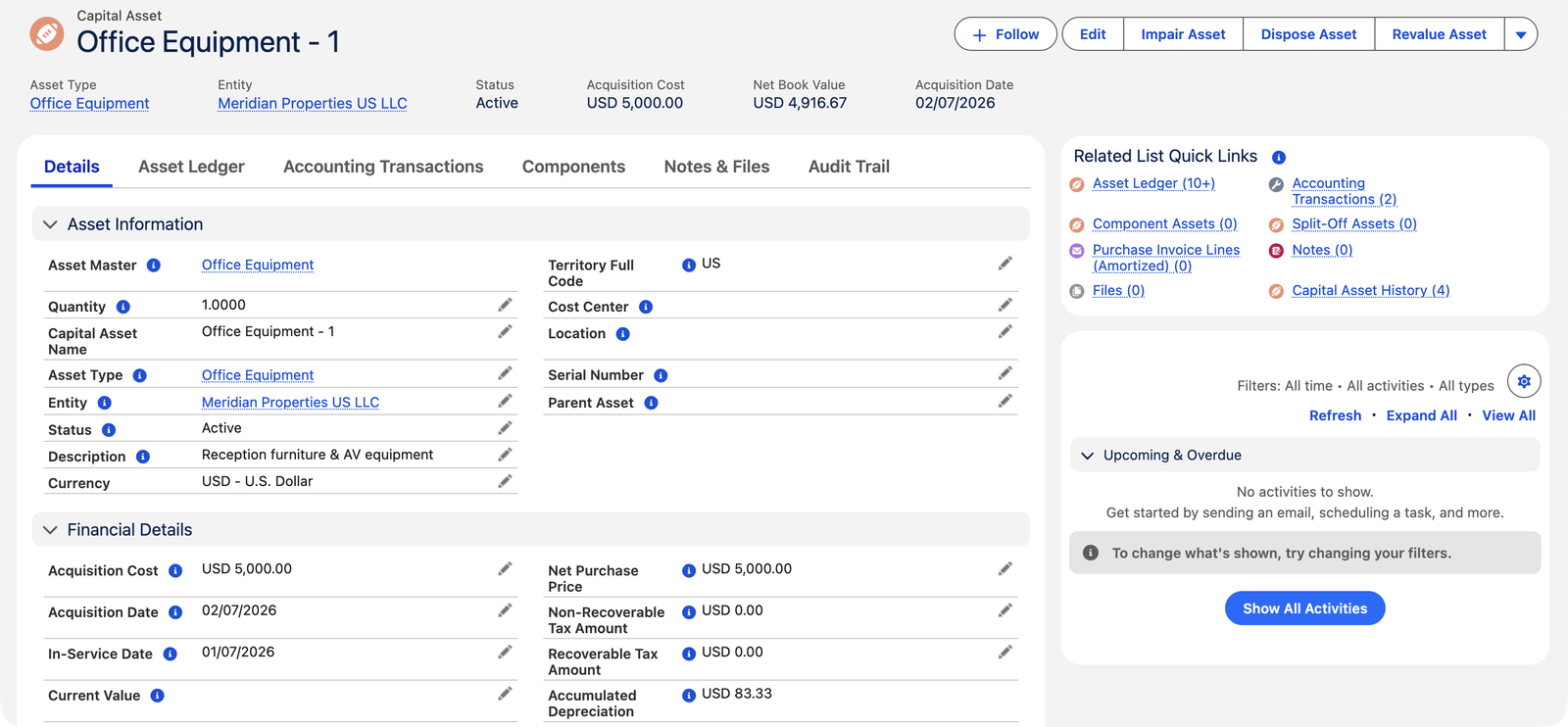
| Component | Meridian's Office Equipment - 1 |
|---|---|
| Acquisition Cost | $5,000.00 |
| + Revaluation Adjustment (from any revaluations) | $0.00 |
| − Accumulated Depreciation (the sum of Posted depreciation lines in the Financial book) | $83.33 (July's charge, posted) |
| − Opening Accumulated Depreciation (migrated assets only) | $0.00 |
| = Net Book Value | $4,916.67 |
The Asset Ledger: the asset's diary
Everything financial that ever happens to an asset is a line on its Asset Ledger tab — typed (Capitalization, Depreciation, Impairment, Revaluation, Disposal…), dated, with the two GL accounts it moves and a status: Scheduled (planned, not yet in the ledger) → Posted (in the GL) — plus Skipped for schedule lines cancelled by a disposal. Accumulated Depreciation and Net Book Value are always the arithmetic of these lines, never a typed-in number. If you ever wonder "why is NBV what it is?" — read the diary.
Each line declares which chapter of the story it belongs to — its Line Type:
| Line Type | Written by |
|---|---|
| Capitalization | Activation's cost reclass — born Posted, dated the in-service date. (Asset Capitalization) |
| Depreciation / Amortization | The generated monthly schedule — Depreciation for tangible assets, Amortization for intangibles. (Depreciation Schedule Generation) |
| Impairment | The Impair Asset action's write-down. |
| Revaluation | The Revalue Asset action's fair-value restatement. |
| Disposal | The Dispose Asset action's write-off pair. |
| Opening Balance / Adjustment | Never written by the system — these types exist for hand-entered records when your controller needs them. |
…and where it stands — its Status:
| Status | Meaning |
|---|---|
| Draft | The default for a hand-entered line — editable, no GL effect yet. |
| Scheduled | A generated future line, waiting for its date. The nightly batch posts it when the date arrives. |
| Posted | In the general ledger — its accounting transactions exist and the line locks: "This Asset Ledger entry is posted and cannot be changed. Move it to Draft to edit it (its GL entries are removed), or delete it." |
| Void | Cancelled, kept on file. A line leaving Posted has its GL entries removed automatically. |
| Skipped | A scheduled charge that will never post — the disposal cancelled it. |
The rules that keep the register clean
Every message below is real — you may meet it in a save error. Each exists to protect the register's integrity, and each tells you the fix:
| The message | What it means / what to do |
|---|---|
| "Acquisition Cost must be zero or positive." | Negative cost never enters the register — correct the source document instead. |
| "Asset Type is required before activating a fixed asset." · "Acquisition Cost is required before activating a fixed asset." · "Acquisition Date is required before activating a fixed asset." | The activation trio — fill all three before flipping status to Active. (In-Service Date is not on the list: it stamps itself at activation if blank.) |
| "Entity cannot be changed after an asset has been activated." | The asset lives on one entity's balance sheet. Moving it between companies is a disposal on one side and an acquisition on the other, not an edit. |
| "Disposal Date is required when disposing an asset." · "Disposal Type is required when disposing an asset." | A disposal must say when and how — see Asset Disposal. |
| "Disposal fields can only be populated when the asset is Disposed." | Disposal facts belong to disposed assets. Clear them, or actually dispose. |
| "Disposed assets cannot be modified." | Terminal means terminal — the record is a historical fact. |
| "Migration Date is required for migrated assets." · "Acquisition Cost is required for migrated assets." · "Opening Accumulated Depreciation is required for migrated assets." | The Is Migrated trio — a mid-life asset must arrive with its past accounted for. |
| "Impairment Loss must be greater than zero when impairing an asset." · "Last Impairment Date is required when impairing an asset." | An impairment needs a real loss and a date — see Revaluation & Impairment. |
Common mistakes to avoid
| Mistake | Why it hurts | Do this instead |
|---|---|---|
| Activating the moment the goods arrive | The cost may still be the provisional PO figure — the vendor invoice can no longer true it up once the asset leaves Under Construction | Activate when the asset is genuinely in service, ideally after the invoice has finalized the cost |
| Leaving the Asset Type's GL accounts for later | A disposal is refused outright mid-action, and an impairment can slip through without posting anything | Configure the full GL set on every Asset Type on day one |
| Trying to delete an activated asset | Refused — only Under Construction assets can be deleted; forcing workarounds corrupts the register's story | Dispose it; the books keep the history and the gain/loss is recognized properly |
| Adjusting value by editing fields instead of posting lines | NBV and Accumulated Depreciation are arithmetic over posted ledger lines — there's nothing to type, and side-door edits leave the GL unmoved | Use Impair / Revalue / a manual Asset Ledger line, so the change posts and the rollups follow |
| Treating the Status field as a casual label | Status changes are the lifecycle actions — they generate schedules, post write-offs, lock records | Change status only as the deliberate action it represents, with its required fields filled |
Who works with assets
The asset register belongs to the books' owners: Accounting Controller and Accounting Admin create, activate, depreciate, and dispose. AP, AR and Read Only users see everything, change nothing.
Where to go next
- Asset Types & Categories — the defaults that make assets consistent.
- Creating Assets from POs — where assets are born.
- Depreciation Rules & Methods — how the monthly charge is computed.
Frequently asked questions
Policy question with an accounting-standard backbone: things with future economic benefit beyond the year (equipment, buildings, major software) are assets; consumables and services are expenses. Your organization sets a practical price floor in its capitalization policy — ask your controller where the line is.
Check the trio: is the asset Active (Under Construction doesn't depreciate)? Does its Asset Ledger show Scheduled lines (the schedule generated)? And is the depreciation batch scheduled and running? NBV only moves when lines post.
Yes — a component asset links to its parent and keeps its own schedule and its own disposability (an elevator inside a building, replaced on its own cycle). The parent's Components tab lists them.
The Is Migrated checkbox with its trio (Migration Date, Acquisition Cost, Opening Accumulated Depreciation) brings mid-life assets in without re-running their past — see Opening Balances & Data Migration. Set the In-Service Date to your migration cutover so the forward schedule starts exactly there.
Acquisition Date is when you got the asset (one of the three fields required before activation). In-Service Date is when it started working — the date the depreciation schedule runs from, and the date the capitalization posting carries. Leave In-Service blank and activation stamps it for you: the acquisition date if there is one, otherwise today.
Only while it's Under Construction. After activation the entity is locked — "Entity cannot be changed after an asset has been activated." — because the asset's cost and depreciation sit on that entity's balance sheet in that entity's currency. A genuine transfer between companies is a disposal (type Transfer) on one side and a new acquisition on the other.
On the asset's Accounting Transactions tab. Each Asset Ledger line that reaches Posted writes its own pair of GL entries — debit one account, credit the other, in the asset's entity currency. The Asset Ledger tab is the readable diary; Accounting Transactions is the same story in the general ledger's language.
Was this article helpful?