
Plan Tiers
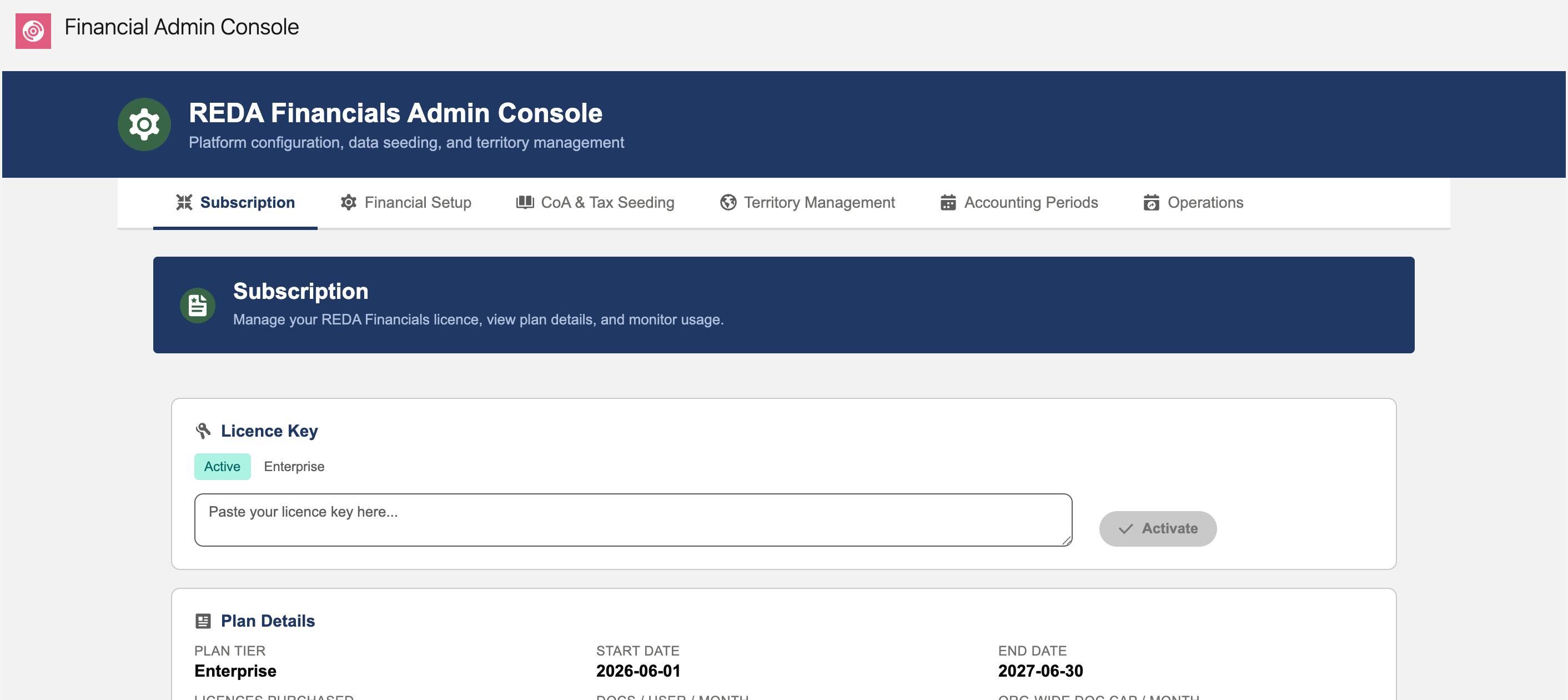
REDA Financials plans come in tiers, and the practical difference between them comes down to two questions: how many people can use the system, and how much AI document volume do you get? Your active tier shows on the Subscription tab next to the licence badge.
The tiers, functionally
| Tier | What it means in daily use |
|---|---|
| Free (evaluation) | Self-provisioned on install: the full accounting core for every user, a small monthly AI document allowance, time-limited. For trying, not running. |
| AI | The full accounting platform — entities, GL, AR/AP, banking, assets, budgets, reporting — for your purchased number of users, plus the AI features, metered by document allowances: a per-user monthly figure and an org-wide monthly cap (both on the Subscription tab’s Plan Details card; the Document Consumption card beside it shows what you have used against them). |
| Enterprise | The AI tier at organizational scale — higher allowances and terms tailored in your contract. |
Current pricing and packaging live with REDA’s sales team, not in this manual — plans evolve; your contract is authoritative. What never changes: the tier decides features, the licence count decides people, the document cap decides AI volume.
Choosing (and changing)
- Heavy invoice intake by email or scan? The AI tier’s OCR pays for itself in typing time — count your monthly vendor documents and compare against the cap.
- Tier upgrades are just a new key: activate, and the features light up in place. No migration, no reinstall.
- Bumping against the document cap month after month is the signal to talk tiers — the Subscription tab’s consumption card gives you the evidence.
Reading your tier off the Subscription tab
Everything the tier decides is visible on one screen — the Subscription tab, the console’s default tab:
| Where to look | What the tier decided |
|---|---|
| Licence Key card | The plan tier label sits right next to the status badge (Active / Expired / Not Active) — the one-glance answer to "what are we on?". |
| Plan Details card | The contract facts your tier set: start and end dates, licences purchased, AI documents per user per month, and the org-wide monthly document cap. |
| User Licences card | Used / available / total seats. On an org-wide plan (the evaluation tier, for instance) it reads Unlimited — every user is licensed, no counting. |
| Document Consumption card | On AI plans: this month’s document usage against the cap — the tier’s AI allowance, live. |
Notice what’s not tier-dependent: roles and access. Whether someone is an AP clerk or a read-only auditor is decided by permission sets, identically on every tier. The tier decides how many licensed people and how much AI volume — never who may do what.
Common mistakes to avoid
| Mistake | Why it hurts | Do this instead |
|---|---|---|
| Running the business on the evaluation tier | It’s time-limited by design — when it lapses, posting stops mid-quarter with the expiry message | Treat free as a trial; activate a purchased key before real books depend on the org |
| Sizing the AI allowance to an average month | Document intake spikes (year-end, audit season) hit the org-wide cap exactly when volume matters most | Size against your busiest month — the Document Consumption card’s history is the evidence |
| Confusing seats with documents | Buying more user licences doesn’t raise the AI document cap, and vice versa — they’re separate plan dimensions | Read the Plan Details card: licences purchased and the document caps are separate lines for a reason |
| Expecting an upgrade to involve reinstallation | Teams delay upgrades fearing downtime that doesn’t exist | An upgrade is a new key: paste, Activate, and the new limits apply in place |
Where to go next
- AI Usage Periods & Credits — how the metering works.
- Licence Key Architecture — how tiers are delivered.
- Subscription Tab — where the tier shows.
Frequently asked questions
The Subscription tab — the plan tier label sits on the Licence Key card next to the status badge, and the Plan Details card spells out everything the tier bought.
Feature-wise they’re the same platform, AI included. Enterprise is the same tier at contract scale — higher user and document allowances, terms negotiated with REDA. Your contract, not this manual, is the authority on the numbers.
The licence behaves like any expired licence: posting and AI features stop with a clear message, while reading, reporting and exporting continue. Nothing is deleted — activate a purchased key and work resumes where it stopped.
Roles don’t move — permission sets decide who does what, on every tier. What changes are capacities: seats, and the monthly AI document allowances the Document Consumption card meters.
Talk to REDA, receive a new key, and activate it on the Subscription tab. It replaces the old key in place — no downtime, no reinstall, and the Plan Details card updates to the new numbers immediately.
Was this article helpful?