
Recurring Transaction Batch
This is the engine behind every recurring template in the org: the batch that wakes up daily, finds what’s due, and generates it. Its card in the Operations console says it precisely: "Processes all active recurring templates due on the run date and generates the corresponding Sales Invoices, Purchase Invoices, Purchase Orders, or Journal Entries."
Access you'll need. Scheduling and running batch jobs requires the Accounting Admin v2 permission set. The Accounting Controller v2 and Read Only v2 sets can open the console to view outcomes; the Accounts Payable v2 and Accounts Receivable v2 sets cannot see it, though they see the documents the batch generates.
What one run does
Finds due templates
Active status and a Next Run Date of today or earlier — those two conditions define "due". Drafts and completed templates are never touched.
Generates each document
Dated the run day, in the right accounting period, lines copied from the template, due date per the template’s payment days — and linked back to its template. Duplication is impossible by design: one document per template per date, even if the batch somehow ran twice.
Posts where asked
Templates with Auto Post get their documents posted in the same breath; if posting would fail, the whole generation for that template rolls back — no broken drafts, and the failure lands in the run’s audit entry.
Advances the schedule
Each processed template’s Next Run Date moves forward by its frequency, its counters update, and templates that reach their end date or occurrence limit flip to Completed.
Scheduling and running
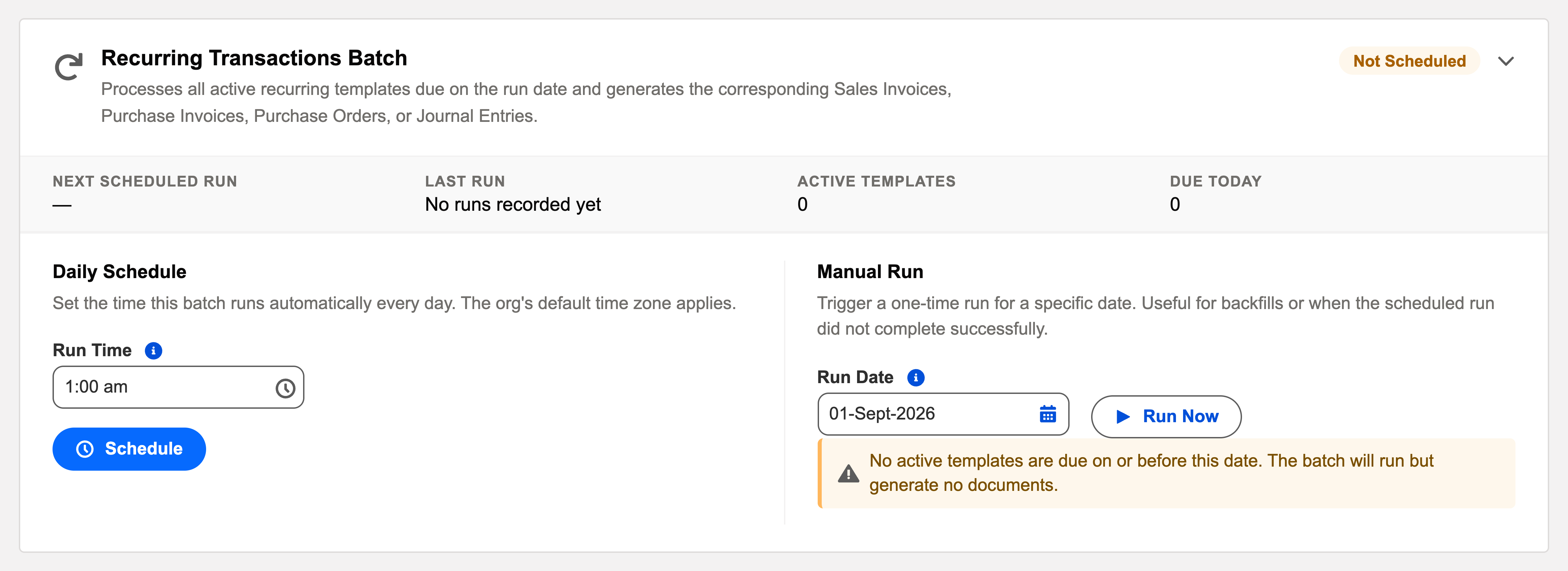
On the card: Schedule a daily time (early morning, after FX sync, is typical), or Run Now after activating new templates you want generated immediately. The status line shows the next run and the last outcome; View Audit Log opens the processed/succeeded/failed detail.
The card’s own dashboard
| Element | What it tells you / does |
|---|---|
| Description | The batch in one sentence: "Processes all active recurring templates due on the run date and generates the corresponding Sales Invoices, Purchase Invoices, Purchase Orders, or Journal Entries." |
| Active Templates / Due Today | The workload counters: how many templates are live, and how many will generate on the next pass. Due Today at zero after the morning run is the healthy state. |
| Status chip & Next Scheduled Run | Scheduled or Not Scheduled, and when the daily run (default 01:00) fires next. |
| Run Now (with date picker) | An immediate pass for a date you choose — the backfill tool. "Due" means on or before the chosen date, so one run sweeps up everything that came due during a pause. |
| Last run + View Audit Log | The most recent outcome, and the link to its full processed/succeeded/failed record with per-template reasons. |
The manual run even warns you when there’s nothing to do: "No active templates are due on or before this date. The batch will run but generate no documents." — a run with no work is harmless, by design.
A pause and a catch-up, at Meridian
Meridian Properties Group bills Corvus Consulting $9,000 rent monthly from one Sales Invoice template. January through April, the nightly batch generates each month’s draft on the 1st and advances the template — Next Run Date rolling forward, Completed Count ticking up. Then a maintenance weekend: an administrator unschedules the batch, and May 1 passes silently. Nothing is lost — the template still shows Next Run Date: May 1: due, waiting, not skipped. On May 3 the administrator uses Run Now with the current date; everything due on or before it sweeps up, May’s invoice generates two days late but correctly dated and numbered, and the template rolls to Jun 1 · Completed Count 5. June resumes on schedule. One click healed the gap, because "due" means on or before — never "missed forever".
Common mistakes to avoid
| Mistake | Why it hurts | Do this instead |
|---|---|---|
| Unscheduling the batch to "pause one template" | Every template in the org stops generating — customers silently stop being billed | Deactivate the one template (deliberately, with a note); leave the engine running |
| Expecting missed months to back-fill themselves | The next run generates for its due date and rolls forward — gaps stay gaps | Use Run Now’s date picker for a sweep, and create genuine catch-up documents by cloning |
| Scheduling it before FX sync | Foreign-currency documents generate against yesterday’s rates | FX Rate Sync first in the overnight order, then this batch, then auto-apply |
| Nobody reads the run’s audit entry | Auto Post rollbacks mean expected documents quietly don’t exist | Make the card’s last-run outcome part of the morning glance; chase template owners on failures |
| Treating Due Today as an error count | Panic over a number that just means "work scheduled for tonight" | Due Today is workload; the audit entry’s Failed count is the error signal |
Where to go next
- Recurring Templates Overview — the templates this engine serves.
- Recurring PI & PO Templates · Recurring Sales Invoices — module specifics.
- Operations Scheduler Overview — the console.
Frequently asked questions
The next run generates for its due date and rolls the schedule forward — it doesn’t back-fill each missed period. Create any catch-up documents manually (cloning makes that quick), then let the schedule resume.
The batch runs once daily for everyone; each template’s own frequency decides whether today is its day. Time-of-day nuance rarely matters for accounting documents — dates, not timestamps, drive the books.
No — generation is one document per template per date, by design. A second run for the same date finds nothing left due and creates nothing. When unsure, Run Now; it’s safe.
Neither. The batch runs under the platform’s automated process context, so it occupies no purchased seat — and the AI document meter counts OCR intake only; recurring generation is never metered.
After FX Rate Sync (so foreign-currency documents get the day’s rate) and before the auto-apply batches (so what it generates can be matched the same night).
Was this article helpful?