
Understanding Cash Receipts
A Cash Receipt records money arriving from a customer — a rent transfer hitting the bank, a check in the mail, a card settlement. It is the mirror image of the payment you make to a vendor: one document per amount received, telling REDA Financials who paid, how much, how, and into which bank account. Applying that money to specific invoices is a deliberate second step — and that two-step design is what makes messy real-world situations (overpayments, deposits, unidentified transfers) easy to handle.
Access you'll need. Any REDA Financials permission set can view Cash Receipts. Creating, posting, and applying them requires the Accounts Receivable v2 permission set (AR clerks & managers) or Accounting Admin v2 (system administrators); the Accounting Controller v2, Accounts Payable v2, and Read Only v2 sets can view but not change them.
Money first, matching second
When a Cash Receipt posts, REDA Financials records that cash came in — but does not guess which invoices it pays. The amount sits in the receipt's Unapplied Cash until you (or the auto-apply feature) match it to invoices:
The receipt posts
Cash is in the books, held against the customer. Unapplied Cash = the full amount.
You apply it to invoices
Each application pays down an invoice's balance and reduces the receipt's Unapplied Cash. One receipt can settle many invoices; one invoice can be settled by many receipts. See Applying Receipts to Invoices.
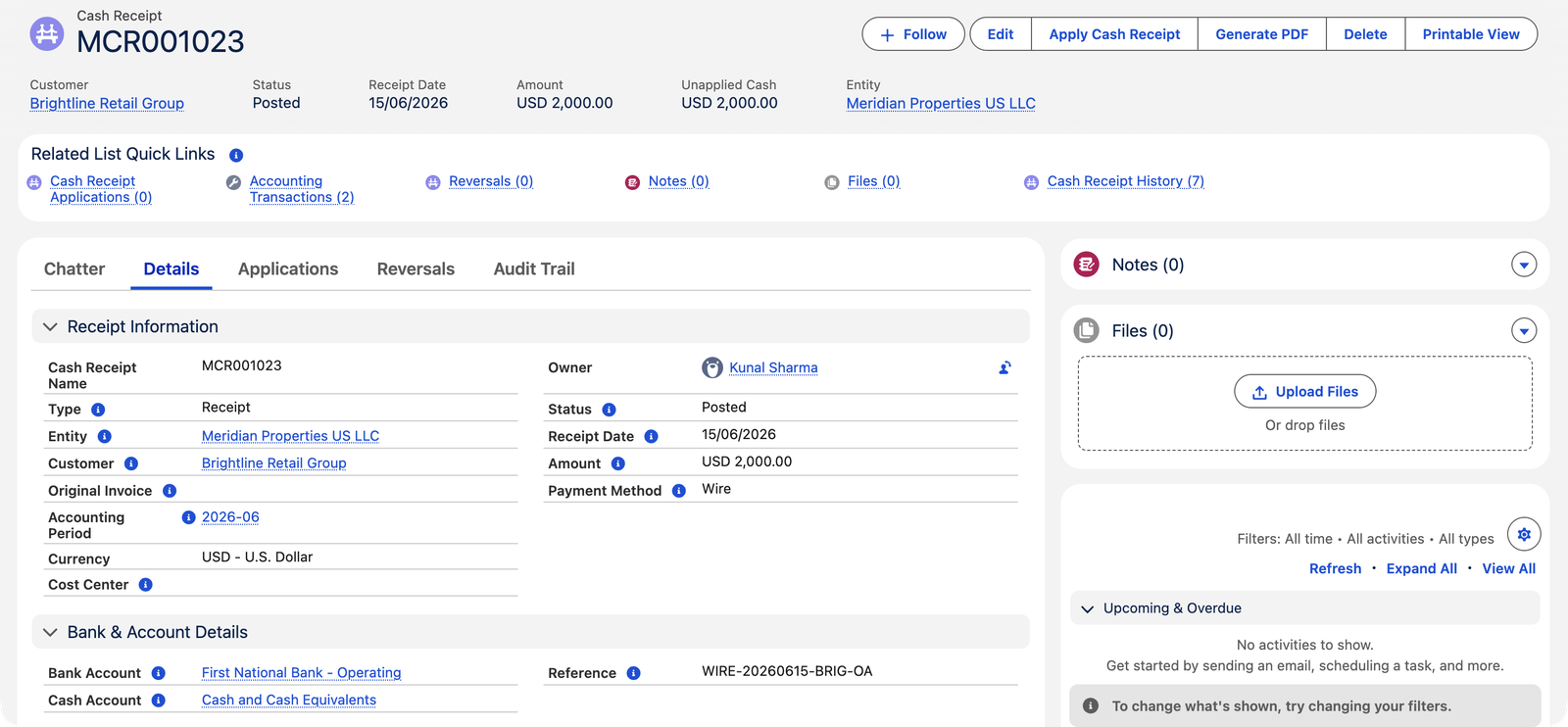
Here is a receipt that deliberately stopped after step 1 — Meridian's tenant Brightline Retail Group wired $2,000 on account (a general payment not tied to any single invoice yet):
Three receipt types
| Type | What it records | Typical use |
|---|---|---|
| Receipt (default) | Money arriving into a bank account | Rent transfers, checks, card settlements — the everyday case. Requires a bank account. |
| WHT Received | A withholding-tax certificate — tax a customer kept back from their payment and remitted to the authority on your behalf | Jurisdictions with sales-side withholding. No bank account (it isn't a deposit). See WHT on Cash Receipts. |
| Refund | Money you pay back to a customer — a negative receipt | Refunding the unused balance of a credit memo. Started from the credit memo itself. See Credit Memo Refund. |
What posting actually records
The two-step design shows up in the accounting. Posting the receipt moves money into the bank and parks the credit in a holding account (Meridian calls it Customer Deposits and Prepayments Received — your chart may name it differently). Applying it then moves the credit from the holding account onto the customer's receivable:
| Account | Debit | Credit |
|---|---|---|
| Posting the $2,000 receipt — cash in, credit parked | ||
| Cash and Cash Equivalents | $2,000.00 | |
| Customer Deposits and Prepayments Received | $2,000.00 | |
| Applying it to an invoice — credit meets receivable | ||
| Customer Deposits and Prepayments Received | $2,000.00 | |
| Accounts Receivable — Trade | $2,000.00 | |
Until you apply, the money is real and visible — it just shows as a customer deposit rather than a settled invoice. This is exactly how an auditor wants an unallocated payment represented.
A worked week of receipts at Meridian
Three receipts from Meridian's books show the model handling three different realities:
| Receipt | What happened | Amount | Applied | Unapplied Cash |
|---|---|---|---|---|
| MCR001024 | Corvus Consulting paid June rent by ACH; applied in full to invoice MSI001007 the same day | $9,000.00 | $9,000.00 | $0.00 |
| MCR001023 | Brightline wired $2,000 on account — no instruction which invoice it covers | $2,000.00 | $0.00 | $2,000.00 |
| MCR001010 | Brightline part-paid May's $13,500 invoice | $7,500.00 | $7,500.00 | $0.00 |
Read the last column like a to-do list: MCR001023's $2,000 is real money in the bank that still needs a decision — apply it to Brightline's oldest open invoice, hold it against next month, or refund it. The customer's Ledger Summary surfaces the same $2,000 as Unapplied Payments, and the reconciliation treats the receipt as fully bankable either way: application status never delays bank matching. Meanwhile the partial payment (MCR001010) shows the other pattern — fully applied itself, while the invoice stays open for the remaining $6,000 and keeps aging.
Numbering, periods, and defaults — what the system fills for you
| Field | How it's derived | Can you override? |
|---|---|---|
| Cash Receipt Name | Next number from the entity's Cash Receipt document sequence (Meridian: MCR001001, MCR001002…) | No, when a sequence exists — "Document number is auto-assigned by the configured sequence and cannot be changed." Duplicates are blocked per entity either way. |
| Accounting Period | From the Receipt Date; re-derived if you change the date on a draft | Yes, but it must contain the receipt date and belong to the entity's territory |
| Ledger | The entity's default ledger | Yes, to another active ledger |
| Bank Account / Cash Account | The entity's Default Bank Account and that bank's GL account | Yes — pick any bank belonging to the same entity |
| Due-date logic | None — receipts have no due date; they are money that already moved | — |
Where receipts come from
- Entered by hand — the everyday path; see Creating a Cash Receipt.
- From an invoice — the Receive Payment action on a Sales Invoice pre-fills the receipt for you.
- Automatically, from cash sales — posting a Receipt-type Sales Invoice (a point-of-sale style cash sale) creates and posts its own Cash Receipt and applies it instantly, so the invoice is born settled.
- As a refund — initiated from a posted Credit Memo with unused credit.
Statuses — and why there is no "Void" status
A Cash Receipt is Draft (editable, no accounting) or Posted (locked, in the books). Unlike invoices, there is no Void status — because banks don't have one either. Cancelling a posted receipt creates a reversal: a mirror-image negative receipt that backs the money out while both documents stay on file, matching what your bank statement will show. That story is covered in Voiding & Refunding Receipts.
The fields that matter
| Field | Why it matters |
|---|---|
| Entity | Whose books receive the money. Picking it auto-fills the default bank and cash accounts. |
| Customer | Who paid. Applications are only allowed to this customer's invoices. |
| Amount / Receipt Date | How much and when. The date drives the accounting period, which is assigned automatically. |
| Payment Method | Check, Wire, ACH, Credit Card, Cash, Withholding Tax Received, or Other. |
| Bank Account / Cash Account | Where the money physically landed, and the ledger account that represents it. |
| Reference (required) | The external identifier — check number, wire confirmation, or transaction ID. This is what bank reconciliation matches on, so make it the real one. |
| Original Invoice | Optional link to one specific invoice — auto-apply settles this one first. |
| Unapplied Cash | Calculated: Amount minus everything applied so far. Zero means fully matched. |
The rules that keep receipts clean
Every guard below is a real message you may meet, with the fix alongside — the system explains itself, and none of these can be bypassed by an import or integration:
| The message | What it means / what to do |
|---|---|
| "Bank Account is required for Receipt type Cash Receipts." | A Receipt is a bank deposit — say which bank received it. |
| "Bank Account must be blank for WHT Received type. WHT receipts represent tax certificates, not bank deposits." | The mirror rule: certificates never touch a bank. Clear the field. |
| "Bank Account must belong to the same entity as the Cash Receipt." | Each company banks separately — pick one of this entity's accounts. |
| "The selected Cash Account belongs to a different entity. Choose a global GL Account (no entity) or one that matches this receipt's entity." | The ledger side of the same discipline. |
| "Customer must be a Customer or Customer & Vendor account. Cash Receipts require customer-class accounts." | The account is vendor-only; correct the account's Financial Type or pick the right party. |
| "Receipt Date must fall within the selected Accounting Period date range." | Date and period disagree — fix the date, or clear the period so it re-derives. |
| "Entity requires a Default Unapplied Cash GL Account to post a Cash Receipt. Configure it in Entity setup." | One-time setup gap — your administrator adds the holding account on the entity. |
| "Posted Cash Receipts cannot be edited. Use the Void action to reverse…" | Posted = locked. Unpost (young, unreconciled) or void by reversal. |
| "Posted or voided Cash Receipts cannot be deleted. Void the receipt instead." | Only drafts delete; recorded money never disappears silently. |
| "This Cash Receipt cannot be unposted or voided because it is reconciled. Remove the reconciliation first." | Bank-matched receipts are protected — deliberately unmatch in the reconciliation before touching the receipt. |
Common mistakes to avoid
| Mistake | Why it hurts | Do this instead |
|---|---|---|
| Recording the amount net of processor fees | The bank statement shows the gross deposit and a separate fee — nothing matches at reconciliation | Record the gross receipt; let the fee arrive as its own statement line (a rule or adjustment books it) |
| One receipt for several separate bank transfers | Three statement lines vs one receipt — matching becomes manual archaeology | One receipt per bank movement; group checks that were deposited together with a Bank Deposit |
| Booking customer money as a journal entry | No customer link, no application, no aging relief, no statement — the subledger goes blind | Always a Cash Receipt for customer money; journals are for what the subledgers can't say |
| A vague Reference ("payment", "transfer") | Auto-match's best pass keys on the reference; vagueness demotes every future month to manual work | Record the bank's real identifier — check number, wire confirmation, processor ID |
| Recording the receipt when the customer promises to pay | The books claim cash that isn't there; reconciliation exposes it weeks later | Record on arrival (bank feed / statement / deposit slip in hand) — promises live on the invoice as its open balance |
Who can work with receipts
Accounts Receivable and Accounting Admin create, post, apply and void cash receipts. Accounting Controller and Read Only can view them but change nothing — the controller reviews the receivables ledger and works at the journal level.
Where to go next
- Creating a Cash Receipt — the form, step by step.
- Applying Receipts to Invoices — matching money to bills.
- Auto-Apply Cash Receipts — let the system do the matching.
- Voiding & Refunding Receipts — reversals, done right.
Frequently asked questions
Record the full amount received. Apply what matches their invoices; the rest stays as Unapplied Cash — an on-account balance you can apply to their next invoice, or refund. Never record less than what actually hit the bank.
One receipt, matching the single bank transaction, then apply it across all the invoices it pays. Your bank reconciliation will thank you: one statement line, one receipt.
Unapplied Cash in the receipt highlights — and at customer level, the Unapplied Payments tile on the account's Ledger Summary adds up every receipt with money still waiting. See Customer Account Ledger.
No — posted receipts are locked ("Posted Cash Receipts cannot be edited"). If the amount, date, or customer is wrong: unpost it back to Draft (if it hasn't been reconciled), fix it, and post again — or void it with a reversal and enter a fresh one.
It's a hint, not an application: linking the invoice the customer said they're paying makes auto-apply settle that one first, and documents intent even before anything is applied. Receipts created from an invoice's Receive Payment action carry it automatically.
The reference is what ties the receipt to a bank statement line — a check number, wire confirmation, or processor transaction ID. There is always some identifier on real money movement; recording it now saves the reconciliation hunt later.
Was this article helpful?