
Recurring Batch Scheduler
Templates describe what repeats; the Recurring Transactions Batch makes it happen — the nightly job that finds every active template due and generates its documents. Its control panel is the first card on the Admin Console's Operations tab, and it's worth five minutes of any administrator's understanding.
Access you'll need. The Admin Console is an administrator's screen: the Accounting Admin v2 permission set reaches it in full, and Accounting Controller v2 can open it too. The Accounts Payable v2 and Accounts Receivable v2 sets can't see it — scheduling this batch is a Core/Admin task.
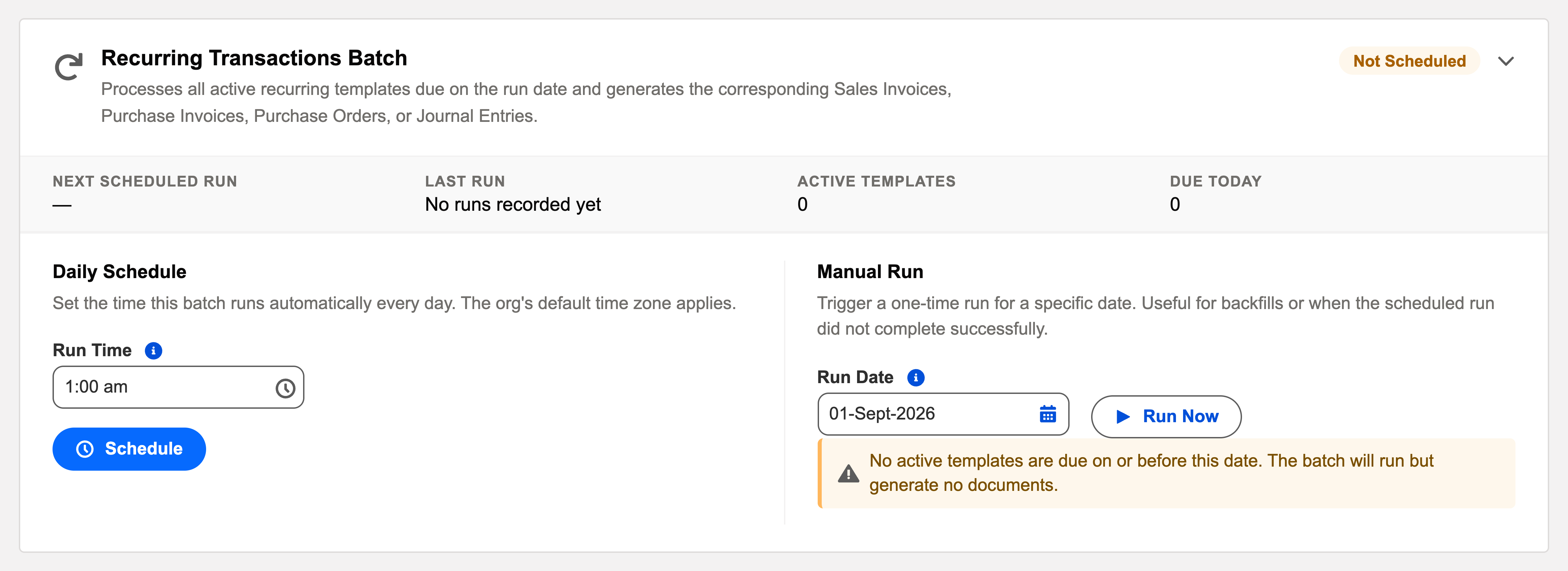
The card, control by control
- The subtitle says it all: "Processes all active recurring templates due on the run date and generates the corresponding Sales Invoices, Purchase Invoices, Purchase Orders, or Journal Entries."
- Status row: Scheduled/Not Scheduled badge, Next Scheduled Run, Last Run and its outcome (Success / Partial Failure / Failed), plus live counters — Active Templates and Due Today ("3 templates are due today and will be processed on the next scheduled run.").
- Daily Schedule: a Run Time (24-hour; the org's default time zone applies) — default 01:00, before the working day. Schedule / Reschedule / Unschedule as needed.
- Manual Run with a date picker: Run Now takes a Run Date — "Templates with Next Run Date on or before this date will be processed." This is the backfill tool: batch was off for a week? Run with today's date and every missed generation catches up (each template's next-run pointer advances through the misses).
Behavior worth knowing
- One template per transaction: failures isolate — a broken template logs and rolls back alone ("Partial Failure" outcome), the rest generate. The audit log carries per-template results, with a CSV of failures attached when there are many.
- Idempotent per date: re-running for the same date doesn't duplicate documents — safe to Run Now when unsure.
- No parallel runs: a second start while one is active is refused — no race conditions on numbering.
- Auto Post honored per template: the batch generates; each document posts or waits as its template decreed.
What the card says back, verbatim
Every action confirms itself in plain words — worth recognising so you know when something didn't happen:
| You did | The card says |
|---|---|
| Scheduled the daily run | "Recurring Transactions Batch scheduled daily at {time}." — and the scheduled job appears as "REDA Recurring Transactions Daily" |
| Ran it manually | "Recurring Transactions Batch is running for {date}. Job ID: {id}. Check the Audit Log for results once complete." |
| Removed the schedule | "Recurring Transactions Batch has been removed from the daily schedule." — the card asks "Remove Daily Schedule?" first |
| Picked a run date with nothing due | "No active templates are due on or before this date. The batch will run but generate no documents." — a warning, not an error |
| Typed a bad run time | "Invalid time format. Expected HH:MM." or "Invalid time value. Hour must be 0-23, minute 0-59." |
| Hit an operational failure | "Failed to schedule job: {reason}" / "Failed to start batch: {reason}" / "Failed to unschedule job: {reason}" — the reason is the fix |
Common mistakes to avoid
| Mistake | Why it hurts | Do this instead |
|---|---|---|
| Assuming templates fire without the schedule | Templates are data; the batch is the engine — Active templates with no scheduled batch generate nothing, indefinitely | Confirm the badge says Scheduled the day you activate your first template |
| Unscheduling for maintenance and forgetting to reschedule | Due dates pile up silently — no error, because nothing is running to error | Calendar the reschedule; on return, one Run Now with today's date backfills the gap |
| Backfilling with a future date "to get ahead" | Everything due on or before that date generates now — next month's rent invoices, dated and numbered today | Backfill with today (or the missed date), never beyond; the future belongs to the nightly run |
| Reading "Partial Failure" as background noise | One template is silently not producing — often a missing accounting period that will bite every template eventually | Open the audit log the day you see it; the failed template and reason are named |
Where to go next
- Operations Scheduler — this card among its ten siblings.
- Template Configuration — what the batch consumes.
- Recurring Document Batches — the bulk-operations view.
Frequently asked questions
So documents dated "today" exist before the working day starts, and so the generation precedes the 07:00 auto-apply batches that might act on them. Change it if your rhythm differs — it's just the default.
No — "due" means Next Run Date on or before the run date. The first run sweeps up everything overdue; that's the backfill semantics working as designed.
Administrators via the Admin Console. The batch itself runs as the system's automated user — generated documents don't consume anyone's licence seat.
No — starting a manual run while one is already active is refused outright rather than queued. Wait for the active run to finish (the audit log entry appears), then run again if still needed.
Check Last Run first: if the 01:00 run succeeded, those five became due after it ran (or were just activated) and tonight's run will take them. If you can't wait, Run Now with today's date processes them immediately — idempotency makes that safe.
Was this article helpful?