
Understanding Vendor Memos
Sometimes a vendor owes you. Goods came back, a bill was too high, or a rebate was agreed — and the supplier issues a credit note. In REDA Financials that credit note is a Vendor Memo: a Purchase Invoice whose Invoice Type is Vendor Memo and whose total is negative, because it reduces what you owe. This article explains how vendor memos work, how their credit gets used, and why they behave differently from ordinary invoices.
Access you'll need. Any REDA Financials permission set can view Vendor Memos; creating, editing, and posting them requires the Accounts Payable v2 permission set (AP clerks & managers) or Accounting Admin v2 (system administrators). The Accounting Controller v2, Accounts Receivable v2, and Read Only v2 sets can view but not create or post.
A worked example
Meridian Properties US LLC received a $3,600 maintenance bill from Summit HVAC Inc — but $300 of it was an overcharge. Summit issued credit note SH-CM-114. Meridian's AP accountant entered it as a Vendor Memo:
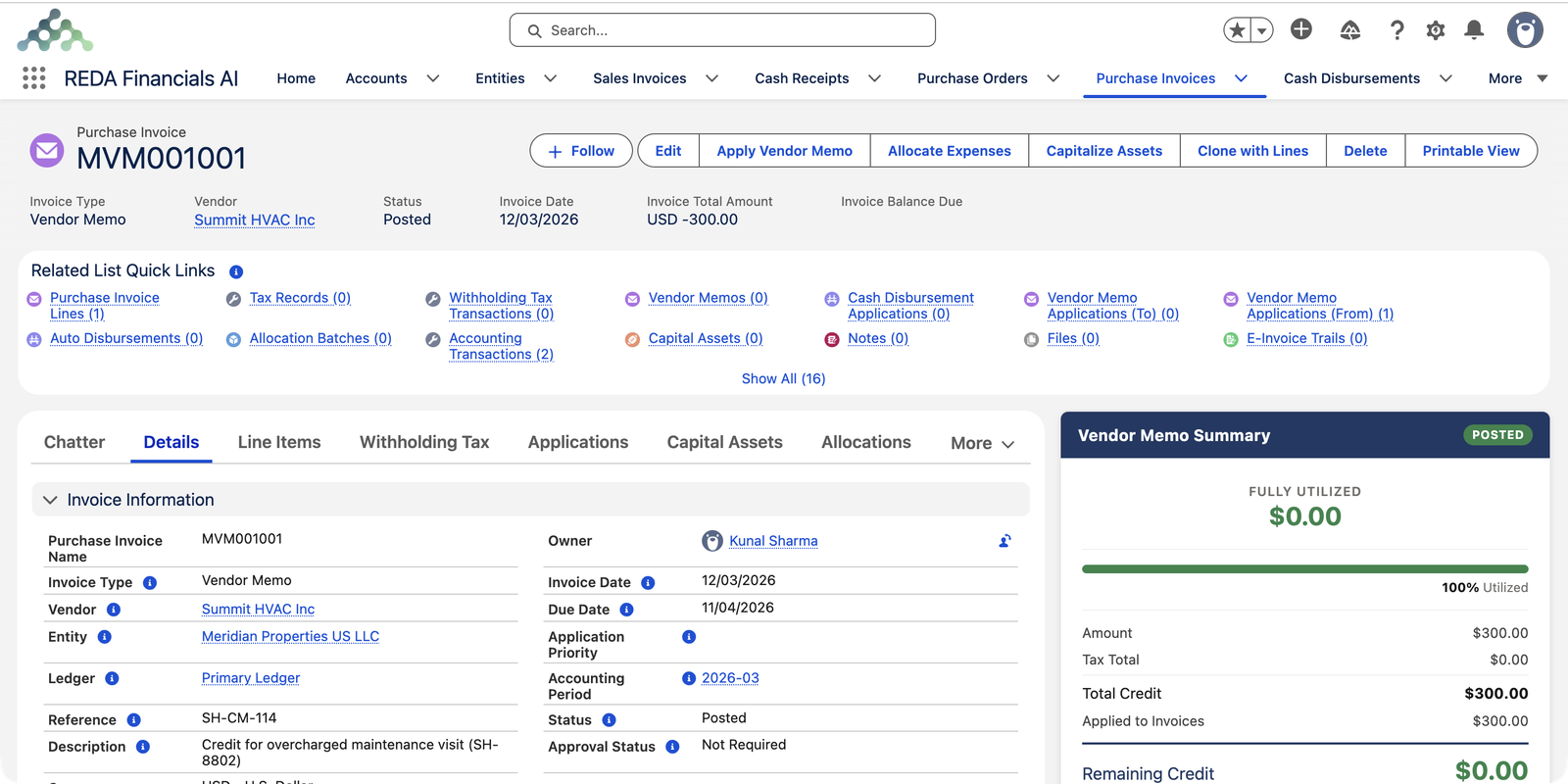
Why the total must be negative
A memo's job is to reduce your payable, so REDA Financials requires its total to be below zero — a memo with a positive total will refuse to post. You don't type negative numbers, though. On each memo line you switch on the credit line toggle (the badge next to the line number flips from Expense to Vendor Memo): quantity and unit price stay positive, and the toggle flips the line's sign for you.
When the memo posts, the accounting entries are the mirror image of an invoice — for Meridian's $300 credit:
| Account | Debit | Credit |
|---|---|---|
| Accounts Payable — Trade (you owe $300 less) | $300.00 | |
| Repairs & Maintenance — Buildings (the original cost comes back down) | $300.00 |
How the credit gets used: applications
A posted memo is a pool of credit waiting to be used. You use it by applying it to the vendor's open invoices — click Apply Vendor Memo on the memo (or work from the invoice side) and choose which bills the credit settles and how much goes to each. Meridian applied the full $300 to the original $3,600 bill, so only $3,300 was paid by check.
The memo keeps score of its own credit:
- Total Credit — the memo's full value.
- Applied to Invoices — how much has been used so far.
- Remaining Credit — what's still available to apply. The Vendor Memo Summary panel shows this as a utilization bar.
Letting REDA Financials apply it for you
Instead of choosing invoices by hand, tick Auto Apply Memo on a posted memo. REDA Financials spreads the credit across the vendor's open invoices automatically, oldest first, until the credit runs out — the same first-in-first-out logic used everywhere else in the app. See Applying Vendor Memos for both the manual and automatic routes.
Two ways to create one
- From scratch: New Purchase Invoice → Invoice Type = Vendor Memo → add credit lines. See Creating a Vendor Memo.
- From the invoice being corrected: open the original invoice and click Create Vendor Memo — the vendor and context carry over, so you only enter the credit lines. This also links the two documents for the audit trail.
Where the memo shows up across AP
A posted memo quietly changes several things you'll see elsewhere:
- On the invoices it credits: each application reduces the invoice's balance due, and shows as Memo Applied in that invoice's summary — so a $3,600 bill with $300 of memo credit asks for only $3,300 of cash.
- In AP aging: memos show a blank Aging Bucket — credit isn't a bill coming due, so it never turns "overdue". The invoices it settles, though, drop out of their buckets as the credit lands.
- In payment runs: the run selects invoices at their reduced balances — which is why applying memos before the run is the golden habit.
- On the original invoice's record: memos created from an invoice appear in its Vendor Memos related list, keeping correction and cause visibly linked.
Lifecycle and corrections
Vendor Memos follow the same Draft → Posted → Void life as other purchase documents:
| Status | What it means | What you can do |
|---|---|---|
| Draft | Being prepared — no accounting effect, no usable credit | Edit freely, delete if it shouldn't exist |
| Posted | The credit is on your books and available to apply | Apply it; reopen to Draft to correct (entries and any applications unwind automatically) |
| Void | Cancelled, with a required reason — its entries removed, its applications unwound | Nothing — the record is frozen permanently: "Voided Purchase Invoices cannot be modified." |
Two memo-specific notes:
- Unposting or voiding a memo automatically unwinds any applications it had made — the credited invoices get their balances back.
- A voided memo keeps its void reason and date permanently and cannot be edited or deleted — and posted memos can't be deleted either; correction always goes through reopen or void.
Common mistakes to avoid
| Mistake | Why it hurts | Do this instead |
|---|---|---|
| Recording a vendor's cash refund as a memo | The memo creates credit to spend on future bills — but the money already came back; you'd double-count | A refund is a banking event; a memo is for credit that offsets invoices |
| Leaving memos unapplied for months | Balances due stay gross, payment runs pay gross, and the credit is forgotten | Apply promptly — or tick Auto Apply Memo and let it spend itself |
| Expecting memo credit to move between your companies | Applications never cross entities — the credit is stuck where it was recorded | Record the memo in the entity that received the credit note in the first place |
| Correcting a posted memo by posting a second, opposite one | Two wrong documents now explain one correction — noisy forever | Reopen the memo to Draft, fix it, repost |
Where to go next
- Creating a Vendor Memo — the step-by-step guide.
- Applying Vendor Memos — manual and automatic application.
- Understanding Purchase Invoices — the parent concept.
- Understanding Credit Memos — the customer-side equivalent.
Frequently asked questions
At least one line (usually all of them) must be a credit line — use the toggle beside the line number so its badge reads Vendor Memo. Keep quantity and unit price positive; the toggle handles the sign. If the memo's overall total is still positive, it will not post.
Not through a Vendor Memo — memo credit can only be applied against the same vendor's invoices. If a vendor actually refunds you money, record that refund through your banking workflow instead, and ask your accountant how they want the entry classified.
Memo applications are restricted to documents of the same entity. Each legal company settles its own payables; cross-company settlement is handled through the cash side. See Cross-Entity AP Settlement.
Apply what fits — the rest stays as Remaining Credit on the memo, visible in the Vendor Memo Summary. Use it against the vendor's next invoice, or let Auto Apply Memo use it automatically as new bills post.
By design — aging buckets track bills coming due, and a memo is the opposite of a bill. Memos show a blank bucket and never appear overdue; their effect on aging is indirect, through the invoice balances they reduce.
The Accounts Payable or Accounting Admin permission sets, like all purchase documents. Accounting Controller is read-only on subledger transactions — reviewing memos, not creating them.
Was this article helpful?