
PI Tax & Tax Profiles
Vendor bills rarely arrive tax-free. A maintenance invoice in London carries 20% VAT; an audit fee in Mumbai carries GST split into two components; a New York bill may carry sales tax or nothing at all. REDA Financials calculates these taxes for you — line by line, at the correct rate for the right country and state — so the invoice you post matches the paper bill to the penny. This article shows what drives that calculation on a Purchase Invoice and where to look when you want to check it.
Access you'll need. Creating, editing, and posting these requires the Accounts Payable v2 permission set (AP clerks & managers) or Accounting Admin v2 (system administrators). The Accounting Controller v2, Accounts Receivable v2, and Read Only v2 sets can view but not create or post. Setting up tax profiles and rates is an administrator task.
One field does the steering: the line's Tax Profile
Every invoice line has a Tax Profile field. A tax profile is a plain-language answer to the question "how is this kind of purchase taxed?" — for example UK — Standard Rate Goods & Services, India — 18% GST Slab, or UK — Exempt Supplies. You pick the profile; REDA Financials looks up the actual rates and rules behind it.
The profiles you see come from your country's tax pack — a ready-made set of jurisdictions, rates, and rules that your administrator loads once during setup (see Understanding the Tax Engine and the Seeded Countries Reference). You never type a tax rate on an invoice.
What REDA Financials considers
When an invoice posts, the tax engine combines four ingredients — all of them master data your team set up once:
| Ingredient | Where it lives | What it contributes |
|---|---|---|
| The line's Tax Profile | Each invoice line | Which family of rates applies to this purchase |
| Your entity's tax location | The Entity record (Tax Jurisdiction + tax registration) | Where you are for tax purposes — country, and state where that matters |
| The vendor's tax details | The vendor's account (tax jurisdiction, party tax profile, registration number) | Where the other side is, and their registration status |
| The invoice date | The invoice header | Rates change over time — the engine uses the rate in force on that date |
Because everything comes from master data, two accountants entering the same bill get the same tax — there is nothing to remember and nothing to look up.
Example 1 — a UK bill with 20% VAT
Meridian Properties UK Ltd receives a quarterly maintenance invoice from London Property Maintenance Ltd for £3,000. Both companies are VAT-registered in the UK, and the line uses the UK — Standard Rate Goods & Services profile. REDA Financials adds £600 of VAT (20%) and the invoice totals £3,600:
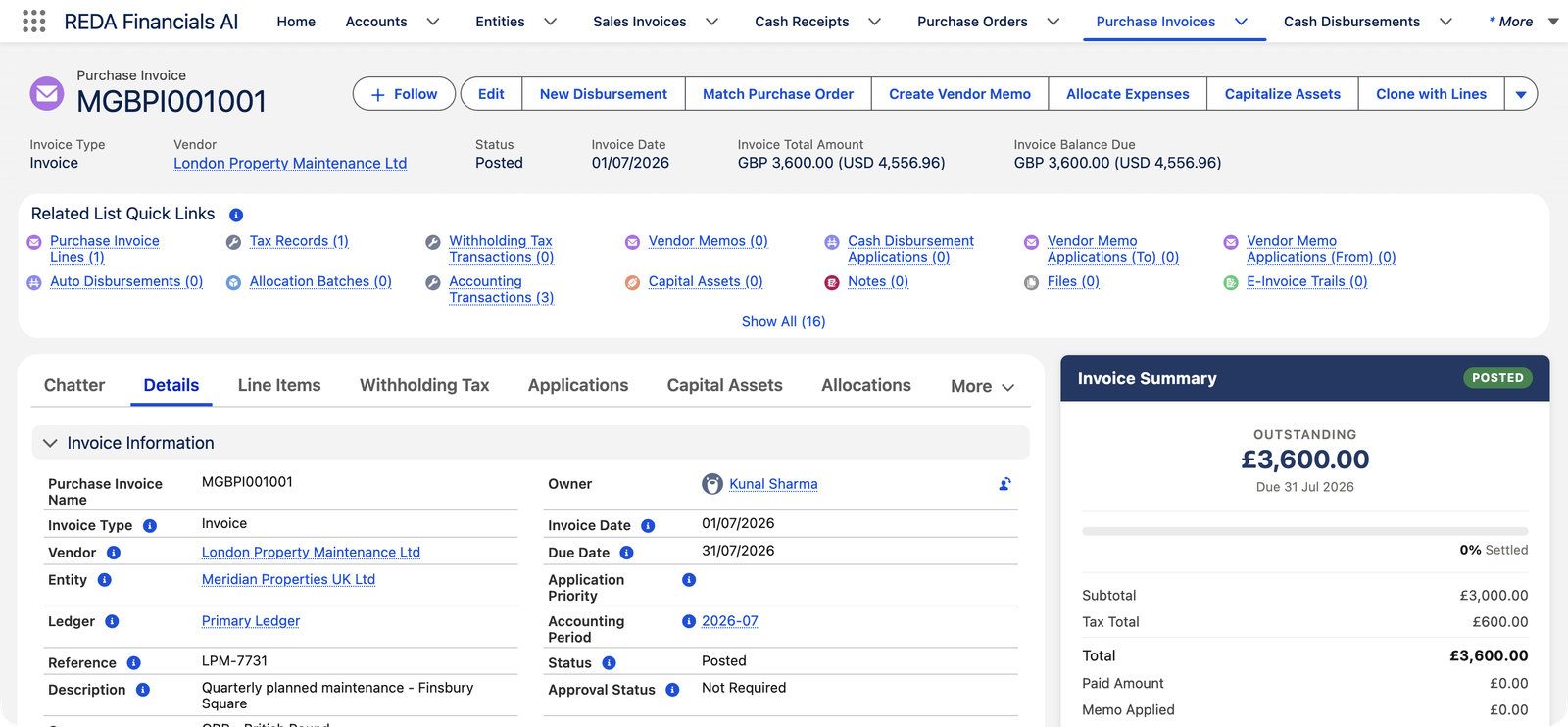
Because UK input VAT is recoverable for a registered business, posting does not treat the £600 as a cost — it parks it in a VAT receivable account, ready to offset against the VAT Meridian collects on its own rent invoices:
| Account | Debit | Credit |
|---|---|---|
| Repairs & Maintenance — Buildings | £3,000.00 | |
| VAT Input Tax Recoverable (UK) | £600.00 | |
| Accounts Payable — Trade | £3,600.00 |
Example 2 — an Indian bill where one tax becomes two
Meridian Properties India Pvt Ltd (registered in Maharashtra) receives a ₹1,00,000 audit-and-advisory bill from Sharma & Associates LLP, a Mumbai firm. The line uses the India Intra-State (CGST+SGST) profile, because buyer and seller are in the same state. Indian GST law splits an intra-state 18% tax into two equal components — CGST (central) and SGST (state) — and REDA Financials does exactly that:
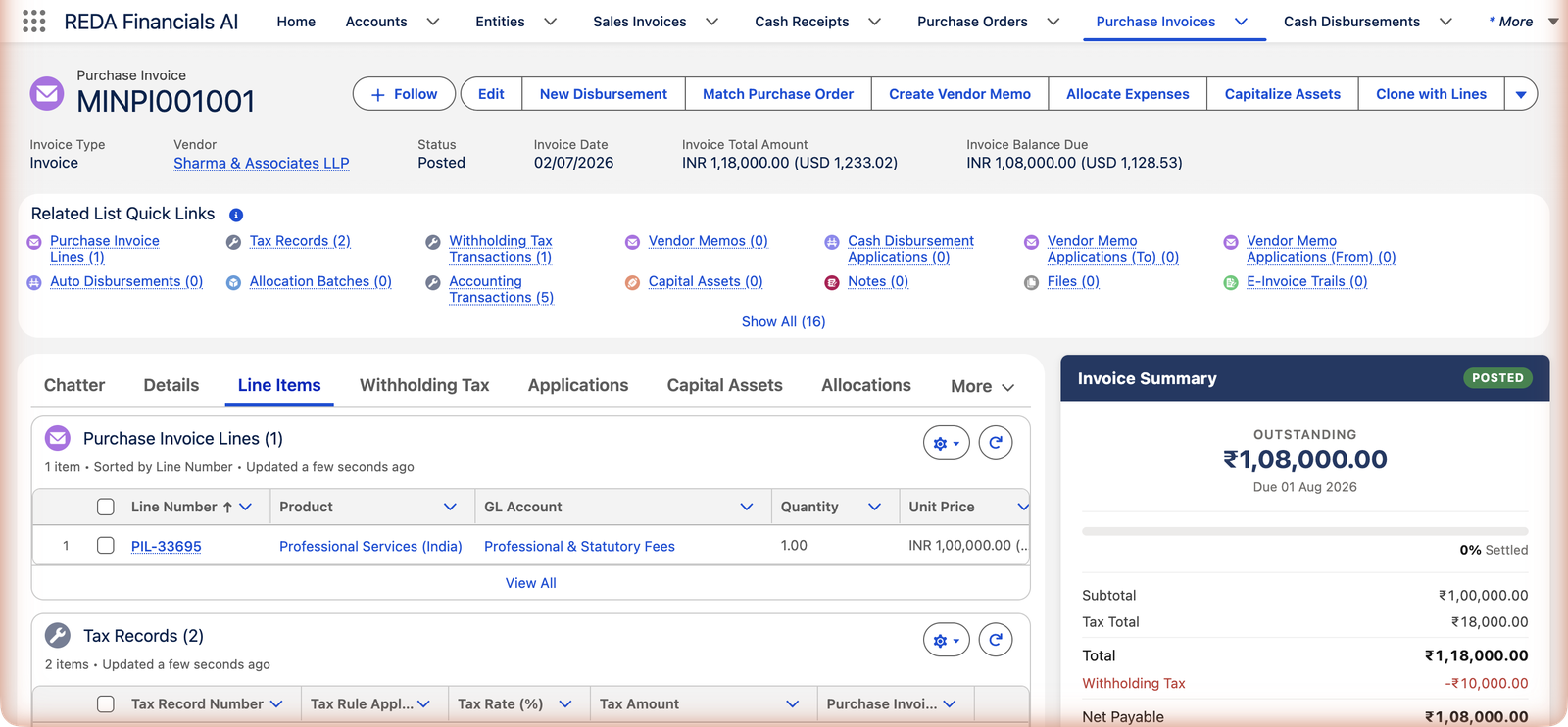
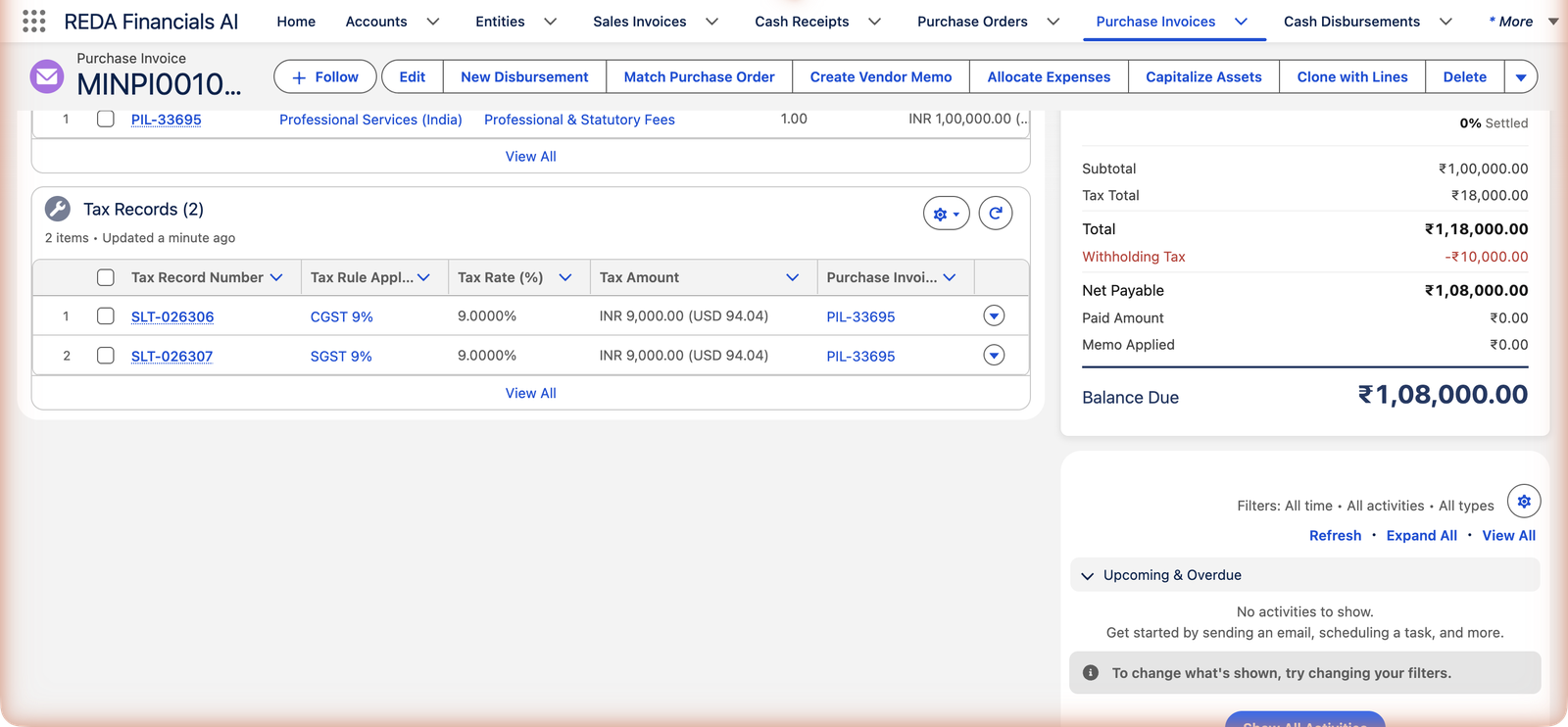
Both components are recoverable input tax credit for a GST-registered business, so — just like the UK example — they post to receivable accounts rather than expense:
| Account | Debit | Credit |
|---|---|---|
| Professional & Statutory Fees | ₹1,00,000.00 | |
| CGST Input Tax Credit Receivable | ₹9,000.00 | |
| SGST / UTGST Input Tax Credit Receivable | ₹9,000.00 | |
| Accounts Payable — Trade | ₹1,18,000.00* |
*On this particular bill the payable is then reduced further by withholding tax — that part of the story is covered in WHT on Purchase Invoices.
Recoverable or a cost? The engine knows
Notice what did not happen in either example: the tax never landed in the expense account. Each tax rule knows whether that tax is recoverable for you:
- Recoverable (UK input VAT, Indian GST input credit): posts to a tax receivable account — an asset you'll offset against the tax you collect on sales.
- Non-recoverable (for example, sales tax paid by the final consumer): becomes part of the cost of what you bought.
This distinction is set up in the tax pack, not on the invoice — so the accounting comes out right without anyone deciding it bill by bill.
When the numbers are calculated
While you're filling in the form — a live preview
As you add lines and pick tax profiles in the invoice form, REDA Financials previews the tax so you can compare against the paper bill before saving.
When you post — the numbers become permanent
Posting runs the full calculation, writes a Tax Record for every tax on every line, stamps the line and header tax totals, and creates the accounting entries. From this point the amounts are locked with the document.
If you reopen — everything is recalculated on the next post
Reopening a posted invoice to Draft removes its tax records along with its accounting entries. Fix the lines, post again, and the engine recalculates from scratch — there is no stale tax left behind.
If the tax comes out blank
A zero where you expected tax almost always traces back to one of these:
- The line has no Tax Profile — no profile, no calculation.
- Your entity's tax location is too vague. In countries where rates are state-specific (India, Brazil, the US), the entity's Tax Jurisdiction must point at the state where you are registered — for Meridian India that is Maharashtra, not just India.
- The vendor's tax details are incomplete — a missing tax jurisdiction or party tax profile on the vendor's account can keep location-dependent rules from matching.
- The invoice date falls outside the rule's validity — rates have start and end dates; a date typo can land you in the wrong era.
Your administrator can review all of this in Understanding the Tax Engine — the fix is always in master data, never a hand-typed rate on the invoice.
Where to go next
- WHT on Purchase Invoices — when part of the payment goes to the tax authority instead of the vendor.
- Understanding the Tax Engine — the full picture behind the calculation.
- Seeded Countries Reference — which countries ship ready-made tax packs.
- Posting & Voiding a PI — what else happens at posting time.
Frequently asked questions
No — and that's deliberate. Tax amounts are always calculated from the master-data rules, which keeps your tax reporting consistent and auditable. If the calculated amount differs from the paper bill, one of the two is wrong: check the line's Tax Profile first, then ask the vendor about theirs.
Open the Tax Records related list (it also appears under the Line Items tab). There is one record per tax, per line, showing the rate applied and the amount — the CGST/SGST example above shows two records for a single line.
Some jurisdictions genuinely levy more than one tax on the same purchase — India's intra-state GST is split into CGST and SGST, for instance. The engine creates one Tax Record per component so each posts to its own account, exactly as your tax return needs them.
The same currency as the invoice. Meridian UK's bill shows £600 of VAT; the USD figures you see alongside are just the corporate-currency equivalents for group reporting.
Your administrator, once per country, by loading REDA Financials' ready-made country packs and completing the entity's tax registration. Day-to-day users only ever pick a Tax Profile on a line. See Understanding the Tax Engine.
Was this article helpful?