
Auto-Apply Batches (CR/CM/CD/VM)
Matching money to invoices is essential and repetitive — the definition of work to automate. Four sibling batches in the Operations console apply the four kinds of settlement documents to their open invoices: Cash Receipts and Credit Memos on the customer side, Cash Disbursements and Vendor Memos on the vendor side. Same philosophy, four flavors.
Access you'll need. Scheduling and running batch jobs requires the Accounting Admin v2 permission set. The Accounting Controller v2 and Read Only v2 sets can open the console to view outcomes; the Accounts Payable v2 and Accounts Receivable v2 sets cannot see it, though they see the applications the batches create.
The shared matching rules
Each batch’s card states them plainly (here’s the receipts one): "Automatically applies Cash Receipts flagged with Auto Apply Receipt to outstanding invoices for the same customer and entity. Uses FIFO by invoice date (or dimension-matched FIFO when Enforce Dimension Match on Apply is checked). Respects book closure dates." Decoded:
- Opt-in per document — only documents flagged for auto-apply (or payments with unapplied amounts, on the disbursement side) are touched. Manual matching remains yours where you want it.
- Same party, same entity — money never wanders across customers, vendors or companies.
- Oldest first (FIFO) — open invoices are settled in invoice-date order, the accounting norm; invoices carrying an Application Priority jump the queue.
- Dimension-aware — with Enforce Dimension Match on Apply, only invoices with matching cost dimensions qualify.
- Closed books respected — no application lands in a closed period.
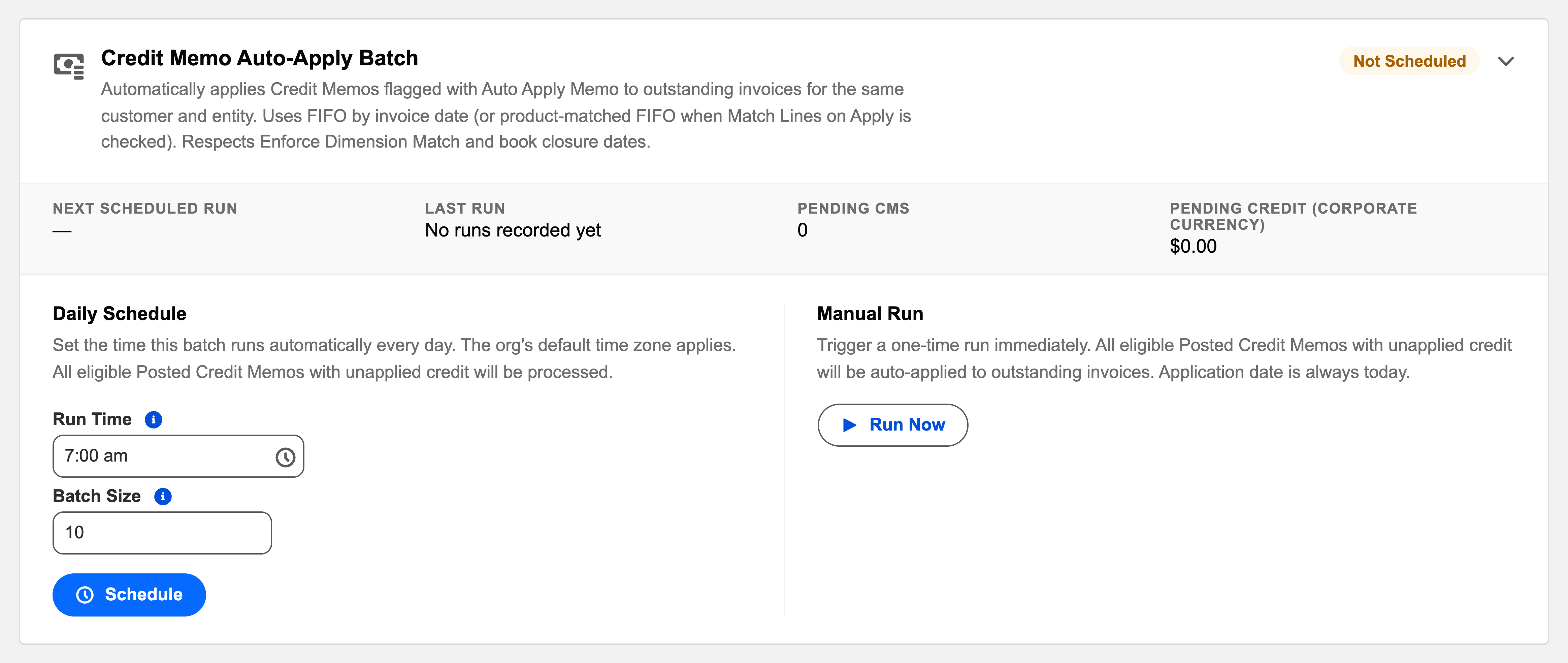
The four cards, in their own words
| Card | Its description on the Operations tab |
|---|---|
| Cash Receipt Auto-Apply Batch | "Automatically applies Cash Receipts flagged with Auto Apply Receipt to outstanding invoices for the same customer and entity. Uses FIFO by invoice date (or dimension-matched FIFO when Enforce Dimension Match on Apply is checked). Respects book closure dates." |
| Credit Memo Auto-Apply Batch | The customer-credit sibling: flagged credit memos applied to the same customer’s outstanding invoices, oldest first. |
| Cash Disbursement Auto-Apply Batch | "Automatically applies Cash Disbursements with unapplied amounts to outstanding Purchase Invoices for the same vendor and entity. Uses FIFO by invoice date. Respects book closure dates and dimension matching." |
| Vendor Memo Auto-Apply Batch | "Automatically applies Vendor Memos flagged with Auto Apply Memo to outstanding Purchase Invoices for the same vendor and entity. Uses FIFO by invoice date. Respects book closure dates and dimension matching." |
Which invoices get settled, in what order
Documented in full for cash receipts — and the pattern to expect across the family:
| Priority | Rule |
|---|---|
| First | The receipt’s Original Invoice, if one is linked — that invoice is settled first, whatever its date. |
| Then | Invoices carrying an Application Priority number, lowest number first — a per-invoice override for strategic invoices. |
| Then | Everything else, oldest invoice first by invoice date, until the money runs out. The last invoice reached may get a partial application — that’s normal. |
A worked run — GreenLeaf’s three months
Meridian Properties Group’s tenant GreenLeaf fell behind: April, May and June invoices, $4,350 each, all unpaid. A payment of $8,700 arrives flagged for auto-apply. The overnight run walks oldest-first:
| Invoice | Balance due before | Auto-applied | Balance due after |
|---|---|---|---|
| April rent | $4,350.00 | $4,350.00 | $0.00 — settled |
| May rent | $4,350.00 | $4,350.00 | $0.00 — settled |
| June rent | $4,350.00 | $0.00 — money ran out | $4,350.00 — still aging |
The receipt ends fully applied, two ordinary application records exist on its Applications tab, and the aging report tells the truth: GreenLeaf owes one month, not three. Oldest-first matters precisely here — overdue balances shrink before current ones.
The refusals, verbatim
| The message | What it means / what to do |
|---|---|
| "WHT Received receipts must be manually applied to specific invoices." | Withholding-tax certificates carry tax meaning per invoice — the batch deliberately leaves them for a person. |
| "Application Date {0} falls on or before the AR book closure date ({1}) for this entity." | The books are closed through that date — nothing applies until the date falls in an open stretch. |
| "No open Accounting Period found for Application Date {0}." | The application’s period derives from its date — an administrator opens or generates the period first. |
Operating the four
Each card schedules independently (a daily overnight slot each), shows its pending-work count, and offers Run Now — the handy one after a bulk import of receipts or before a payment run, when you want everything matched now. Results land in the audit log per run, failures with reasons.
Common mistakes to avoid
| Mistake | Why it hurts | Do this instead |
|---|---|---|
| Flagging money the customer earmarked for a specific invoice | Oldest-first sends it to a different (older) invoice — your records and the customer’s stop agreeing | Link the Original Invoice on the receipt; that invoice settles first |
| Auto-applying while an old invoice is disputed | The disputed invoice is the oldest, so it gets paid first — undermining your own dispute position | Apply manually, or set Application Priority on the invoices that should absorb the money |
| Leaving deliberate on-account balances to the nightly batch | The batch will spend them on the oldest invoices — but the customer asked you to hold them | Keep held money unflagged; note the instruction on the document |
| Assuming silence means matched | A benign skip (closed books, no eligible invoices) leaves money quietly unapplied | Glance at unapplied amounts after the run — zero means matched; the audit entry explains the rest |
| Scheduling the customer-side pair and forgetting the vendor side | Payments and vendor memos pile up unapplied while everyone assumes "auto-apply is on" | All four cards schedule independently — check each chip reads Scheduled |
Where to go next
- Operations Scheduler Overview — the console.
- The four module articles linked above — matching behavior in depth.
Frequently asked questions
It matched the oldest — which is right by default and wrong when a specific invoice should come first. Delete the application, apply manually, and set Application Priority on invoices that deserve the front of the queue.
No eligible target: nothing open for that party in that entity, dimensions didn’t match, the only open invoice is dated in the future (its balance doesn’t exist yet), or the period was closed. The run’s audit entry says which; the money stays safely in its unapplied bucket meanwhile.
No — candidates are always the document’s own party and entity; money never wanders across customers, vendors or companies. Cross-entity settlement is a deliberate, opt-in feature with its own intercompany bookkeeping, and the batches never do it for you.
Completely — every application it creates is an ordinary application record, visible on the document’s Applications tab and removable exactly like a manual one. Un-apply, then reallocate by hand. (Removals in closed periods are refused, same as any application.)
No — scheduled automation runs under the platform’s automated process context and doesn’t occupy one of your purchased seats.
Was this article helpful?