
Understanding Reconciliation
Your ledger says the bank account holds one number; the bank says another. Reconciliation is the monthly proof that both are telling the same story — every difference explained, every explanation documented. It's the control that catches missing receipts, duplicate payments, bank errors and fraud; auditors treat it as sacred, and REDA Financials gives it a dedicated workspace.
Access you'll need. Any REDA Financials permission set can view reconciliations; working, completing and approving them requires the Accounting Admin v2 or Accounting Controller v2 permission set — and the approver must be a different user from whoever completed the reconciliation.
The model: one reconciliation per account, per period
A Bank Reconciliation record anchors one bank account to one accounting period, and periods chain: each reconciliation starts from the approved previous one's ending position, so no month can be skipped or silently rewritten. (The first-ever reconciliation for an account is marked a Starting Period with its opening balance supplied — see Starting a Reconciliation.)
What's on a reconciliation
You supply only three fields when creating the record — the rest is computed around them, live, as you work. Reading this table once makes the whole workspace legible:
| Field | What it holds |
|---|---|
| Bank Account / Accounting Period | The anchor pair — one reconciliation per account per period, and both lock the moment the record exists ("…cannot be changed after creation. Delete this reconciliation and create a new one."). |
| Reconciliation Date | When the work was done — required at creation. |
| Status | Draft → In Progress → Completed → Approved. A record you create yourself opens In Progress; Draft appears only on next-period reconciliations the system creates automatically after an approval. |
| Starting Reconciliation Period | Checkbox marking the first-ever reconciliation for this account — the anchor of the chain. The workspace shows a Starting Period badge on it. |
| Starting Bank Balance | Where the bank began the period. Copied automatically from the approved previous reconciliation — typed by hand only on a starting period. |
| Ending Bank Balance | The one number the system cannot know: the closing balance printed on the bank's statement. You enter it in the workspace. |
| Starting / Ending GL Balance | Computed: the ledger's activity on the bank's GL account before the period starts, and through its end. |
| Deposits in Transit | Computed: posted receipts, bank-GL journal debits, and posted bank deposits that no statement line has matched yet — money your books recorded that the bank hasn't shown. |
| Outstanding Checks | Computed: posted payments and bank-GL journal credits still unmatched — money you've issued that hasn't cleared. |
| Reconciled Deposits / Reconciled Payments | Computed: the sums of matched statement-line amounts, money in and money out. |
| Adjusted Bank / Adjusted Book Balance / Difference | The proof arithmetic — next section. |
| Match Window Days (default 30) | How many days beyond the period's edges statement lines are still pulled into this reconciliation — the allowance for last month's checks clearing this month. |
| Previous Reconciliation | A link to the approved predecessor — the chain, made visible. |
| Completed By / Date · Approved By / Date | The two signatures, stamped automatically when each gate is passed. |
The arithmetic being proven
| Side | Formula |
|---|---|
| Adjusted Bank Balance | Ending Bank Balance + Deposits in Transit (money recorded in your books that hasn't reached the bank yet) − Outstanding Checks (payments issued but not yet cleared) |
| Adjusted Book Balance | The ledger's ending balance for the bank's GL account |
| Difference | Adjusted Bank − Adjusted Book — must reach exactly zero to complete |
The two "adjustments" are the classic timing differences — the system computes both automatically from your unmatched posted documents. Everything else in the workspace exists to drive the Difference to zero honestly: by matching, by rules, or by booking what the bank knew and you didn't.
July at Meridian, in numbers
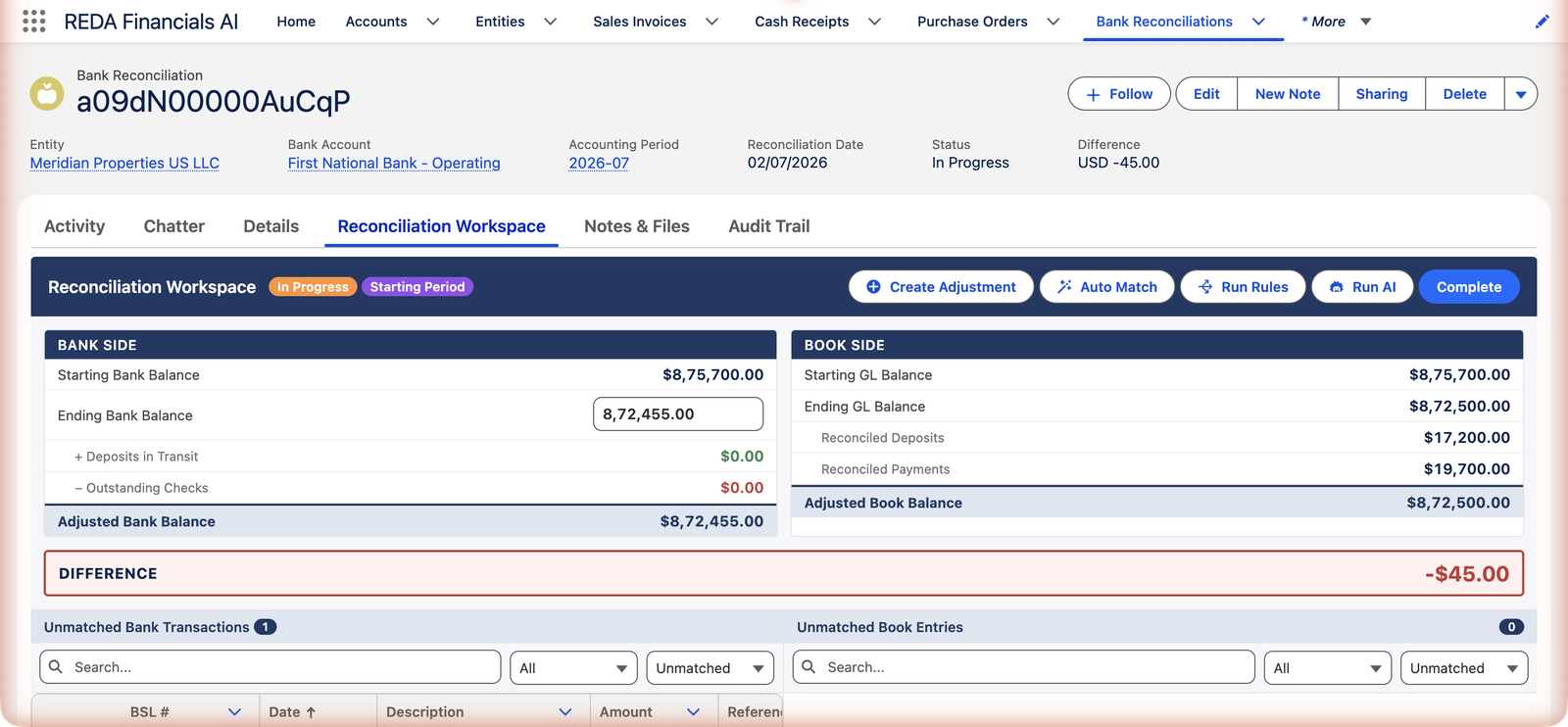
The screenshot above is the end of a real month. Here is the whole of it. Meridian's July statement for First National Bank - Operating opened at $875,700.00, closed at $872,455.00, and carried four lines:
| Statement line | Amount | Explained by |
|---|---|---|
| ACH credit, reference ACH-20260702-CORV | +$9,000.00 | Corvus Consulting's rent receipt — same amount, same reference, so Auto Match paired it in its first, exact pass |
| ACH debit, reference CC-INV-11406 | −$2,200.00 | The payment for CityClean's June janitorial bill — matched automatically |
| Wire debit, reference WIRE-ACC-0702 | −$10,000.00 | The progress payment to Apex Construction — matched automatically |
| MONTHLY ACCOUNT SERVICE FEE | −$45.00 | Nothing — the bank invented it, so no document exists to match. This is the red −$45.00 in the screenshot. |
Both sides tell their story: the bank says 875,700 + 9,000 − 2,200 − 10,000 − 45 = 872,455; the books say 875,700 + 9,000 − 2,200 − 10,000 = 872,500, because they never heard about the fee. Difference: −$45.00 — exact, explained, and honest. Meridian books the fee with Create Adjustment (a pre-built journal crediting cash $45, offset to Bank Charges and Fees), the Ending GL Balance becomes 872,455, the Difference reads $0.00, and Complete is allowed through its gate. The full close is walked through in Completing a Reconciliation.
How lines get explained
- Matching pairs each statement line with the document that explains it — automatically (exact references, then close dates, then unique amounts, then AI suggestions) or by hand.
- Rules create-and-match documents for recurring bank-side items.
- Adjustments book the one-offs — fees, interest — as journal entries seeded straight from the statement lines.
Lifecycle & the trust chain
In Progress (the work) → Completed (difference proven zero; who and when is stamped) → Approved (a different user signs off — segregation of duties is enforced, not suggested). Approval seals the period and, where configured, spawns next month's draft automatically. And once a receipt, payment or journal is reconciled, the system defends it everywhere: "This Cash Receipt cannot be unposted or voided because it is reconciled. Remove the reconciliation first."
The rules that keep reconciliations clean
The reconciliation chain is enforced, not suggested. Every message below is quoted verbatim from the system — meeting one means a guardrail is doing its job:
| The message | What it means / what to do |
|---|---|
| "A reconciliation already exists for this bank account and accounting period." | One per account per period, no exceptions. Open the existing record and work there. |
| "Previous period must be reconciled and approved before starting this period. Mark this as a Starting Reconciliation Period if this is the first reconciliation for this bank account." | The chain in action: finish and approve last month first — or, if this account has never been reconciled, tick Starting Reconciliation Period. |
| "Starting Bank Balance is required when marking a reconciliation as a starting period." | A starting period has no predecessor to inherit from — supply the bank's balance at the period's start yourself. |
| "A starting reconciliation period cannot exist when an earlier reconciliation already exists for this bank account." | Only the true first period may anchor the chain — this account already has history, so continue it instead. |
| "Accounting Period cannot be changed after creation. Delete this reconciliation and create a new one." | The anchor pair is immutable. Wrong period? Delete and recreate — matches live on the statement lines, so nothing is lost. |
| "Bank Account cannot be changed after creation. Delete this reconciliation and create a new one." | Same discipline, other half of the anchor. |
| "Cannot complete reconciliation: balance difference is not zero." | The zero gate. Something is still unexplained — match it or book it as an adjustment; nothing else opens this door. |
| "Cannot edit a completed reconciliation. Reopen it first to make changes." | Completed means frozen. Reopening is allowed — deliberately, on the record — and then you're In Progress again. |
| "Cannot edit an approved reconciliation." | Approved means sealed. The chain has moved on from this month. |
| "The approver cannot be the same user who completed the reconciliation. Segregation of duties requires a different user to approve." | Two people, always. See Completing a Reconciliation. |
| "This reconciliation cannot be reopened because a later period has already been approved for this bank account." | History behind an approved period is protected — book corrections in the open month instead, documented as adjustments. |
| "Cannot delete a completed or approved reconciliation." | Proven months don't disappear. Only unfinished reconciliations can be deleted. |
Common mistakes to avoid
| Mistake | Why it hurts | Do this instead |
|---|---|---|
| Letting months pile up before reconciling | The chain requires each period approved before the next begins — three unreconciled months means three sequential closes in one sitting, with cold memories | Reconcile monthly, right after the statement arrives; turn on Auto-Create Reconciliations so next month's record makes itself |
| Typing a rounded or from-memory Ending Bank Balance | The Difference chases a phantom — you'll hunt cents that exist only in the typo | Copy the closing balance exactly as the statement prints it, to the cent |
| Forcing zero with an adjustment for "miscellaneous difference" | The number becomes zero and the books become fiction — the unexplained item is still out there, now hidden | Adjustments are for real bank-side facts (fees, interest). An unexplained difference means keep looking: an unmatched line, a missing document, or a wrong-direction match |
| Completing and approving with the same person's login | The system refuses — and working around it via a shared login defeats the audit trail that protects you | Give the approval to a second real user: the controller, the owner, the outside accountant |
| Deleting a reconciliation to "start over" when matching went wrong | Unnecessary — and impossible once Completed | Unmatch the wrong pairs (stamps clear, both sides return to their queues) and match again; the record itself is fine |
Who can reconcile
Accounting Admin and Accounting Controller have full rights over reconciliations and everything banking. Accounts Payable, Accounts Receivable and Read Only users can view all of it but change none of it. Note the deliberate nuance: permissions decide who may work a reconciliation, but the approval control is functional — whoever completes it, someone else must approve it.
Where to go next
- Starting a Reconciliation — the setup and first period.
- AI Auto-Matching — the engine that does most of the work.
- Completing a Reconciliation — adjustments, the zero gate, approval.
Frequently asked questions
Because "small unexplained" is where errors and fraud live. A genuine $0.45 bank charge takes thirty seconds as an adjustment — then it's explained, not ignored. The gate is verbatim: "Cannot complete reconciliation: balance difference is not zero."
Receipts you've posted that no statement line has matched yet — recorded by you, not yet seen by the bank (Friday's deposit clearing Monday). They're expected to clear next period; ones that never clear are the find of the month.
Anyone with banking rights (Controller/Admin) can work and complete a reconciliation; a different user must approve — "The approver cannot be the same user who completed the reconciliation." Two sets of eyes on cash, by design.
Reopening an approved period is possible while no later period is approved — after that, the chain protects history ("…a later period has already been approved…"). Corrections then belong in the current period, documented as adjustments.
The name is traditional; the content is any posted money-out that hasn't cleared — unmatched payments of every method, plus journal lines crediting the bank's GL account. An ACH sent on the 30th that clears on the 2nd spends a few days as an "outstanding check."
You didn't — the system did. When a month is approved on an account with Auto-Create Reconciliations on, the next period's reconciliation is created automatically as a Draft, waiting for you. Records you create yourself open In Progress.
Not in parallel — each period needs its predecessor approved first ("Previous period must be reconciled and approved before starting this period…"). Catching up is sequential: close June fully, then July. The chain is the point: every month starts from a proven balance.
Was this article helpful?