
Asset Capitalization
Capitalization is the moment a pile of spending officially becomes a working asset: the status flips from Under Construction to Active, the cost reclasses from wherever the purchase parked it into the asset account, and the depreciation schedule springs into existence. In REDA Financials the status change is the button.
Access you'll need. Capitalizing and activating assets requires the Accounting Admin v2 or Accounting Controller v2 permission set. The Accounts Payable v2, Accounts Receivable v2, and Read Only v2 sets can view assets but not change them.
Activating an asset
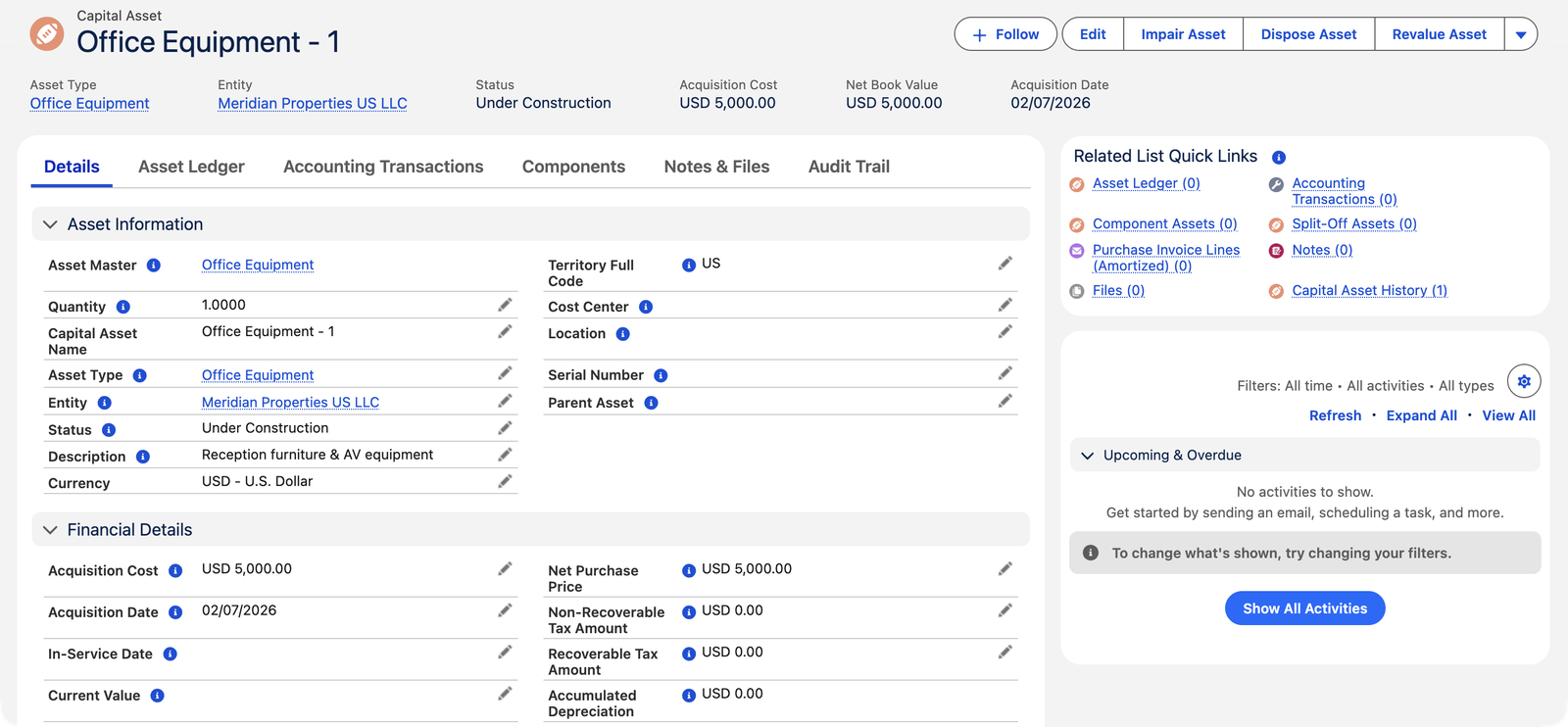
Check the prerequisites
Three fields must exist before Active is accepted: Asset Type, Acquisition Cost, and Acquisition Date (each has its own clear refusal if missing). Review the depreciation fields too — anything you leave blank fills from the type's defaults at this moment.
Set the In-Service Date — or let it default
The date the asset started working is the date depreciation runs from. Leave it blank and activation stamps it (acquisition date, else today). Meridian activated Office Equipment - 1 with In-Service 1 July — and its first monthly charge fell on 31 July.
Flip Status to Active
Three things happen at once: blank settings fill from the Asset Type; the depreciation schedule generates (unless the asset's Auto-Generate Schedule was unchecked for hand-built schedules, or the type is non-depreciable); and the cost reclass posts:
Spelled out, the moment status hits Active the system works through this list:
| What happens | Detail |
|---|---|
| 1. In-Service Date stamps | If blank: the Acquisition Date, else today. This date anchors the schedule and the capitalization posting. |
| 2. Blanks fill from the Asset Type | Method, Useful Life, Convention, Declining Rate — and Residual Value computed from the type's Default Residual % when the asset's is blank or zero. Values you set yourself are never overwritten. |
| 3. The schedule generates | When Auto-Generate Schedule is checked (the default). The field's own words: "If checked, the depreciation schedule is generated automatically when this asset becomes Active. Uncheck to build the schedule yourself." Tangible types get Depreciation lines; Intangible types get Amortization lines; non-depreciable types (land) get none. |
| 4. The cost reclass posts | For invoiced assets — the Capitalization ledger line described next. |
The capitalization posting
For assets born from an invoiced purchase, activation writes a Posted Capitalization line in the asset's ledger, dated the in-service date: debit the Asset Type's Asset GL Account for the capitalizable cost, credit the account(s) the purchase originally hit — moving the spend from expense/project cost onto the balance sheet. Non-recoverable taxes join the asset's cost; recoverable tax credits stay untouched where they belong. Assets with no source invoice line (migrated assets, or PO-received units not yet invoiced) skip the reclass — their cost is assumed placed by the migration journal or handled when the invoice arrives.
For one of Meridian's $5,000 units (a tax-free purchase), the reclass reads:
| Account | Debit | Credit |
|---|---|---|
| Asset GL Account (the Asset Type's balance-sheet home for the class) | $5,000.00 | |
| The account the purchase originally posted to | $5,000.00 |
Where taxes are involved, the credit side splits: the purchase account is credited net of any recoverable taxes embedded in the price, and each additive non-recoverable tax's GL account is credited its share — so every account ends exactly where it should. Two configuration gaps can stop the posting, each with its message: "Cannot capitalise {asset}: the Asset Type has no Asset GL Account configured." and "Cannot capitalise asset {asset}: no GL Account mapping found for Tax Type {tax type} on Entity {entity}. Configure a Purchase-side non-recoverable Tax Type GL Mapping."
The invoice path (intangibles)
Software, licenses and other intangibles never sit on a truck, so their path starts from the posted purchase invoice: the Capitalize Assets action lists the invoice lines flagged Create Asset whose products carry an Intangible asset type, and offers one asset per line or one consolidated asset (several lines becoming a single implementation asset — pick the product and intangible type for it). The created assets arrive Under Construction, dated the invoice date, and activate exactly as above — with charges labelled amortization, as intangibles' should be.
The dialog explains itself as you go — these are its actual words:
| The message | When you'll see it |
|---|---|
| "Invoice lines flagged with Create Asset will be capitalized as Under Construction fixed assets. Activate each asset to generate its depreciation or amortization schedule." | The dialog's opening line — a reminder that this step creates assets but doesn't activate them. |
| "The Purchase Invoice must be Posted before capitalising." | Draft invoices can't create assets — post first. |
| "Line {n}: only Intangible-asset products can be amortised here. Tangible assets are created from the Purchase Order." | You picked a line whose product carries a Tangible type — that one belongs to the PO path. |
| "Consolidated capitalisation requires a Product and an Asset Type." · "The selected Asset Type must be an Intangible category." | The consolidated-asset option needs to know what the single combined asset is. |
| "Line {n} is already capitalised." | Each line capitalizes once — the earlier asset already stands on it. |
| "Select at least one line to capitalize." | Nothing was ticked. |
| "{n} asset(s) created." | Success — the new Under Construction assets are on the register. |
Each created asset's cost follows the same discipline as the PO path: the line's net purchase price in the entity's currency (recoverable taxes stripped out) plus any additive non-recoverable taxes. With the consolidated option, all selected lines' costs combine into the one asset, and every line points at it.
After activation
- The schedule's monthly lines wait as Scheduled; the batch posts each as it falls due.
- The asset's entity is now fixed ("Entity cannot be changed after an asset has been activated.").
- The source documents lock protectively — the PO can't be unwound and the invoice line can't be unmatched while a capitalized asset stands on them ("Dispose or reverse that asset first.").
Common mistakes to avoid
| Mistake | Why it hurts | Do this instead |
|---|---|---|
| Activating before the vendor invoice has finalized the cost | The provisional PO figure becomes the depreciating cost — and once activated, the invoice can no longer true it up | Match and post the invoice first (see Creating Assets from POs), then activate |
| Activating with a missing Asset GL Account on the type | The reclass refuses ("Cannot capitalise {asset}: the Asset Type has no Asset GL Account configured.") and the cost stays parked in the purchase account | Complete the Asset Type's GL set before the first activation of each class |
| Unchecking Auto-Generate Schedule and forgetting about it | The asset activates silently with no schedule — no charges ever post, NBV never moves | Leave the box checked unless you're deliberately hand-building the schedule, and if you unchecked it, build the lines now |
| Backdating nothing — letting In-Service default when the asset actually started earlier | The schedule starts from the wrong month, understating depreciation to date | Enter the real in-service date before flipping the status; the stamp is a convenience, not a judgment |
| Capitalizing taxed invoice lines without checking the postings | The known tax-split issue (callout above) can leave the asset account and expense accounts mis-stated | After any capitalization involving tax, tie the asset GL balance to the assets' recorded costs before closing the period |
Where to go next
- Depreciation Schedule Generation — what activation just created.
- Creating Assets from POs — the tangible birth path.
- Revaluation & Impairment — when the plan meets reality.
Frequently asked questions
When the asset is available for use — installed, tested, ready — not when it was bought and not when someone remembers. That's the accounting standard's line (IAS 16), and the In-Service Date should be that day even if you activate the record later; the schedule runs from the date, not the click.
An Active asset that hasn't depreciated yet can go back to Under Construction (allowed only while its ledger is empty) — fix and reactivate. Once charges have posted, corrections are prospective: adjust the remaining life/method and the future schedule, never the posted past.
It accumulates in your project/expense account as invoices post. When the renovation completes, that spend is capitalized deliberately — the consolidated-asset option on the invoice path, or a controller's journal to the asset account with a manually created asset — per your policy for construction in progress.
Not necessarily. The reclass only fires for assets standing on a matched invoice line. Migrated assets skip it (their cost arrived via opening balances), and PO-received units whose invoice hasn't been matched skip it too. Check the asset's source: if an invoice is behind it and nothing posted, look for the "Cannot capitalise…" configuration messages.
No — changing Status from Under Construction to Active is the activation. That's deliberate: the register's statuses are its controls, so an import, a mass update, or a form edit all trigger exactly the same checks and the same machinery.
Because its Asset Type's category is Intangible — accounting reserves depreciation for physical assets and amortization for intangible ones. Same arithmetic, same schedule, same batch; only the label (and the line type) differs.
Was this article helpful?