
Entity Default GL Accounts
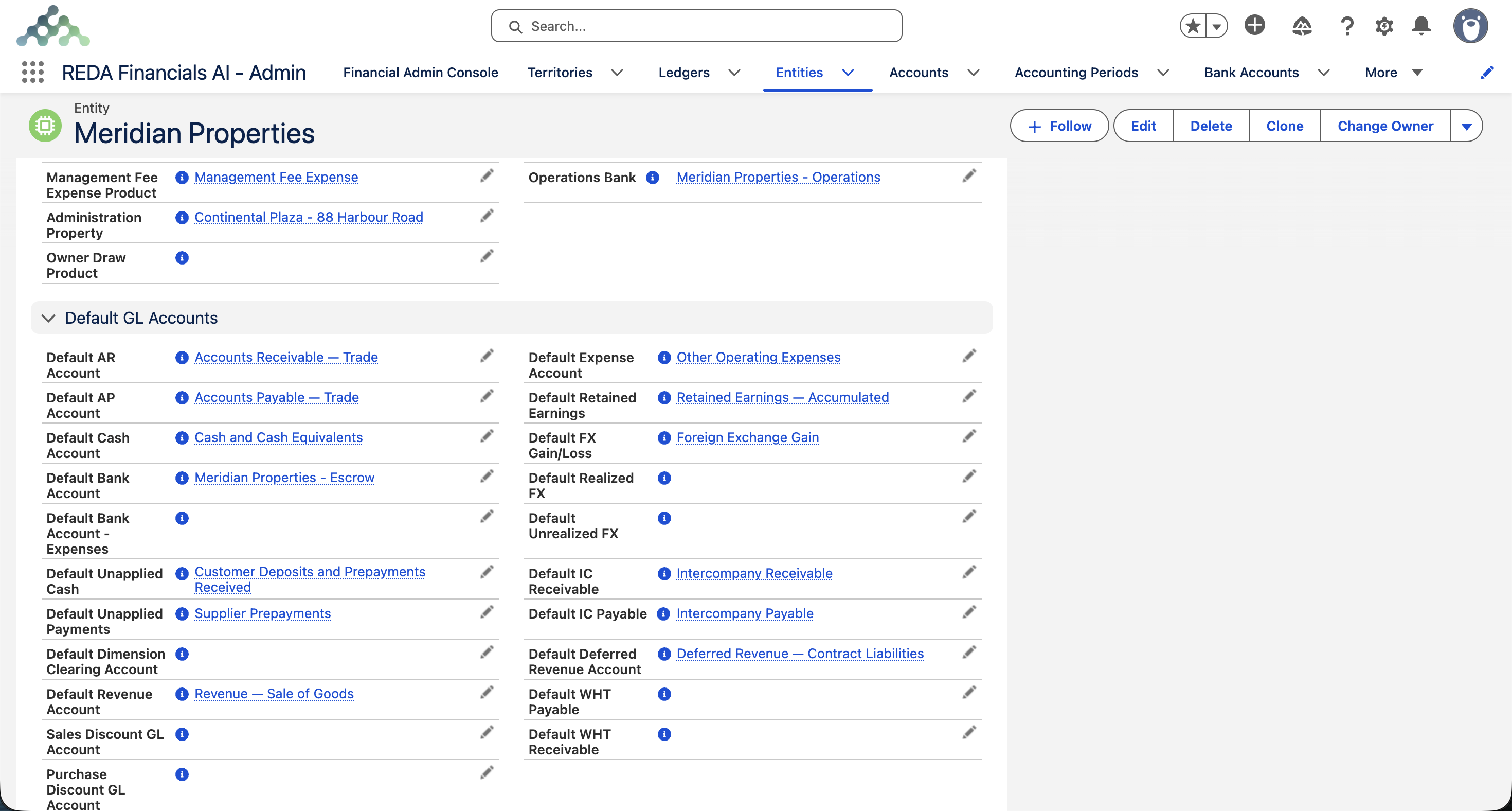
Every time REDA records a transaction, it has to decide which accounts to use. When you raise an invoice, where does the amount owed go? When a payment arrives, which account does the cash land in? For the routine, repeating parts of accounting, REDA answers these questions from a set of default GL accounts held on the entity. Set them once and every posting lands in the right place — automatically, the same way, every time.
This article does two things: it explains, in plain language, the bookkeeping ideas you need, and then it walks every default account — what it is, when REDA uses it, and a worked example showing the actual accounting entry.
Access you'll need. Setting these default accounts requires the Accounting Admin v2 or Accounting Controller v2 permission set. The Accounts Payable v2, Accounts Receivable v2, and Read Only v2 sets can view them but not change them.
A quick primer (skip if you know double-entry)
| Term | What it means |
|---|---|
| GL account | A labelled "bucket" in your chart of accounts — e.g. Sales Revenue, Bank, Trade Receivables. Every amount you record lands in one. |
| Debit / Credit | The two sides of every entry. Every transaction balances: total debits = total credits. (Roughly: a debit increases what you own or spend; a credit increases what you owe or earn.) |
| Control account | A summary account that holds a total — e.g. all customer balances live in one Receivables control account, even though each customer is tracked separately. |
| Contra account | An account that reduces another. A Sales Discount account is a contra to Revenue: it pulls reported revenue down to the net figure. |
| Suspense / holding account | A temporary parking spot for money that isn't yet matched to anything — e.g. a customer prepayment before there's an invoice to apply it to. |
Control & cash accounts
These four are the backbone — they're touched by almost every sale, purchase and payment.
Default AR Account — what customers owe you
The receivables control account. Debited when you raise a Sales Invoice (the customer now owes you), and credited when they pay (the debt clears).
| Raise a £1,200 invoice (incl. £200 VAT) | Debit | Credit |
|---|---|---|
| Accounts Receivable | 1,200 | |
| Sales Revenue | 1,000 | |
| VAT Payable | 200 |
Default AP Account — what you owe vendors
The payables control account. Credited when you record a Purchase Invoice (you now owe the vendor), debited when you pay it.
| Record a £600 vendor bill, then pay it | Debit | Credit |
|---|---|---|
| Expense | 600 | |
| Accounts Payable | 600 | |
| — on payment — | ||
| Accounts Payable | 600 | |
| Bank | 600 |
Default Cash & Default Bank Account — where money moves
The Default Bank Account is the bank record auto-selected on new receipts and disbursements; its linked GL is where the cash posts. The Default Cash Account is the fallback cash/bank GL used when no specific bank is chosen. These are the "Bank" lines in the examples above and below.
Revenue & expense fallbacks
A line's account normally comes from the product on it. These defaults are the safety net for when a line has no product account.
| Account | When REDA uses it |
|---|---|
| Default Revenue Account | A Sales Invoice line has no product GL → the sale's credit lands here. |
| Default Expense Account | A Purchase Invoice line has no product GL → the cost's debit lands here. |
Default Retained Earnings — where the year's profit goes
At year-end, REDA "closes" the profit & loss accounts and moves the net result into Retained Earnings — the running total of profits the company has kept. A profitable year:
| Year-end close, £50,000 net profit | Debit | Credit |
|---|---|---|
| Profit & Loss summary | 50,000 | |
| Retained Earnings | 50,000 |
Recognition & holding accounts
Default Unapplied Cash — a customer prepayment
A customer sends money before there's an invoice to match it to. It can't be income yet — you owe them goods/service — so it parks in Unapplied Cash (a liability) until you apply it to an invoice.
| Customer prepays £500, later applied to an invoice | Debit | Credit |
|---|---|---|
| Bank | 500 | |
| Unapplied Cash | 500 | |
| — when applied to invoice — | ||
| Unapplied Cash | 500 | |
| Accounts Receivable | 500 |
Default Unapplied Payments — a vendor prepayment
The mirror image: you pay a vendor before their bill arrives. It's money owed to you (an asset) until matched, so it parks in Unapplied Payments.
| Prepay a vendor £300 | Debit | Credit |
|---|---|---|
| Unapplied Payments | 300 | |
| Bank | 300 |
Default Deferred Revenue — cash-basis income
On a Cash-basis entity, an invoice can't be counted as income until you're paid. The revenue parks in Deferred Revenue and is released when cash arrives.
| Cash-basis: £1,000 invoice, then paid | Debit | Credit |
|---|---|---|
| Accounts Receivable | 1,000 | |
| Deferred Revenue | 1,000 | |
| — on payment — | ||
| Deferred Revenue | 1,000 | |
| Sales Revenue | 1,000 |
Discounts
Sales Discount — a discount you give
A contra-revenue account. A discount reduces what the customer owes, and is recorded separately so you can see gross vs net revenue.
| £1,000 sale with a £50 discount | Debit | Credit |
|---|---|---|
| Accounts Receivable | 950 | |
| Sales Discount | 50 | |
| Sales Revenue | 1,000 |
Purchase Discount — a discount you take
When you pay a bill early and earn a settlement discount, the saving is income (or a cost reduction) recorded here.
| Pay a £600 bill early, take a £12 discount | Debit | Credit |
|---|---|---|
| Accounts Payable | 600 | |
| Bank | 588 | |
| Purchase Discount | 12 |
Foreign exchange (multi-currency only)
When you trade in a currency other than the company's own, exchange rates move between invoicing and payment. Those movements create gains and losses that have to be recorded. (New to this? See 3-Tier Currency.)
Default Realized FX — settled at a different rate
You invoice a US customer $1,000 when £1 = $1.25, so it's booked at £800. They pay later when £1 = $1.22, so $1,000 is now worth £820 — a real £20 gain.
| $1,000 receivable settled at a better rate | Debit | Credit |
|---|---|---|
| Bank | 820 | |
| Accounts Receivable | 800 | |
| Realized FX Gain | 20 |
Default Unrealized FX — open items restated at period-end
The invoice is still unpaid at month-end. If your accounting policy requires restating open foreign-currency balances at the closing rate — typically done with an adjusting journal at period end — the open $1,000 (booked at £800) is restated at £1 = $1.27 → £787: a £13 paper loss, recorded here but not yet realised.
| Period-end revaluation of the open item | Debit | Credit |
|---|---|---|
| Unrealized FX Loss | 13 | |
| Accounts Receivable | 13 |
Default FX Gain/Loss is the general account for exchange differences and is required in a multi-currency org — REDA won't save a multi-currency entity without it. Realized and Unrealized are the more specific accounts for splitting differences between settled items and still-open ones.
Intercompany — when your own companies trade
If Meridian's UK company does £500 of work for its US sibling, both companies must record their side, and the group offsets them on consolidation. The IC Receivable and IC Payable accounts (set as a pair) give those entries their home.
| UK invoices US sibling £500 | Debit | Credit |
|---|---|---|
| In UK books: IC Receivable | 500 | |
| In UK books: Revenue | 500 | |
| In US books: Expense | 500 | |
| In US books: IC Payable | 500 |
Withholding tax
In some countries the payer must hold back a slice of a payment and remit it to the tax authority on the other party's behalf. (New to this? See Understanding Withholding Tax.)
Default WHT Payable — you withhold on a payment
You owe a contractor £1,000 but must withhold 10%. You pay them £900 and owe £100 to the tax authority.
| £1,000 bill, 10% withheld | Debit | Credit |
|---|---|---|
| Expense | 1,000 | |
| Accounts Payable (to contractor) | 900 | |
| WHT Payable (to authority) | 100 |
Default WHT Receivable — a customer withholds from you
A customer owes you £1,000 but withholds £100 and pays £900. The £100 is a tax credit you'll reclaim, recorded as a receivable.
| £1,000 receipt, £100 withheld by customer | Debit | Credit |
|---|---|---|
| Bank | 900 | |
| WHT Receivable | 100 | |
| Accounts Receivable | 1,000 |
Three defaults that aren’t accounts
Alongside the GL accounts, the entity carries three companions worth knowing:
| Field | What it does |
|---|---|
| Default Ledger | The book of record this entity's postings land in when a document doesn't name one explicitly. See Ledger Management. |
| Default Reporting Framework | The statement structure used by default for this entity's financial reports. See Reporting Frameworks. |
| Default Dimension Clearing Account | A technical clearing account used when postings are re-balanced across dimension values — for example when a receipt application spreads cash across invoices carrying different dimensions. |
A separate bank account for paying expenses
Every entity has a Default Bank Account — the account REDA reaches for when it needs to know "which bank did the money move through." Some organizations, though, pay their expenses from a different account than they use for everything else: a dedicated operating or petty-cash account, kept apart from the main receipts account for control.
The Default Bank Account – Expenses field lets an entity nominate that second account. When it is set, REDA uses it as the paying bank for:
- Cash Disbursements,
- the batch payment run, and
- auto-payments on Expense-type Purchase Invoices.
Leave it blank and nothing changes — REDA falls back to the entity's ordinary Default Bank Account, exactly as before. As with any bank account default, the chosen account's own GL Account drives the Cash Account used when those payments post.
Access you'll need. The field is editable by the Accounting Admin v2 and Accounting Controller v2 permission sets. If your org customized the Entity page layout, an admin adds the field via Setup → Object Manager → Entity → Page Layouts.
Where to go next
- Entity Fields Reference — where the default GL fields sit.
- Creating an Entity — set defaults while building the company.
- Entity-Level Policy Settings — other per-entity behaviour to configure.
- Creating GL Accounts — build the accounts you point to.
- How Posting Works — how these defaults drive postings.
Frequently asked questions
The core ones (Receivables, Payables, Cash, Revenue, Expense, Retained Earnings) are needed because everyday posting fails without them. The specialised ones (FX, intercompany, WHT, discounts) are only needed if you do that kind of business — FX accounts matter once you're multi-currency; intercompany once you have a group; WHT once you withhold. The core set arrives by inheritance from the territory's defaults; the specialised ones you set on the entity when the need arises.
If it's a product-driven line, fix the account on the product. If it's one of these entity defaults (e.g. the wrong receivables account), correct it on the entity — future postings follow the new mapping.
Because every intercompany transaction has two sides — one company's receivable is the other's payable. REDA blocks setting just one to prevent half-recorded group entries.
Was this article helpful?