
JE Reversal Batch
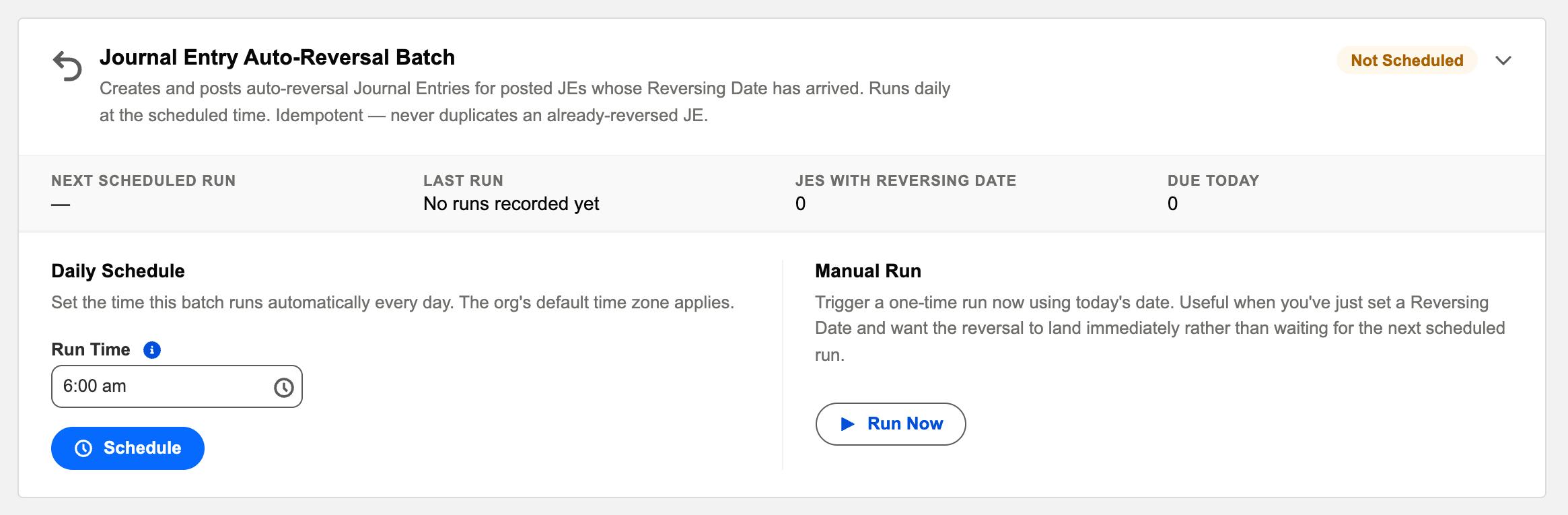
Accruals are promises to undo yourself: June’s estimated utility cost books on June 30 and must come back out on July 1, when the real bill takes its place. The Journal Entry Auto-Reversal Batch keeps that promise for you — its card says it all: "Creates and posts auto-reversal Journal Entries for posted JEs whose Reversing Date has arrived. Runs daily at the scheduled time. Idempotent — never duplicates an already-reversed JE."
Access you'll need. Scheduling and running batch jobs requires the Accounting Admin v2 permission set. The Accounting Controller v2 and Read Only v2 sets can open the console to view outcomes; the Accounts Payable v2 and Accounts Receivable v2 sets cannot see it, though they see the reversals the batch posts.
How the contract works
You set a Reversing Date when you create the entry
Meridian’s June utilities accrual carries Reversing Date: July 1. That single field is the entire setup — see Reversing Journal Entries.
The batch honors it on the day
On or after that date, the batch generates the mirror-image entry — debits and credits swapped — posts it into the reversal date’s period, marks it system-generated, and links it to the original.
Never twice
Idempotency is checked against the original entry: once a reversal exists, the original is done — rerun the batch all you like.
The pair, side by side — Meridian’s June accrual
Meridian Properties Group books $3,200 of estimated June electricity on June 30 (entry MJE001002, Reversing Date July 1). At dawn on July 1, the batch creates and posts MJE001004 — the mirror:
| Account | 30 Jun — the accrual (MJE001002) | 1 Jul — the reversal (MJE001004) |
|---|---|---|
| Utilities — Buildings | Debit $3,200 | Credit $3,200 |
| Accrued Expenses and Other Payables | Credit $3,200 | Debit $3,200 |
June carries the cost; July starts clean — so when the real bill posts in July at $3,350, the month’s expense nets to the $150 the estimate missed, and nothing is double-counted. That’s the entire trick, and it runs without anyone remembering it.
What the generated reversal carries
| On the reversal | What you’ll see |
|---|---|
| Lines | Copied from the source with Debit and Credit swapped — same accounts, same amounts, same dimensions, opposite direction. |
| Journal Date | The source’s Reversing Date, so the undo lands in the new period. |
| Type | Reversing, marked system-generated — a filter on the type shows only true undo entries. |
| Source Journal Entry | Points back at the original; the original’s Reversal Entries list points forward. The pair is permanently linked. |
| Description / Reference | "Reversal of …" plus the original description — provenance in plain sight. |
| Journal Entry Name | The next number from the entity’s document sequence, like any other entry. |
Operating it
Schedule it daily (early morning), and its work becomes invisible — accruals simply behave. The card’s last-run outcome and audit entry surface the exceptions: the classic is a reversal aimed at a period that’s since been closed, which fails loudly with exactly that reason rather than posting somewhere wrong. Fix the date or reopen the period, then Run Now.
Run Now’s own confirmation tells you its exact scope: "This will immediately process all posted Journal Entries with a Reversing Date on or before today and create their auto-reversal entries." — the same daily run, started by hand, useful when a reversal is needed before tomorrow’s scheduled pass.
The rules around it, verbatim
| The message | What it means / what to do |
|---|---|
| "Reversing Date must be after the Journal Date. Typically this is the first day of the following period." | An undo can’t precede — or coincide with — the thing it undoes. Set the date into the next period. |
| "No Open Accounting Period found for Reversing Date …. Create or open the period first." | Checked when the source entry posts, so a reversal is never stranded without a home. An administrator generates or opens the period. |
| A closed-period failure in the run’s audit entry | The reversal’s target period closed after the source posted. Nothing half-created is left behind — reopen the period (or align the close checklist to run the batch first), then Run Now. |
Common mistakes to avoid
| Mistake | Why it hurts | Do this instead |
|---|---|---|
| Expecting the reversal the instant the accrual posts | The batch is deliberately decoupled from posting — an empty Reversal Entries list before the Reversing Date is normal | Wait for the scheduled run on/after the date, or use Run Now |
| Setting the Reversing Date inside the same period | Accrual and undo cancel within one month — the period shows nothing, defeating the purpose | First day of the following period, per the field’s own guidance |
| Closing the new period before the batch’s round on the 1st | Every reversal aimed at the 1st fails with a closed-period reason | Run the batch first in the close checklist, or keep the period open until its round is done |
| Manually reversing scheduler-owned entries | Two undos of one accrual — the opposite of clean books | Entries with a Reversing Date belong to the batch; manual reversal is for the rest |
| Never looking at the run’s audit entry | A failed reversal means a misstated new month — quietly | The card’s outcome icon plus the Batch Run log entry is a ten-second daily check |
Where to go next
- Reversing Journal Entries — the user-side workflow.
- Understanding Journal Entries — entry types incl. Reversing.
- Operations Scheduler Overview — the console.
Frequently asked questions
Yes — the Reverse action on the journal entry creates the reversal on demand. The batch then sees it exists and leaves the entry alone; manual and automatic never collide.
A posted journal entry of type Reversing, system-generated, dated the reversing date, every line the mirror of the original, linked back to it. Open the original and its reversal is right there in the related records.
Posted — the batch creates the mirror entry and posts it in the same run; that’s the point of automating it. If the post can’t succeed, nothing half-created is left behind and the failure is logged for the administrator.
Before it exists: reopen the source entry, clear the Reversing Date, re-post. After it exists: reopen or void the reversal entry itself (Controller/Admin rights), which restores the accrual’s effect. See Reversing Journal Entries.
Completely — the batch is idempotent: an entry that already has a reversal on file is skipped, never reversed twice. An extra run with nothing due simply reports no work.
Was this article helpful?