
JE Lines (Debit & Credit)
The header of a journal entry is bookkeeping metadata; the lines are the accounting. Each line is one movement — one GL account, one side (debit or credit), one amount — and REDA Financials polices every one of them so that what reaches the ledger is exactly, and only, what a ledger should accept.
Access you'll need. Adding and editing journal lines requires the Accounting Admin v2 or Accounting Controller v2 permission set — the same access as the parent entry. The Accounts Payable v2, Accounts Receivable v2, and Read Only v2 sets can view lines but not change them.
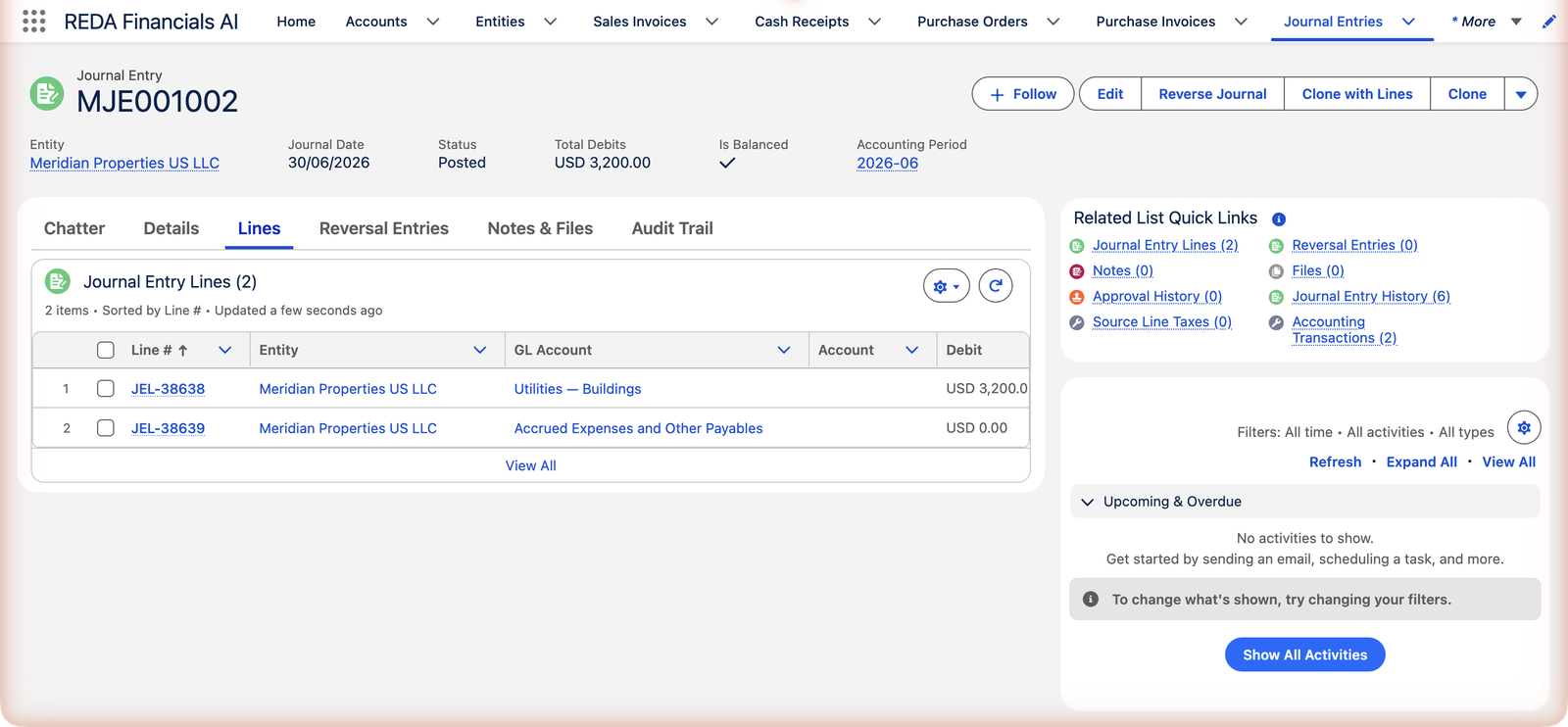
What a line carries
| Field | Rules |
|---|---|
| GL Account (required) | Must be active, and either global or scoped to this line's entity/territory. Inactive or foreign-entity accounts are refused with a specific message. |
| Debit / Credit | Exactly one of the two, always a positive amount — "Each Journal Entry Line must have exactly one of Debit or Credit populated with a positive amount." To flip a line's direction, move the number to the other column; never type a minus. |
| Entity | Defaults from the entry's header; set it per line only for intercompany entries. |
| Cost Center | The line's dimension — carried onto the ledger for dimensional reporting; must be global or belong to the line's entity. |
| Account | Optional customer/vendor the line concerns (reporting context only). |
| Description | Line-level note — "Estimated June electricity" tells more than the header alone. |
| Product / Tax Side / Tax Base / Tax Profile Override | The advanced tax quartet: give a line a Product and a Tax Side (Sales or Purchase) and the tax engine treats it like an invoice line at posting — computing tax, splitting the amount, and posting the tax to its mapped account. |
The accrual's lines, field by field
Meridian's June accrual (MJE001002) needs exactly two lines. Here's everything each one carries:
| Line 1 | Line 2 | |
|---|---|---|
| Entity | Meridian Properties US LLC | Meridian Properties US LLC |
| GL Account | Utilities — Buildings | Accrued Expenses and Other Payables |
| Debit | $3,200.00 | — |
| Credit | — | $3,200.00 |
| Description | Estimated June electricity — invoice not yet received | Estimated June electricity — invoice not yet received |
Two lines, one story: the expense side says June used this electricity; the liability side says we owe for it. When the entry posts, each line becomes one ledger row — same account, same side, same amount — so anything you can say about a line you can later read back from the ledger.
The balance discipline
- The entry balances as a whole: total debits = total credits, to the penny. The form's Difference indicator and the record's Is Balanced check both watch it; posting enforces it — "Journal Entry cannot be posted because Total Debits do not equal Total Credits…"
- Zero isn't an entry: "Total posting amount is zero. Add at least one non-zero line."
- Intercompany entries balance per entity too — each entity's lines must net to zero on their own. The whys and hows live in Intercompany Journal Entries.
When a line carries tax
Most journal lines never meet the tax engine. But give a line a Product and a Tax Side (Sales or Purchase), with Tax Base anything other than Tax Exempt, and posting treats it like an invoice line:
- Tax is computed at posting, per line — each line can have its own Tax Side, its own party (the Account field), even its own entity, and an optional Tax Profile Override when the standard profile shouldn't apply.
- The amount splits. The debit or credit you entered becomes a net-of-tax ledger row on the line's GL account, plus separate tax rows (described as Output Tax or Input Tax) on the tax account your administrator mapped for that tax type and entity.
- Tax Amount fills itself on the line, and rolls up to the entry's Total Tax Amount. You never type either.
- Missing setup stops the post, by name: "No GL Account configured for Tax Type "…" on Entity … . Configure it in Entity Tax Type Mapping." — a one-time administrator fix.
- Reopening the entry removes its tax records along with the ledger rows — the round trip is complete either way.
The rules that keep lines clean
Each guard below is a real message, quoted exactly. They apply on every save — manual, CSV upload, or integration:
| The message | What it means / what to do |
|---|---|
| "Each Journal Entry Line must have exactly one of Debit or Credit populated with a positive amount." | Both sides filled, neither filled, or a negative amount. One side, positive, per line. |
| "GL Account is required on every Journal Entry Line." | Every movement needs somewhere to land. |
| "GL Account is inactive and cannot receive new postings. Select an active GL account or contact your administrator." | The account was retired from the chart. |
| "This GL Account belongs to a different entity. Use a global GL Account (no entity restriction) or one assigned to the same entity as this line." | Each company posts to its own accounts (or shared global ones). |
| "This GL Account is restricted to a different territory. Select a GL Account that is either global or scoped to this entity's territory." | The regional variant of the same rule. |
| "Entity is inactive and cannot receive new transactions. Select an active entity or contact your administrator to reactivate it." | The line names a retired company. |
| "Account is inactive. Remove the account reference or select an active account." | The customer/vendor on the line is deactivated. |
| "This Cost Center belongs to a different entity. Use a global cost center (no entity restriction) or one assigned to the same entity as this document." | Dimensions follow entity scope too. |
| "This Cost Center is restricted to a different territory. Select a cost center that is either global or scoped to this entity's territory." | …and territory scope. |
| "Cannot modify lines on a posted or voided Journal Entry." | Lines lock with their parent — see below. |
When lines lock
Lines follow their parent: while the entry is Draft they're freely editable; once Posted (or Void), every insert, edit and delete is blocked — "Cannot modify lines on a posted or voided Journal Entry." To fix a posted line, reopen the entry to Draft (its ledger entries are removed), correct, and post again.
Common mistakes to avoid
| Mistake | Why it hurts | Do this instead |
|---|---|---|
| A negative debit to "flip" a line | Refused outright — and even if it weren't, signed amounts make ledgers unreadable | Move the amount to the Credit column |
| Filling both Debit and Credit on one line | Refused — a line is one movement, not two | Two movements = two lines |
| Overriding a line's Entity casually | The entry silently becomes intercompany and must balance per entity | Leave Entity blank (it defaults from the header) unless you mean a cross-entity journal |
| Skipping the Cost Center on dimensional accounts | The ledger row posts without its dimension — dimensional reports show a gap that can't be patched later without reopening | Set the dimension while the line is a draft; it's carried onto the ledger at posting |
| Setting the tax quartet "to be safe" | A Product + Tax Side triggers real tax accounting — extra ledger rows you didn't intend | Leave tax fields blank unless the journal genuinely represents a taxable event |
Where to go next
- Creating a Journal Entry — the form these lines live in.
- Intercompany Journal Entries — when lines span entities.
- Accounting Transactions — where the lines end up.
Frequently asked questions
A negative debit is just a credit wearing a disguise — and disguises make ledgers unreadable. The rule (one side, positive) keeps every ledger row unambiguous. Move the amount to the Credit column instead.
Yes — for example, the same expense account debited under two different cost centers. Each line is its own ledger row with its own dimension.
Nothing — no Product + Tax Side means no tax calculation, which is right for the vast majority of journals. Only fill them when the journal genuinely represents a taxable transaction that has no invoice document.
Not while it's Posted — "Cannot modify lines on a posted or voided Journal Entry." Click Edit on the entry: the confirmation reopens it to Draft (removing its ledger rows), you fix the lines, and post again. If the period has since closed, correct with a new entry in the open period instead.
No practical one — allocation-style journals routinely run dozens of lines. For big grids, build the lines in a spreadsheet and use the form's CSV upload (see Creating a Journal Entry) rather than typing row by row.
The tax engine computes it at posting from the line's Product, Tax Side and Tax Base, and writes it to the line — it's read-only bookkeeping, not an input. It rolls up to the entry's Total Tax Amount, and disappears again if the entry is reopened.
Was this article helpful?