
Trial Balance
The trial balance is accounting's smoke test: every account's activity and balance, side by side, with one non-negotiable property — total debits equal total credits. It's the first report a controller runs at month-end and the last word in "do the books balance?" — computed live from the ledger.
Access you'll need. Any REDA Financials permission set can open the Financial Center tab and run the trial balance; what you see is limited to the records your role can read.
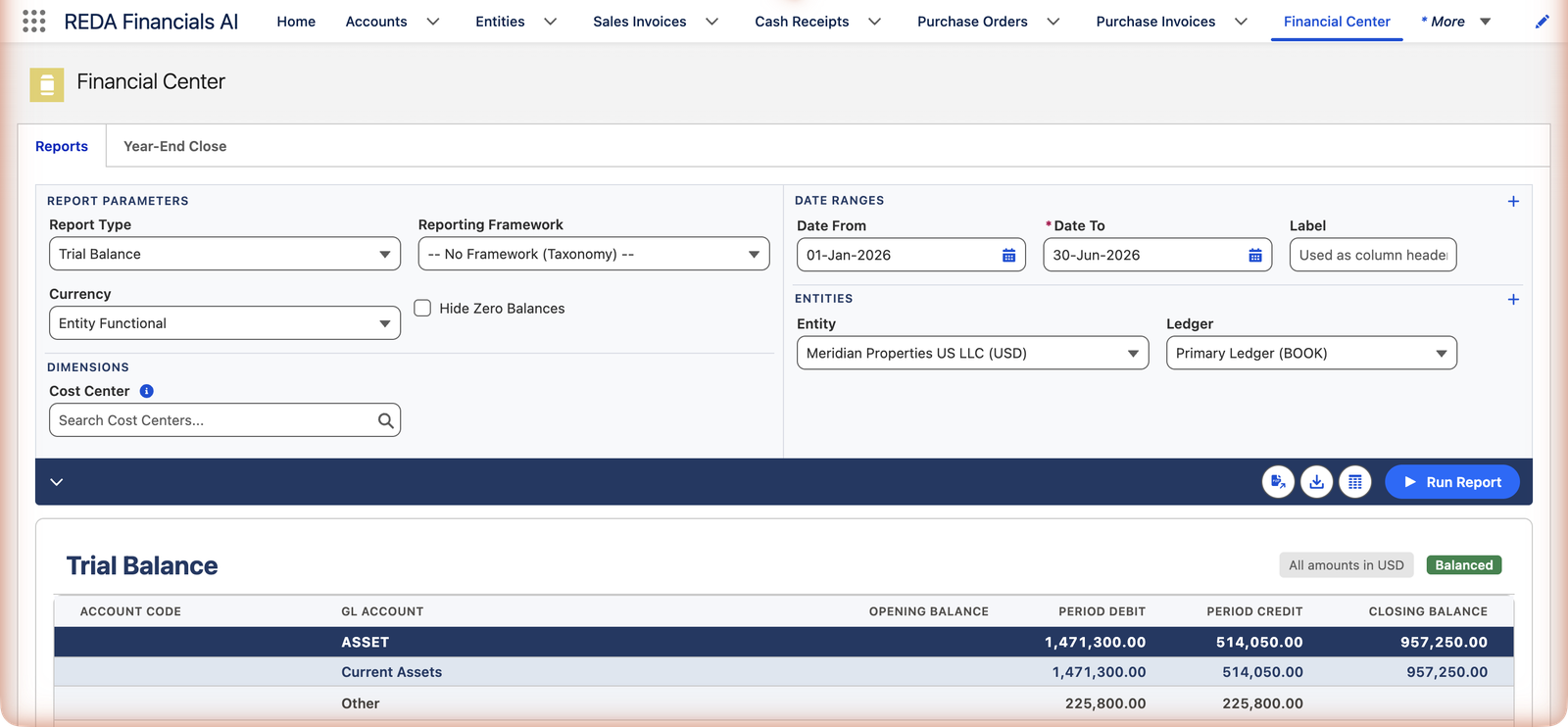
Setting up the run
The trial balance shares the Financial Center's single filter panel with the other statements (full reference). Here is what each control means for this report specifically:
| Control | For the trial balance |
|---|---|
| Report Type | Set to Trial Balance. Switching type clears the previous result, so export first if you need it. |
| Date From / Date To | The period whose activity fills the Period Debit and Period Credit columns. The From date also anchors the opening balances — leave it empty and the report shows period movement without opening balances. |
| Entity + Ledger | Each entity row adds a full four-column set for that company. The Ledger box preselects the entity's default ledger; change it to run another ledger's books. |
| Reporting Framework | Optional. A framework restructures the rows under your own headings; left at "-- No Framework (Taxonomy) --" the report groups by account type and subtype. |
| Hide Zero Balances | Removes rows that are zero in every column, and any groups left empty — the working view for real reviews. |
| Run Report | Stays disabled until at least one entity and one date range are set. |
Reading the four columns
| Column | Meaning |
|---|---|
| Opening Balance | Where the account stood at your From date — balance-sheet accounts carry their full history; income and expense accounts open from the fiscal year's start (they reset yearly, as they should). |
| Period Debit / Period Credit | The activity between your dates — both sides shown separately, because the trial balance's job is exactly to compare them. |
| Closing Balance | Opening + the period's net activity. Credit balances show in parentheses. |
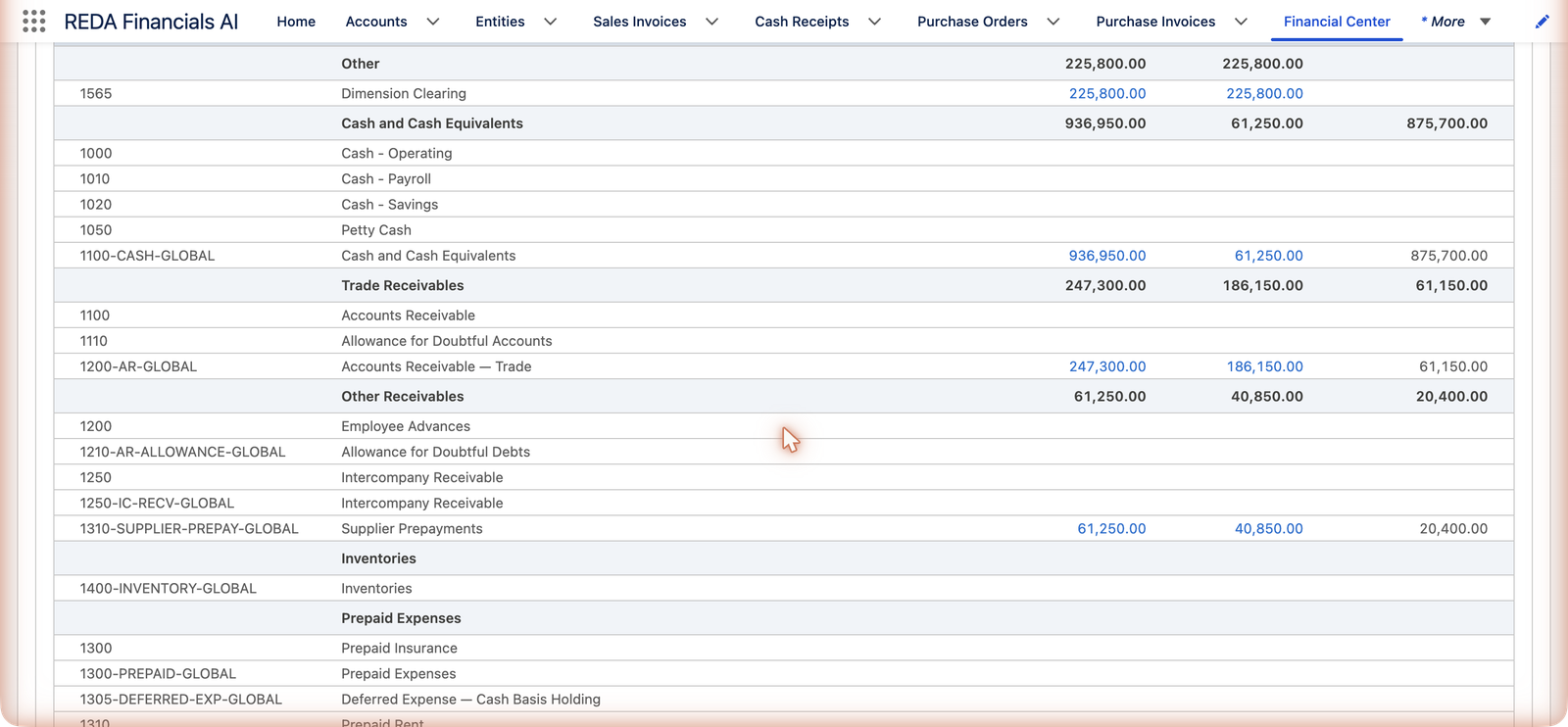
Rows group by account type and subtype (ASSET → Current Assets → Cash and Cash Equivalents…), or by your own reporting framework if you select one. The Grand Total row and the Balanced / Imbalanced badge give the verdict.
A worked run: Meridian US, first half of 2026
Meridian Properties Group's US entity runs its trial balance for 1 January – 30 June 2026 (the run in the screenshots above). The books opened with the year, so the cash row reads straight across the four columns:
| Account | Opening Balance | Period Debit | Period Credit | Closing Balance |
|---|---|---|---|---|
| Cash and Cash Equivalents | 0.00 | 936,950.00 | 61,250.00 | 875,700.00 |
The arithmetic is the whole report in miniature: Closing = Opening + Period Debit − Period Credit = 0 + 936,950 − 61,250 = 875,700. Down the page, Accounts Receivable — Trade closes at 61,150 and Supplier Prepayments at 20,400 — and the Balanced badge confirms the entity's total debits and credits agree. Meridian's controller repeated the run for June 2026 alone at month-end: same badge, one month's activity, opening balances carrying everything through 31 May. Either amount in the Debit or Credit column is one click from its transactions — 936,950 of cash debits sounds like a lot until the drill-down shows the rent receipts behind it.
More entities, more periods
The trial balance handles the group question as comfortably as the single-company one:
- One entity, one period — the classic month-end run above.
- Several entities — each entity row adds its own four columns, and the balanced-or-not verdict is given per entity column: one subsidiary's problem doesn't hide inside a group total.
- Several periods — each date range adds a column set, labeled with whatever you typed in the range's Label field. Useful for watching an account's opening→closing progression quarter by quarter.
- Mixed currencies — selecting entities with different currencies switches the report to corporate currency automatically (a toast tells you: "Multiple currencies detected — showing in corporate currency"), and the badge above the report always names the currency: "All amounts in USD".
The three classic uses
- The month-end gate: Balanced badge + eyeball of unusual balances (a credit where a debit belongs) before producing statements.
- The reconciliation anchor: closing balances are what sub-ledgers, bank reconciliations and aging reports must tie to — Meridian's cash row (875,700) is the same figure its bank reconciliation proved.
- The audit handshake: auditors start from a trial balance; export it (PDF, CSV or Excel) and the four-column layout survives in Excel and PDF.
Messages you may meet
The Financial Center explains itself as you go. These are the exact texts and what they mean:
| The message | What it means / what to do |
|---|---|
| "Configure your report parameters and click Run Report" | The empty state — nothing has run yet. Set an entity and a date range, then Run Report. |
| "Generating report..." | The run is in progress; large date spans take a moment. |
| "No data found for the selected parameters" | The run worked but nothing matched — usually a date range before the books began, the wrong entity, or a dimension filter that excludes everything. |
| "At least one entity is required to generate a report." | Add an entity row — every statement needs to know whose books to read. |
| "At least one date range is required to generate a report." | Add a date range with a To date filled in. |
| "Date To is required for date range row 1." | A range row is missing its To date — ranges without one are not submitted. |
| "Report generation failed: …" | Something unexpected stopped the run; the detail after the colon says what. Persistent failures go to your administrator. |
Common mistakes to avoid
| Mistake | Why it hurts | Do this instead |
|---|---|---|
| Running without a From date and reporting the "balances" | With no From date there are no opening balances — the columns show movement, not position | Always set both dates for a month-end trial balance; use From = the entity's first day for a since-inception view |
| Reconciling a sub-ledger against the CSV export | The CSV flattens each entity to a single net-movement amount — it has no opening or closing columns to reconcile against | Use the Excel or PDF export, which keep all four columns |
| Misreading amounts in parentheses | Parentheses mean a credit balance, not an error — treating a revenue account's (246,100) as a problem wastes an investigation | Expect credit-normal accounts (revenue, liabilities, equity) to sit in parentheses in the Opening/Closing columns |
| Using the trial balance for period-over-period analysis | It deliberately has no variance column — you end up computing differences by hand | Run the Income Statement or Balance Sheet with two labeled ranges; the Variance column appears automatically |
| Clicking a group subtotal and concluding drill-down is broken | Group rows are arithmetic over their members — they aren't links | Drill the account-level Debit and Credit amounts; the group is their sum |
| Reviewing with zero rows left in | A full chart of accounts buries the twenty rows that matter under hundreds of silent ones | Tick Hide Zero Balances for reviews; untick it when you need to prove an account is empty |
Where to go next
- Report Filters & Dimensions — every parameter explained.
- Drill-Down from Any Amount — from balance to transactions.
- Income Statement — the story the P&L accounts tell.
Frequently asked questions
Treat it as a stop-everything signal — double-entry means it should be impossible from normal postings. Check the Grand Total row for the difference, drill into recently active accounts, and involve your administrator: the cause is usually data loaded outside normal flows.
P&L accounts measure a year, so their opening balance counts only from the fiscal year's start. Balance-sheet accounts never reset — their opening is all history to date. This mirrors how the statements themselves work.
Every active account with activity or balance in scope, including the control accounts (AR, AP) — the trial balance needs them to balance. Tick Hide Zero Balances to prune the silent rows.
The CSV flattens to one net-movement amount per entity (a data-friendly shape); PDF and Excel keep the four-column layout. Pick the format for the audience: Excel for humans, CSV for tools.
The drillable links are the Period Debit and Period Credit amounts on account lines — the activity between your dates. An opening balance is the sum of everything before the From date; to inspect it, run the report again with an earlier range covering that history and drill the activity there.
Each entity row in the filter panel carries its own Ledger selection, preset to the entity's default. If your entity keeps more than one ledger, check that box before trusting a run — the report reads exactly the ledger you picked.
Yes — the report switches itself to corporate currency and tells you so ("Multiple currencies detected — showing in corporate currency"). Every run states its money at the top: "All amounts in …". For a single entity you'll normally see its own functional currency.
Was this article helpful?