
AI Auto-Matching
Most statement lines have an obvious explanation sitting in your books — same amount, same reference, a day or two apart. Machines should find those. REDA Financials matches in three escalating layers: a deterministic engine for the certain, rules for the recurring, and an AI layer for the judgment calls — each triggered by its own button in the workspace, each leaving a full audit trail.
Access you'll need. Running matching and accepting suggestions requires the Accounting Admin v2 or Accounting Controller v2 permission set. The Accounts Payable v2, Accounts Receivable v2, and Read Only v2 sets can view the reconciliation but not match or change it.
Layer 1 — Auto Match: the deterministic passes
The Auto Match button runs three passes over the unmatched lines, strictest first, each pairing a line with one posted document (receipt, payment, bank-GL journal line, or bank deposit) of the same direction:
| Pass | Pairs when… | Character |
|---|---|---|
| 1 — Exact | Amount + same date + the same reference or check number on both sides | Certainty — the reason disciplined references pay off |
| 2 — Date Range | Amount matches within the account's match window (default ±10 days); the closest date wins, ties are left alone as ambiguous | Clearing delays, handled |
| 3 — Amount Only | Exactly one candidate anywhere has that amount and direction | Safe last sweep — unique or untouched |
Everything it pairs is stamped Auto and recalculates the Difference immediately; ambiguity is never guessed — those lines wait for you. Auto Match also runs your rules automatically after its passes. Meridian's July run: three lines matched in one click (the exact references did the work), one bank fee left over.
July's one click, line by line
What that click actually did, on the four lines of Meridian's July statement:
| Statement line | Candidate found | Pass that paired them |
|---|---|---|
| +$9,000.00 · ACH-20260702-CORV | Corvus Consulting's $9,000 rent receipt, carrying the same reference | 1 — Exact: amount, date and reference all agree |
| −$2,200.00 · CC-INV-11406 | The $2,200 payment to CityClean Services, same reference | 1 — Exact |
| −$10,000.00 · WIRE-ACC-0702 | The $10,000 wire to Apex Construction, same reference | 1 — Exact |
| −$45.00 · MONTHLY ACCOUNT SERVICE FEE | None — the bank generated this; no document exists | Left unmatched, correctly. Its future is an adjustment (this month) or a rule (every month). |
Three exact-pass hits out of three matchable lines is not luck — it's reference discipline. Each document carried the bank's real identifier, so the strictest pass, the one that can't be wrong, did all the work. The run itself is a background job: the workspace reports "Auto matching in progress..." and then "Auto match complete. Refresh to see results."
Layer 2 — Run Rules: the recurring
Between the deterministic and the AI sits automation you author: Bank Account Rules, which recognize recurring statement lines by their text and create the missing document — the very thing matching can't do. The workspace's Run Rules button sweeps them across the unmatched lines (and Auto Match chains them automatically after its own passes); the reconciliation must be open for it — "Bank Reconciliation must be In Progress to run rules." Lines a rule handles are stamped Rule-Based.
Layer 3 — Run AI: suggestions with receipts
Run AI sends the stubborn remainder to REDA Financials' AI with real context — your reconciliation history, your rules, your past adjustments — and returns three kinds of suggestions, each with a confidence score and written reasoning:
- Match suggestions (only 70%+ confidence is shown): "this line is probably that document, because…". Review and Accept Selected — or Accept All ≥90% for the green-badge tier. Accepted suggestions apply through the manual-match machinery, audit-stamped to you: the human owns the decision.
- Adjustment suggestions — lines that look like fees, interest or FX differences with no document to find: "book this, don't hunt it."
- Rule suggestions — recurring patterns worth automating permanently.
What the AI is shown
The suggestions are only as good as their context, so the AI reads your organization's own history before saying a word:
| Context | Why it's included |
|---|---|
| Up to 1,000 of your past manual matches | Learning data — how your team has historically connected this bank's wording to your documents |
| Up to 50 active matching rules | So rule suggestions never duplicate automation you already have |
| Up to 500 unmatched statement lines and 500 candidates | The actual work in front of it |
| Up to 100 past reconciliation-adjustment journals | What your bank-generated lines (fees, interest) have looked like before — fuel for adjustment suggestions |
While it works, the panel narrates its progress — "Analysing reconciliation history…", "Building context…", "AI processing…", "Analysis complete" — and reports its haul plainly: "AI found {0} match suggestion(s), {1} adjustment suggestion(s), and {2} rule suggestion(s)." (or, just as honestly, "AI found no suggestions for the current unmatched items."). Each suggestion in the AI Match Suggestions panel shows its confidence — a green badge at 90% and above, yellow below — and its written reasoning. Accepting confirms with "{0} AI match(es) applied successfully."
Matching when the bank account and the document are in different currencies
Sometimes the money in your books and the money on the statement are quoted in different currencies. A customer pays a €1,000 invoice, but the receipt lands in your US-dollar bank account, and the statement shows the dollars the bank actually credited. The amounts will never be equal number-for-number — €1,000 is not $1,000 — so a naive amount match would miss them. REDA Financials handles this by comparing the two sides in one common currency: the bank account's.
Every receipt and payment now carries a Bank Reconciliation Amount — its value expressed in the bank account's currency, calculated as Amount × Exchange Rate. This is the number matching compares against the statement line. It is filled in for you and shown read-only; you never type it.
Reconciliation Tolerance — absorbing the rounding gap
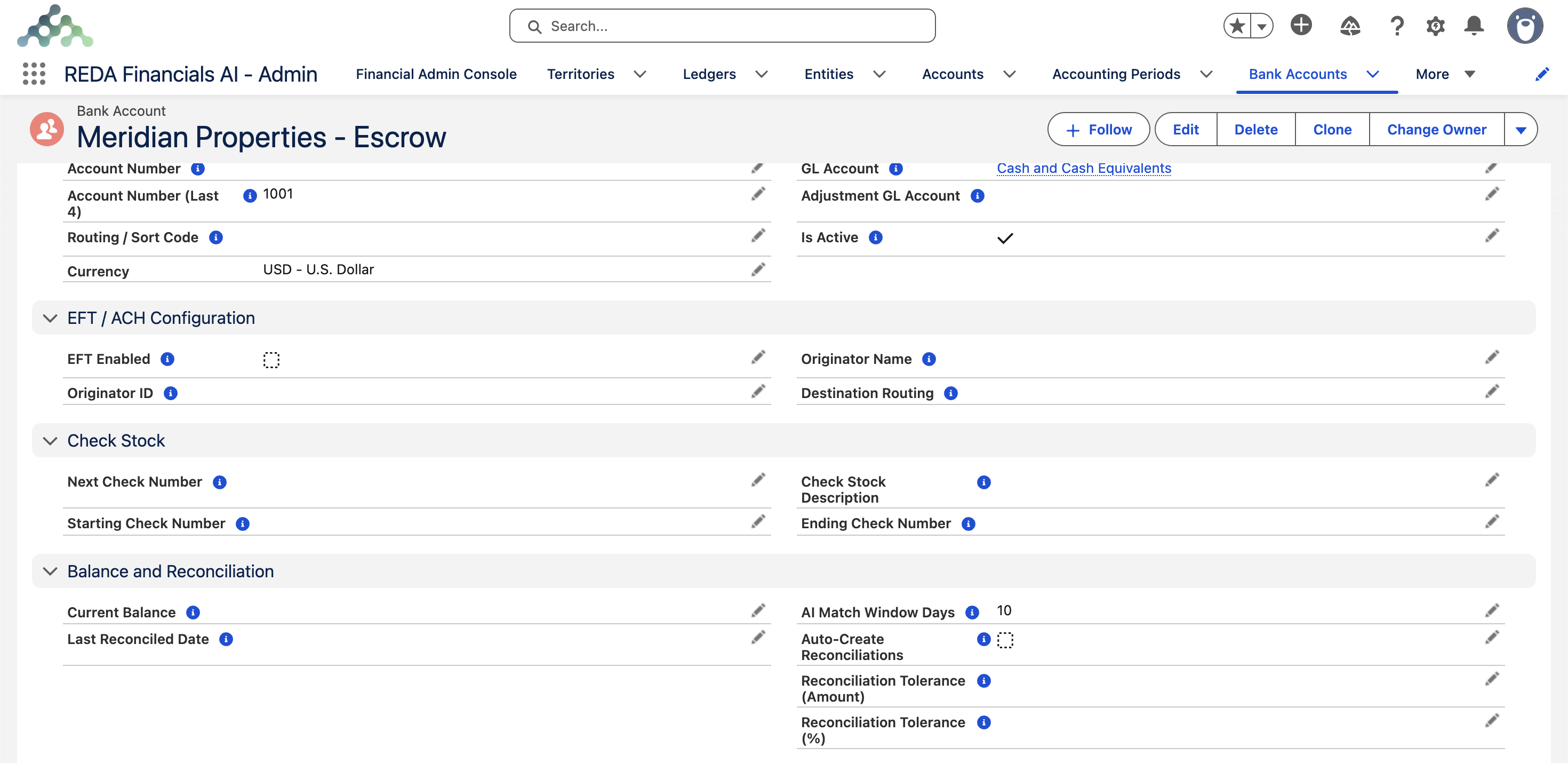
Cross-currency values rarely land to the cent, so each Bank Account has a Reconciliation Tolerance that says how large a difference is still "the same payment":
| Field | What it does |
|---|---|
| Reconciliation Tolerance (Amount) | The largest absolute difference, in the bank account's currency, still allowed to match. In the example above, any value of $0.80 or more permits the $0.80 gap. |
| Reconciliation Tolerance (%) | Optional. A percentage cap applied together with the amount tolerance — the difference must be within both to match. Leave blank to rely on the amount tolerance alone. |
Within tolerance, the line matches and the small difference is resolved through the reconciliation's usual adjustment process. Beyond tolerance, the line is left unmatched and flagged for review — a gap that large is telling you something (a wrong rate, a bank fee to book, the wrong document) rather than a rounding artifact. The default tolerance is 0, which means exact match only; the feature is off until you set a value.
Access you'll need. The two tolerance fields are editable by the Accounting Admin v2 and Accounting Controller v2 permission sets; the Accounts Payable, Accounts Receivable, and Read Only sets see them read-only. If your org customized the Bank Account page layout, an admin must add the two fields to it (Setup → Object Manager → Bank Account → Page Layouts).
Common mistakes to avoid
| Mistake | Why it hurts | Do this instead |
|---|---|---|
| Reaching for Run AI before Auto Match | You spend judgment (and an AI run) on lines the deterministic passes would have cleared for free, instantly | Always the same order: Auto Match → Run Rules (chained automatically) → Run AI on the stubborn remainder |
| Accepting suggestions without reading the reasoning | The reasoning is the safeguard — the confidence score says how sure, the reasoning says why, and a wrong "why" at 85% is a wrong match with your name on it | Read the sentence. Accept Selected for what convinces you; leave the rest for the two-pane view |
| Vague references on receipts and payments | Pass 1 can only pair what both sides name identically — "payment" matches nothing, and every month demotes to date-and-amount work | Record the bank's real identifier on every document; import the bank's reference column faithfully |
| Widening the match window to make a stubborn line pair | A too-wide window invites wrong neighbors — pass 2 picks the closest date, which now might be the wrong document | Fix the actual cause (a missing document, a wrong sign); tune the window to your clearing times, not to one line |
| Waiting for the AI to book fees or create rules by itself | It never will — suggestions are display-only pointers | Adjustments: Create Adjustment. Rules: create them on the bank account, using the suggestion as your spec |
Habits that make matching excellent
- Real references on your documents (the receipt's wire confirmation, the payment's check number) — every exact-pass match is a reference you recorded well.
- Import the bank's reference column — the other half of the handshake.
- Tune the match window per account (see configuration) — wide enough for your clearing times, tight enough to avoid wrong neighbors.
- Promote AI's repeat suggestions into rules — this month's suggestion is next month's automation.
Where to go next
- Manual Matching & Unmatching — the lines that need a human.
- Bank Account Rules — automating the recurring.
- Completing a Reconciliation — after the queues empty.
Frequently asked questions
Thirty seconds bad: unmatch the line (the stamps clear, both sides return to their queues) and match it right. Wrong pairs are rare by construction — passes 1 and 3 only act on certainty, and pass 2 skips ambiguity.
No candidate cleared 70% confidence — the honest answer is "a human should look." Check the other side exists at all: the most common cause is a receipt or payment that was never posted.
Never. It suggests; you accept — and acceptance is recorded as your manual match. Adjustment and rule suggestions likewise point you at the tool; they don't wield it.
No — matching is one-to-one. A bank splitting one deposit across two lines is the rare manual case: unbundle on your side (or reconcile via a deposit grouping that mirrors the bank's slices).
The unmatched lines belonging to this reconciliation's period — extended by the reconciliation's Match Window Days, so last month's checks clearing this month are in scope. Candidates on the book side are posted documents only: receipts, payments, bank-GL journal lines, and posted bank deposits.
They step out of the pool — a posted Bank Deposit is matched as one unit, and its member receipts and journal lines are excluded as individual candidates. That's the design: the statement shows one line for the deposit, so the books offer one candidate.
No — "AI analysis failed: {0}" means no suggestions arrived, and since suggestions never apply themselves, nothing in your reconciliation moved. Run it again; if it keeps failing, reconcile the old way and mention the message to your administrator.
Was this article helpful?