
Acquiring a Property
This is the end-to-end how-to for buying property through REDA: taking a qualified acquisition deal all the way from underwriting through offer, contract, and close. It covers the two headline automations that surprise newcomers — REDA creates the Property record for you the moment the deal goes under contract, and a placeholder loan appears automatically for that property — so you can explain where every record came from. After reading, you'll be able to advance an acquisition through each stage, run the purchase agreement ticket, and complete the financing. No prior REDA experience is assumed; each stage and term is defined as we reach it.
Access you'll need. Working acquisitions requires the REDA - Property Acquisition User permission set. Completing the financing also needs REDA - Property Lending User. Deleting a Property is reserved for REDA - Master Data - Admin.
What an acquisition deal is
An acquisition deal is REDA's deal record in its "buying" form. It does double duty: it's the deal that moves stage by stage from qualification to close, and it's the underwriting worksheet holding your analysis numbers. For the field-by-field detail of that worksheet — the after-repair value, the cost estimates, and the ceiling offer — see Acquisition Analysis Fields.
Where deals come from
A deal usually begins when you convert a qualified acquisition inquiry (see Capturing and Converting Acquisition Leads). Conversion creates the deal at Qualification, with a primary Seller contact role and the underwriting block carried across. Notably, the deal can exist before any Property record does — early on, the target's address is just text on the deal. REDA names the deal automatically as "<address> [ Acquisition ]."
The acquisition pipeline, stage by stage
An acquisition moves along seven stages. You advance most of them; the jump to Under Contract is set for you by the purchase agreement ticket. Here's the full ladder with what you do versus what REDA does:
| Stage | What you do | What REDA does |
|---|---|---|
Qualification (default) | Underwrite: ARV, estimates, MAO; pick the Profit & Holding Rule | Seeds blank estimates from the rule; auto-names the deal from the address |
Inspection | Inspect the asset | — |
Offering | Make the offer (MAO as your ceiling) | — |
Under Contract | Record the signed purchase agreement via the ticket | Deal becomes active → creates the Property (and the property side creates the placeholder loan) |
Clear to Close | Title and funding clearance | — |
Closed Won | Close the purchase | Deal closes; the Property and loan carry on |
Closed Lost | Walk away | Deal is inactive |
The word active is the pivot: a deal is active from Under Contract onward, and reaching active is what triggers the automations covered below.
Underwriting numbers on the deal
The deal carries the underwriting block. Picking a Profit & Holding Rule seeds the Estimated Con/Reno Cost, Estimated Holding Cost, and Estimated Profit — but only where they're blank, so your hand-entered figures are preserved. The Maximum Allowed Offer (MAO) then computes as the after-repair value minus those three estimates, giving you an offer ceiling. Your Buying Account (the purchasing entity) is chosen from a list restricted to your internal entities. For the complete field reference see Acquisition Analysis Fields, and for where the defaults come from see Profit Holding Rules.
The Purchase Agreement ticket
When terms are agreed, you contract the deal with the Acq - Purchase Agreement ticket — a short, controlled process. Its statuses drive the deal:
| Ticket status | Effect on the deal |
|---|---|
New (default) / In Process / Contract Sent | None — acquisitions have no Contract Out stage |
Contract Signed | Deal stage → Under Contract |
Closed | Deal stage → Under Contract |
Cancelled | Deal reverts to the stage saved when the ticket was created (only if still in the stage this ticket set) |
The ticket must link an acquisition deal — "Only Acquisition Opportunity can be selected." — and if the agreement was signed on paper, you must attach the signed file before closing it — "Please attach Document prior closing Ticket." The full ticket walkthrough is in The Acquisition Purchase Agreement Ticket.
Under Contract — sign or close the purchase agreement ticket and let it write the transition. Editing the stage directly fights the automation.
When it goes active: REDA creates the Property
Signing the ticket moves the deal to Under Contract, and — if no Property is linked yet — REDA creates the Property record for you from the deal, copying roughly twenty details across. The ones to know by name:
| On the new Property | From |
|---|---|
| Owner Account | The deal's Buying Account |
| Purchase Price | The deal's Sale / Purchase Price |
| Leasing Rule | The Profit & Holding Rule's leasing rule, or the region default |
| Beds / Baths / Built & Gross Area / Parking | The deal's property-fact snapshot |
| Link back to the acquisition deal | The deal |
| …and other property details | The deal |
If a Property was already linked, REDA doesn't create a duplicate — it refreshes the property's references to the active deal instead. Right after the property is born, REDA also creates a placeholder loan (a Lending deal) for it — at Prospecting, with the borrower set to your Buying Account, linked back to the acquisition. It's the financing slot; you complete it or close it out for a cash purchase. The full detail of both automations is in Property Creation and Funding an Acquisition.
Financing the purchase
Complete the placeholder loan with the amount and terms. Two rules keep it aligned with the acquisition:
"Property must be same as on Acquisition Opportunity."
Loan amounts allotted to the acquisition roll up onto the deal automatically (active loans only). As funds release, record draws with Loan Disbursement tickets, which roll up to the property, the loan, and the acquisition. Settlement charges are available on the deal for the closing statement. The financing mechanics live in the lending section; the closing statement in the property-sales section.
The full walkthrough
Qualification with a Seller contact role.Inspection, then Offering; record the binder if there's earnest money.Contract Signed moves the deal to Under Contract.Clear to Close → Closed Won.Worked example: acquiring Meridian Court
Meridian Properties sources the distressed Meridian Court, owned by Continental Holdings. The acquisition inquiry (no Property record yet) converts to the deal "Meridian Court [ Acquisition ]" at Qualification with a Seller contact role. The rule "Harbour District - Property" seeds Con/Reno 40,000, Holding 15,000, and Profit 45,000; with ARV 400,000, the MAO is 300,000. The offer is accepted at 280,000 (the Sale / Purchase Price).
| You do | REDA does |
|---|---|
Underwrite at Qualification, pick the rule | Seeds the three estimates; MAO = 300,000 |
| Inspect, offer 280,000, record the binder | — |
| Sign the Acq - Purchase Agreement ticket (1 Jul) | Deal → Under Contract; creates the Property "Meridian Court" (owner = Meridian Capital, purchase price 280,000) and a placeholder loan (Prospecting, borrower = Meridian Capital) |
| Fund with a 750,000 rehab loan; record draws | Loan totals roll up to the acquisition |
Advance Clear to Close → Closed Won | Deal closes; Property and loan carry on |
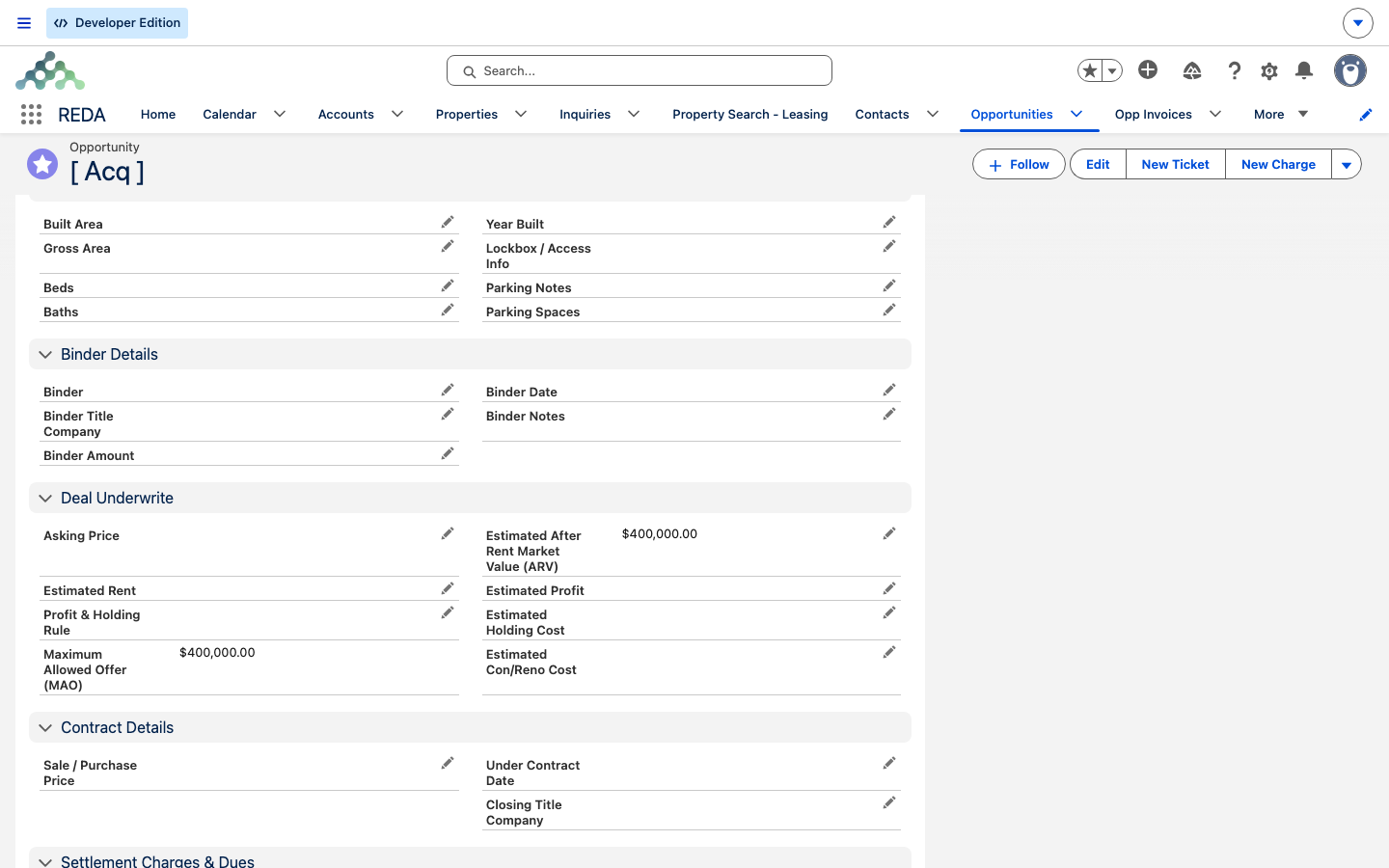
Qualification). Estimated After Rent Market Value (ARV) is $400,000.00 and the Maximum Allowed Offer (MAO) computes to $400,000.00 — the ceiling recomputes from the ARV and the cost estimates (Estimated Profit, Holding Cost and Con/Reno Cost, still blank here).Reference: stage → what REDA does
One row per stage, showing who moves it and what REDA creates or updates as it lands there:
| Stage | Who / what moves it | What REDA creates or updates |
|---|---|---|
Qualification | Conversion, or a manual new deal | Seeds blank estimates from the rule; auto-names the deal |
Inspection | You | — |
Offering | You | — |
Under Contract | Acq - Purchase Agreement ticket → Contract Signed / Closed | Deal goes active; Property created; placeholder loan created |
Clear to Close | You | — |
Closed Won | You | Deal closes; Property and loan carry on |
| Rewind | Ticket → Cancelled | Stage reverted to the creation-time snapshot |
Where to go next
- Capturing and Converting Acquisition Leads — how a deal is created.
- Running an Acquisition Deal — Binder to Contract — advancing the deal and recording the binder.
- The Acquisition Purchase Agreement Ticket — the ticket that drives
Under Contract. - Property Creation and Funding an Acquisition — the auto-created records and the financing.
- Acquisition Analysis Fields — every underwriting field defined.
- Profit Holding Rules — where the estimate defaults come from.
Frequently asked questions
REDA creates it when the acquisition goes active — the moment it reaches Under Contract — if no property was linked yet. It copies the deal's details and sets the owner to your Buying Account.
It's the auto-created financing slot for every acquisition-born property. Complete it with real loan terms, or close it lost if the purchase is cash.
The ticket must link an acquisition deal: "Only Acquisition Opportunity can be selected."
A paper-signed ticket needs the file first: "Please attach Document prior closing Ticket." Upload the signed document, then close it.
They must match the acquisition: "Borrower Account must be same as Buying Account on Acquisition Opportunity." and "Property must be same as on Acquisition Opportunity."
The rule seeds only the blank estimate fields; values you already typed are kept. That's blank-only seeding.
Was this article helpful?