
Email-to-Service-Request
A resident who emails your support address to report a leaking tap shouldn't have to wait for someone to copy their message into a ticket. Email-to-Service-Request opens the ticket for them. Point a support or maintenance mailbox at REDA, and every email that arrives there becomes a Service Request automatically — its subject and description taken straight from the message, the sender's contact linked when REDA recognizes them, and the original email filed on the request so your team has the resident's own words in front of them. This is the same pattern as Email-to-Inquiry, turned toward service work instead of sales. This article explains how it works, what REDA writes onto the request, and how to route a support mailbox through it.
Access you'll need. Working the requests that arrive needs your normal access to the Service Request record. Configuring an intake address is administrator work, covered in Email Services Setup.
What Email-to-Service-Request does
An intake address is a doorway into your service queue. Your administrator designates a mailbox — a support address, a maintenance address — as an intake address for service requests. From then on, any email sent or forwarded to it is read by REDA and turned into a Service Request, with the email itself filed on the record so the resident's exact request is never lost in a hand-off.
A key point sets this apart from the inquiry path: a service request is created even when REDA doesn't recognize the sender. Support mail often comes from addresses that aren't yet on file — a new resident, a contractor, a shared household mailbox — and none of that should stop a ticket from opening. If REDA does recognize the sender, it links their contact to the request as a convenience; if it doesn't, the request is still created and the sender's email address is preserved so your team can identify and reach them.
- Every email opens a request. A message to the intake address creates a new service request, ready for your team to triage.
- The contact is linked when known, not required. A recognized sender is tied to the request; an unknown sender still gets a request, with their address on it.
- The message is always kept. The original email is filed on the request, its formatting and attachments intact.
- Replies stay on the request. Once a request exists, replies within its thread are filed onto that same request rather than opening a new one, so an ongoing exchange stays in one place.
- Nothing is dropped. If REDA can't create the request, the email is held for review rather than discarded (see When a request can't be created).
How an email becomes a request
Unlike the inquiry path, which reuses a prospect's open inquiry, a fresh email to a service intake address opens a fresh request — because two separate emails usually mean two separate issues to resolve. It's the reply that threads onto an existing request, not every new message from the same person.
What REDA writes onto the request
| On the service request | Where it comes from |
|---|---|
| Subject | The subject line of the email, so the request is titled with what the resident wrote. |
| Description | The body of the email, so the full details of the problem are captured on the request. |
| Contact | The sender's contact, linked when REDA recognizes their email address. Left unset — but with the sender's address preserved — when the sender is unknown. |
Alongside these, the email itself is filed on the request — visible on its Activity timeline and Emails related list — with attachments saved to the request's Files. From there the request behaves like any other: your team assigns, works, and resolves it, with the originating email always attached as the source of truth for what was asked.
What the end user does and sees
- You watch the Service Requests list. Email-sourced requests appear in the Service Requests tab alongside those raised by hand. Work them as part of your normal queue.
- You can forward requests in. If a resident emails a personal mailbox by mistake, forwarding that message to the intake address opens a service request from it.
- You read the originating email on the record. Open the request and the resident's message is on the activity timeline — their exact words, plus any photo or document they attached.
- You reply from the request. Responding from within the request keeps the conversation logged on it, and the resident's replies thread back onto the same record; see Emailing from REDA.
When a request can't be created
If REDA can't turn an email into a service request — a message missing something it needs, or one that hits a rule preventing creation — the email isn't lost. It's held in the Unmatched Email queue with its full contents, so an administrator can review it, correct whatever blocked creation, and raise the request by hand. This is the same review queue that catches unmatched auto-synced mail and inquiry-intake failures, so your triage team has a single place to watch. It's covered in The Unmatched Email Queue.
How to start using Email-to-Service-Request
Worked example: a maintenance email becomes a request
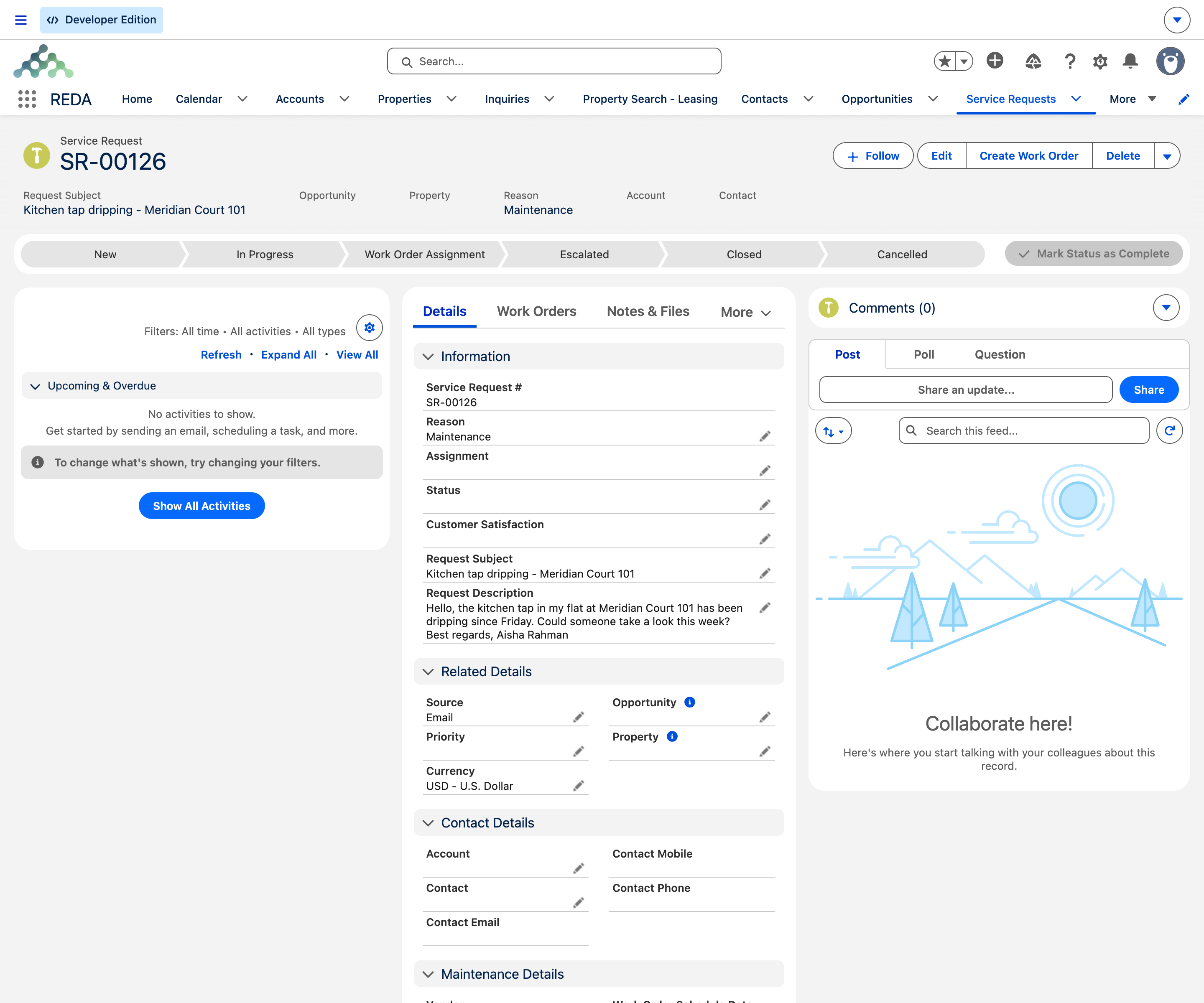
A resident, Aisha Rahman, emails support at Meridian Properties: subject "Kitchen tap won't stop dripping", with a short description and a photo attached. Because Aisha is an existing resident, REDA recognizes her address and links her contact to the new Service Request — its Subject "Kitchen tap won't stop dripping" and its Description carrying her message, the photo saved to the request's Files. The maintenance team picks it up from the Service Requests tab.
Had the email come from an address REDA didn't recognize — a new tenant not yet on file — the request would still have opened, subject and description intact, with the sender's email preserved so the team could identify and reach them; the contact would simply be left for someone to link later. When Aisha replies to the team's response about scheduling a visit, that reply threads onto the same request rather than opening a second one.
Where to go next
- REDA Email Services Overview — how Email-to-Service-Request sits alongside Auto-Sync and Email-to-Inquiry.
- Email-to-Inquiry — the same pattern for sales and leasing enquiries.
- Email Auto-Sync — how the resident's later replies and your responses file onto the request.
- The Unmatched Email Queue — where an email that couldn't become a request waits.
- Email Services Troubleshooting — what to check when support emails aren't becoming requests.
Frequently asked questions
They follow the same pattern for different work. Email-to-Inquiry creates Inquiries — sales and leasing leads — from an enquiry mailbox. Email-to-Service-Request creates Service Requests — support and maintenance items — from a support mailbox. Each intake address is configured for one or the other.
No. If REDA recognizes the sender it links their contact to the service request, but a request is still created from an unknown sender. The email address is preserved either way, so you can identify who wrote in.
A new email to the intake address opens a new service request. Replies to an existing request's thread, though, are filed onto that same request rather than opening another — so an ongoing back-and-forth stays on one record.
The request's Subject is taken from the email's subject line and its Description from the email body, so the ticket describes the problem in the resident's own words.
If REDA couldn't create the service request from a message, the email is held in the Unmatched Email queue with its full contents, so an administrator can review it and create the record by hand. Nothing is discarded.
Was this article helpful?