
Where Properties Come From
Not every property record is created by a person. When an acquisition or a property-management deal goes active, REDA creates the property for you and links it back to the deal — and once a property exists, REDA keeps a whole family of its fields up to date on its own: its current and future lease, its sale, acquisition and management deals, its ownership history, its availability flags, its region and parent codes. This article is for anyone who opened a property nobody remembers creating, or edited a field only to watch it revert on the next save. After reading you'll know how properties get created for you, how to recognise the machine-managed fields, why editing them is futile, and — the useful part — what to change instead. No prior REDA experience is assumed.
Access you'll need. The REDA - Property Leasing User or REDA - Master Data - Read Only set can view properties; creating and editing requires REDA - Property Sales User, REDA - Property Acquisition User, REDA - Property Management User, or REDA - Property Lending User; deleting is reserved for REDA - Master Data - Admin. The automatic behaviour described here runs regardless of who's looking at the record.
Some properties create themselves
Most of the time you create a property deliberately (see Creating & Editing Properties). But REDA also creates properties as a side effect of deals going active — because a deal about a property implies a property, and REDA would rather make it than leave a dangling reference. A deal in REDA is an Opportunity: the single record that represents a lease, a sale, an acquisition, a management engagement, or a loan.
This cuts two ways. A deal can bring a property into being; and a property created with a deal already linked can spawn further records of its own. The next two sections take each direction.
Born from a deal
When an Acquisition deal (buying a property into your book) goes active, REDA's after-save automation can create a brand-new property record and then link that property back onto the acquisition deal. A Property Management deal (taking on management of a property) does the same as it activates: a new property record is created and linked back. In both cases the property exists because the deal needed one, and you can always trace it — the deal is written straight onto the property.
The reverse direction adds a twist. If you create a property and link an Acquisition Opportunity to it as you do so, REDA writes the property back onto that acquisition and creates a Lending Opportunity for it automatically — at the Prospecting stage, with the acquisition's buying account as the borrower, and the close date, region, neighbourhood and property type carried across. Create a property with a PM Opportunity linked and it's simply written back onto that PM deal.
| Where a property comes from | What REDA does |
|---|---|
| Created by hand | You fill the fields (see Creating & Editing Properties). |
| From an Acquisition deal going active | REDA creates the property and links it to the deal. |
| From a PM deal going active | REDA creates the property and links it to the deal. |
| Created with an Acquisition deal linked | Property linked back, plus a Lending deal auto-created at Prospecting. |
| Created with a PM deal linked | Property linked back onto the PM deal. |
The self-updating deal fields
A property keeps a live link to its current deal in each business line, and a plain-text copy of that deal's stage beside it. Five pairs in all:
| Link + its stage twin | Kept in step with… |
|---|---|
| Active Lease / Active Lease Stage | The property's first active lease. |
| Future Lease / Future Lease Stage | A second active lease already lined up. |
| Sale Opportunity / Sale Stage | The property's active sale deal. |
| Acquisition Opportunity / Acquisition Stage | The property's active acquisition deal. |
| PM Opportunity / PM Stage | The property's active management deal. |
All ten fields are system-managed. As the property's deals come and go and change stage, REDA clears and repopulates them to match — there is no need to edit them, and a hand-edit won't stick. When you see the active-lease stage or the sale stage change on a property, that's REDA reflecting what happened on the underlying deal.
These fields feed the property's availability too. A small state machine derives the property's Leasing Status from its active lease's stage — application stages read as a form of vacant-on-hold, occupied stages as occupied-and-not-available — and from that it recomputes Available For Leasing, the Leasing Availability Date and the Hold Till Date. Only two Leasing Status values are treated as manual overrides that REDA leaves alone: Vacant - Admin and Vacant - Not Available. The full state machine is covered in Property Statuses Explained.
The "SYS" and system-stamped fields
Beyond the deal links, a property carries a set of fields REDA stamps or computes for you. You'll recognise several by the "SYS" in their name; others just quietly refill on save. Here's what drives each:
| Field | What REDA does with it |
|---|---|
| Region Code | Stamped to the Region's unique code on every save. It's a system field you don't set by hand. |
| Parent Property Code | A copy of the parent property's Property Code, kept for fast reporting and matching. Its help text says it plainly: "Set automatically - please do not edit it." |
| SYS Currency | Mirrors the Region's currency. It only affects the record's currency when multi-currency is switched on, which is off in the standard configuration — so for most orgs it's simply along for the ride. |
| SYS Amenities | A system-built list of the property's active amenity codes, used to power amenity search. |
| Amenity Additional Rent | The sum of the property's active "addition-to-rent" amenities, recomputed whenever an amenity changes, and added on top of base rent. |
| List Tags | The combined tags of the Property Lists the property belongs to. Change them by adding or removing the property from a list, not by editing here. |
| Best Leasing Term | The system's suggested best rent setup, recomputed when the property's rent setups change. |
| Available For Sale | Recomputed on every save: on only while the Sale Status is Inventory - Available, off for anything else. A manual tick is overwritten. |
A couple of dated fields belong here too — the Last and Next Inflation Calculation Date that track automatic rent inflation, and PM Agreement, which points at the executed management agreement — all written by REDA, not by you.
The ownership trail
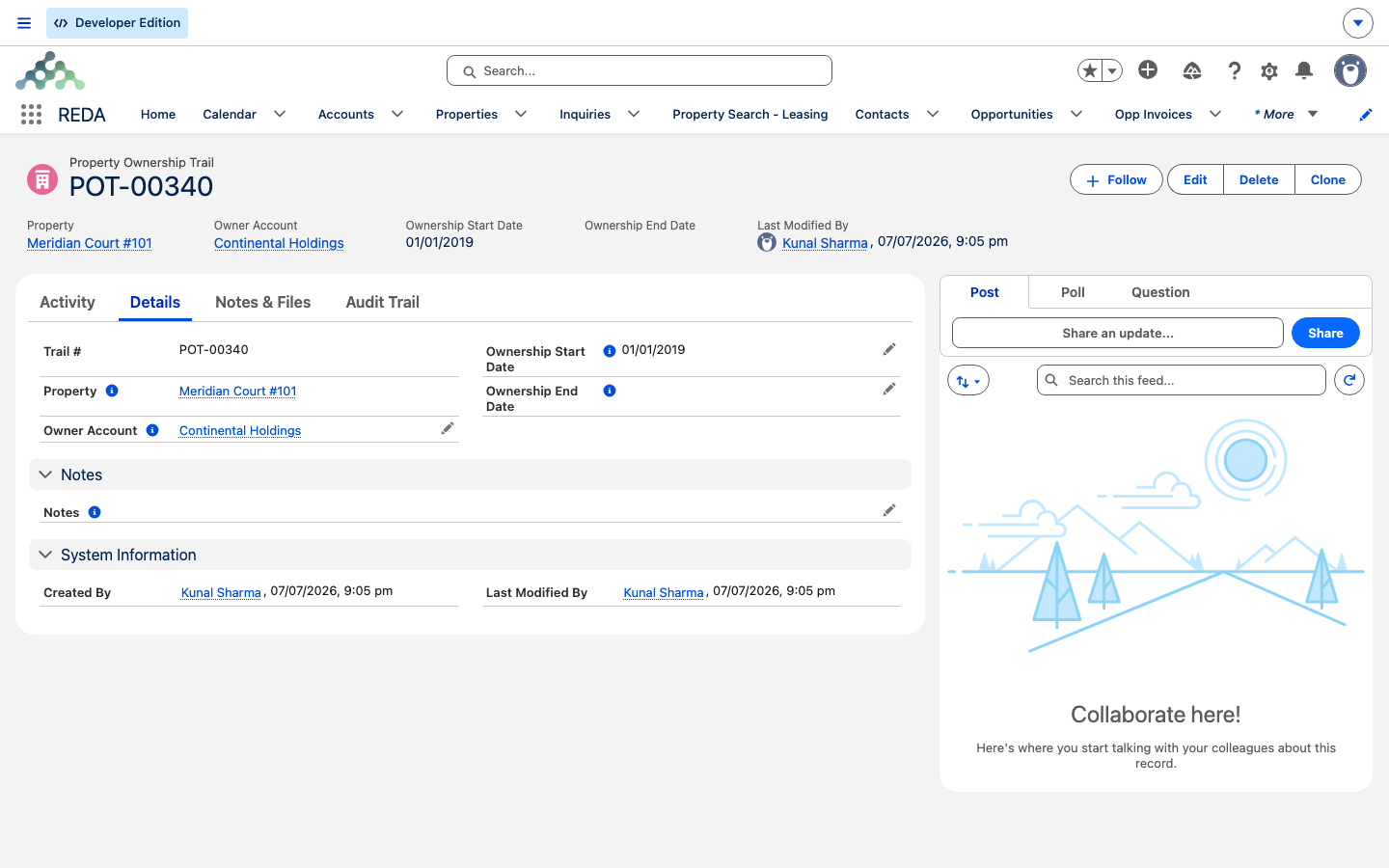
Ownership history is maintained the same automatic way. Change a property's Owner Account or Ownership Start Date and REDA writes the Property Ownership Trail for you — closing the previous owner's entry the day before the new start date and opening a fresh one for the new owner. You never build the trail by hand (the full mechanics are in Owners & Ownership History).
Owner and start date are a co-required pair, and clearing the start date while a different owner's entry is still open leaves REDA unable to write the history — so the save is refused:
Restore the owner and start date together and the save goes through.
Why editing these is futile
The thread running through all of the above is simple: these values are derived, and REDA re-derives them — many on every single save. Type over one and the next save writes it back. That's not a bug; it's the field doing its job of staying true to its source.
Which points at the right move every time. To change a machine-managed value, don't fight the field — change what it's derived from:
| To change… | Change its source: |
|---|---|
| Active / Future Lease, Leasing Status, availability | The lease and its stage (or set an admin override on Leasing Status) |
| Sale / Acquisition / PM links and stages | The deals themselves |
| Available For Sale | The Sale Status |
| Region Code / SYS Currency | The Region |
| Parent Property Code | The parent property (or its code) |
| SYS Amenities / Amenity Additional Rent | The property's amenities |
| List Tags | The property's Property List memberships |
| Best Leasing Term | The property's rent setups |
| Property Ownership Trail | The Owner Account + Ownership Start Date (the history writes itself) |
Worked example: two Meridian provenance stories
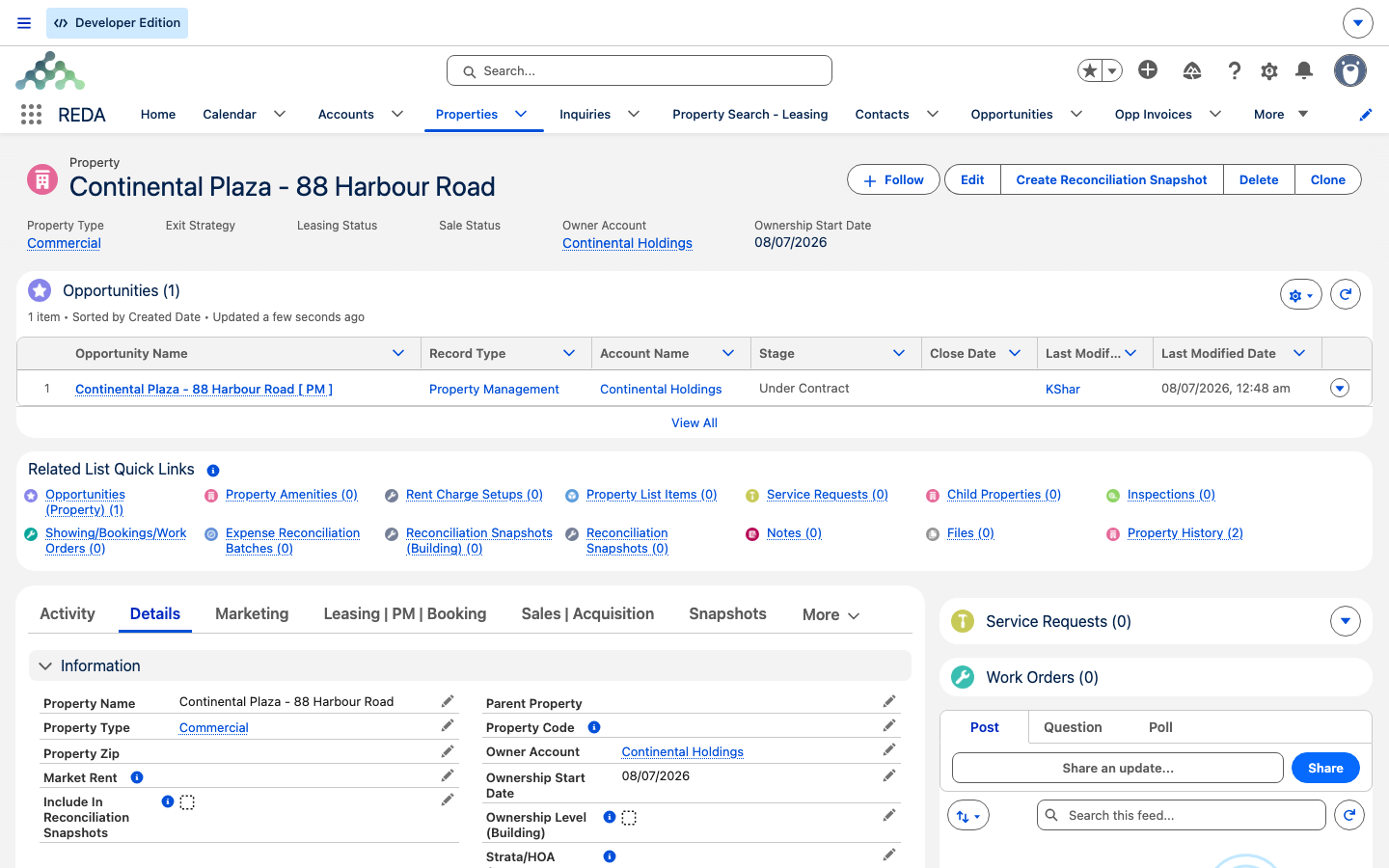
A property that created itself. A management engagement is taken on for Meridian Court, owned by Continental Holdings. When the property-management deal goes active, REDA creates the Meridian Court property record and links it to the PM deal. The operations team, browsing properties the next morning, finds a Meridian Court record "nobody created" — with the management deal already linked on it, exactly as expected.
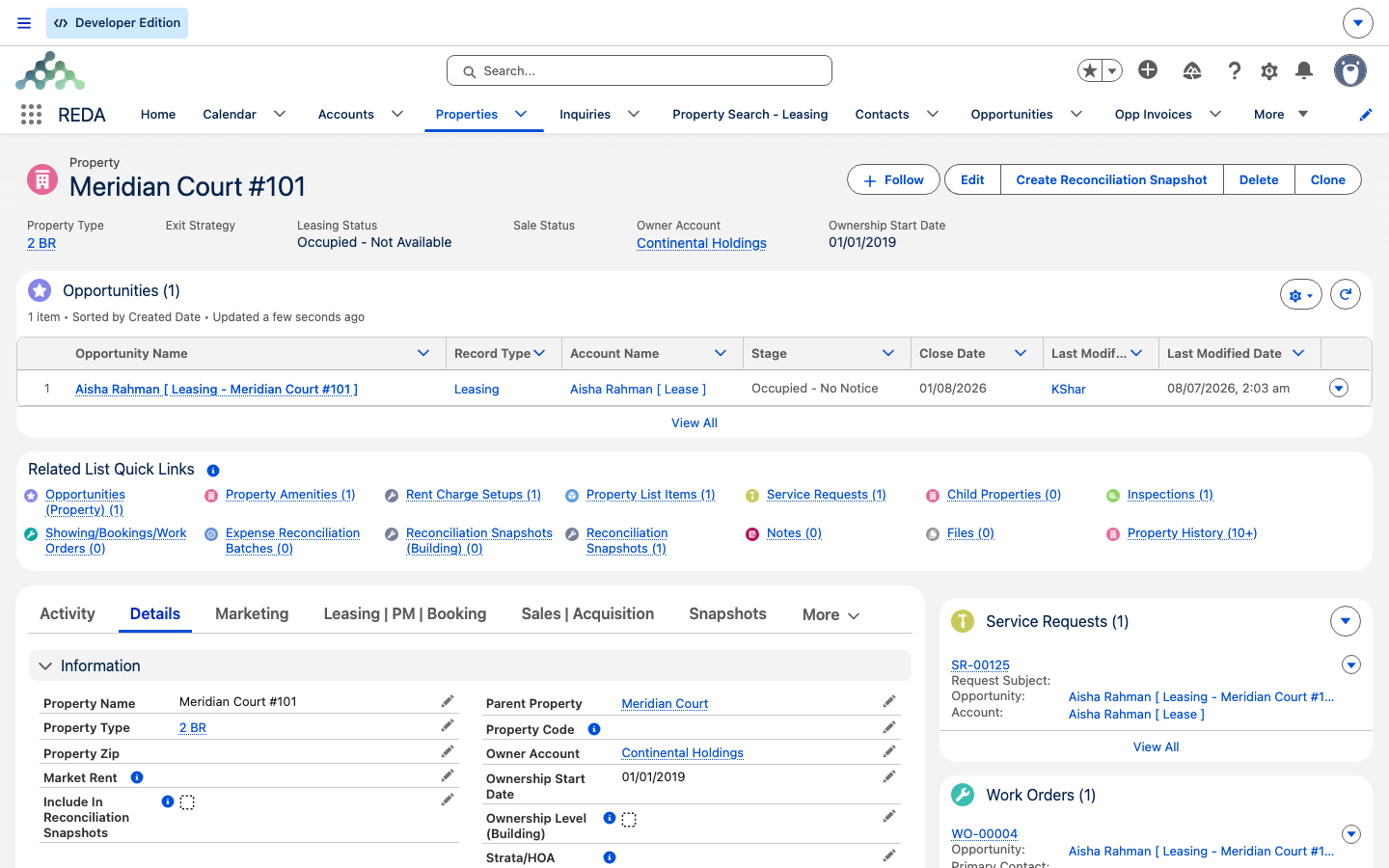
Fields that maintain themselves. On unit Meridian Court #101, a manager sets Owner Account to Continental Holdings with an Ownership Start Date; REDA writes the first ownership-trail entry automatically. Weeks later, when Aisha Rahman's lease reaches Occupied - Pending Move In, the property's Active Lease link and Leasing Status flip to occupied on their own. Nobody edited those fields — REDA kept them in step with the lease.
Where to go next
- Creating & Editing Properties — creating a property deliberately, the other side of this story.
- Understanding Properties — what a property is and where every field sits.
- Property Statuses Explained — the leasing-status state machine in full.
- Owners & Ownership History — the ownership trail REDA writes for you.
Frequently asked questions
REDA creates properties automatically when an Acquisition or Property Management deal goes active without a property already linked to it. The new property is linked straight back onto the deal, so you can trace it. That's why you'll find perfectly good property records nobody remembers making.
When you create a property with an Acquisition Opportunity already linked, REDA also creates a Lending Opportunity for it, at the Prospecting stage, with the acquisition's buying account as the borrower. It's expected — acquisitions often come with financing, so REDA lines up the loan deal for you.
It isn't a field you set by hand. REDA recomputes it on every save from the property's Sale Status: on only while the status is Inventory - Available, off for anything else. Change the Sale Status to change the flag.
Both are maintained from the property's leases and their stages. As a lease moves through its lifecycle, REDA repoints the Active Lease and recomputes the Leasing Status to match. Only the manual overrides Vacant - Admin and Vacant - Not Available are left untouched.
No. The SYS and system-stamped fields are recomputed by REDA, many of them on every save, so a hand-edit is overwritten. To change the value, change its source — the region, the amenity, the list membership, the lease stage — and REDA re-derives the field.
You cleared the Ownership Start Date (or left the owner and start date out of step) while an open ownership-history entry exists for a different owner, so REDA couldn't write the trail. Restore both the Owner Account and Ownership Start Date as a complete pair and save again.
Was this article helpful?