
Recording Tenant Payments
A tenant hands you a check at the front desk, and you want it recorded in accounting before they've left the counter — without opening a separate system. The Post Payment action on the lease does exactly that: it records the money as a receipt in REDA's accounting, with the right bank, cash account and ledger already filled in, and can settle the tenant's open invoices in the same step. This article walks the action end to end — every field on the guided screen, who you can name as the payer and why, the setup the action quietly relies on, what the Prepayments figure means when a tenant pays too much, the exact messages you'll see if something isn't ready, and how a bounced payment can bill an NSF fee on its own. No accounting background is assumed; every term is defined as we reach it.
Access you'll need. Working the lease requires the REDA - Property Leasing User permission set (or a sibling operational set). Recording the receipt itself is part of the accounting extension, so your administrator confirms that recording rights are in place for the people who take payments — you don't need to open the accounting side yourself.
Before you start
Post Payment leans on a little setup being in place. When it's all there, the action just works; when a piece is missing, the action stops with a clear message (see When the payment won't open) rather than recording something wrong. Three things matter:
Whose bank the money lands in
This is the one part of Post Payment worth understanding up front, because it surprises people: the receipt is banked into the property owner's financial home, not the tenant's. When you click Post Payment, REDA walks a short chain to find that home:
Every hop has to resolve before the payment screen will even open — that's a deliberate guard, so you never record money against a half-configured owner. If any hop is missing, the action stops and tells you exactly which one (see the messages table). The tenant is still the customer on the receipt — the money is recorded against them — but it's banked through the owner's entity, because that's whose books the rent belongs in.
Who can be the payer
When you post a payment you choose a payer (the payee) — the person the money is recorded against. REDA offers a specific set of people: those whose role on the lease is marked as payment-eligible.
A Contact Role is the link that says how a person relates to a lease — a lessee, a guarantor, a co-signer. Lessee roles are made payment-eligible automatically, so the tenant on the lease is always available as a payer. Other roles — a guarantor, for example — become available only when an administrator marks that person's role as a payee. The dropdown shows each eligible person by their Payee Name.
| Role on the lease | Offered as a payer? | How |
|---|---|---|
| Lessee | Yes, automatically | Lessee roles are marked payment-eligible for you — no setup needed |
| Guarantor, co-signer, other | Only if marked | An administrator checks Is Payee on that person's contact role |
Posting a payment, field by field
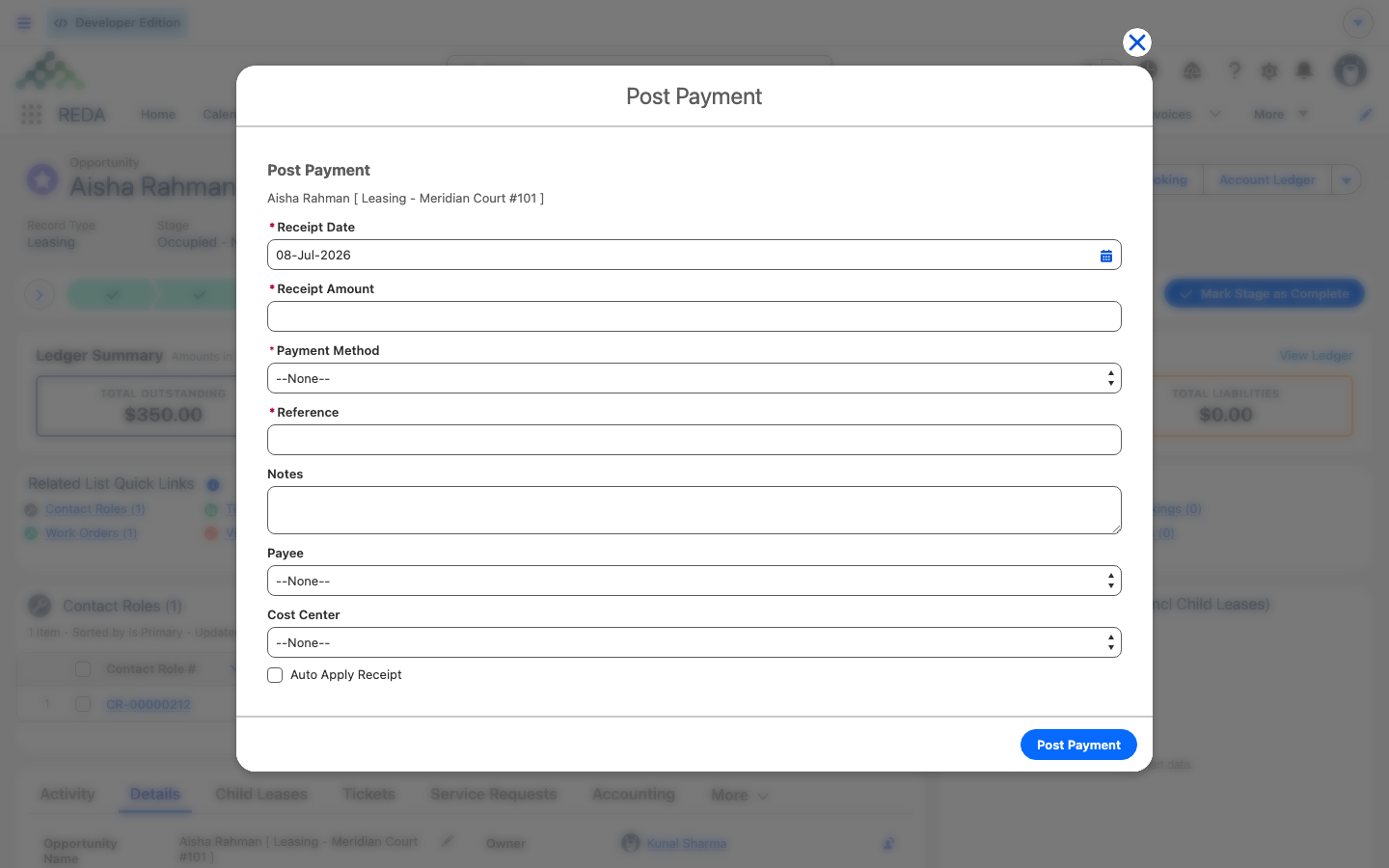
From the lease, the whole thing is one guided screen. Here's every field you'll meet, in order:
What REDA creates
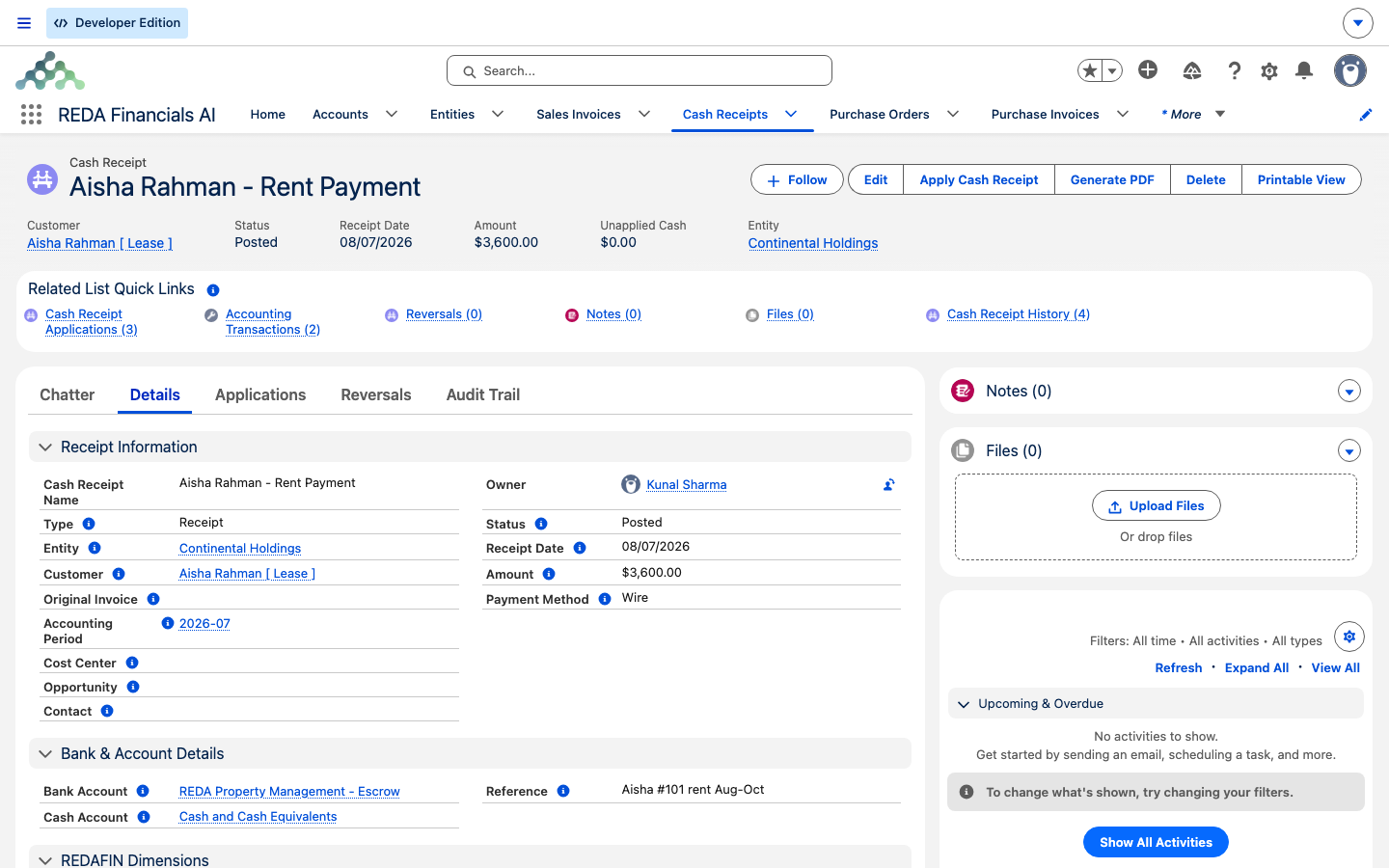
Finishing the action produces one posted cash receipt in accounting, filled in from the lease so you don't have to:
| On the receipt | Value | Where it comes from |
|---|---|---|
| Status | Posted immediately | The action always books, never drafts |
| Customer | The lease's account (the tenant) | The lease |
| Entity | The property owner's financial entity | Property → owner account → entity |
| Bank, cash account and ledger | The entity's defaults | The owner's activated financial entity |
| Amount, method, date, reference, notes | As you entered them | The guided screen |
| Payer | The person you picked | Eligible contact roles on the lease |
| Reporting tags | Lease, property and payer contact | Stamped so the receipt slices cleanly in reports |
Those reporting tags matter downstream: because the receipt carries the lease, the property and the contact, it shows up correctly in property-level and payer-level reporting (see Property Dimensions in Financial Reports).
When the payment won't open: the four messages
If a piece of setup is missing, Post Payment stops before you can enter anything and shows one of four messages. Each names exactly what's wrong and who fixes it — nothing is recorded, so it's always safe to close and try again once the setup is in place.
| Message | What it means | How to fix it |
|---|---|---|
| "REDA Financials Extension is not active. Please contact your administrator." | The accounting extension isn't switched on for your org | Your administrator enables it |
| "Property not found for the selected opportunity." | The lease isn't linked to a property | Set the property on the lease, then reopen Post Payment |
| "Entity not found for the property owner account." | The property's owner account hasn't been activated as a financial entity | An administrator activates it — see Activating a Client Account as a Financial Entity |
| "Default Cash Account is not defined for the entity." | The owner's entity exists but is missing its default cash account | An administrator sets the entity's defaults |
If instead the receipt fails while saving, the screen shows the system's own message for what went wrong — note it down and pass it to your administrator; it's not one of the four setup checks above but a problem completing the save.
Overpayments and the Prepayments figure
Sometimes a tenant pays more than they owe — a round number, or next month in advance. The extra isn't lost; it becomes unapplied cash, money received but not yet matched to any invoice. REDA keeps a running total of that on the account's Prepayments figure — and on the lease's, so you can answer both "how much credit does this tenant hold overall?" and "how much of it relates to this lease?".
Think of Prepayments as a plain-language label: money received that hasn't been applied to anything yet. It's recalculated every time a receipt changes — a new payment, an edit, a void — not just when you run Post Payment. That's deliberate: because the figure is recomputed from every one of the tenant's unapplied receipts rather than nudged up and down, it can't drift out of sync with reality, and it always reflects exactly what's genuinely sitting as credit.
Later, that credit can be applied to a future invoice, at which point it leaves the Prepayments total and reduces the tenant's balance. Nothing is stranded: an overpayment today simply sits as credit until there's a bill for it to meet. And if a receipt is ever moved to a different tenant or lease, both the old and the new Prepayments totals are recomputed, so neither is left overstating the credit on hand.
Bounced payments and the NSF fee
If a payment bounces, the receipt is voided on the accounting side. When that happens, REDA can bill the bounced-payment fee — the NSF fee (non-sufficient funds) — for you, provided the tenant's account is set up for it. You don't raise the fee by hand.
The account needs three settings in place (and the receipt has to relate to a lease, which every Post Payment receipt does):
| Requirement | Where it's set |
|---|---|
| The receipt is voided (bounced) | The accounting side — this article doesn't cover voiding |
| Charge NSF Fee is checked | The account |
| An NSF Fee Charge Code is set | The account |
| An NSF Fee Amount is set | The account |
When those line up, voiding the bounced receipt raises a new invoice on the lease for the fee. That invoice is marked to bill like any other, so it flows through to accounting the same way — and the tenant's balance goes up by the fee. The billing note on the invoice even references the receipt that bounced, so it's easy to trace back.
Worked example: Aisha pays her rent
Let's trace one payment from the desk to a settled balance. Aisha Rahman rents Meridian Court #101, a unit owned by Continental Holdings. Her lease has one open Rent invoice of 1,200.00. Continental Holdings' account is an activated financial entity with its default bank, cash account and ledger set.
| You do | REDA does |
|---|---|
| Click Post Payment on Aisha's lease | Walks the chain — lease → Meridian Court #101 → owner Continental Holdings → its entity — finds everything, and opens the guided screen |
| Pick payer "Aisha Rahman" (offered automatically as a lessee), enter 1,200.00, method Check, a reference, choose to auto-apply, attach a scan of the check | Shows "Cash Receipt created successfully." and records a posted receipt: customer Aisha, entity Continental Holdings, banked to that entity's defaults |
| Nothing more | Settles the open Rent invoice; its Received/Applied Amount becomes 1,200.00 and its Balance drops to 0 (see Payments & Balance Sync-Back) |
| Variant: Aisha instead pays 1,500.00 | Settles the 1,200.00 Rent; the leftover 300.00 shows as credit on the account's (and lease's) Prepayments, ready for next month |
| Variant: the check bounces and accounting voids the receipt (Aisha's account has an NSF fee of 50.00 configured) | Raises a new 50.00 fee invoice on the lease, which bridges to accounting automatically and adds to her balance |
Where to go next
- Payments & Balance Sync-Back — how the payment then updates the invoice's balance, and how a batch payment splits across charges.
- Activating a Client Account as a Financial Entity — the bank, cash and ledger defaults, and the NSF fields.
- Charge Code Accounting Setup — the order invoices settle in, and the NSF charge code.
- Property Dimensions in Financial Reports — why the receipt carries the lease, property and payer.
- How REDA Works with REDA Financials — the accounting bridge as a whole.
- The Resident Portal — where tenants can pay themselves, without the front desk.
Frequently asked questions
Only people whose lease role is marked payment-eligible appear. Lessees are marked automatically; a guarantor or co-signer needs Is Payee set on their contact role by an administrator.
No — Post Payment always records the receipt as posted, so the money is booked the moment you finish.
Yes — the action requires a proof-of-payment file (a scan of the check, a transfer confirmation) before it completes.
Check, Wire, ACH, Credit Card, Cash, Withholding Tax Received, or Other.
The receipt uses the property owner's financial entity and its default bank, cash account and ledger. The tenant is the customer on the receipt, but it's banked through the owner's entity.
It's held as unapplied cash. Look at the Prepayments figure on the account or lease — that's the running total of credit, and it can be applied to a future invoice.
The accounting extension isn't switched on for your org. Your administrator enables it, then Post Payment will open.
The lease isn't linked to a property, so REDA can't tell where the money should be banked. Set the property on the lease and reopen Post Payment.
The property's owner account hasn't been activated as a financial entity. An administrator activates it (see Activating a Client Account as a Financial Entity), then the payment can go through.
The owner's entity exists but is missing its default cash account. An administrator sets the entity's defaults and the payment screen will open on the next try.
Not if the account is set up for it. When the bounced receipt is voided and the account has Charge NSF Fee, an NSF Fee Charge Code and an NSF Fee Amount in place, REDA raises the fee invoice on the lease automatically.
It finds its receivable account the usual way — the charge code's default, then the property's managing entity, then the property owner's account.
Was this article helpful?