
Property Statuses Explained
"Why did my property's status change by itself?" is the single most common question in this whole area — and the answer is reassuring: that's the product working. A property's leasing and sale statuses are mostly maintained for you, derived from the deals attached to it. This article names every status value, explains which ones REDA recomputes and which stick when you set them by hand, walks the hold lifecycle end to end, and covers the parallel sale-side recompute. No prior REDA experience is assumed.
Access you'll need. Any set with property read (such as REDA - Property Leasing User or REDA - Master Data - Read Only) can view these fields. Editing them requires a property-operations set (REDA - Property Sales User / Acquisition / Management / Lending User) or REDA - Master Data - Admin.
Two status families
A property carries two status fields. Leasing Status (seven values) describes its rental state; Sale Status (six values) describes its for-sale state. Both are largely maintained by REDA from the property's deals — so if one changes on its own, that's the system keeping the property honest, not a glitch. The rest of this article is about understanding when and why each one moves.
The seven Leasing Status values
| Leasing Status | What it means |
|---|---|
| Vacant - Available | Empty and on the market — appears in leasing search. |
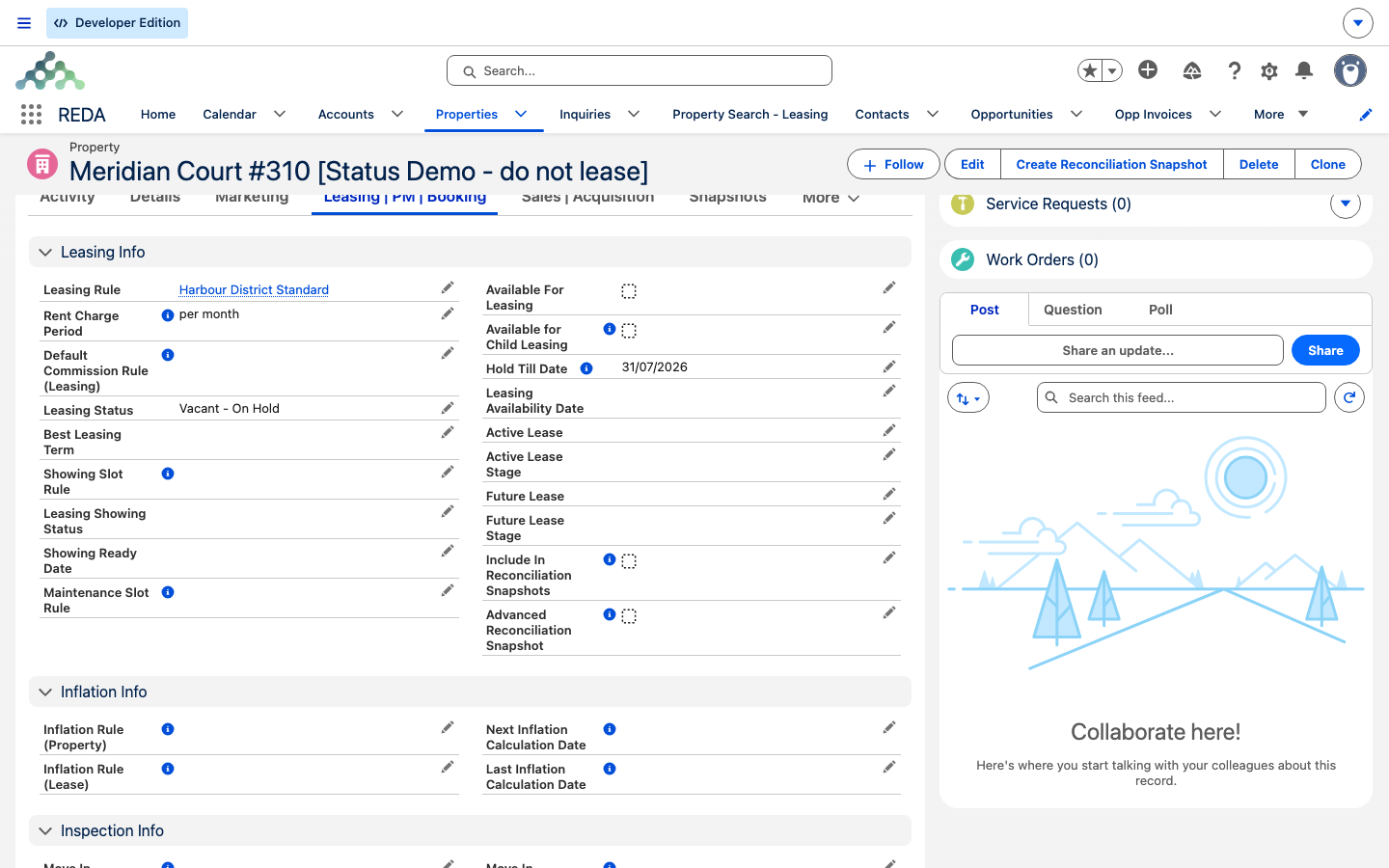
| Vacant - On Hold | Empty but held — an application is in progress; temporarily off the market. |
| Vacant - Not Available | Empty and deliberately off-market. A manual choice REDA respects. |
| Vacant - Admin | Empty and held back for administrative reasons. Also respected as a manual choice. |
| Occupied - Available | Tenanted but available — for example, a tenant has given notice and the unit can be re-let. |
| Occupied - Available (On Hold) | Tenanted, with a future lease already lined up, held pending that lease. |
| Occupied - Not Available | Tenanted and not available. |
Any "not available" value takes the property out of leasing search.
How REDA sets Leasing Status
Behind the scenes, REDA keeps two lease links on every property: the Active Lease (the current one) and, if a second is queued, the Future Lease. When the stage of the active or future lease changes, REDA recomputes the Leasing Status to match. The mapping is:
| Lease stage | Leasing Status becomes |
|---|---|
| Application - New / Completed / Approved | Vacant - On Hold |
| Application - Denied / Cancelled | Vacant - Available |
| Agreement - In Process | Vacant - On Hold |
| Occupied - Pending Move In / No Notice / Notice (Eviction) | Occupied - Not Available |
| Occupied - Notice (Move Out) / Notice (Termination) | Occupied - Available |
| Anything else | Vacant - Available |
There's one override on top of this: if a Future Lease exists, the status is forced to Occupied - Available (On Hold) instead — a current tenant with the next lease already booked.
Availability follows status
The Available For Leasing switch — the one leasing search actually reads — is recomputed along with the status. It's on exactly when the status is Vacant - Available or Occupied - Available, and off otherwise. Alongside it, REDA derives Leasing Availability Date — the date the unit can next be moved into. With a lease in play that's the lease's end date plus the Leasing Rule's make-ready days; with no lease it's worked out from today. Choosing a not-available or admin status clears both the flag and the date.
The hold lifecycle
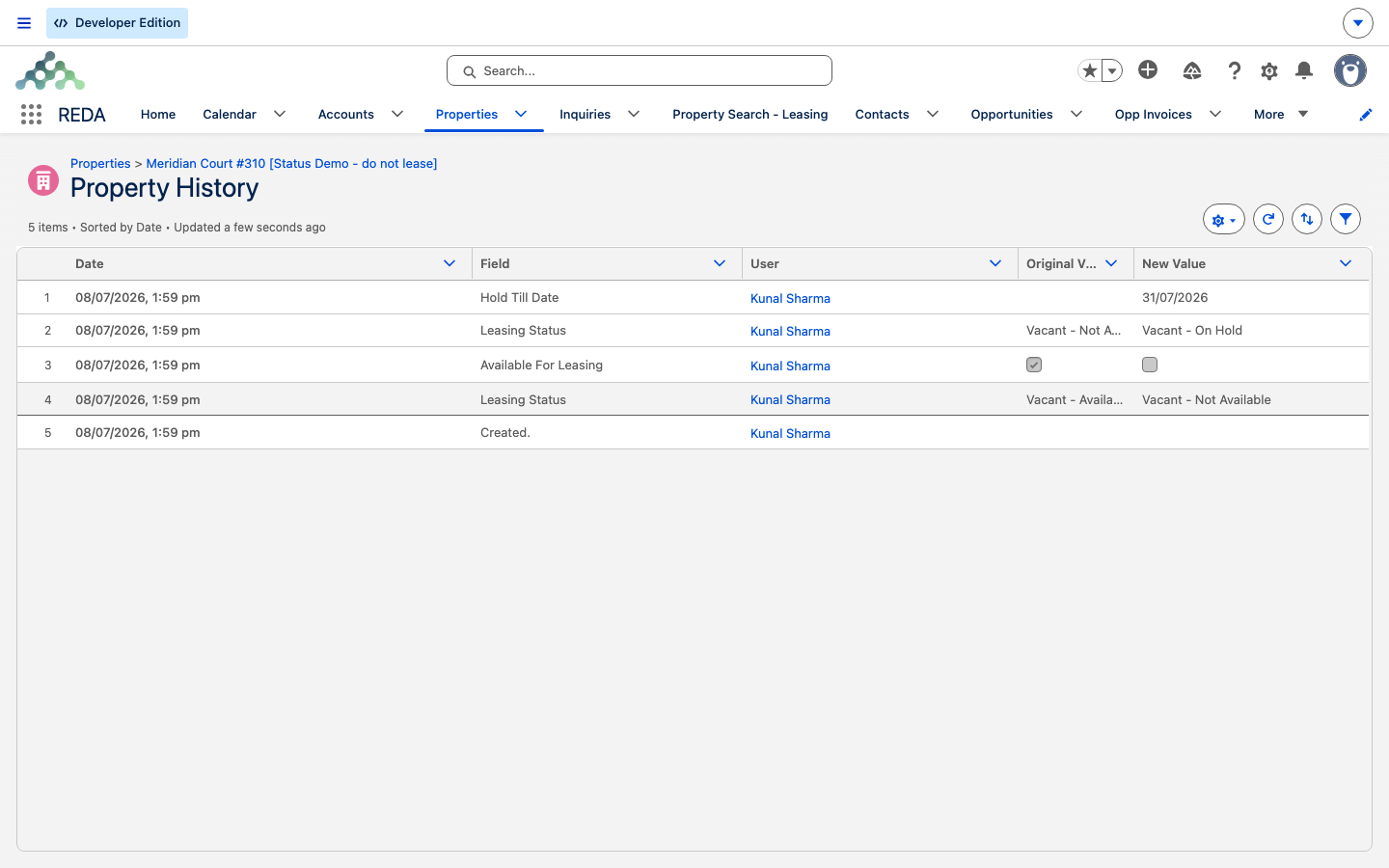
When an application comes in, REDA puts the property on hold so nobody else can be shown it — then releases it automatically. Here's the full arc:
Sale Status and Available For Sale
The sale side works the same way in miniature. The six Sale Status values are Inventory - Not Available, Inventory - Available, Inventory - Upcoming, Under Contract - In Progress, Under Contract - Complete, and Sold. Sale paperwork keeps this status moving as a sale progresses. The Available For Sale flag is recomputed on every save: it's on only while Sale Status is Inventory - Available, and any manual edit is overwritten. To change the flag, change the Sale Status.
Showing status
Separate from the automated machine are the manual showing fields: Leasing Showing Status — Make Ready In Progress, Ready, or Not Ready — and Showing Ready Date. You set these yourself to note where a unit is in getting show-ready. Treat them as information you maintain, independent of the status machine.
Worked example: Meridian Court #101 over time
The unit uses a Leasing Rule with a 7-day hold period and 5 make-ready days. Watch the status track the story:
| What happens | Leasing Status | Available For Leasing |
|---|---|---|
| Freshly vacant and on the market | Vacant - Available | On |
| Application received (lease at Application - New) | Vacant - On Hold | Off; Hold Till Date = today + 7 |
| Application stalls, hold date arrives | Vacant - Available | On; Hold Till Date cleared |
| Instead, application approved → Agreement - In Process | Vacant - On Hold | Off |
| Tenant moves in (Occupied - Pending Move In) | Occupied - Not Available | Off |
| Tenant gives notice (Occupied - Notice (Move Out)) | Occupied - Available | On; Availability Date = lease end + 5 |
Reference: what's respected vs recomputed
| Field / value | Behaviour |
|---|---|
| Vacant - Admin, Vacant - Not Available | Respected — set them by hand to hold a property off-market. |
| The other five Leasing Status values | Recomputed from the current lease stage. |
| Available For Leasing, Leasing Availability Date | Recomputed alongside the status. |
| Hold Till Date | Stamped automatically, but you can adjust it to lengthen or shorten a hold. |
| Available For Sale | Recomputed every save from Sale Status. |
Where to go next
- Making a Property Available for Leasing — the setup chain behind the availability flag.
- Finding Properties: Leasing Search — where the status decides what shows up.
- Understanding Properties — the record and its deal links.
Frequently asked questions
Both are derived from the current lease's stage and recomputed when it moves. Only Vacant - Admin and Vacant - Not Available stick when you set them by hand; every other value is maintained for you.
Set the Leasing Status to Vacant - Not Available or Vacant - Admin. REDA clears the availability flag and date and won't recompute over these two values.
Change the Hold Till Date — the automatic release fires on whatever date is set. Don't re-tick Available For Leasing yourself.
It's recomputed on every save and is on only while Sale Status is Inventory - Available. Change the Sale Status instead of the flag.
The property needs a Rent Charge Period first: "Rent Charge Period must be provided if property is available for Leasing." See Making a Property Available for Leasing for the full chain.
There's a current tenant and a future lease already lined up. The property is held pending that next lease.
Was this article helpful?