
Selling a Property
This is the full journey of a property sale in REDA: from a brand-new deal, through the binder and the signed contract, all the way to closing — where REDA transfers ownership to the buyer for you. Along the way you'll learn the safe way to move a sale forward (let the Sales Agreement ticket drive the middle of the pipeline rather than dragging the stage yourself), what REDA fills in and creates at each step, and why a closed sale can't simply be reopened. No prior REDA experience is assumed — every stage and term is defined as we reach it.
Access you'll need. Working a sale — the deal, its tickets, and its payment plans — requires the REDA - Property Sales User permission set. System administrators can use REDA - Master Data - Admin instead. Access to the buyer's Account and Contact is granted by your administrator separately, outside the REDA permission sets.
What a sale deal is
A sale is a deal — a record on the Opportunities tab, REDA's single "deal" hub. The same tab also holds leasing, acquisition, lending, and property-management deals; what makes one a sale is its type, Property Sale. One sale deal represents one property sold to one buyer, and the buyer is the deal's Account. REDA names the deal for you from the property (for example, Harbour Villa 7 [ Property Sale ]), and keeps any name you type yourself.
The deal advances through a fixed ladder of Stages, shown as a Path across the top of the record:
Property Selection → Binder → Contract Out → Under Contract → Funded → Clear to Close → Closed Won (or Closed Lost)
Contract Out and Under Contract — are meant to be driven by the Sales Agreement ticket, not by dragging the Path. Editing the stage by hand skips the work the ticket does for you (stamping dates and keeping the property's Sale Status in step) and can leave the deal and its paperwork out of sync.
Before you start
Two things need to be in place before you open a sale:
- The property must be available for sale. Set the property's Sale Status to Inventory - Available; REDA then marks it available for sale automatically. The property picker on a sale deal only offers listings that are available for sale in the matching region — so if a property doesn't appear, its Sale Status is the first thing to check.
- You need a buyer. Usually the buyer arrives as a Property Sale inquiry that you convert: converting creates the buyer's Account and Contact and the sale deal together, and sets the buyer as the deal's primary contact.
The sale pipeline, stage by stage
Here's the whole ladder: what you do at each stage, and what REDA does in response. The gates named in the last column are validation checks that block a stage change until you've filled the required field — the exact messages are quoted later.
| Stage | What you do | What REDA does | Gate to enter |
|---|---|---|---|
Property Selection | Confirm the buyer and the property (the picker only shows for-sale listings in the region) | Defaults the Selling Account from the property's owner; defaults the Commission Rule; names the deal from the property | — |
Binder | Record earnest money: set Binder = Yes with the Amount, Date, and Title Company | — | Binder details, all or nothing |
Contract Out | Send the contract (usually via the Sales Agreement ticket) | The ticket at Contract Sent sets this stage | — |
Under Contract | Record the signing (usually via the ticket) | The ticket at Contract Signed or Closed sets this stage and stamps the Under Contract Date | Sale / Purchase Price and Under Contract Date required from here on |
Funded | Record that the buyer's funds are received | The deal counts as won from here | Price and date still required |
Clear to Close | Complete the final walkthrough / title clearance | — | Price and date still required |
Closed Won | Close the sale | Transfers ownership, writes the ownership trail, flags the deal for commission (see below) | An Account is required once the deal is won |
Closed Lost | Mark the deal dead | Deal becomes inactive; the property stays with its current owner | — |
The Sales Agreement ticket
A ticket in REDA is a short, tracked checklist for one step in a record's life. The Sales Agreement ticket — its full type name is Sales - Purchase & Sales Agreement — is how you move a sale through its contract phase. You work the ticket down its own status Path, and each status writes the deal's stage and keeps the property's Sale Status in step, so the paperwork and the property stay together.
| Ticket status | What it does to the deal |
|---|---|
| New (default) | Nothing yet — REDA quietly notes the deal's current stage and the property's current Sale Status so it can undo cleanly later |
| In Process | Work underway; the property moves into the Under Contract - In Progress family |
| Contract Sent | Deal stage → Contract Out |
| Contract Signed | Deal stage → Under Contract; stamps the Under Contract Date |
| Closed | Same as Contract Signed — the agreement is done |
| Cancelled | Rolls the deal back to the stage it was on when the ticket was created, and reverts the property's Sale Status |
If the contract was signed on paper, REDA won't let you close the ticket until the signed document is actually attached — and it checks that a file is really there, not just that you flipped a switch:
"No document found associated to this ticket. Please upload document prior provide Document Attached as "Yes"."
The Sales Agreement ticket has its own article — see The Sales Agreement Ticket for the full walkthrough, the document gate, and cancellation.
Recording the binder
The binder is the buyer's earnest money — the good-faith deposit that holds the deal. To record it, set Binder = Yes and fill in the Binder Amount, Binder Date, and Binder Title Company. REDA insists on all three together: flip Binder to Yes with any of them missing and you'll see:
Closing: what happens at Closed Won
Setting the deal to Closed Won is the payoff of the whole workflow. In one move, REDA does the work that would otherwise take a stack of manual updates:
The buyer's staged payments, if the property carries a sale payment plan, were already generated earlier — when the deal first became active — so nothing new happens to them at close.
Closed Won sale back down the ladder while that ownership change is still in place. You'll first have to undo the ownership change on the property. The message you'll see is quoted in the FAQ below.
If plans change
If a deal falls through mid-contract, Cancel the Sales Agreement ticket. REDA rewinds the deal to the stage it was on when the ticket was created, and reverts the property's Sale Status to that same moment — but only if the deal is still on the stage this ticket set. If some other process has moved the deal on since, the cancellation leaves it alone, so it never clobbers a later step.
If the deal simply won't complete, set the stage to Closed Lost. The deal becomes inactive and the property stays with its current owner — no ownership change happens, because none happened on the way in.
Worked example: Harbour Villa 7
Meridian Properties is selling Harbour Villa 7 — listed with Sale Status Inventory - Available at a sale price of 1,000,000.00, currently owned by Continental Holdings — to buyer David Okafor. Here's how the file plays out:
| You do | REDA does |
|---|---|
| Convert David Okafor's Property Sale inquiry | Creates the sale deal at Property Selection; defaults the Selling Account from Continental Holdings; defaults the commission rule |
| Record the binder: Binder = Yes, 50,000.00 on 15 Jun, title company entered | Accepts the binder (all three details present); deal moves to Binder |
| Create the Sales Agreement ticket, set it to Contract Sent on 20 Jun | Deal moves to Contract Out |
| Enter the Sale / Purchase Price 1,000,000.00; attach the signed contract; set the ticket to Contract Signed on 1 Jul | Deal moves to Under Contract; stamps the Under Contract Date as 1 Jul |
| Record funds received, then title clearance | Deal moves to Funded, then Clear to Close |
Close the sale on 15 Aug (Closed Won) | Property owner becomes David Okafor; Ownership Start Date set to 1 Jul (the Under Contract Date); Continental Holdings' trail closed at 30 Jun; deal flagged for commission |
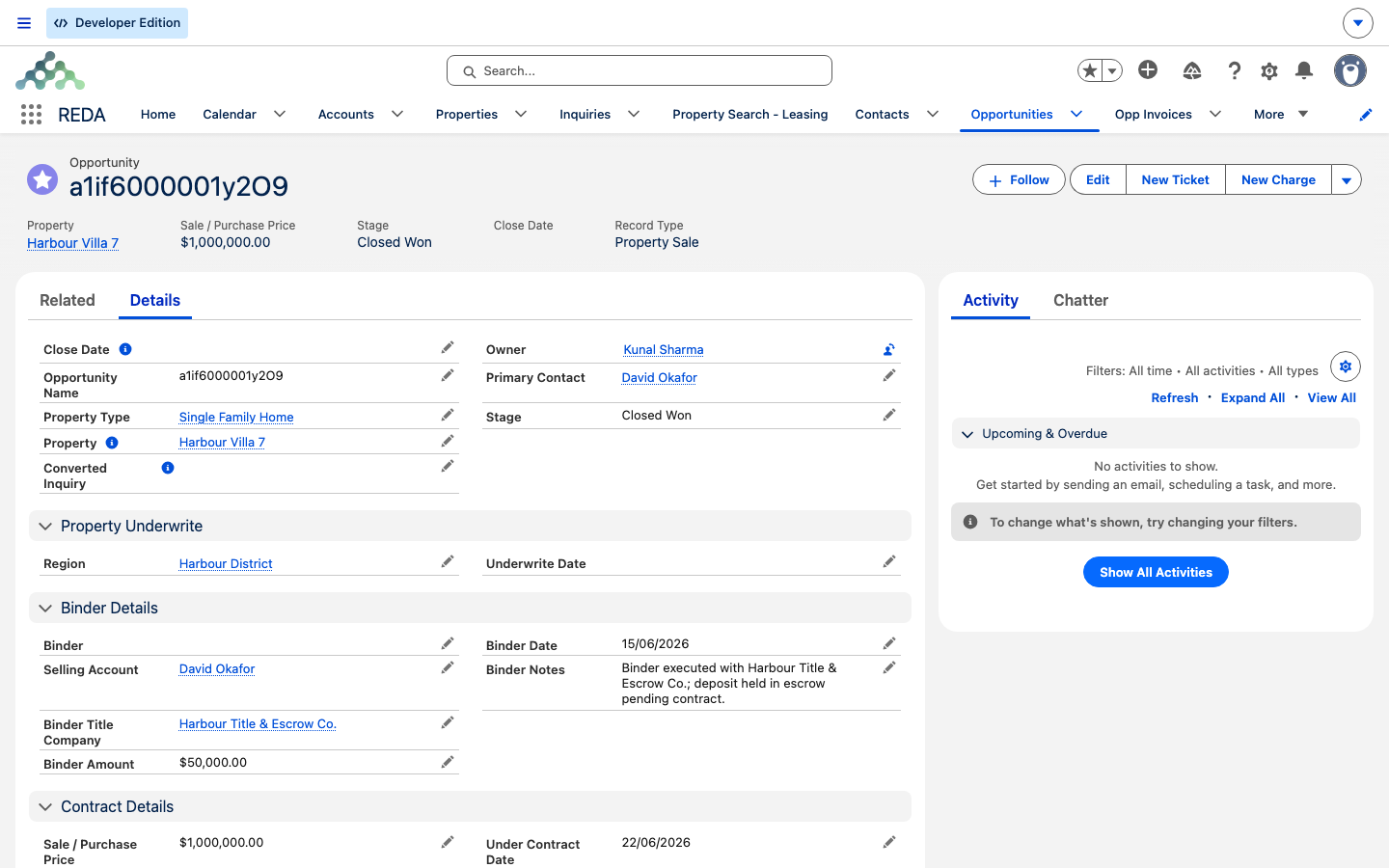
Closed Won, the end of the run), with the buyer's chosen Property (Harbour Villa 7), Sale / Purchase Price 1,000,000.00, and the Property Sale record type.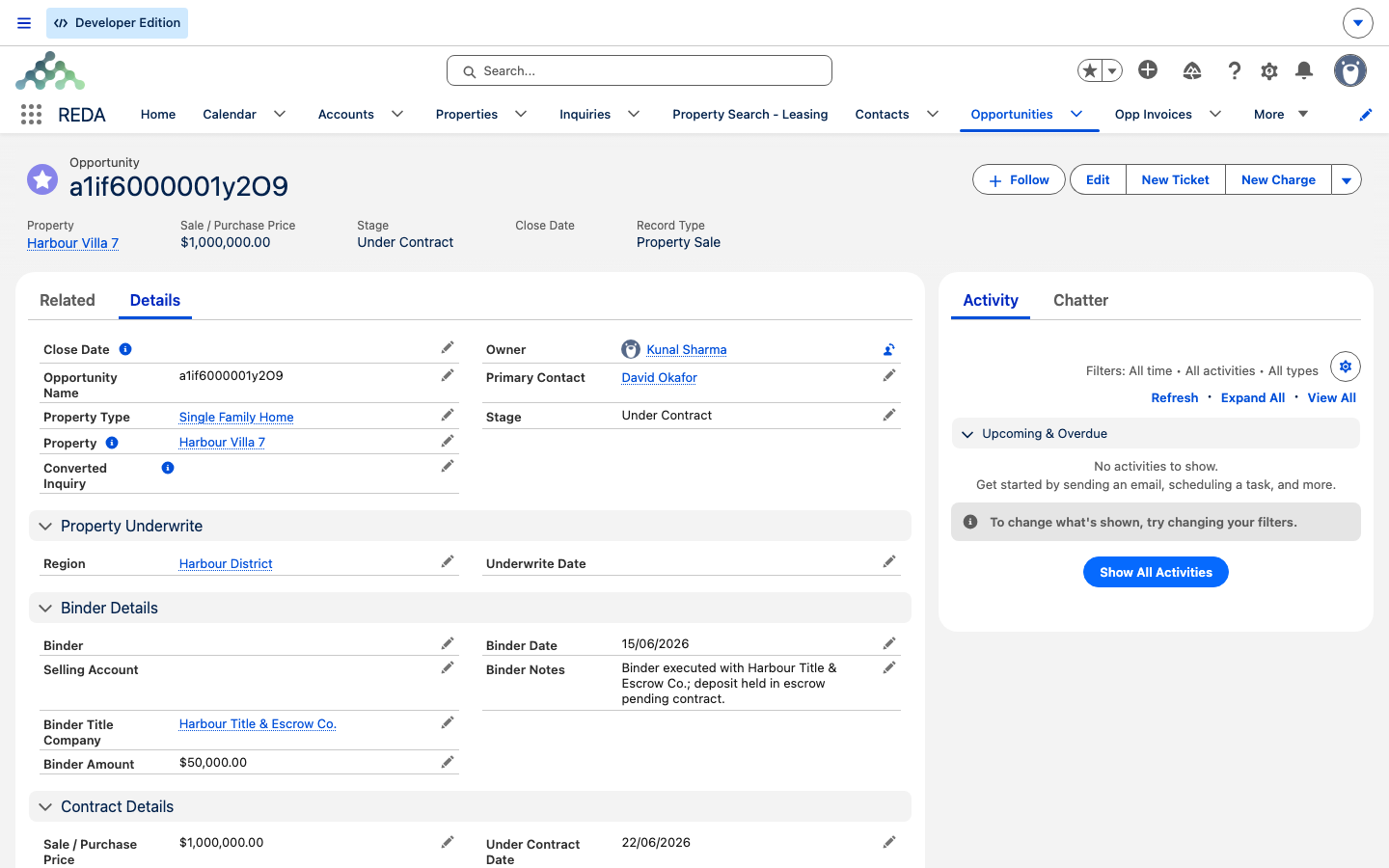
Under Contract (Under Contract Date 22/06/2026), so the binder figures sit above the Contract Details.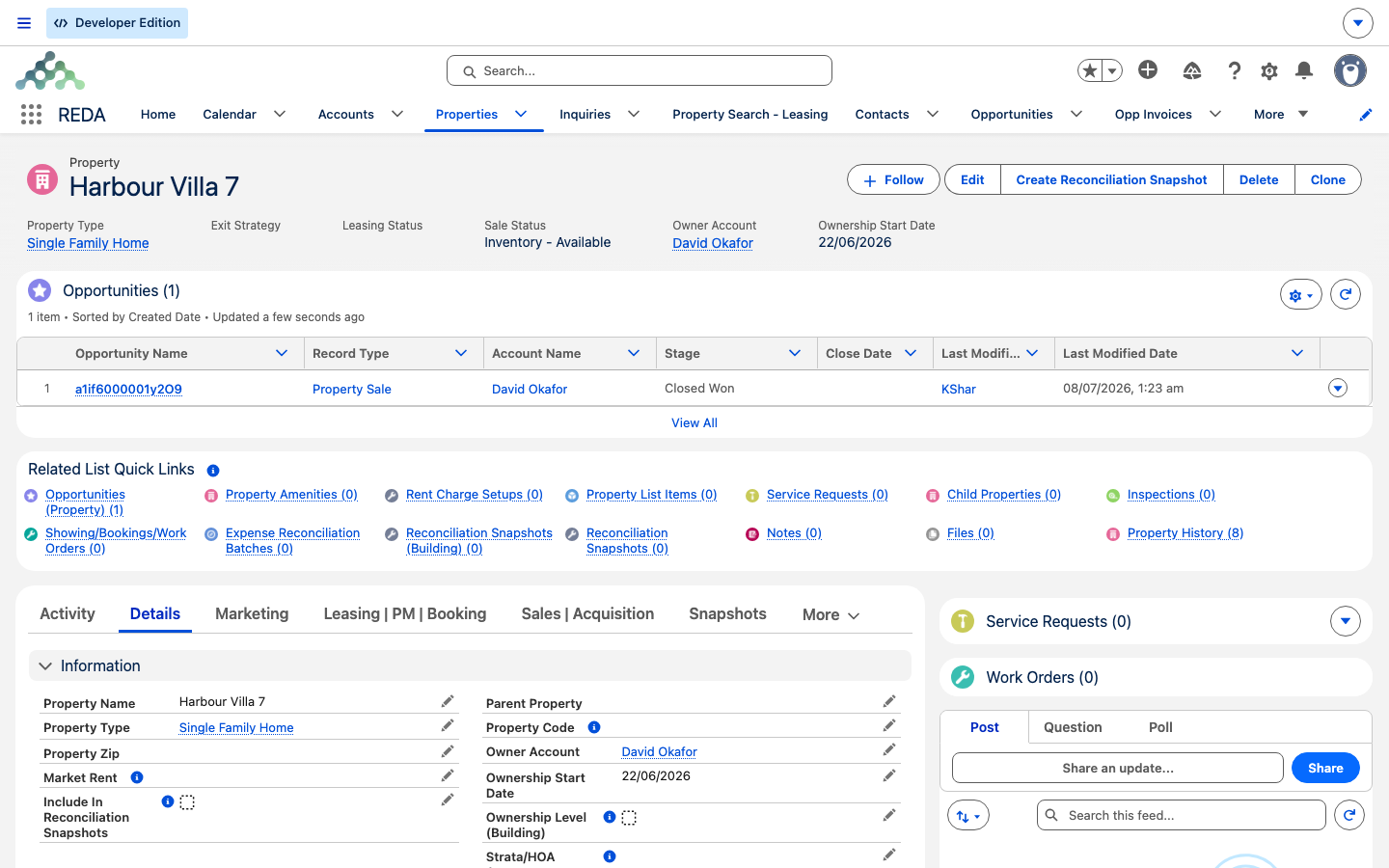
Closed Won — the ownership handover that Closed Won performed.Reference: stage to system state
REDA treats certain stages as active or won behind the scenes — these are internal states, not stages you set. They matter because activation is what generates the buyer's payment schedule, and the won state is what drives commissions and the reopen guard.
| Stage | Active? | Won? |
|---|---|---|
Property Selection | — | — |
Binder | — | — |
Contract Out | — | — |
Under Contract | Active | — |
Funded | Active | Won |
Clear to Close | Active | — |
Closed Won | Active | Won |
Closed Lost | — | — |
Funded — a system state, not the final positive close. The final close is Closed Won. See The Sale Stages Reference for what these states drive.
Where to go next
- The Sale Stages Reference — look up any stage's meaning, gate, and system state.
- The Sales Agreement Ticket — the contract process, the document gate, and cancellation, in full.
- Settlement Charges & Closing Statements — the closing costs and the two gross figures.
- Property Sales in REDA — the section map, if you want the wider picture.
Frequently asked questions
The Sale / Purchase Price and the Under Contract Date must both be set first. REDA shows "You must provide the value of Sale / Purchase Price prior updating the stage." and "You must provide the value of Under Contract Date prior updating the stage." Enter both, then advance the stage. (When the Sales Agreement ticket drives the stage, enter the price before you set the ticket to Contract Signed.)
Closing transferred ownership on the property, and REDA won't unwind that silently. You'll see "The property ownership was updated when this opportunity was marked as "Closed Won." Please revert the property ownership changes on the associated property before updating the opportunity stage." Undo the ownership change on the property first, then move the deal.
The Sales Agreement ticket drives it: setting the ticket to Contract Sent moves the deal to Contract Out, and Contract Signed or Closed moves it to Under Contract. That's the intended behavior — the ticket is meant to move the middle of the pipeline for you.
For a paper-signed agreement, the signed document must be attached first: "Please attach Document prior closing Ticket." And you can't flag the document as attached without an actual file present: "No document found associated to this ticket. Please upload document prior provide Document Attached as "Yes"." Upload the file, then close the ticket.
REDA recomputes it from the property's Sale Status on every save — it's on only when the Sale Status is Inventory - Available. Set the Sale Status to Inventory - Available rather than editing the available-for-sale flag directly.
While the sale is still open, REDA keeps the Selling Account aligned with whoever currently owns the property — it re-defaults from the property's Owner Account on save. So an edit you make to the Selling Account before the deal closes can be replaced. If it's showing the wrong seller, correct the owner on the property; the deal will follow.
They're deleted when the deal leaves its won state. Recalculation rebuilds them from scratch when the deal returns to Closed Won — nothing is preserved from the earlier calculation.
Was this article helpful?