
Evictions & Early Terminations
Not every lease runs to its natural end. When a tenant has to be removed for cause, or both sides agree to end early, REDA handles it with two tickets: Eviction and Termination. Each puts the lease into its own notice stage and, when you close it, raises a child Move Out ticket that finishes the job. This article shows which ticket writes which stage, why the child Move Out ticket behaves differently under one of these parents, and how calling it off rewinds the lease. No prior REDA experience is assumed.
Access you'll need. Both require the REDA - Property Leasing User permission set.
Eviction vs Termination vs Move-Out
Three lease-ending paths, and it helps to see them side by side:
| Path | Who initiates | Notice stage it writes |
|---|---|---|
| Eviction | The landlord, for cause | Occupied - Notice (Eviction) |
| Termination | Both sides, ending early | Occupied - Notice (Termination) |
| Move-Out (normal end) | The tenant giving notice | Occupied - Notice (Move Out) — covered in Notice & Move-Out |
Eviction and Termination share the same shape — a parent ticket that sets a notice stage and then spawns a child Move Out ticket to finish. What differs is the stage label and, for terminations, an optional document workflow for the surrender agreement.
Starting the process
Both tickets can only be raised against an occupied lease — you can't evict or terminate an application or an already-expired lease. Try it on the wrong lease and REDA stops you:
On the ticket you set the Move Out Date (the scheduled date the unit will be vacated), a Notice Date, and — for an eviction — Eviction Start Date and Eviction End Date. Both tickets start with an approval status of Draft, which your organization can use as a review checkpoint before the process runs.
Eviction, step by step
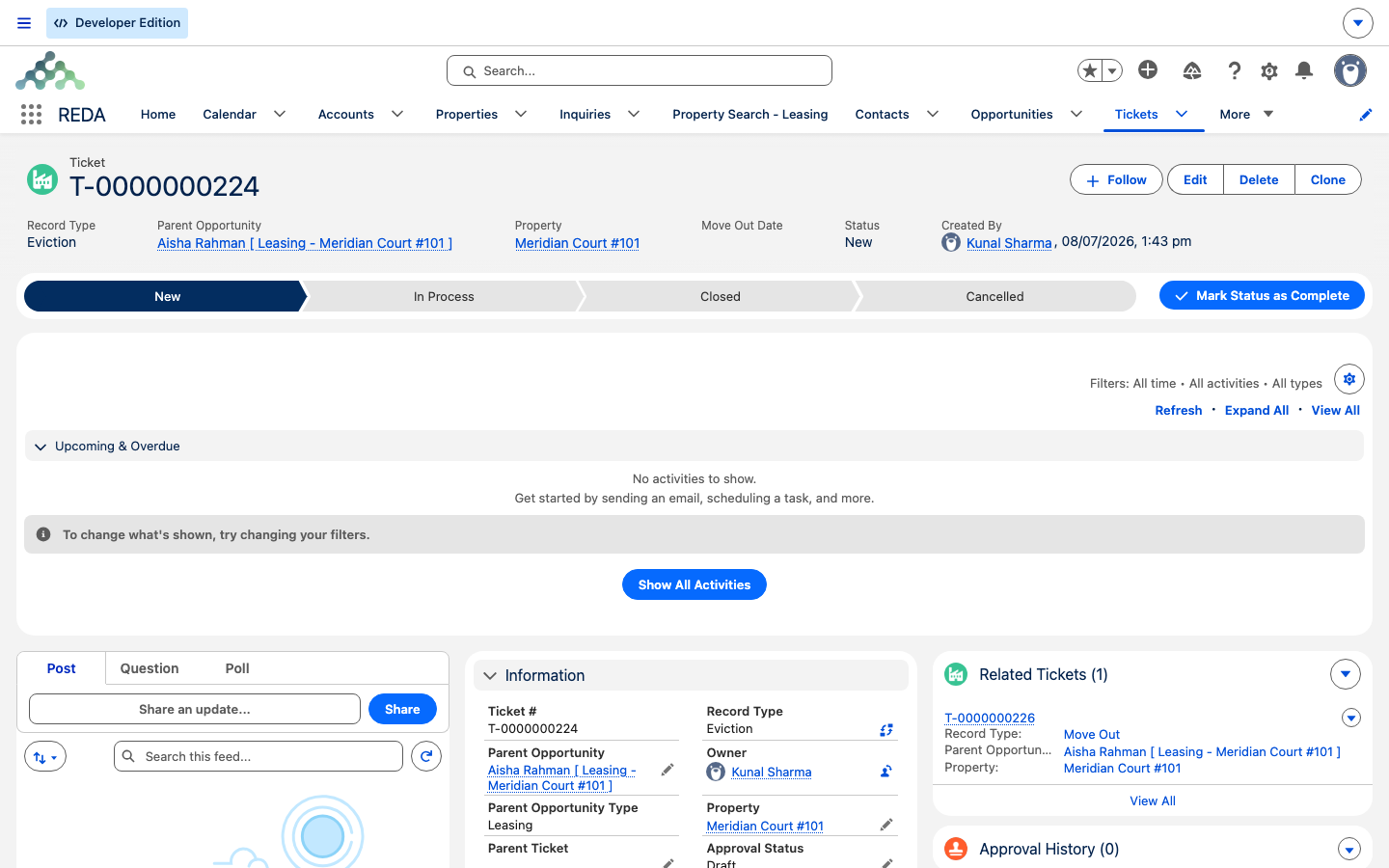
An Eviction ticket moves through statuses New, In Process, Closed, and Cancelled:
Occupied - Notice (Eviction) and REDA stamps the Scheduled Move Out Date from the ticket's Move Out Date.Occupied - Notice (Eviction), and REDA raises a child Move Out ticket — linked back to this eviction, with the move-out date copied and the lease's current stage snapshotted on it. REDA won't let you close without a move-out date: "Move Out Date must be provided for Closed Eviction."Termination, step by step
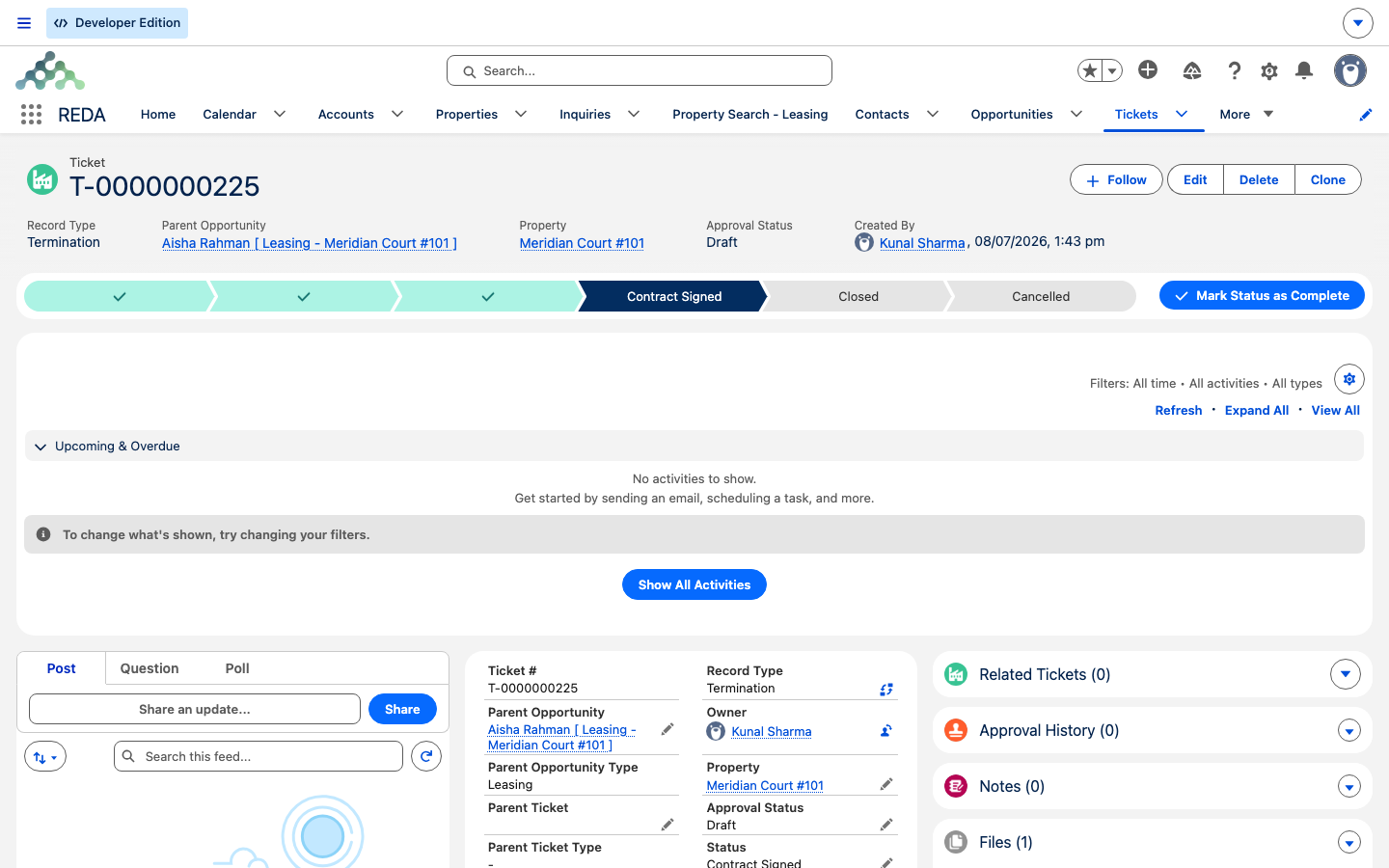
A Termination ticket has the same shape as an eviction, writing Occupied - Notice (Termination) and spawning its own child Move Out ticket on close. It adds statuses for a document workflow — Contract Sent and Contract Signed — so you can track a surrender agreement through to signature. If that agreement is signed on paper, REDA won't let you close the ticket until the signed document is attached, and it checks a file is really there:
"No document found associated to this ticket. Please upload document prior provide Document Attached as "Yes"."
On close, REDA stamps the scheduled move-out date and raises the child Move Out ticket, exactly as an eviction does. (Eviction has no Contract Sent/Signed statuses — that document workflow is unique to termination.)
Finishing with the child Move Out ticket
Both parents hand off to a child Move Out ticket. Under an eviction or termination parent it behaves in one important non-obvious way:
Occupied - Notice (Move Out) when it goes In Process. Under an eviction or termination parent that's suppressed — the parent process already owns the notice stage, so the child leaves it as is. Seeing the child "In Process" while the lease still reads Occupied - Notice (Eviction) is correct, not broken.
Closing the child ticket works normally and is what ends the lease: REDA stamps the Actual Move Out Date, moves the lease to Expired, switches off billing, deactivates portal access, and cleans up any outstanding renewal tickets. If the property has a move-out inspection template and schedule, that inspection is scheduled off this child ticket too. The Parent Ticket and Parent Ticket Type fields keep the eviction-to-move-out chain visible and auditable.
Expired. Watch the balance during a drawn-out eviction.
When the unit goes back to market
There's a difference worth knowing between the three paths in how the unit becomes available again. On a normal move-out and on a termination, REDA looks ahead: as soon as the lease is on its notice stage with a known end date, it stamps the property's next Leasing Availability Date — the end date plus the rule's make-ready turnaround days — so the unit can be marketed before the tenant is even out. An eviction notice stage does not pre-stamp that forward date the same way. Instead, the unit returns to market once the child Move Out ticket closes and the lease reaches Expired, when the property's leasing status recomputes on its own (see Property Statuses). The practical takeaway: don't expect an early availability date to appear while an eviction is still in progress — it lands at the end.
Calling it off
Setting either parent ticket to Cancelled rewinds the lease: the notice stage reverts to the snapshot taken when the ticket was created, and the scheduled move-out date is cleared. The rewind only applies while the lease is still on the stage the ticket set — so a cancellation never clobbers a stage some other process has since written.
If the process has already reached the child Move Out ticket, calling it off is a two-step affair: cancel the child ticket first (which rewinds it from Expired and cancels its inspection), then cancel the parent (which rewinds the notice stage). Work from the child up to the parent so each rewind lands on the stage it expects.
Worked examples
Eviction. Aisha Rahman stops paying. On 10 Mar the manager raises an Eviction ticket with Move Out Date 30 Apr and Eviction Start 10 Mar. Set to In Process, the lease shows Occupied - Notice (Eviction) with Scheduled Move Out 30 Apr. When the eviction concludes, the ticket is closed and a child Move Out ticket appears, linked to the eviction. Aisha vacates on 30 Apr; closing the child ticket moves the lease to Expired and billing stops. Note that rent and late fees kept accruing the whole time until that final close.
Termination. A tenant and landlord agree to end a lease early — the lease runs to 31 Jul next year, but both want out on 30 Sep. The manager raises a Termination ticket, moves it to Contract Signed with the signed surrender agreement attached, and closes it. The lease shows Occupied - Notice (Termination) and a child Move Out ticket appears. Closing that child on 30 Sep moves the lease to Expired.
Reference: ticket status to lease stage
Every status and what it does to the lease:
| Ticket | Status | Lease stage | Other updates |
|---|---|---|---|
| Eviction | In Process | Occupied - Notice (Eviction) | Scheduled Move Out Date set from the ticket |
| Eviction | Closed | Occupied - Notice (Eviction) (kept) | Child Move Out ticket created (linked, date copied, stage snapshotted) |
| Eviction | Cancelled | Reverted to the snapshot | Scheduled Move Out Date cleared |
| Termination | Closed | Occupied - Notice (Termination) | Scheduled Move Out stamped; child Move Out ticket created |
| Termination | Cancelled | Reverted to the snapshot | Scheduled Move Out cleared |
| Child Move Out | In Process | Unchanged (suppressed under these parents) | — |
| Child Move Out | Closed | Expired | Actual Move Out Date; billing off; renewal tickets cancelled; portal off |
| Child Move Out | Cancelled | Reverted from Expired | Move-out dates cleared; inspection cancelled |
Where to go next
- Notice, Move-Out & Lease End — the child Move Out ticket's full behavior.
- Renewing a Lease — the opt-out path that also raises a Move Out ticket.
- Understanding Tickets — parent and child tickets, and how cancellation rewinds.
- The Lease Record — what the notice and expired stages mean.
- Property Statuses — how a unit becomes available again after move-out.
Frequently asked questions
Both can only be raised against an occupied lease: "Only Occupied Leasing Opportunity can be selected." You can't evict or terminate an application-stage or already-expired lease.
It needs a move-out date to close: "Move Out Date must be provided for Closed Eviction." Set the Move Out Date, then close it.
No. Under an eviction or termination parent, the child Move Out ticket deliberately doesn't overwrite the notice stage — the parent process owns it. That's expected behavior.
Closing the parent only spawns the child Move Out ticket. The lease reaches Expired when that child ticket closes — that's the step that ends the lease and stops billing.
The rewind only applies while the lease is still on the stage the eviction set. If another process has since moved the lease, the cancellation leaves that later stage untouched rather than overwriting it.
Don't. The snapshot-and-rewind safety net only works when the stage is driven by the ticket. Editing the stage by hand fights the automation and breaks the clean cancellation path.
Was this article helpful?