
Running an Acquisition Deal — Binder to Contract
This is the middle of the acquisition pipeline: you have a live deal and need to move it forward. You'll advance it through its early stages — Qualification, Inspection, Offering — record the binder (earnest money) without tripping the validation, and learn which stages you set by hand versus which one the purchase agreement ticket sets for you. The key thing to take away: the jump to Under Contract is not a hand-edit — it comes from signing the purchase agreement, covered next in The Acquisition Purchase Agreement Ticket. No prior REDA experience is assumed.
Access you'll need. Advancing an acquisition deal requires the REDA - Property Acquisition User permission set. REDA - Master Data - Read Only can view a deal but not change it.
Where the deal starts
An acquisition deal usually begins life when you convert a qualified acquisition inquiry (see Capturing and Converting Acquisition Leads). It opens at Qualification — the default stage — with a primary Seller contact role and the underwriting block carried over from the inquiry (the Maximum Allowed Offer recomputed on the deal). REDA names the deal automatically as "<address> [ Acquisition ]."
The stage ladder
An acquisition deal moves along seven stages. Most you advance yourself; one is set for you. Here's who does what:
| Stage | What you do | Who sets it |
|---|---|---|
Qualification (default) | Underwrite; confirm the deal is worth pursuing | You (or on conversion) |
Inspection | Inspect the asset; adjust estimates (the MAO recomputes) | You |
Offering | Make the offer (MAO as your ceiling); record the binder if any | You |
Under Contract | Record the signed purchase agreement through the ticket | The ticket (Contract Signed/Closed) |
Clear to Close | Title and funding clearance | You |
Closed Won | Close the purchase | You |
Closed Lost | Walk away | You |
The deal counts as active from Under Contract onward — and reaching active is what triggers REDA to create the Property and a placeholder loan (see Property Creation and Funding an Acquisition).
Qualification → Inspection → Offering
These first three stages are workflow markers you move through as you work the deal: qualify it, inspect the asset, make the offer. REDA doesn't gate movement between them — there's no price or date check standing in your way — so advancing is simply a matter of setting the Path as the work progresses.
Use the deal's Maximum Allowed Offer (MAO) as your offer ceiling. If an inspection changes your assumptions, edit the estimates on the deal and the MAO recomputes (blank-only seeding still applies, so your hand-entered figures stick). For the field detail behind those numbers, see Acquisition Analysis Fields.
Recording the binder
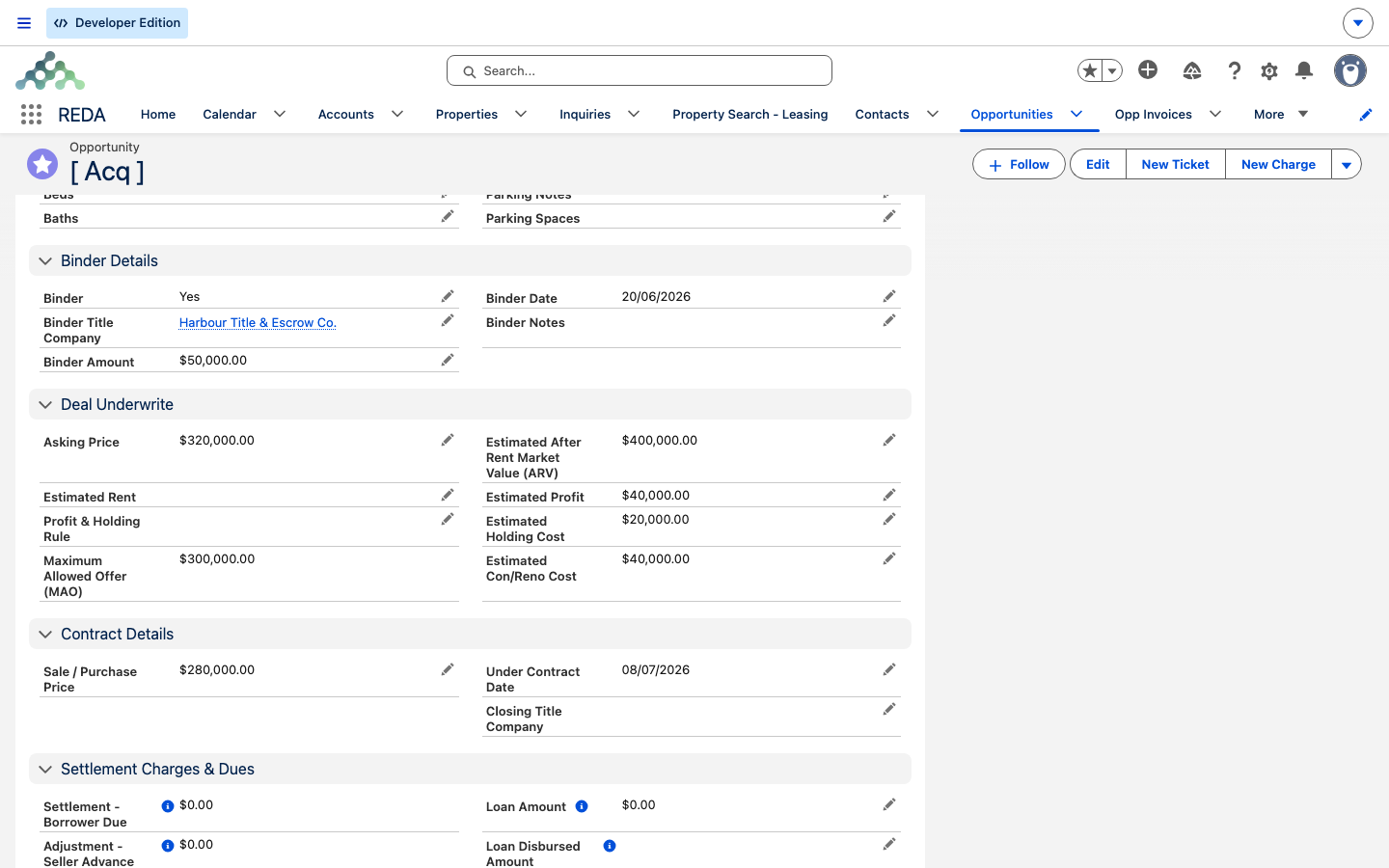
When the seller accepts earnest money — a binder — record it on the deal. The deal carries a Binder picklist (Yes/No) plus Binder Amount, Binder Date, Binder Title Company, and a free-text Binder Notes field.
| Field | When required |
|---|---|
| Binder (Yes/No) | Always available |
| Binder Amount | Required when Binder = Yes |
| Binder Date | Required when Binder = Yes |
| Binder Title Company | Required when Binder = Yes |
| Binder Notes | Optional |
There's an all-or-nothing rule: once you set Binder = Yes, you must supply all three details in the same save, or REDA blocks it with:
The Binder Title Company is a lookup to the title or escrow entity holding the funds — it's filtered to non-client accounts.
Reaching Under Contract
Under Contract. Dragging the Path yourself fights the automation and can leave the deal and its paperwork out of step.
One contrast worth noting if you also work property sales: acquisitions have no "Contract Out" stage. The purchase agreement's Contract Sent status does not create an intermediate stage on an acquisition — only Contract Signed or Closed moves the deal, and it goes straight to Under Contract. The full ticket walkthrough is in The Acquisition Purchase Agreement Ticket.
The walkthrough
Qualification with a Seller contact role.Inspection and adjust the estimates from the inspection report — the MAO follows your edits.Offering and make your offer, capped by the MAO. If there's earnest money, set Binder = Yes and fill all three binder details in one save.Worked example: advancing Meridian Court
Meridian Properties' deal "Meridian Court [ Acquisition ]" opens at Qualification with an MAO of 300,000. After a site inspection, Meridian moves the deal to Inspection and revises Estimated Con/Reno Cost upward, which drops the MAO. Meridian then moves to Offering and offers 280,000. The seller, Continental Holdings, accepts with 50,000 earnest money, so Meridian sets Binder = Yes and enters Binder Amount 50,000, a Binder Date, and the Binder Title Company all in one save (leaving any of the three blank would trigger the binder validation). With terms agreed, Meridian creates the Acq - Purchase Agreement ticket rather than hand-editing the stage — signing it will move the deal to Under Contract.
Where to go next
- The Acquisition Purchase Agreement Ticket — the ticket that moves the deal to
Under Contract. - Property Creation and Funding an Acquisition — what happens the moment the deal goes active.
- Acquisition Analysis Fields — the MAO and every underwriting field.
- Capturing and Converting Acquisition Leads — how the deal got here.
Frequently asked questions
Qualification → Inspection → Offering → Under Contract → Clear to Close → Closed Won (or Closed Lost).
All three binder details are required together: "Provide complete Binder Details. Binder Amount , Binder Date & Binder Title Company". Fill the amount, date, and title company, then save.
Under Contract is driven by the Acq - Purchase Agreement ticket, not a hand-edit. Sign or close the ticket instead — see The Acquisition Purchase Agreement Ticket.
No — acquisitions have no Contract Out stage. The purchase agreement moves the deal straight to Under Contract.
The MAO recomputes from the deal's own inputs. Blank-only seeding means your edits stick and the ceiling offer follows them.
Was this article helpful?