
How Acquisitions Work in REDA
This is the map of how REDA handles buying property. When you acquire an asset, everything runs through a single record — the acquisition deal — that carries the numbers you underwrite, the stage the purchase is at, and the paperwork that contracts it. This article names all the moving parts and the order they happen in: the inquiry, the deal, the purchase agreement, and the Property and loan that REDA creates for you along the way. It does not walk through any one task — each of those has its own how-to, linked as we go. No prior REDA experience is assumed; every term is defined as we reach it.
Access you'll need. Working the acquisition pipeline requires the REDA - Property Acquisition User permission set, which lets you create and edit deals, inquiries, properties, and tickets. REDA - Master Data - Read Only can view deals but not change them; deleting a property is reserved for REDA - Master Data - Admin. You'll also need access to Accounts and Contacts, which your administrator grants separately.
What "acquisition" means in REDA
REDA runs every deal — whether you're leasing a unit, lending against one, or buying one — through one shared record called an Opportunity, which we'll simply call a deal. A single deal record can play several roles, and an acquisition is one of those roles: a purchase you're running. When you open an acquisition deal you're looking at the deal in its "buying" form.
Each kind of deal has its own record page and its own progress bar — the Path — showing where it sits in its lifecycle. The acquisition Path has its own set of stages, described below.
An acquisition deal does double duty. It's both the deal — the thing that moves stage by stage from qualification to close — and the underwriting worksheet, holding the analysis numbers (the after-repair value, your cost estimates, and the ceiling offer). For the field-by-field detail of that worksheet, see Acquisition Analysis Fields.
One thing surprises newcomers: a deal can exist before any Property record does. Early on, the target's address is just typed in as text on the lead and the deal. REDA creates the actual Property record for you later, automatically, at the moment the purchase goes under contract.
The buy-side journey at a glance
Here's the whole path from first contact to a closed purchase. Each step links to its own how-to:
The seven acquisition stages
An acquisition deal moves along a fixed ladder of stages, shown as the Path across the top of the record. A new acquisition opens at Qualification. Here is the full ladder, in order, with what each one means:
| Stage | One-line meaning | Deal is… |
|---|---|---|
Qualification (default) | New deal being underwritten | — |
Inspection | The asset has been inspected | — |
Offering | An offer has been made, capped by your ceiling offer | — |
Under Contract | The purchase agreement is signed | Active — Property + placeholder loan appear |
Clear to Close | Title and funding are cleared | Active |
Closed Won | The purchase is complete | Active · Won · Closed |
Closed Lost | You walked away | Closed |
The word active matters. A deal counts as active from Under Contract onward (through Clear to Close and Closed Won). Reaching active is the single event that sets off REDA's two headline automations, described next.
The two records REDA creates for you
When an acquisition deal first becomes active — the moment it reaches Under Contract — two records appear that you did not create by hand:
Neither is a glitch: they're the system getting the asset and its financing ready for you. You complete the placeholder loan with real terms, or close it out if the purchase is all cash — either way it's expected, not something you created by mistake. The full mechanics — what the Property inherits, and how to fund the purchase — live in Property Creation and Funding an Acquisition.
Key concepts and vocabulary
These terms recur across every acquisition article. Define them once here:
| Term | What it means |
|---|---|
| Deal (Opportunity) | REDA's shared deal record. An acquisition is the deal in its "buying" form. |
| Stage | Where the deal sits on its Path — one of the seven above. |
| Ticket | A short, controlled process you work step by step. The purchase agreement is a ticket. See Understanding Tickets. |
| Buying Account | The internal entity purchasing the asset. It becomes the new Property's owner. |
| Profit & Holding Rule | The master-data record that seeds your underwriting estimates. See Profit Holding Rules. |
| Maximum Allowed Offer (MAO) | The computed ceiling for your offer. See Acquisition Analysis Fields. |
Who does what
Running the acquisition pipeline requires the REDA - Property Acquisition User permission set — it grants create-and-edit rights on deals, inquiries, properties, and tickets, plus the settlement codes used on the closing statement. Viewing without editing is covered by REDA - Master Data - Read Only. Deleting a Property is restricted to REDA - Master Data - Admin.
Because acquisitions create Accounts and Contacts (the seller entity and the seller's contact), you also need access to those, which your administrator grants separately from the REDA permission sets.
The moving parts, in one place
Every piece of the pipeline and where you'll find it:
| Piece | What it is | Where it lives |
|---|---|---|
| Acquisition inquiry | The buy-side lead, underwritten before there's a deal | Inquiries tab |
| Acquisition deal | The purchase, stage by stage | Opportunities tab |
| Acq - Purchase Agreement ticket | The signed contract that drives Under Contract | Tickets tab / the deal's Tickets |
| Property (auto-created) | The asset, born when the deal goes active | Properties tab |
| Placeholder loan (auto-created) | The financing slot for the new property | Opportunities tab, on the property |
A whole acquisition in one trace
To make it concrete, follow Meridian Properties buying the distressed Meridian Court, currently owned by Continental Holdings. This is the compact overview; the click-by-click lives in the sibling how-tos.
| Step | What happens |
|---|---|
| Capture & underwrite the lead | An acquisition inquiry for "Meridian Court" is created and underwritten — after-repair value 400,000, cost estimates, and a ceiling offer (MAO) of 300,000 |
| Convert | REDA creates the Account, Contact, and the deal "Meridian Court [ Acquisition ]" at Qualification, with a Seller contact role |
| Inspect & offer | Meridian inspects, then offers 280,000 (at or under its ceiling) and records the binder |
| Sign the purchase agreement | The Acq - Purchase Agreement ticket is signed → the deal moves to Under Contract |
| REDA creates records | The Property "Meridian Court" (owner = Meridian Capital, the buying entity) and a placeholder loan appear |
| Fund & close | Meridian funds the purchase with a 750,000 rehab loan, then closes the deal Closed Won |
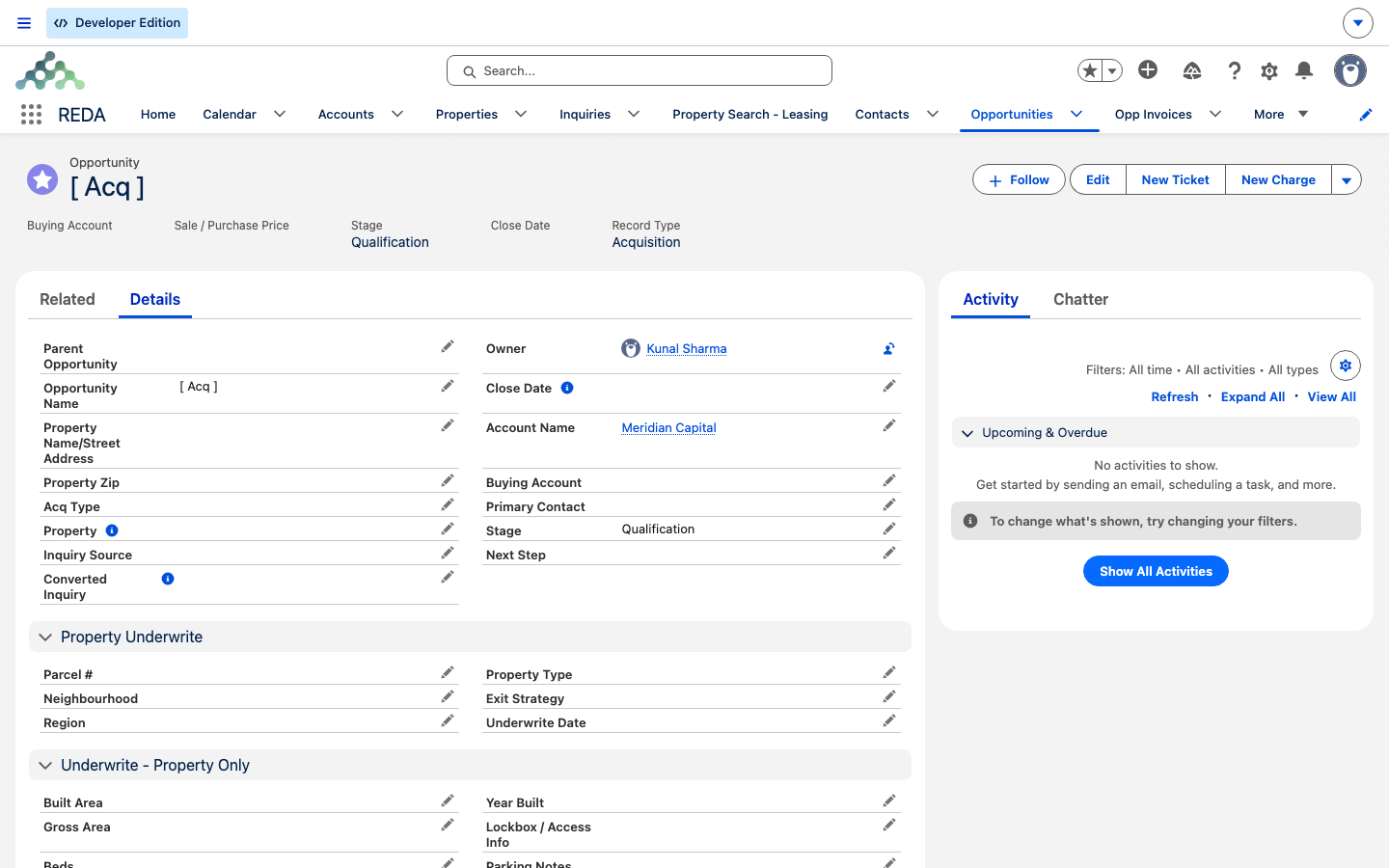
Qualification, the first stage), Close Date and Record Type Acquisition; the Details tab below opens the underwriting fields.
Qualification.Where to go next
- Capturing and Converting Acquisition Leads — the front of the pipeline: capture, qualify, underwrite, convert.
- Running an Acquisition Deal — Binder to Contract — advancing the deal and recording the binder.
- The Acquisition Purchase Agreement Ticket — the ticket that drives
Under Contract. - Property Creation and Funding an Acquisition — the two auto-created records and how to fund the purchase.
- Acquisition Analysis Fields — every underwriting field and the ceiling-offer math.
- Profit Holding Rules — where the estimate defaults come from.
Frequently asked questions
It's the deal record in its buying form — a purchase you're running. The same record also holds the underwriting numbers, so it's both your deal tracker and your analysis worksheet.
Qualification → Inspection → Offering → Under Contract → Clear to Close → Closed Won (or Closed Lost). A new deal opens at Qualification.
REDA creates them when the deal goes active — the moment it reaches Under Contract — so the asset and its financing are ready for you. See Property Creation and Funding an Acquisition.
No — the purchase agreement ticket drives that transition. Work the ticket, not the stage. See The Acquisition Purchase Agreement Ticket.
From acquisition inquiries, which you convert into deals. See Capturing and Converting Acquisition Leads.
Was this article helpful?