
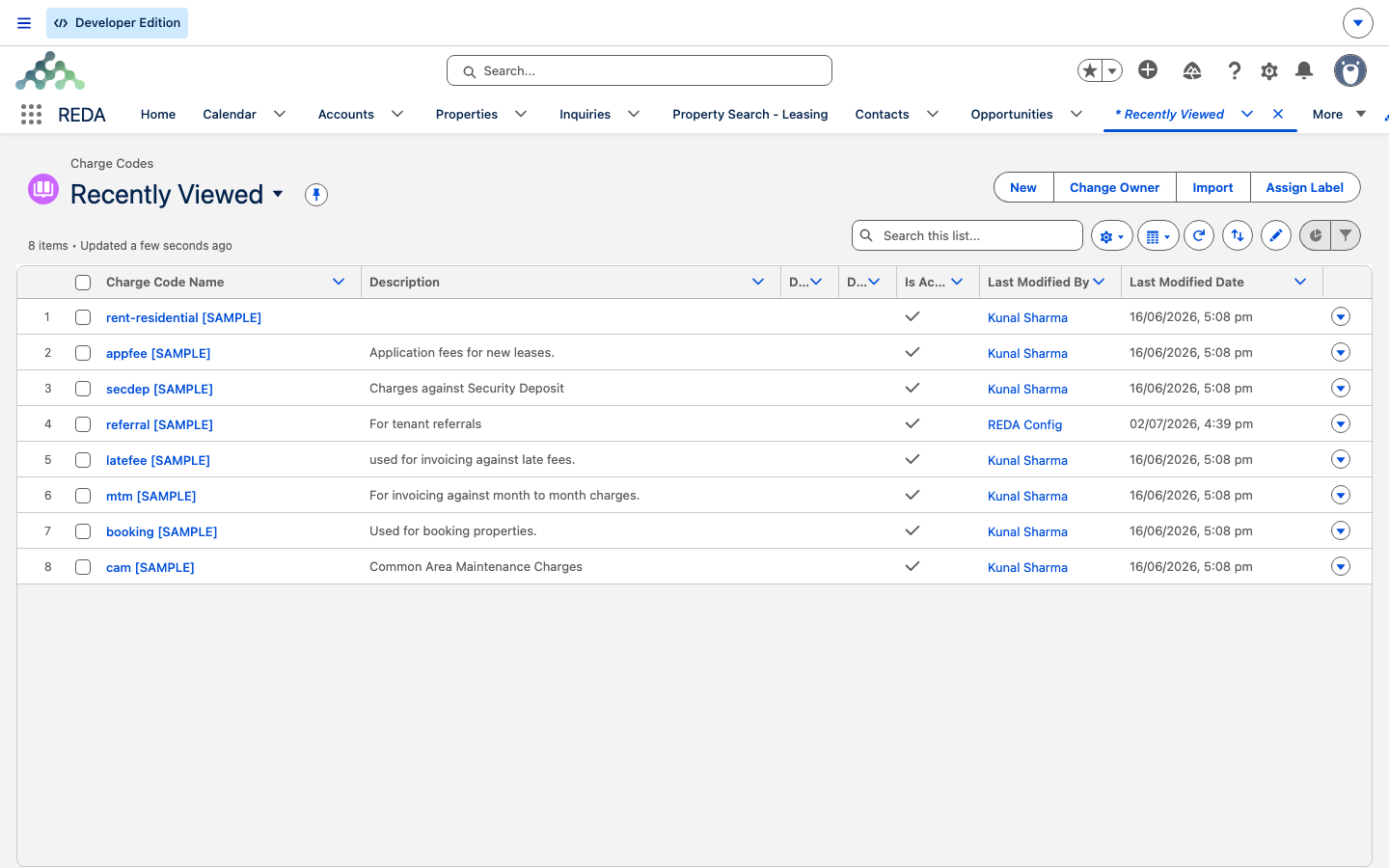
Charge Codes
A charge code is the label REDA puts on every amount it bills — Rent, Late Fee, Security Deposit, Utilities Recovery, and so on. It is a small piece of setup with an outsized effect: the charge code decides who the invoice is billed to, how many days the tenant gets to pay, whether the invoice is folded into a consolidated bill, and whether the amount ever accrues a late fee. This article explains what a charge code is, walks through every switch on one, and answers the question that trips people up most often: when REDA generates an invoice, which charge code actually lands on it? No prior REDA setup experience is assumed — every term is defined as we reach it.
Access you'll need. Creating and editing charge codes requires the REDA - Master Data - Admin permission set; REDA - Master Data - Read Only can view them but not change them.
What a charge code is
Think of charge codes as your billing vocabulary — a fixed, reusable set of categories that every charge and every invoice speaks. When someone sets up rent on a lease, adds an amenity fee, or configures a late-fee rule, they pick a charge code to say what kind of money this is. That single choice then carries a bundle of behavior with it onto every invoice the charge produces.
Charge codes are master data — shared reference records you set up once and reuse everywhere, like a chart of accounts. Because historical charges and invoices point back at their code, you never delete an obsolete code; you switch it off instead (see the Is Active switch below). That keeps old records readable while removing the code from new selections.
The switches, one by one
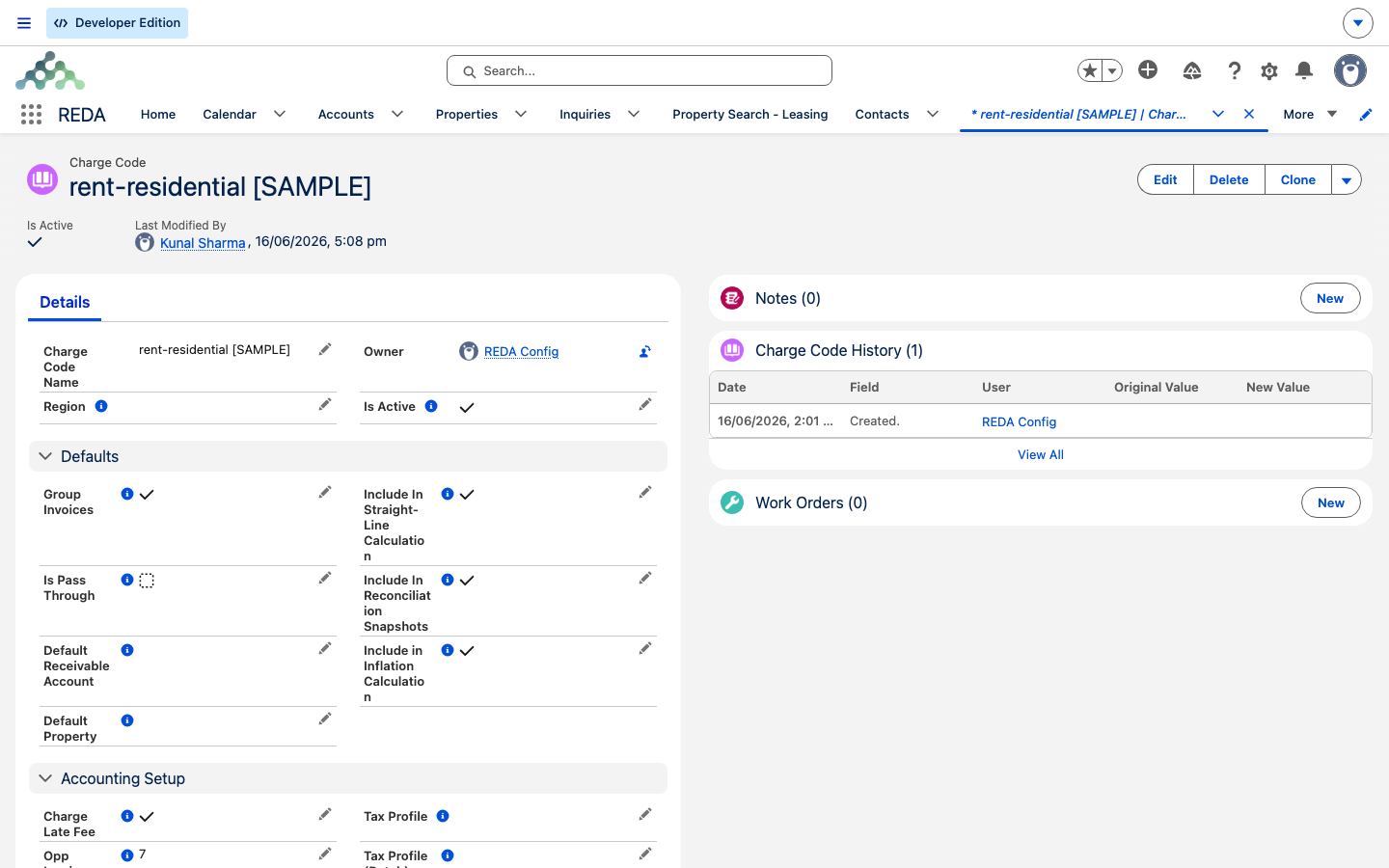
A charge code is mostly a set of toggles and defaults. Here is what each one does, grouped by the job it performs. You rarely set all of them — most codes need only a name, Is Active, and perhaps a grace-day figure.
Pass-through codes: rerouting the receivable
By default, an invoice's money is owed to the property's Owner Account — the landlord being billed on behalf of. A pass-through code changes that. When you tick Is Pass Through, three things flip on every invoice the code produces:
- The receivable moves. The account that's owed becomes the code's Default Receivable Account if one is set; if it isn't, it falls to the property's PM Company/Entity (your management company) instead of the owner.
- The property can swap. If the code has a Default Property, the invoice is stamped with that property rather than the lease's own.
- It never joins a batch. Pass-through invoices are excluded from consolidated bills, even if Group Invoices is ticked — so a pass-through charge always stands as its own invoice.
- One more condition, whatever the code says. An invoice joins a batch only when its code has Group Invoices on, is not pass-through, and its amount is greater than zero. A zero or negative line — a promotion credit, for example — always stands alone, however the code is configured.
Pass-through is how you bill things that flow through the property to a different party — recovered utilities owed to the management entity, for example, rather than rent owed to the owner.
The feature feeds
Four tick-boxes decide whether a charge under this code participates in an optional billing engine. Each is a gate: the engine only ever touches charges whose code has the matching box ticked.
| Feed | What ticking it does |
|---|---|
| Charge Late Fee | Lets invoices under this code accrue late fees. An invoice can never be charged a late fee unless its code has this on. See Late Fees. |
| Include In Straight-Line Calculation | Adds this code's charges to straight-line rent schedules. See Straight-Line Rent. |
| Include in Inflation Calculation | Lets inflation adjustments re-rate this code's charges. See Inflation Adjustments. |
| Include In Reconciliation Snapshots | Feeds property-management reconciliation snapshots. Configured here; used in the property-management reports. |
Which charge code lands on the invoice?
This is the question that causes the most confusion, because a charge can be linked to several things at once — a fee setup, a lease ticket, an amenity — and each of those can carry its own charge code. So which one wins?
The rule is simple once stated plainly: the code comes from wherever the charge itself came from. When REDA generates an invoice, it reads the charge code from the charge's source:
| Where the charge came from | Charge code used on the invoice |
|---|---|
| An admin fee setup (a fee template) | The fee setup's charge code |
| A property amenity | The amenity's charge code |
| A promotion | The promotion's charge code |
| Rent (from the Leasing Rule) | The rule's Rent Charge Code |
| A charge linked to a ticket that also has one of the sources above | The source's code — the ticket's code is not used |
| A charge linked to a ticket with no other source | The ticket's code (used only as a fallback) |
In practice a charge has only one source populated, so the everyday summary holds: the code follows the charge's origin, and a ticket's code steps in only when there's nothing else to use. The billing comment follows the same logic — REDA uses the source's description, and only falls back to the code's Default Billing Description if the source has none.
Worked example: a pass-through utility
Your portfolio recovers water from tenants and owes it to the management entity, not the owner. You set up a code Utilities Recovery: Is Active ticked, Is Pass Through ticked, Default Receivable Account = the management entity's account, Opp Invoice Payment Grace Days = 5, Group Invoices ticked (which is moot — pass-through never batches).
Aisha Rahman at Meridian Court #101 has a 120.00 monthly utility charge under this code. When it bills on the 1st, the invoice comes out routed to the management entity — not the owner — is due on the 6th (billing date 1st + 5 grace days), and stands on its own rather than joining the rent batch. Contrast a plain Rent code with pass-through off: its invoice is owed to the property's Owner Account and is eligible to be consolidated with other groupable charges.
Field reference
Every field on a charge code, at a glance:
| Field | Default | What it does |
|---|---|---|
| Charge Code Name | — | The code's display name everywhere it's used |
| Is Active | Off | Only active codes appear in selection lists |
| Description | — | Administrator reference note; never shown on invoices |
| Default Billing Description | — | Fallback invoice comment when the charge's source has no description |
| Opp Invoice Payment Grace Days | Blank | Due Date = Billing Date + this many days; blank means due on billing |
| Group Invoices | On | Lets the recurring run consolidate this code's invoices into a batch |
| Is Pass Through | Off | Reroutes the receivable, may swap the property, and excludes the invoice from batching |
| Default Receivable Account | — | First-choice receivable for pass-through codes |
| Default Property | — | Overrides the invoice's property for pass-through codes |
| Charge Late Fee | Off | Gate: invoices under this code can accrue late fees |
| Include In Straight-Line Calculation | Off | Charges under this code join straight-line schedules |
| Include in Inflation Calculation | Off | Charges under this code get re-rated by inflation adjustments |
| Include In Reconciliation Snapshots | Off | Charges under this code feed reconciliation snapshots |
| Region | — | Sets who can see the code (region-based sharing); the region code text is filled in by REDA |
Where to go next
- How Billing Works in REDA — how charges turn into invoices, end to end.
- Invoices Explained — reading a generated invoice, field by field.
- Consolidated Invoices (Batches) — how groupable invoices are combined.
- Late Fees — the engine gated by the Charge Late Fee flag.
- Settlement Codes — the sister vocabulary for settlements.
Frequently asked questions
New codes start switched off. Open the code and tick Is Active — only active codes appear in the selection lists where charges are set up.
Its charge code is a pass-through code. Pass-through routes the receivable to the code's Default Receivable Account, or, if that's blank, to the property's PM Company/Entity — instead of the owner.
Batching needs the code to have Group Invoices ticked, not be a pass-through code, and the amount to be greater than zero — and at least two invoices sharing the same grouping key. Miss any of those and the invoice stays standalone.
By design. The charge's source (fee setup, amenity, promotion, or rent) supplies the code; the ticket's code is only used when no source supplies one. The source always wins.
No — deactivate it instead. Historical charges and invoices reference their code, so the guidance for all master data is to switch it off (untick Is Active) rather than delete it, which keeps old records readable while removing the code from new selections.
Was this article helpful?