
Late Fees
A tenant calls: "Why is there a 125.00 fee on my account?" This article lets you answer that with confidence. When a rent invoice goes overdue, REDA can raise a late-fee invoice against it automatically — and it does so on a policy you set. Here you'll learn which invoices qualify, exactly when a fee arms, how the two kinds of fee (a monthly charge and a per-day charge) are calculated, why a monthly fee only ever appears once, and where the per-day cap comes from. No prior REDA experience is assumed; every term is defined as we reach it.
Access you'll need. Configuring the policy on a Leasing Rule requires the REDA - Master Data - Admin permission set. Viewing and working the resulting invoices requires REDA - Invoice Management Admin or REDA - Property Leasing User (with REDA - Invoice Management Read Only for view-only). Scheduling the late-fee runs is admin-only.
How a late fee is born
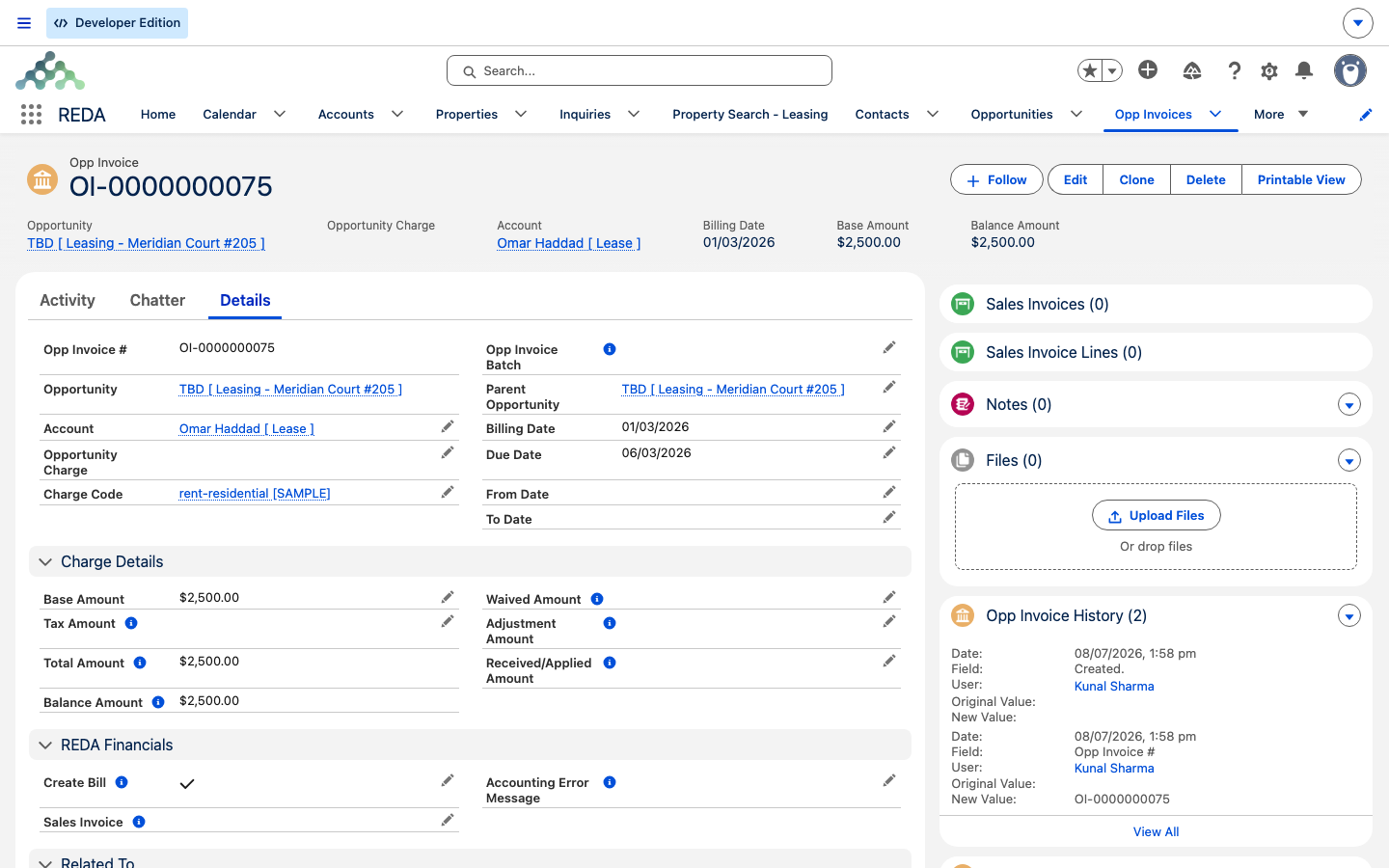
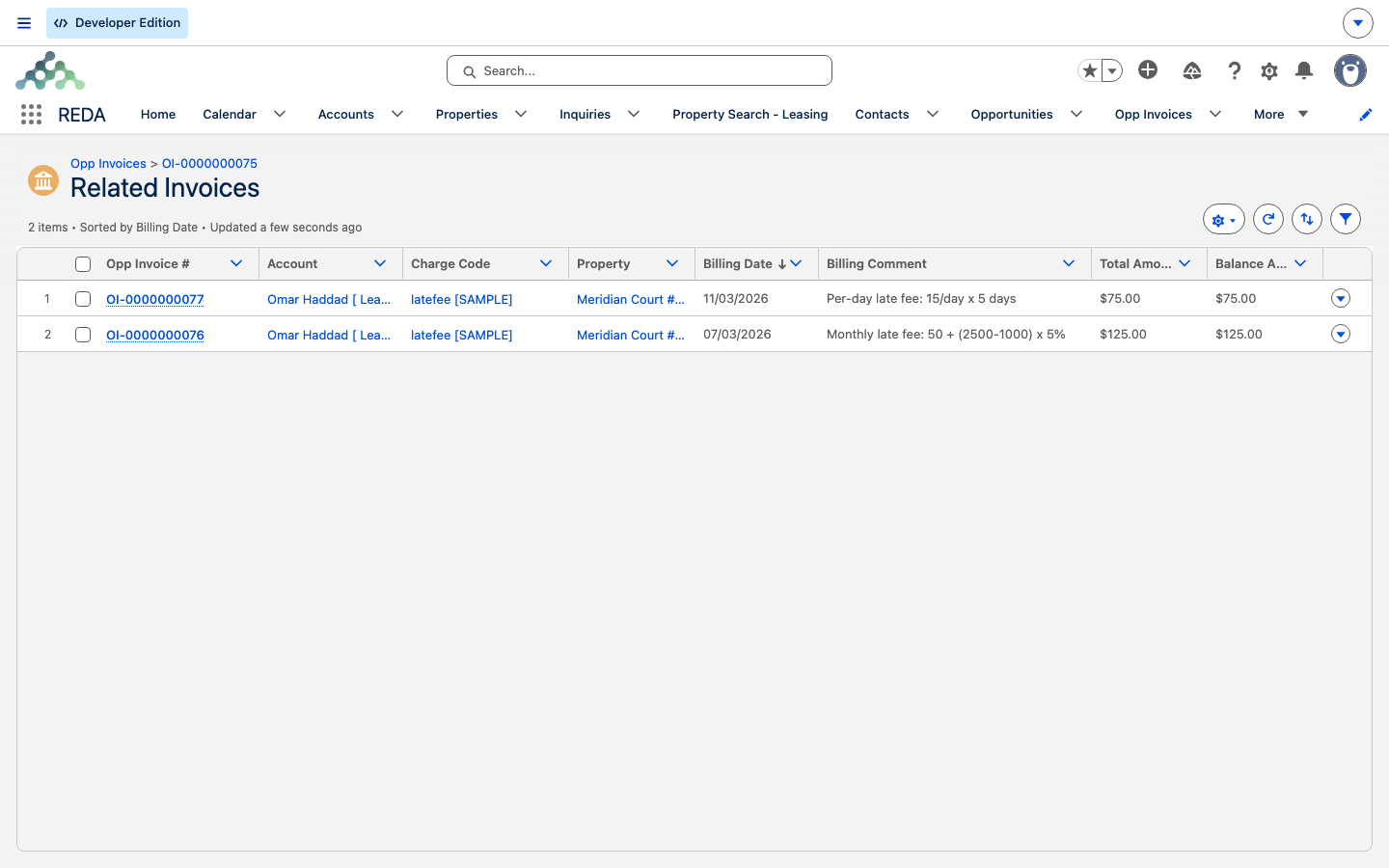
A late fee is itself an invoice — a child of the overdue one. The chain runs like this: an invoice passes its due date and remains unpaid; it clears a set of qualification conditions; a scheduled run picks it up; and REDA raises a new late-fee invoice linked back to the overdue invoice through its Parent Invoice field (which is what puts it on the parent's Related Invoices list). The fee invoice sits on the same lease and points at the same source charge as its parent.
The policy fields
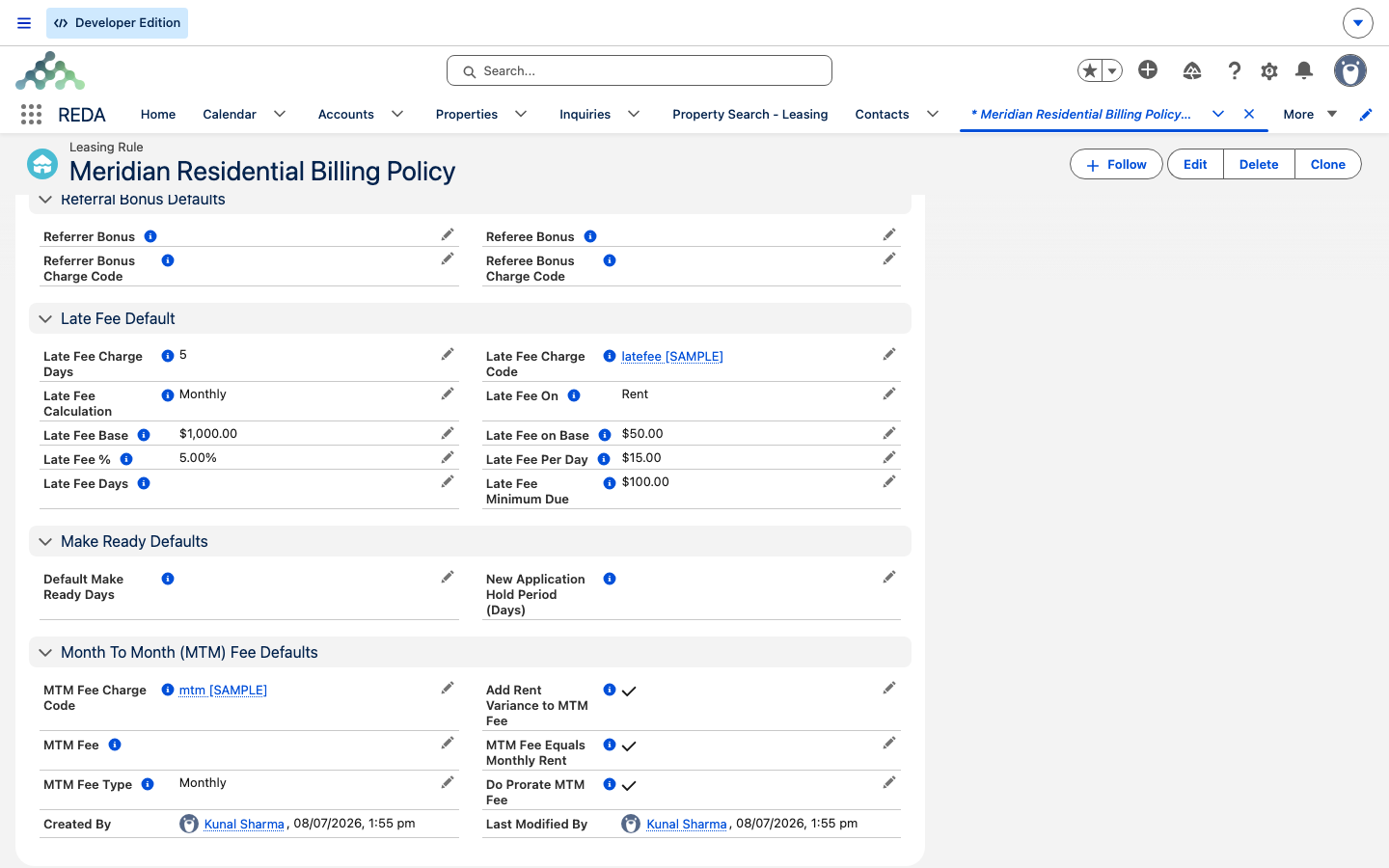
You set the late-fee policy on the Leasing Rule, and REDA stamps it onto each lease when the lease turns active. These are the fields that shape a fee:
| Field | What it controls |
|---|---|
| Late Fee Calculation | The mode: Monthly, Per Day, or Monthly and Per Day. |
| Late Fee On | What the fee works from: Rent (the invoice's own amount) or Debt (the outstanding balance). |
| Late Fee Charge Days | Days after billing before a fee arms. Must be a number between 1 and 28. |
| Late Fee Days | How long the per-day charge is allowed to keep accruing — its cap length. |
| Late Fee Minimum Due | The principal must exceed this for any fee to apply (blank counts as zero). |
| Late Fee Base | An amount subtracted from the principal before the percent is applied. |
| Late Fee on Base | The flat component added to every monthly fee. |
| Late Fee % | The percent applied to (principal − base) in the monthly fee. |
| Late Fee Per Day | The daily rate in per-day mode. |
| Late Fee Charge Code | From the Leasing Rule — sets the routing and grace for fee invoices. Its charge code must have Charge Late Fee ticked. |
| Late Fee Interest % (Monthly) | An optional monthly simple-interest rate charged on top of the percentage fee, for the days the invoice has been overdue. Monthly mode only. |
- Monthly: "If "Late Fee Calculation" basis is "Monthly", then values for below fields must be provided." — Late Fee Base, Late Fee on Base, Late Fee %, Late Fee On, Late Fee Minimum Due, and Late Fee Charge Day.
- Per Day: "If "Late Fee Calculation" basis is "Per Day", then values for following fields must be provided." — Late Fee Days, Late Fee On, Late Fee Per Day, Late Fee Minimum Due, and Late Fee Charge Day.
- Monthly and Per Day: both sets are required — the fields from Monthly plus Late Fee Days and Late Fee Per Day.
Which invoices qualify
An invoice only accrues a late fee when all of these hold. When a tenant is overdue and no fee has appeared, this is the list to walk:
| # | Condition |
|---|---|
| 1 | It's an invoice on a leasing deal. |
| 2 | The invoice has a source charge with a charge code. |
| 3 | That code has Charge Late Fee ticked. |
| 4 | The lease has a Late Fee Calculation mode set. |
| 5 | The Late Fee Charge Days value is greater than zero. |
| 6 | The principal exceeds the minimum due (Rent mode tests the invoice amount; Debt mode tests the balance). |
| 7 | The invoice's amount is above zero and its balance is above zero. |
| 8 | The trigger date — billing date plus Late Fee Charge Days — has been reached. |
| 9 | Monthly: no monthly fee has been charged yet. Per-day: still within the day cap. |
| 10 | The matching late-fee run is scheduled. |
The trigger date is worth stating plainly: a tenant has Late Fee Charge Days days from an invoice's billing date before a fee can arm. Set it to 5, and a fee can't appear until the sixth day. This value must fall between 1 and 28 — set it outside that band and the Leasing Rule won't save ("Late Fee Charge Day - must be a number between 1 to 28.").
Monthly fee math
A monthly fee is a flat component plus a percentage of the principal above a base — but only if the principal clears the minimum due. In words: take the flat Late Fee on Base, then add the Late Fee % applied to whatever the principal exceeds the Late Fee Base by (never less than zero).
Plus interest, if your policy sets a rate. When the lease carries a Late Fee Interest % (Monthly), REDA adds simple interest for the days the invoice has been overdue: principal × (rate ÷ 100 ÷ 30) × days overdue, counted from the invoice's Due Date to the day the run raises the fee. It uses the same principal the percentage fee uses (the invoice amount on Rent, the balance on Debt). The interest is simple — it never compounds, and no monetary index is applied. Leave the rate blank or zero and no interest is added. This applies in Monthly mode only: Per Day and Monthly and Per Day already charge for elapsed time, so adding interest there would bill the same days twice.
A monthly fee is charged once per invoice, ever. Once REDA has raised it, the parent invoice is marked as having had its monthly fee, and it won't get another — no matter how long it stays unpaid. Ongoing pressure on a stubborn balance is what per-day mode is for.
Per-day fee math
A per-day fee accrues a fixed amount for each uncharged day the invoice stays overdue. Each run charges from the day after the last charged-through date (the first time, from the trigger date) up to the processing date, at the Late Fee Per Day rate, then advances the parent's charged-through marker to the end of that window.
Per-day accrual doesn't run forever. It stops at the trigger date plus Late Fee Days — the cap recorded on the parent invoice as its per-day charge-till date.
One fee, once — how REDA keeps count
Two markers on the parent invoice stop a fee from double-charging:
| Marker | Mode | What it does |
|---|---|---|
| Is Late Fee Charged | Monthly | Set once the monthly fee is raised — guarantees one monthly fee per invoice, ever. |
| Charge Per Day Late Fee Till Date | Per day | The cap: the trigger date plus Late Fee Days, beyond which per-day accrual stops. |
| Per-day charged-through date | Per day | Advances to the end of each run's window, so days are never charged twice. |
The runs must be scheduled
Late fees come from two separate scheduled runs — one for monthly fees, one for per-day fees — and, like the recurring-billing runs, neither ships scheduled. An administrator must schedule them in the REDA Admin Console before any late fee will ever appear. A common cadence is the per-day run nightly and the monthly run on the first of each month.
The invoice produced
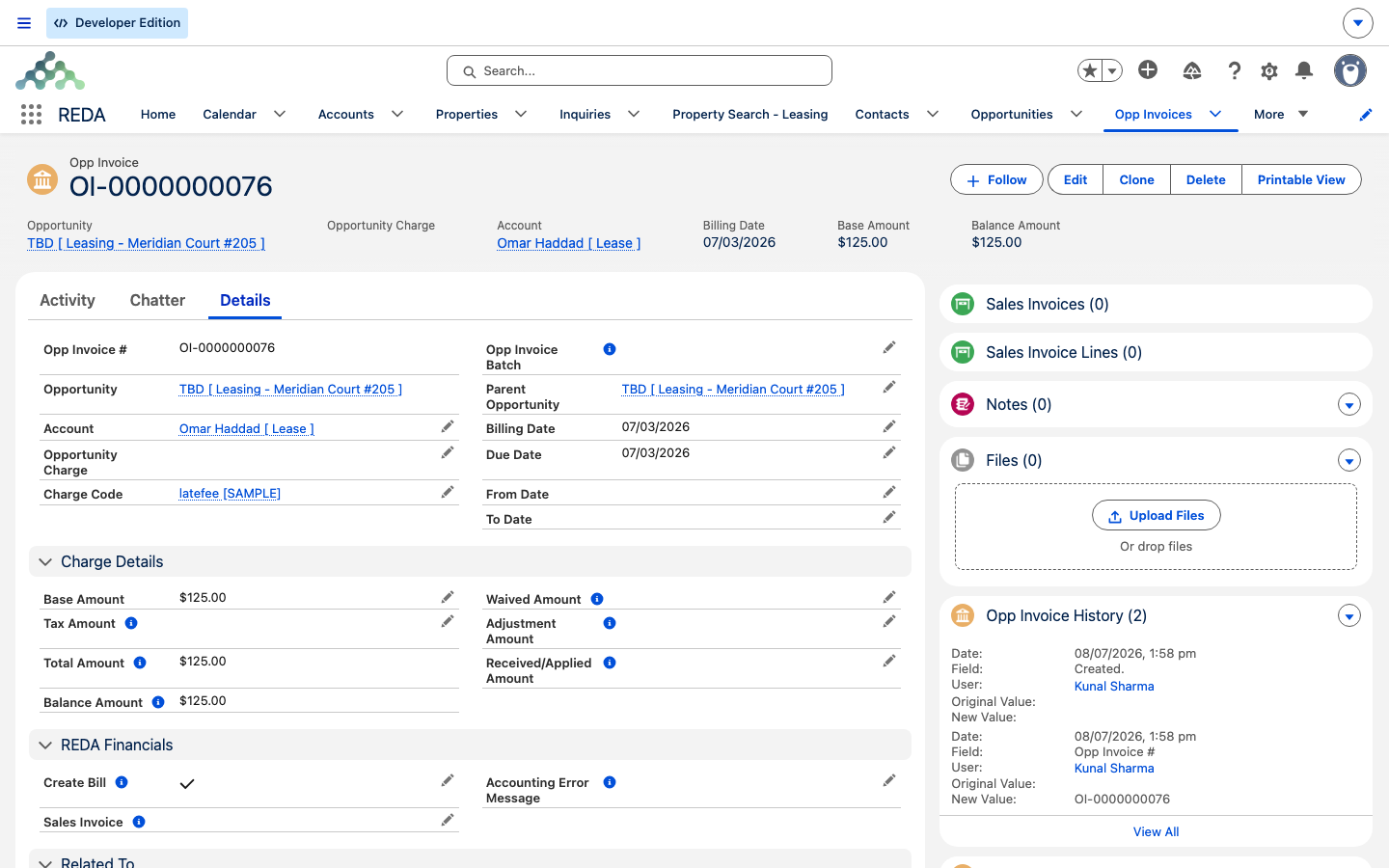
The late fee is a child Opp Invoice: its Parent Invoice points at the overdue invoice (which lists it under Related Invoices), its billing date is the day it's raised, and its due date follows the late-fee charge code's grace days. It carries the same lease and source charge as its parent, and its routing honors a pass-through code the same way any other invoice does.
Worked example: Aisha's overdue rent
Aisha Rahman's February rent invoice on Meridian Court #101 goes unpaid, with a balance of 2,500.00. Her lease's policy is Monthly and Per Day, On = Rent, with Minimum Due 100, Base 1,000, Fee-on-Base 50, Percent 5, and a per-day rate of 15.
On the trigger date, the monthly run raises a single monthly fee of 125.00. From then on, the per-day run accrues 15.00 a day — reaching 75.00 by day five — up to the Late Fee Days cap. Both fees appear as child invoices under the February rent invoice's Related Invoices list: one monthly, one per-day that grows run by run.
Fee math at a glance
| Mode | Formula | Worked example |
|---|---|---|
| Monthly | on-base + max(0, (principal − base) × percent), if principal exceeds the minimum due | 50 + (2,500 − 1,000) × 5% = 125.00 |
| Per day | uncharged days in the window × the per-day rate, up to the cap | 5 × 15 = 75.00, then 15.00/day |
Where to go next
- Invoices Explained — the Parent Invoice link and the balance chain a fee works from.
- Charge Codes — the Charge Late Fee switch and the grace days on fee invoices.
- How Recurring Invoicing Works — the invoices that go overdue in the first place.
- Month-to-Month Fees — the separate holdover-fee engine.
Frequently asked questions
Walk the gate: are the late-fee runs scheduled, does the charge code have Charge Late Fee ticked, does the lease have a calculation mode and a charge day above zero, is the balance above the minimum due, and has the trigger date been reached? Remember Rent mode tests the invoice amount and Debt mode tests the balance.
By design — a monthly fee is charged once per invoice, ever. For ongoing pressure on an unpaid balance, use per-day mode.
The per-day window is capped at Late Fee Days after the trigger date. Once the cap is reached, no further per-day fees accrue.
It sets both the principal and the minimum-due test. Rent uses the invoice's own base amount; Debt uses the outstanding balance, including tax and net of payments.
Waiving is a cash-side action: the accounting extension's waived amount reduces the balance. REDA doesn't delete a fee invoice once money has moved against it.
The late-fee policy is owned by the Leasing Rule and re-copied onto the lease each time an active lease is saved — so a hand-edit to those fields on a single active lease is overwritten from the rule on its next update. To change the policy for real, change it on the Leasing Rule; to vary it for one property group, put that group on its own rule.
Was this article helpful?